What the Consumer Sees
Before diving into how the form generator works internally, let's start with the consumer's point of view. The consumer simply supplies an array of FieldDef objects, each containing metadata that describes the form—for instance, field names and validation constraints.
@Component([...])
export class FlightEditComponent {

  [...]

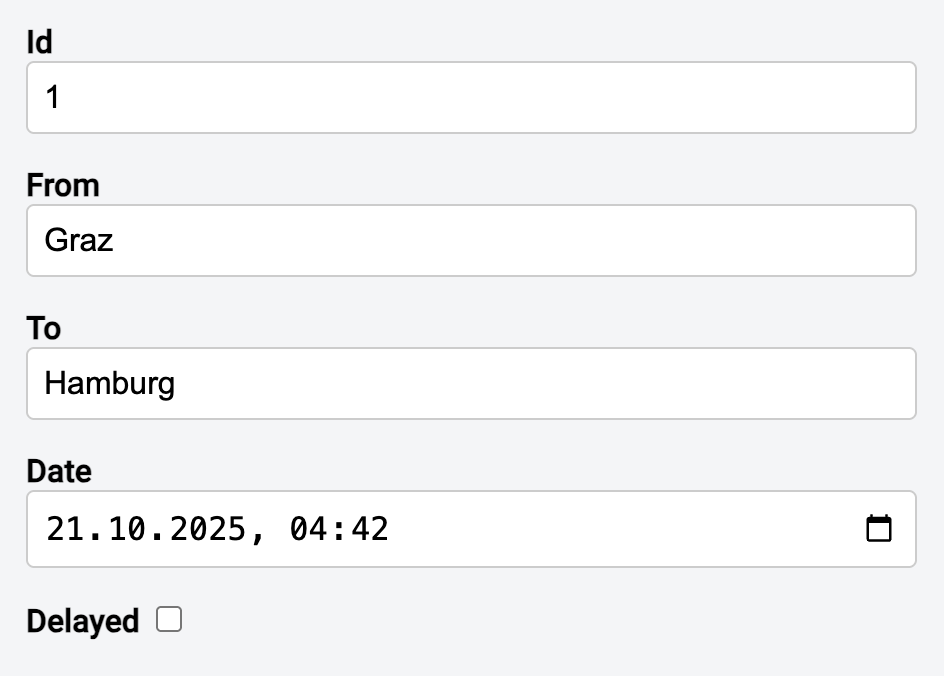
  meta: FieldDef[] = [
    { name: 'id', label: 'Id', required: true },
    {
        name: 'from',
        label: 'From',
        required: true,
        minLength: 3,
        maxLength: 20,
    },
    { name: 'to', label: 'To', required: true, minLength: 3, maxLength: 20 },
    { name: 'date', label: 'Date', required: true, type: 'datetime-local' },
    { name: 'delayed', label: 'Delayed', type: 'checkbox' },
 ];

  // Let's assume we don't know the structure of the entity
  // upfront but we have fitting meta data
  entity = [...] as WritableSignal<unknown>;
  dynamicForm = form(this.entity, toSchema(this.meta));

  [...]
}
A helper function named toSchema takes this metadata and produces a schema that Signal Forms can understand. The form function then accepts two arguments: the entity being displayed and the schema. Since the shape of user-defined objects isn't known at compile time, the entity can be passed as a Signal<unknown>.
The template in turn delegates rendering to a dedicated component, app-dynamic-form:
<form [...]>

  <app-dynamic-form [metaInfo]="meta" [dynamicForm]="dynamicForm" />

 [...]
</form>
When this runs, it produces the form shown below:
How It's Built
The implementation I'll show here is deliberately stripped down so the main idea is easy to follow. At its core, three pieces are needed: a FieldDef type, a toSchema function, and a component that renders the form. The type and the function are listed here:
import { maxLength, minLength, required, Schema, schema } from "@angular/forms/signals";

export interface FieldDef {
  name: string;
  label: string;
  required?: boolean;
  minLength?: number;
  maxLength?: number;
  type?: string;
}

export function toSchema(meta: FieldDef[]): Schema<unknown> {
  return schema<unknown>((path) => {
    for (const fieldDef of meta) {
      const prop = fieldDef.name;
      const fieldPath = (path as any)[prop];

      if (!fieldPath) {
        continue;
      }
      if (fieldDef.required) {
        required(fieldPath);
      }
      if (typeof fieldDef.minLength !== 'undefined') {
        minLength(fieldPath, fieldDef.minLength);
      }
      if (typeof fieldDef.maxLength !== 'undefined') {
        maxLength(fieldPath, fieldDef.maxLength);
      }
    }
  });
}
This function builds a schema<unknown> by walking through the metadata and describing each field, attaching validators along the way. Because field names are dynamic and unknown at compile time, properties are addressed using index notation (brackets).
The app-dynamic-form component accepts the metadata and the entity as inputs. It then loops over the metadata and renders each field accordingly:
@for(fieldDef of metaInfo(); track fieldDef.name) {

    @let field = $any(dynamicForm())[fieldDef.name];

<div class="form-group">
  <label>
    {{ fieldDef.label }}
    <input
      [type]="fieldDef.type"
      [field]="field"
      [class.form-control]="fieldDef.type !== 'checkbox'"
    />
  </label>
  <app-validation-errors
    [errors]="field().errors()"
  ></app-validation-errors>
</div>
}
More: Modern Angular Workshop
Join our Modern Angular Workshop to keep your skills sharp!

English Version | German Version
Summary
This example shows how Signal Forms can power a simple dynamic form generator. By relying on metadata such as field names and validation rules, the form can be assembled at runtime even when the underlying object's structure isn't known ahead of time.
The code above is intentionally minimal to highlight the essential steps:
- Metadata gets transformed into a schema,
- the schema is attached to a signal-based form,
- and a generic component takes care of field rendering.
In practice, this pattern can be extended without much effort to handle:
- Arrays and nested form groups,
- custom validators,
- or more sophisticated UI controls.
All in all, Signal Forms offer a flexible and solid base for building dynamic forms.