This article is an excerpt from my Angular Deep Dive course
In Angular, change detection—or rendering—is typically triggered automatically whenever an asynchronous event occurs in the browser. This automation is powered by the zone.js library, which implements zones. Zones offer a way to intercept how asynchronous operations are scheduled and invoked. Before or after a task runs, the interceptor can execute extra logic and notify registered listeners about the activity. Each zone defines these rules individually when it is created.
Zones form a hierarchy of parent-child relationships. When the browser starts, it operates in a special root zone configured to mimic the platform exactly, ensuring any existing code that isn't zone-aware continues to behave normally. At any moment, exactly one zone is active, and it can be accessed via the Zone.current property:

If you'd like to explore working with zone.js directly, check out this article.
Despite what many assume, zones are not a built-in part of Angular's change detection machinery. In reality, Angular can function without zones by relying on change detection services. To enable automatic change detection, Angular uses the NgZone service, which creates a child zone and subscribes to its notifications.
This child zone is called the Angular zone, and all application-specific code is meant to run inside it. The key point is that NgZone receives notifications solely about events happening within this Angular zone—it remains unaware of events in any other zone:
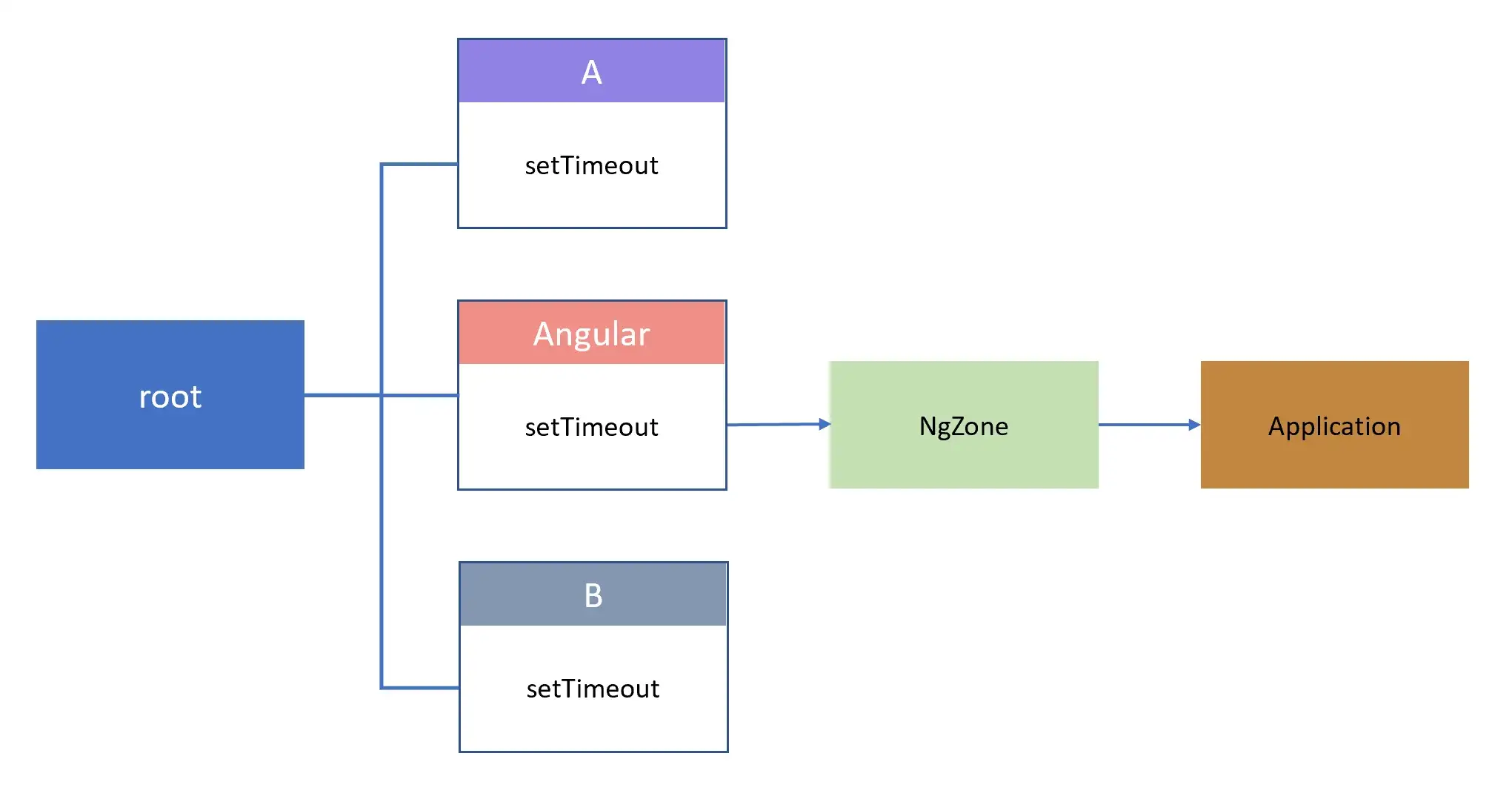
Looking at NgZone, you'll notice that the reference to the forked Angular zone is stored in the _inner property:
export class NgZone {
  constructor(...) {
    forkInnerZoneWithAngularBehavior(self);
  }
}

function forkInnerZoneWithAngularBehavior(zone: NgZonePrivate) {
  zone._inner = zone._inner.fork({ ... });
}
This is the zone that executes a callback when you invoke NgZone.run():
export class NgZone {
 run(fn, applyThis, applyArgs) {
     return this._inner.run(fn, applyThis, applyArgs);
 }
}
The zone that is active at the moment the Angular zone is forked is stored in the _outer property and is used to run a callback when you invoke NgZone.runOutsideAngular():
export class NgZone {
 runOutsideAngular(fn) {
   return (this as any as NgZonePrivate)._outer.run(fn);
 }
}
In most cases, this outer zone is the top-level "root" zone.
Once Angular completes its bootstrapping, the zone hierarchy looks like this:
"root"
   "angular"
You can verify this yourself by logging the relevant properties:
export class AppComponent {
  constructor(zone: NgZone) {
    console.log((zone as any)._inner.name); // angular
    console.log((zone as any)._outer.name); // root
  }
}
However, in development mode, an additional AsyncStackTaggingZone is inserted between the root and angular zones:
"root"
   "AsyncStackTaggingZone"
               "angular"
In this scenario, the NgZone instance keeps a reference to AsyncStackTaggingZone in its _inner property. This tagging zone provides linked stack traces to indicate where an asynchronous operation was scheduled. For more details, see the article Better Angular Debugging with DevTools.
One final crucial detail is that Angular creates the NgZone instance during the bootstrapping phase:
export class PlatformRef {
  bootstrapModuleFactory<M>(moduleFactory, options?) {
        const ngZone = getNgZone(options?.ngZone, getNgZoneOptions(options));
        const providers: StaticProvider[] = [{provide: NgZone, useValue: ngZone}];
        // all initialization logic runs inside Angular zone
        return ngZone.run(() => {...});
  }
}
Angular listens for the onMicrotaskEmpty event within ApplicationRef to automatically trigger change detection across the entire application:
@Injectable({providedIn: 'root'})
export class ApplicationRef {
  constructor(
      private _zone: NgZone,
      private _injector: EnvironmentInjector,
      private _exceptionHandler: ErrorHandler,
  ) {
    this._onMicrotaskEmptySubscription = this._zone.onMicrotaskEmpty.subscribe({
      next: () => {
        this._zone.run(() => {
          this.tick();
        });
      }
    });
  }
}
Now let's examine how Angular functions without zones.
Zoneless application
To run an Angular app without zone.js, you pass noop as the ngZone parameter to bootstrapModule:
platformBrowserDynamic()
    .bootstrapModule(AppModule, {
        ngZone: 'noop'
    });
If you then run this simple application:
@Component({
  selector: 'app-root',
  template: `{{time}}`
})
export class AppComponent {
  time = Date.now();
}
you'll observe that change detection works perfectly and renders the time value in the DOM.
However, if you modify the name property inside a setTimeout callback:
@Component({
  selector: 'app-root',
  template: `{{time}}`
})
export class AppComponent {
  time = Date.now();

  constructor() {
    setTimeout(() => { this.time = Date.now() }, 1000);
  }
}
you'll notice that the change doesn't reflect in the view. This is expected because there's no Angular zone to inform Angular about the timeout event. Interestingly, you can still inject NgZone into a constructor:
import { ɵNoopNgZone } from '@angular/core';

export class AppComponent {
  constructor(zone: NgZone) {
    console.log(zone instanceof ɵNoopNgZone); // true
  }
}
But it's essentially a no-op implementation of NgZone that does nothing. Instead, you could use a change detector service to manually trigger change detection:
@Component({
  selector: 'app-root',
  template: `{{time}}`
})
export class AppComponent {
  time = Date.now();

  constructor(cdRef: ChangeDetectorRef) {
    setTimeout(() => { this.time = Date.now() }, 1000);
    cdRef.detectChanges();
  }
}
This service will be covered in detail in the manual control chapter.
There may be situations where a function executes outside Angular's zone, and you don't benefit from automatic change detection. This often happens with third-party libraries that operate outside Angular's context.
Here's an example of such a question involving Google API Client Library (gapi). A common culprit is using techniques like JSONP, which don't rely on standard AJAX APIs such as XMLHttpRequest or Fetch API—these are patched and tracked by Zones. Instead, JSONP creates a script tag with a source URL and defines a global callback that fires when the script with data is fetched from the server. Zones cannot patch or detect this approach, so the framework remains unaware of requests made this way.
The typical fix is to run the callback inside the Angular zone. For instance, with gapi, you would do this:
// Load the JavaScript client library.
gapi.load('client', ()=> {
    // Run initialization code INSIDE Angular zone
    NgZone.run(()=>{
        // Initialize the JavaScript client library
        gapi.client.init({...}).then(function() { ... });
    });
});
Another example involves a component that emits notifications from a callback running outside the Angular zone:
@Component({
  selector: 'n-cmp',
  template: '{{title}} <div><n1-cmp></n1-cmp></div>'
})
export class N {
  title = 'N component';
  emitter = new Subject();

  constructor(zone: NgZone) {
    zone.runOutsideAngular(() => {
      setTimeout(() => {
        this.emitter.next(3);
      }, 1000);
    });
  }
}
If you simply subscribe to the changes in the child N1 component:
@Component({
  selector: 'n1-cmp',
  template: '{{title}}, emitted value: {{value}}'
})
export class N1 {
  title = 'Child of N';
  value = 'nothing yet';

  constructor(parent: N, zone: NgZone) {
    parent.emitter.subscribe((v: any) => {
      this.value = v;
    });
  }
}
you won't see any updates on screen, even though this.value changes to 3 after the parent emits it. To resolve this, as with the gapi example, you run the callback inside the Angular zone:
@Component({...})
export class N1 {
  title = 'Child of N';
  value = 'nothing yet';

  constructor(parent: N, zone: NgZone) {
    parent.emitter.subscribe((v: any) => {
      zone.run(() => {
        this.value = v;
      });
    });
  }
}
This fixes the issue.
For more in-depth content like this, check out the course:

If you believe something important is missing here, let me know in the comments!