In the prior Hashbrown write-up, I demonstrated how a chat assistant driven by an LLM can be wired into an Angular app. Through tool calling, the language model is able to execute functions that fetch data or carry out actions within the frontend.
This installment takes things further: the LLM now picks one or multiple UI components and renders them right inside the chat. Consequently, responses move beyond plain text, gaining visual and interactive layers.
📂 Source Code (🔀 branch hashbrown_ui)
Demo Application
To illustrate how a language model response can include components, an upgraded variant of the solution from the earlier article is employed. It surfaces flight components directly within the chat stream:
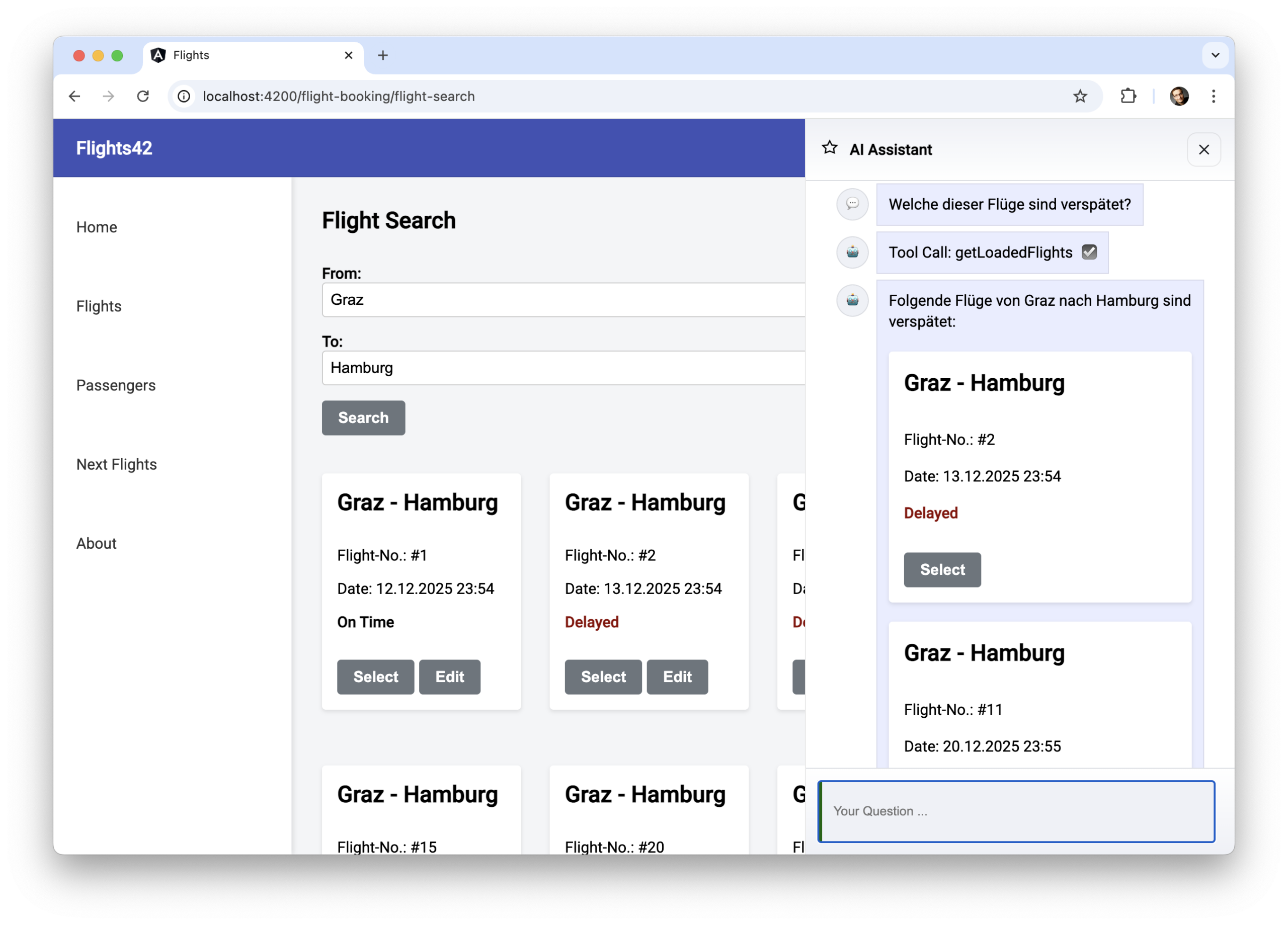
The model might decide to render several components at once within the same output:
UI chat with uiChatResource
Hashbrown’s uiChatResource goes beyond tool invocation—it lets the assistant reply through UI components. Swap it in wherever chatResource was used in the earlier guide:
@Component([…])
export class AssistantChatComponent {

  message = signal('');

  chat = uiChatResource({
    model: 'gpt-5-chat-latest',
    system: `
      You are an UI assistent that helps with finding flights […]
    `,
    tools: [
      findFlightsTool,
      getLoadedFlights,
      getBookedFlights,
      […]
    ],
    components: [
      flightWidget,
      messageWidget
    ],
  });

  […]

  submit() {
    const message = this.message();
    this.message.set('');
    this.chat.sendMessage({ role: 'user', content: message });
  }
}
For the LLM to access these components, they must be declared under components\. Notably, these are Angular components that resemble tools, as both are defined via the Skillet schema language. Further elaboration on this topic follows below.
A key observation is that with uiChatResource active, every answer generated by the LLM consists of one or several components. Consequently, a messageWidget is also registered in this instance, tasked only with accepting and exhibiting a string.
In order to show the components that the LLM picks within the conversation history, the Hashbrown-provided element hb-render-message comes into play:
@for (message of messageModels(); track $index) {
<article class="msg assistant">
  <div class="avatar">{{ message.icon }}</div>
  <div>
    <div class="bubble">
      @if (message.role === 'assistant') {
        <hb-render-message [message]="message" />
      }
      @else {
        <app-message [data]="message.contentString"></app-message>
      }

      @for(toolCall of message.toolCalls; track toolCall.toolCallId) {
         […]
      }
    </div>
  </div>
</article>
}
This particular component is required exclusively for LLM-generated outputs. Those outputs are marked by the assistant role. The requests made by the user, on the other hand, are plain text in this scenario and reside within the content field.
Since the content field supports formats beyond text—such as number or JSON—it has to be cast to a string for app-message to render it. That conversion, along with comparable operations like choosing an icon based on the role (assistant or user), is performed through a computed-based projection.
messageModels = computed(() =>
  this.chat.value().map((message) => ({
    ...message,
    contentString: String(message.content),
    icon: this.icons[message.role] || '❓',
    toolCalls: message.role === 'assistant' ?
      message.toolCalls : [],
  }))
);
Components for chat: Dumb Components and Smart Wrappers
The set of components exposed to the LLM consists of Dumb Components, or—as seen with flightWidget—a smart wrapper that encloses a Dumb Component:
@Component({
  selector: 'app-flight-widget',
  imports: [FlightCardComponent],
  template: `
    <div class="flight">
      <app-flight-card [item]="flight()" [selected]="isSelected()">
        <div>
          @if(isBooked()) {
          <button class="btn btn-default" (click)="checkIn()">Check in</button>
          } @else if (isSelected()){
          <button class="btn btn-default" (click)="select(false)">
            Remove
          </button>
          } @else {
          <button class="btn btn-default" (click)="select(true)">Select</button>
          }
        </div>
      </app-flight-card>
    </div>
  `,
  styles: `
    .flight {
      margin: 20px 0;
    }
  `,
})
export class FlightWidgetComponent {
  router = inject(Router);
  store = inject(FlightBookingStore);

  flight = input.required<Flight>();
  status = input<'booked' | 'other'>('other');

  isBooked = computed(() => this.status() === 'booked');
  isSelected = computed(() => this.store.basket()[this.flight().id]);

  checkIn(): void {
    this.router.navigate(['/checkin', this.flight().id]);
  }

  select(selected: boolean): void {
    this.store.updateBasket(this.flight().id, selected);
  }
}
This wrapper forwards its inputs to the underlying dumb component and manages its events. When events occur, it fires actions within the feature-specific stores or triggers navigation changes.
The crucial input here is status, which determines whether a flight has been booked or comes from a search result. The LLM has to infer this value from the conversation context. As shown later in this piece, smaller budget-friendly models such as Gemini Flash need extra help with this inference.
The status value dictates which button appears on the flight map widget: Booked flights display a Check in option, while flights from a search present an add-to-cart or remove-from-cart control.
Describing Components
Hashbrown's exposeComponent function outlines how the components are defined:
import { exposeComponent } from '@hashbrownai/angular';
import { s } from '@hashbrownai/core';
[…]

export const flightWidget = exposeComponent(FlightWidgetComponent, {
  name: 'flightWidget',
  description: `
    Displays a flight or flight ticket. Use this instead of textual
    descriptions of flights or tickets.
    `,
  input: {
    flight: FlightSchema,
    status: s.enumeration(
      `Whether the flight is booked or not […]`,
      ['booked', 'other']
    ),
  },
});
The LLM relies on the saved textual description to determine the appropriate moment for invoking the component. Each input parameter must have its own explanation as well. To achieve this, the Skillet schema language from Hashbrown is employed. In the illustration, the status input is defined as an enum restricted to two options. For characterizing the flight input, the schema references a previously established one:
import { s } from "@hashbrownai/core";

export const FlightSchema = s.object('Flight to be displayed', {
  id: s.number('The flight id'),
  from: s.string('Departure city. No code but the city name'),
  to: s.string('Arrival city. No code but the city name'),
  date: s.string('Departure date in ISO format'),
  delay: s.number('If delayed, this represents the delay in minutes'),
});
Additional Context & Real-World Usage
For a more comprehensive exploration than isolated snippets provide, the
Angular Architecture Workshop dives into these subjects from start to finish.
The emphasis lies on practical architecture choices—such as determining AI's
role and placement within large-scale Angular projects.

English Version | German Version
Under the Hood: Structured Output
Hashbrown forces the LLM to emit only JSON documents when it needs to decide which components appear in the chat history. This kind of model response is what we call structured output.
The JSON documents that come back from the model hold the components to render and their input values, all stored as a string under the content property:
[…]
{
    "role": "assistant",
    "content": "{\"ui\":[{\"messageWidget\":{\"$props\":{\"data\":\"Yes, you have already booked a flight to France.\"}}},{\"flightWidget\":{\"$props\":{\"flightInfo\":{\"id\":2,\"from\":\"London\",\"to\":\"Paris\",\"date\":\"2025-12-05T21:15:10.716Z\",\"delay\":0,\"status\":\"booked\",\"delayInfo\":\"delayed\"}}}}]}",
    "toolCalls": []
},
[…]
In every request, Hashbrown includes the available components, together with their inputs and descriptions, inside a dedicated section. Formally speaking, this takes the shape of a JSON schema that originates from Skillet.
Supporting Different Models
To pick the right components, Hashbrown relies on JSON-formatted responses, which is also known as structured output. Yet certain models—Google Gemini being one—do not currently permit the simultaneous use of structured output and tool calling. This issue can be addressed during application bootstrap by means of the emulateStructuredOutput flag:
bootstrapApplication(AppComponent, {
  providers: [
    […]
    provideHashbrown({
      baseUrl: 'http://localhost:3000/api/chat',
      emulateStructuredOutput: true,
    }),
  ],
});
When this property is set to true by the application, Hashbrown creates a pseudo-tool that lets the LLM pick any number of the available components. At the same time, Hashbrown tells the language model to reply by invoking that tool.
Weaker Models: Few Shot Prompting to Help get Things Moving
For the model to always produce at least some free text, and optionally attach one or more components, the rules within the resource’s system prompt need to be expanded. To further assist cheaper, less capable models such as Gemini Flash, this prompt is augmented with a handful of illustrative examples:
[…]

## Rules:
[…]
- Answer questions with the messageWidget to provide some text to the user.
- When appropriate, *also* answer with other components (widgets), e.g.,
      the flightWidget to display information about a flight or a ticket
- Instead of describing a flight, use the flightWidget
- Don't call the same tool more than once with the same parameters!

## EXAMPLE

- User: Which flights did I book?
- Assistant:
  - UI: messageWidget(You've booked these 3 flights)
  - UI: flightWidget({id: 0, from: '...', to:'...', ...})

## NEGATIVE EXAMPLE

Don't call the same tool several times in a row with the same parameters:

- User: Search for flights from A to B
- Assistant:
  - Tool: findFlights({from: 'A', to: 'B'})
  - Tool: findFlights({from: 'A', to: 'B'})
  - Tool: findFlights({from: 'A', to: 'B'})

[…]
It has been demonstrated that including examples like these in the prompt enhances the quality of the model's output. If several examples are included, this approach is called few-shot prompting, whereas providing just one example is known as one-shot prompting.
This same method is essential when less capable models must correctly determine the flight status ( booked or other ) from the prior dialogue:
export const flightWidget = exposeComponent(FlightWidgetComponent, {
  name: 'flightWidget',
  description: `[…]`,
  input: {
    flight: FlightSchema,
    status: s.enumeration(
      `Whether the flight is booked or not.

      A flight has the status 'booked' **only** when retrieved
      via the tool 'getBookedFlights'.

      ## Example for infering a status 'booked'
      - User: Which flights did I book?
      - Assistant:
          - Tool: getBookedFlights()
          - UI: flightWidget({flightInfo: { id: 0, ..., status: 'booked' }})

      ## Example for infering a status 'other'
      - User: Which of the found flights is the earliest one?
      - Assistant:
          - Tool: getLoadedFlights()
          - UI: flightWidget({flightInfo: { id: 0, ..., status: 'other' }})
      `,
      ['booked', 'other']
    ),
  },
});
Prose-based examples, such as those illustrated above, are simple to compose and follow. Yet, they are also susceptible to mistakes, because these examples may reference components or arguments that have since been removed. The prompt helper, which Hashbrown exposes for labeling strings, addresses this issue:
uiChatResource({
  system: prompt`
    [...]
    <user>Hello</user>
    <assistant>
      <ui>
        <app-message
            data="How may I assist you?" />
      </ui>
    </assistant>
  `,
  components: [
    exposeComponent(MessageComponent, { ... })
  ]
});
The prompt tag function verifies that the examples—which must be written in the displayed XML syntax—match up with the components that have been registered. At present, its use is restricted solely to the system prompt inside the resource. But given that our example replaces the server-side system prompt for security reasons, and because component descriptions also rely on examples, its practical application is confined to prose-based examples.
Conclusion
LLMs are capable of driving interactive UI components through Structured Output, as long as the components themselves and their inputs are defined and registered in an organized way. By integrating Hashbrown with Angular, this approach enables AI-fueled user interfaces that extend well beyond conventional chat experiences.
However, it is equally evident that smaller models depend on explicit prompting and illustrative examples to achieve reliable output. Few-shot prompting, combined with clearly specified components, lays the essential groundwork for such reliability.