Understanding Angular's defer block
Angular’s deferrable views introduce the defer block, a declarative mechanism that lets you hold off on loading specific content or heavy components until they are actually required. The defer block acts as a wrapper around delayed content and provides a range of triggers that give you precise control over when and how that content gets fetched.
Spotting routing configuration problems
Consider a large web application with multiple features and views.
export const routes: Routes = [
   {
      path: ‘yellow’,
      component: YellowComponent
   },
   {
      path: ‘cyan’,
      component: CyanComponent
   },
   {
      path: ‘purple’,
      component: PurpleComponent
   }
]
When each feature carries a substantial and intricate routing setup, Angular’s default behavior is to eagerly load all routes, which quickly leads to performance bottlenecks.
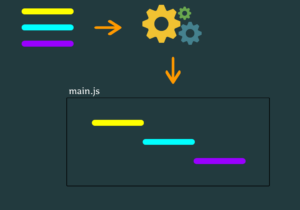
The routing configuration shown below is hurting core web vitals. Angular detects the three features and, during compilation, eagerly loads every one of them, causing all code to be bundled into the single main.js file. In the diagram, these are indicated by the yellow, cyan, and purple segments. While the application still functions, the enlarged initial bundle can degrade performance and negatively affect core web vitals.
Boosting Angular performance via code splitting and lazy loading
This setup risks violating LCP and TTFB thresholds, but code splitting offers a way out. Angular provides APIs to support this, including the loadComponent property within route definitions.
export const routes: Routes = [
   {
      path: ‘yellow’,
      loadComponent: () =>
         import(‘./yellow.component’).then(it => it.YellowComponent)
   },
   {
      path: ‘cyan’,
      loadComponent: () =>
         import(‘./cyan.component’).then(it => it.CyanComponent)
   },
   {
      path: ‘purple’,
      loadComponent: () =>
      import(‘./purple.component’).then(it => it.PurpleComponent)
   }
]
By specifying a path and returning a Promise, Angular can lazy-load the relevant components, splitting them into distinct chunks and avoiding performance pitfalls.
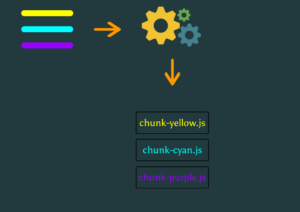
This approach trims the initial bundle size and contributes to better overall performance.
Dividing a feature into smaller pieces
Now imagine a page or feature made up of many components. Different users often take different paths through a feature, so breaking a large feature into smaller lazy-loaded fragments can be a powerful optimization strategy. For instance, if User A follows Flow A and loads chunk cyan-1, while User B takes Flow B and triggers chunk cyan-2, each user fetches only the components relevant to their journey, cutting down on unnecessary downloads and improving efficiency.
To generate such chunks, one approach is to create a component instance:
const componentInstance = await import(‘./cyan.component’)
   .then(it => it.CyanComponent);
then hand it to the createComponent method on ViewContainerRef:
this.vcr.createComponent(componentInstance)
However, this method comes with drawbacks. For sizable components or slow connections, users typically need a loading indicator. Error handling during the load phase is also important, as is manual cleanup to avoid duplicate component instances. Furthermore, the component should not be placed in the imports array, since that forces eager loading instead of lazy loading.
Deferred loading and chunk generation
The defer block solves these issues. It lets you postpone loading specific chunks of large components until they’re truly needed, improving both efficiency and the end-user experience.
In our current setup with three lazy-loaded components (yellow, cyan, and purple), placing the CyanComponent inside a defer block:
cyan-component.html
@defer {
   <div>
<!-- Deferred part of the template - ->
(...)
</div>
}
<div>
	<!-- Eagerly loaded part of the template - ->
	(...)
</div>
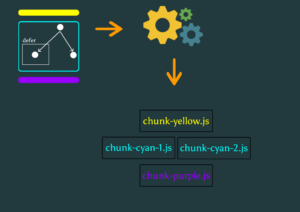
Angular recognizes the defer block during compilation and marks the component tree accordingly.
As a consequence, the following chunks are produced: yellow, purple, cyan-1, and cyan-2.
We also get to decide when to fetch and render the component, using a boolean expression:
@defer (when isVisible) {
   <app-cyan />
}
When isVisible turns true, Angular fetches and renders the CyanComponent content. If isVisible later changes back to false, the component remains displayed—this operation is one-time.
Enhancing UX with placeholders
Placeholders are a simple yet effective way to guide users. In a sign-up form, for instance, placeholders like “first name” and “last name” clarify what data is expected. Similarly, in an Angular app employing a defer block, a placeholder lets users know content is coming, providing context while the actual component is still loading.
@defer (when isVisible) {
   <app-cyan />
} @placeholder {
  <span> Will be overwritten with the cyan’s content </span>
}
Preventing flicker is another key UX consideration. Forcing the placeholder to remain visible for a minimum duration can smooth out the experience. This makes the interface feel more stable and professional.
@defer (when isVisible) {
   <app-cyan />
} @placeholder(minimum 500ms) {
  <span> Will be overwritten with the cyan’s content </span>
}
Since the defer block delays component loading, a loading indicator is essential to show that work is happening. The @loading block whose content is displayed while the lazy chunk is being fetched. Optional parameters let you set a delay (after which the loading UI appears) and a minimum display duration to avoid jarring transitions.
@defer (when isVisible) {
   <app-cyan />
} @placeholder(minimum 500ms) {
  <span> Will be overwritten with the cyan’s content </span>
} @loading(after 100ms; minimum 1s) {
  <span> Loading... </span>
}
In case of a loading error, the @error block provides a place to show a friendly message.
@defer (when isVisible) {
   <app-cyan />
} @placeholder(minimum 500ms) {
  <span> Will be overwritten with the cyan’s content </span>
} @loading(after 100ms; minimum 1s) {
  <span> Loading... </span>
} @error {
  <span> Oops! Failed to download </span>
}
Different trigger types in Angular
Angular provides several interaction types for defer blocks, each suited to different scenarios. Knowing how these triggers behave is key to building responsive applications. Each trigger has its own characteristics and can be mixed to achieve the desired user interaction.
While the when keyword takes a boolean condition, the on keyword refers to one or more predefined triggers:
idle – waits for the browser to be idle (via requestIdleCallback) before loading. This is the default trigger.
immediate – fetches the chunk immediately as the template is processed.
interaction – loads the block when the user clicks or presses a key on the associated element.
hover – triggers on mouseenter and focusin events when the user hovers over an element.
viewport – loads when the element enters the viewport, using the Intersection Observer API.
timer – fetches the content after a given amount of time.
Several triggers can be combined in one statement, mixing on and when. Angular resolves them using a logical OR.
@defer (on viewport; when condition) {
   <app-cyan />
} @placeholder {
   <span> Will be overwritten with the cyan’s content </span>
}
Implicit vs explicit triggers
For interaction, hover, and viewport triggers, we can distinguish between implicit and explicit definitions. Taking interaction as an example:
An implicit interaction fires when the user clicks the placeholder itself, since that is the only visible element:
@defer (on interaction) {
   <app-cyan />
} @placeholder {
   <span> Click here to load </span>
}
An explicit interaction, conversely, references a specific element via a template variable; clicking that element will fetch the deferred content. Note that no click event handler is required.
<button #trigger> Click to load </button>

@defer (on interaction(trigger)) {
   <app-cyan />
}
Prefetching component data
For very heavy components or users on slow networks, more granular control may be needed. Angular’s prefetch keyword offers a declarative way to prefetch chunks ahead of time, combining any of the triggers already discussed. This helps deliver a smoother experience without blocking the main rendering.
@defer (on “action”; prefetch on “action”) {
   <app-cyan />
}

@defer (on “action”; prefetch when “boolean expr”) {
   <app-cyan />
}

@defer (when “boolean expr”; prefetch on “action”) {
   <app-cyan />
}

@defer (when “boolean expr”; prefetch when “boolean expr”) {
   <app-cyan />
}
What’s new in Angular: better UX and loading speeds
Angular continues to evolve with an emphasis on performance and experience. While targeting specific display ports directly is not yet possible, ongoing improvements aim to give developers better options.
With defer blocks and prefetching, we can tailor loading behavior to precise needs, creating polished and seamless experiences. Angular supplies the necessary building blocks to build modern applications with confidence.
Contributors:
Miłosz Rutkowski
Damian Maduzia