The Core Idea Behind Module Federation
Module Federation has become a go-to approach for building micro frontends, yet it remains tightly coupled to webpack. In the near and medium term, this isn't a major concern—webpack dominates the ecosystem with over 20 million downloads. Still, the landscape shifts quickly: the Angular team, for instance, is already experimenting with esbuild as a CLI-supported bundler, a move that promises significant build-time gains.
That raises a practical question: can we preserve the proven mental model of Module Federation without tying it to webpack, so your micro frontend setup stays resilient to future tooling changes? This article explores an answer built on Import Maps, a web standard that, as of now, has found its way into every major browser.
The Thinking Behind Module Federation
Before diving into Import Maps, it's worth laying out the mental model we intend to replicate.
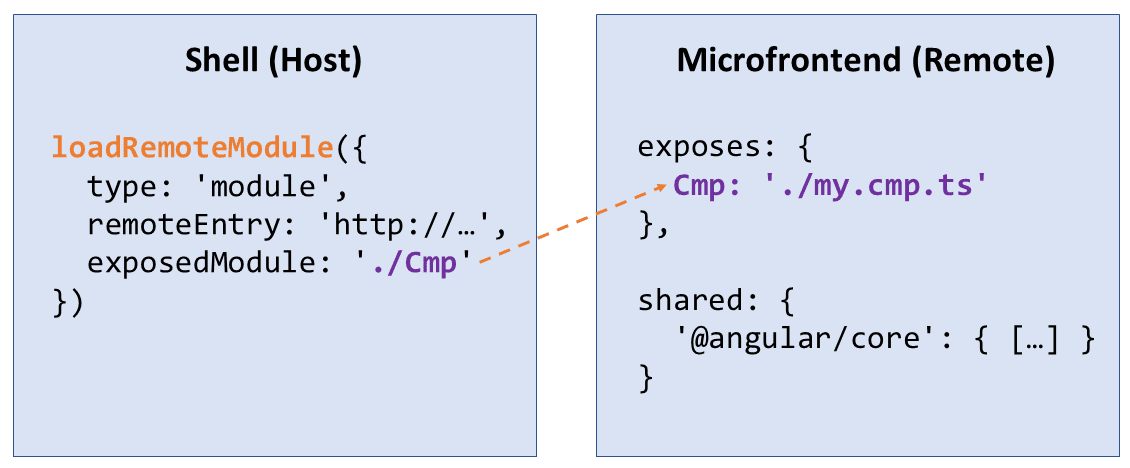 At its heart, this model involves a host application that pulls in modules from a remote application, which is built and deployed on its own. These modules aren't limited to simple functions; they often carry entire components, Angular modules, route definitions, or other data structures. In a micro frontend context, the host acts as the shell and the remote as the micro frontend itself.
The host reaches out to the remote's modules using a dynamic import, or, when the remotes aren't known ahead of time, through a lower-level runtime API that webpack offers. This is where loadRemoteModule enters the picture, as shown in Figure 1. That helper function needs two pieces of information: the name of the module to fetch (exposedModule) and the file where the remote's entry point lives (remoteEntry).
That remote entry is a JavaScript file—generated by webpack during the build—that carries metadata about the remote. Crucially, this metadata includes details about which dependencies the remote is willing to share with the host. Those are declared in the configuration under the shared key. For example, if the setup in Figure 1 lists @angular/core as shared, that library gets loaded exactly once, even if multiple remotes and the host all rely on it.
Sharing dependencies can easily lead to version clashes—a situation that older Windows users might remember as “DLL Hell.” Module Federation addresses this with a few built-in strategies:
- Take the highest compatible version: By default, Module Federation picks the highest version that's still compatible with what everyone is requesting. If the host points to version 10.0 and a remote to 10.1, Module Federation will likely serve just 10.1, on the assumption that it's backward compatible with 10.0.
- Load multiple versions side by side: When compatibility breaks down, such as when the host expects 10.0 and a remote needs 11.0, both versions get loaded into memory so each app gets what it expects.
- Force a single version: Sometimes you want to guarantee a single copy of a dependency. By marking it as a singleton, Module Federation will only load the highest version, compatible or not. If there's a mismatch, you'll see a warning in the console—and you can even configure it to throw an error instead, which is handy for catching issues during integration tests.
To determine whether two versions are actually compatible, the system checks the package.json of the project or the dependency itself. A semver range like ^10.1.7 signals that any version within major version 10 is acceptable. At runtime, this same information is available in the remote entry's metadata, making that file essential for resolving any version disputes.
Import Maps—an Often-Overlooked Browser Feature
To illustrate what Import Maps brings to the table, let's look at an example that decides whether a public holiday creates a long weekend or a bridging day:
import { format , parseISO } from 'date fns';
import { isLongWeekend } from 'is-long-weekend';
import { isBridgingDay } from 'is-bridging-day';
const date = parseISO('2023-01-01');
const weekday = format(date, 'EEE');
console.log(<code>It's a ${ weekday }.);
if (isLongWeekend(date)) {
console.log ( 'Long weekend 😎 ' );
}
else if ( isBridgingDay ( date )) {
console.log('Bridging day 😎 ');
}The example leans on the date-fns library, along with two helper functions—isLongWeekend and isBridgingDay—each living in their own file.
What makes this interesting is that everything runs straight in the browser, as the script tags imply. So how does the browser figure out these import statements? Typically, that's bundler work: the tool would merge source files into either a single bundle or several chunks held together by glue code.
In this case, the browser itself takes on the task of resolving imports at runtime, using an import map as its guide:
<script type="importmap">
{
    "imports": {
        "date-fns": "./libs/date-fns.js",
        "is-long-weekend": "./js/is-long-weekend.mjs",
        "is-bridging-day": "./js/is-bridging-day.mjs"
    }
}
</script>
The import map simply maps the module names used in the import statements over to concrete JavaScript files. Here, date-fns.js serves as a pre-bundled version of the library—built with esbuild—so the browser doesn't end up requesting hundreds of individual files.
As mentioned, Import Maps support has landed in every major browser now:
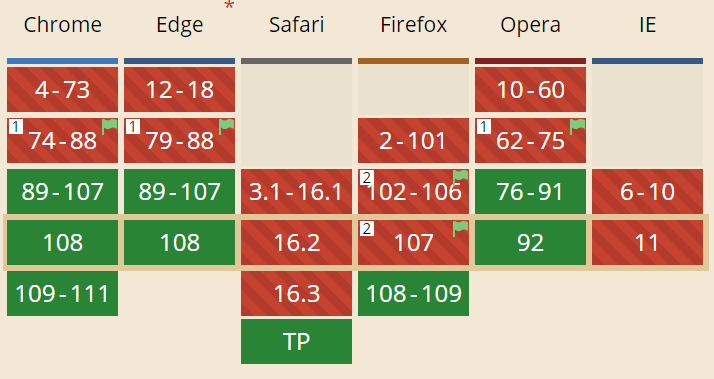 That said, Safari's implementation was still in Technology Preview at the time of writing. For Safari and older browsers, a production-ready polyfill for Import Maps steps in. It's built with performance in mind and adds some useful capabilities for dynamic use cases.
Handling Version Differences with Scopes
One of Import Maps' more practical features is scopes, which offer a way to manage version conflicts. The next snippet defines a scope for the is-bridging-day.mjs file:
<script type="importmap">
{
    "imports": {
        "date-fns": "./libs/date-fns.js",
        "is-long-weekend": "./js/is-long-weekend.mjs",
        "is-bridging-day": "./js/is-bridging-day.mjs"
    },
    "scopes": {
        "/js/is-bridging-day.mjs": {
            "date-fns": "./libs/other-date-fns.js"
        }
    }
}
</script>
That scope tells the browser: inside is-bridging-day.mjs, the name date-fns actually points to other-date-fns.js. Elsewhere, date-fns still resolves to the originally mapped date-fns.js under imports. If you inspect the network tab in dev tools, you'll see the browser load both versions at runtime:
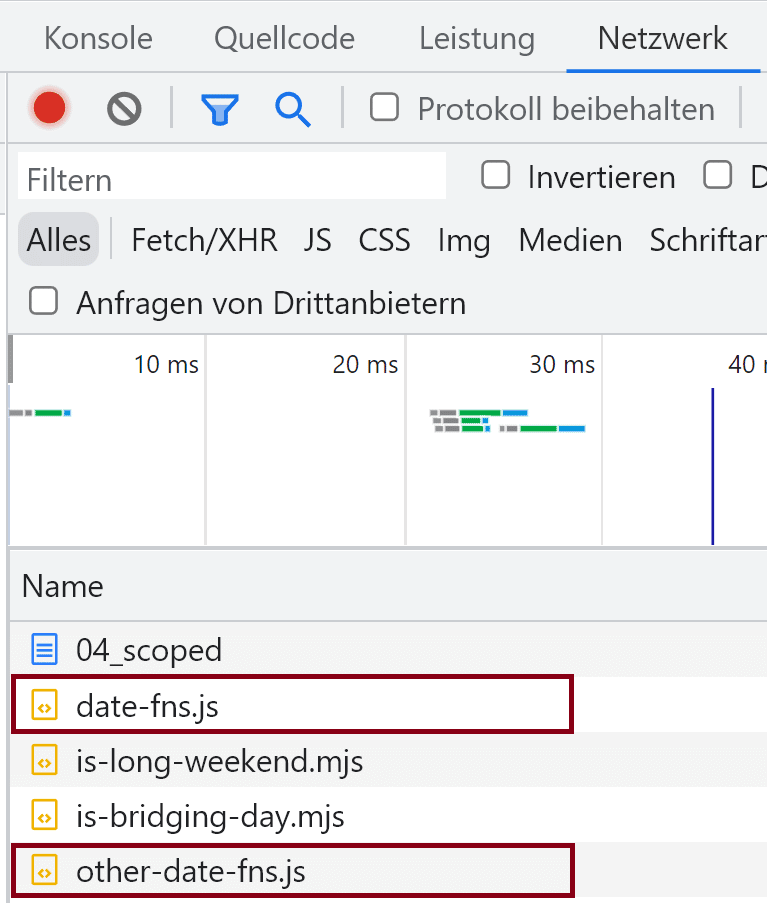 If multiple scopes happen to reference the same file, though, the browser loads it just once. Extending that thinking to the Module Federation model, each remote could get its own scope in the import map. The file names referenced there would then determine whether a remote brings its own dependency copy or reuses one that another remote is already providing.
Dynamic Import Maps and Dependency Negotiation
The import maps we've looked at so far were written by hand, which doesn't scale to large applications with many dependencies and remotes. A better approach is to build the import map from metadata:
<script>
const myDateFns = {
    paths: './libs/date-fns.js',
    version: '2.29.2'
}

const otherDateFns = {
    paths: './libs/other-date-fns.js',
    version: '2.29.2'
};

function negotiate(my, other) {
    if (my.version === other.version) {
        return my.path;
    }
    return other.path;
}

const importMap = {

    "import": {
        "date-fns": myDateFns.path,
        "is-long-weekend": "./js/is-long-weekend.mjs",
        "is-bridging-day": "./js/is-bridging-day.mjs"
    },

    "scopes": {
        "/js/is-bridging-day.mjs": {
            "date-fns": negotiate(myDateFns, otherDateFns)
        }
    }
};

const im = document.createElement('script');
im.type = 'importmap';
im.textContent = JSON.stringify(importMap);
document.currentScript.after(im);
</script>
In this simplified case, the host knows its own dependency info (myDateFns) and has fetched the remote's metadata (otherDateFns). It then constructs an import map object in memory. The remote gets its own scope, and a negotiate function decides whether the remote should receive its own copy of date-fns or make do with the host's version. With a bit more logic, this could mirror the strategies Module Federation uses to settle version conflicts, and eventually derive an entire import map from metadata alone.
Finally, the code creates a script tag for the import map and injects it into the page. A key constraint: there must be no earlier script tags with type="module" before it—otherwise you run into a chicken-and-egg problem with native browser behavior. The polyfill, however, is more forgiving in its shim mode and will happily accept import maps added later.
Externals, but with Imports, Please!
With Import Maps doing the resolution at runtime, the bundler's role changes. It can no longer pre-resolve these dependencies. Instead, it must be told to leave the corresponding import statements as-is in the output, 1:1, without bundling the referenced files.
Most bundlers call these unresolved dependencies externals, and they're usually declared via configuration. For esbuild, they're passed in as an array:
await esbuild.build ({
    entryPoints: ["js/is-bridging-day.mjs", [...] ],
    [...]
    external: [ "date-fns" ],
    format: "esm" ,
    target: [ "esnext" ],
});
Externals can take different shapes depending on the ecosystem. Node.js modules historically used the require function to pull in externals at runtime. Other setups expect consumers to expose them as global variables. But since import maps are rooted in EcmaScript modules, you'll want the bundles to keep actual import statements. With esbuild, this works out when the target format is set to esm.
Wrapping Up So Far: It Shows Promise, but It's Low-Level
As we've seen, import maps provide the raw building blocks to mirror Module Federation's mental model. What they don't offer is a comfortable level of abstraction. Large-scale applications will need a layer on top that takes care of details like:
- Handling metadata for shared dependencies and remotes
- Building separate bundles for shared pieces and remotes
- Making sure the Angular compiler fits into the picture
- Generating an import map with scopes for each remote
- Resolving conflicting dependency versions
- Loading remote modules
Following the Module Federation pattern, all of this should be tunable through a simple configuration file. In the Angular space, we'd also expect a CLI integration that can set things up via ng add or ng generate and hooks into ng serve, ng build, and similar commands.
Enter Native Federation
That's exactly the gap Native Federation [native-federation] aims to fill. It builds on the techniques described above, is open source, and deliberately mirrors the API of the existing Module Federation plugin [module-federation-plugin]. The goal is to let developers reuse what they already know. A configuration example gives you a feel for it:
const { withNativeFederation, shareAll }
    = require('@angular-architects/native-federation/config');

module.exports = withNativeFederation({

    name: 'mfe1',

    exposes: {
        './Module': './projects/mfe1/src/app/flights/flights.module.ts',
    },

    shared: {
        ...shareAll({ [...] }),
    },

});
Beyond the initial package name brought in via require, the configuration's shape matches the familiar Module Federation plugin [module-federation-plugin] style. The shareAll helper marks every dependency listed in package.json under dependencies as shared. For remotes, there's a loadRemoteModule helper ready to use:
const m = await loadRemoteModule({
    remoteName: 'mfe1',
    exposedModule: './Module'
});
While the current implementation focuses on Angular alongside esbuild, the architecture is deliberately built to work with any SPA framework or bundler. Think of it as insurance for a future where webpack might no longer be the default choice. Given that micro frontends often live in large, long-lived projects, having that option feels like a worthwhile safeguard.
Is Native Federation Production-Ready Yet?
On the tooling side, the framework- and bundler-agnostic core of Native Federation has reached version 1.0. The Angular integration is still in beta—so don't rush to production with it just yet.
That's partly because the Angular integration rides on the experimental esbuild-based builder from the CLI team. Once that builder becomes official, the integration will follow, and the beta tag can finally come off.
Still, Native Federation's current state positions it as a useful mid-term hedge: if the Angular community ever shifts away from webpack, you won't lose access to the Module Federation model—you'd simply switch to Native Federation once it's production-ready.
Until then, the safer route is the battle-tested webpack Module Federation, which you can enable through our Angular CLI plugin.
Conclusion
Import maps give you everything needed to recreate the Module Federation mental model without being locked into a specific bundler. They load remotes and shared dependencies directly, support dynamic generation from metadata, and handle version conflicts through scopes.
Because they operate at such a low level, though, you'll want a higher-level layer on top. Ideally, that layer offers the same API as the popular Module Federation plugin module-federation-plugin, letting teams put existing knowledge to work instead of starting over.
Looking Ahead: Architectural Insights
For a deeper dive into enterprise-grade Angular architecture, our complimentary eBook (5th edition, 12 chapters) offers a wealth of practical guidance.
- What criteria help in breaking down a large-scale application into distinct sub-domains?
- What steps ensure that a solution remains maintainable over the long term—spanning years or decades?
- What Micro Frontend capabilities does Module Federation put at your disposal?
Grab your copy by downloading it here right away.