
Single Repository vs. Monorepo Strategies
It may seem contradictory at first, but pairing Micro Frontends with a monorepo approach is surprisingly attractive. You gain freedom from version conflicts by construction, effortless code sharing, and leaner bundles. At the same time, you retain the ability to deploy individual Micro Frontends on their own and keep them decoupled from one another.
This piece weighs the trade-offs of opting for multiple repositories (the classic Micro Frontend pattern) versus consolidating everything into a single monorepo. Following that, it walks through a practical example of wiring up Module Federation within an Nx monorepo.
For a hands-on look, the 📂 source code is available in this repository.
A heartfelt thank you to the brilliant Tobias Koppers for his invaluable input on this subject, and to the incomparable Dmitriy Shekhovtsov for his assistance with the Angular CLI/webpack 5 integration.
Note: This article targets Angular 14.x and up, which also means you'll need Nx 14.2.x or newer. For specifics on older Angular versions or migrating from them, please refer to our migration guide.
Multiple Repos vs. Monorepos
I’m aware that the debate between multiple repositories and monorepos can stir strong feelings. People have had vastly different experiences with each. That said, I can vouch for having seen both succeed in substantial, real-world projects. Nevertheless, the two paths lead to different outcomes, which I'll break down in the next two sections.
Ultimately, it’s up to you to assess these outcomes against your specific project context and objectives. That, in essence, is what software architecture boils down to.
Multiple Repositories: The Classic Micro Frontend Approach
The conventional method assigns a distinct repository to each Micro Frontend:
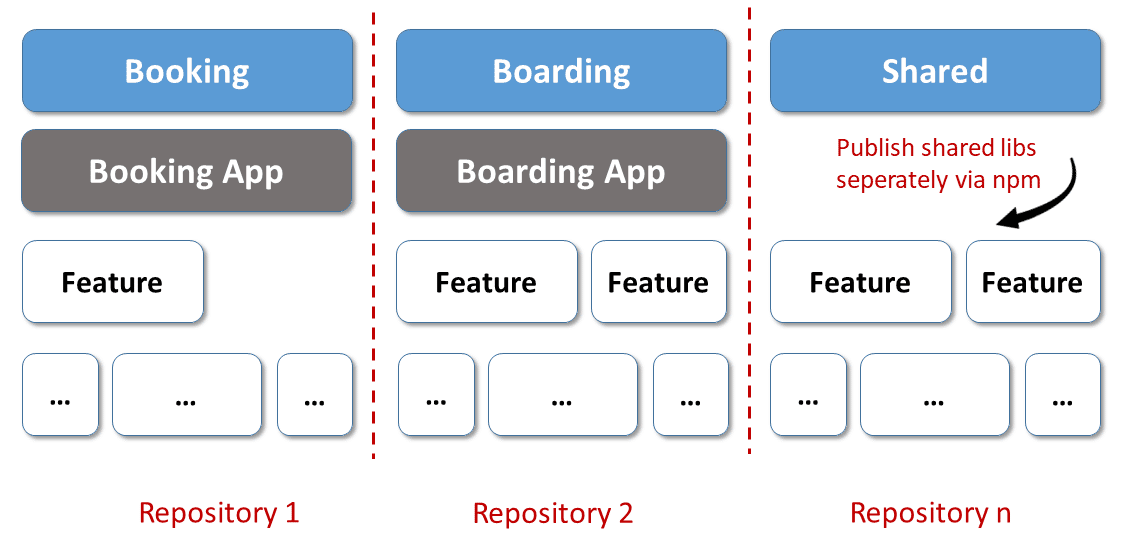
This pattern, common in Micro Services as well, brings several benefits:
- Micro Frontends — and thus the business domains they represent — remain isolated. With no dependencies linking them, separate teams can advance them independently.
- Teams can zero in on their own Micro Frontend, focusing solely on their dedicated repository.
- Each team enjoys maximum autonomy within their repo. They can make their own architectural choices, select their preferred tech stack, and define their build pipeline. They also control the timing of framework upgrades.
- Deploying each Micro Frontend independently is a given.
Given that it aligns closely with the foundational ideals of Micro Frontends, I label this "the by-the-book approach." But it does come with drawbacks:
- Distributing shared dependencies becomes a burden. Every modification demands a new version release, publication, and installation across the relevant Micro Frontends — a significant overhead.
- With each team free to pick its own stack, you risk ending up with a mix of frameworks and versions. This can trigger version clashes in the browser and puff up bundle sizes.
Naturally, there are ways to soften these downsides: automating the distribution of shared libraries, for instance, cuts down on the overhead. To sidestep version issues entirely, you could refrain from sharing libraries between Micro Frontends. Encapsulating these Micro Frontends as web components further masks the framework differences.
While that approach dodges version conflicts, it doesn’t solve the inflated bundle issue. You might also stumble into workarounds because Angular isn’t built to coexist with a different Angular version in the same browser context. It goes without saying that the Angular team doesn’t endorse this scenario.
If the advantages of this path outweigh its flaws for you, there's a guide on combining multiple frameworks and versions.
Should you conclude the disadvantages are more pressing, the upcoming sections propose a different route.
Micro Frontends with a Monorepo
Most of the aforementioned shortcomings can be eliminated by housing all Micro Frontends within one monorepo:
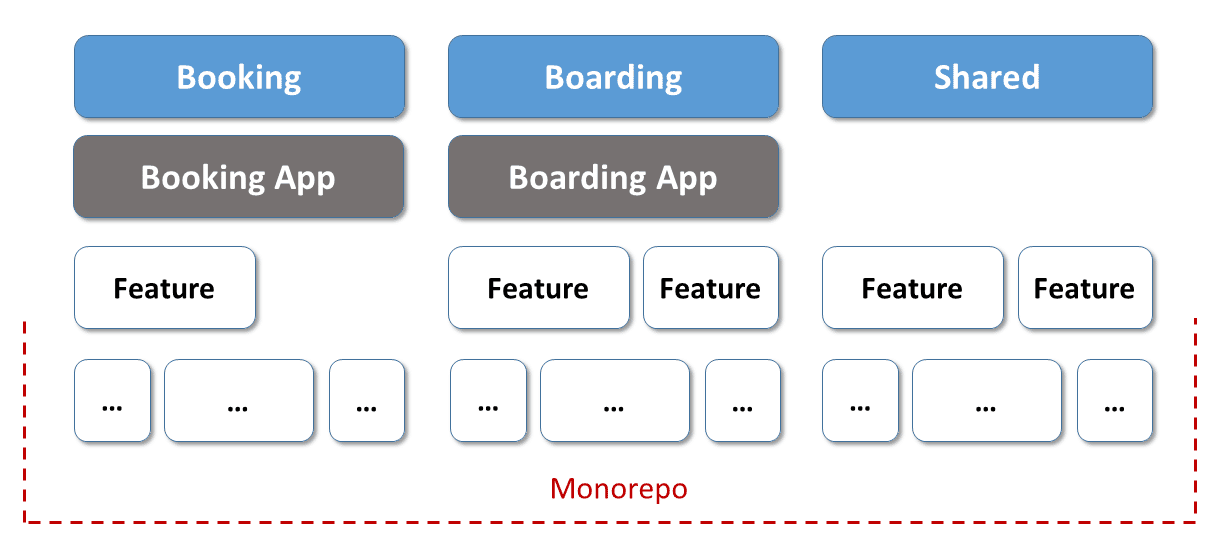
This setup makes sharing libraries trivial, and since there's a single version of every component, browser-based version conflicts become a non-issue. You also get to preserve certain advantages from the earlier discussion:
- Micro Frontends stay decoupled via linting rules, which block one from depending on another. This lets teams evolve their Micro Frontends without stepping on each other’s toes.
- Micro Frontends can still be rolled out independently.
So, where’s the trade-off? The catch is that you’re sacrificing some flexibility: teams must settle on a unified version for dependencies like Angular and adhere to a shared update timetable. In essence, you exchange a degree of freedom for the sake of avoiding version clashes and bloated bundles.
Once more, it’s on you to weigh these implications for your particular project. That calls for a clear understanding of your architecture goals and their priorities. As I noted, I’ve observed both strategies thriving in various production settings. It all comes down to the distinct consequences they bring.
Monorepo in Action
With the strategic considerations out of the way, let’s dive into a concrete implementation. The example showcases an Nx monorepo containing a Micro Frontend shell (shell) and a Micro Frontend (mfe1, short for "micro frontend 1"). These two rely on a shared authentication library (auth-lib) housed within the same monorepo. Additionally, mfe1 pulls in a library named mfe1-domain-logic.
If you're new to Nx, picture a CLI workspace packed with extra bells and whistles. For a deeper dive, check out our tutorial on Nx.
To map out the monorepo’s layout, the Nx CLI can generate a dependency graph:
nx graphIf you don't already have that CLI installed, you can grab it via npm (npm i -g nx). The resulting graph appears like this:
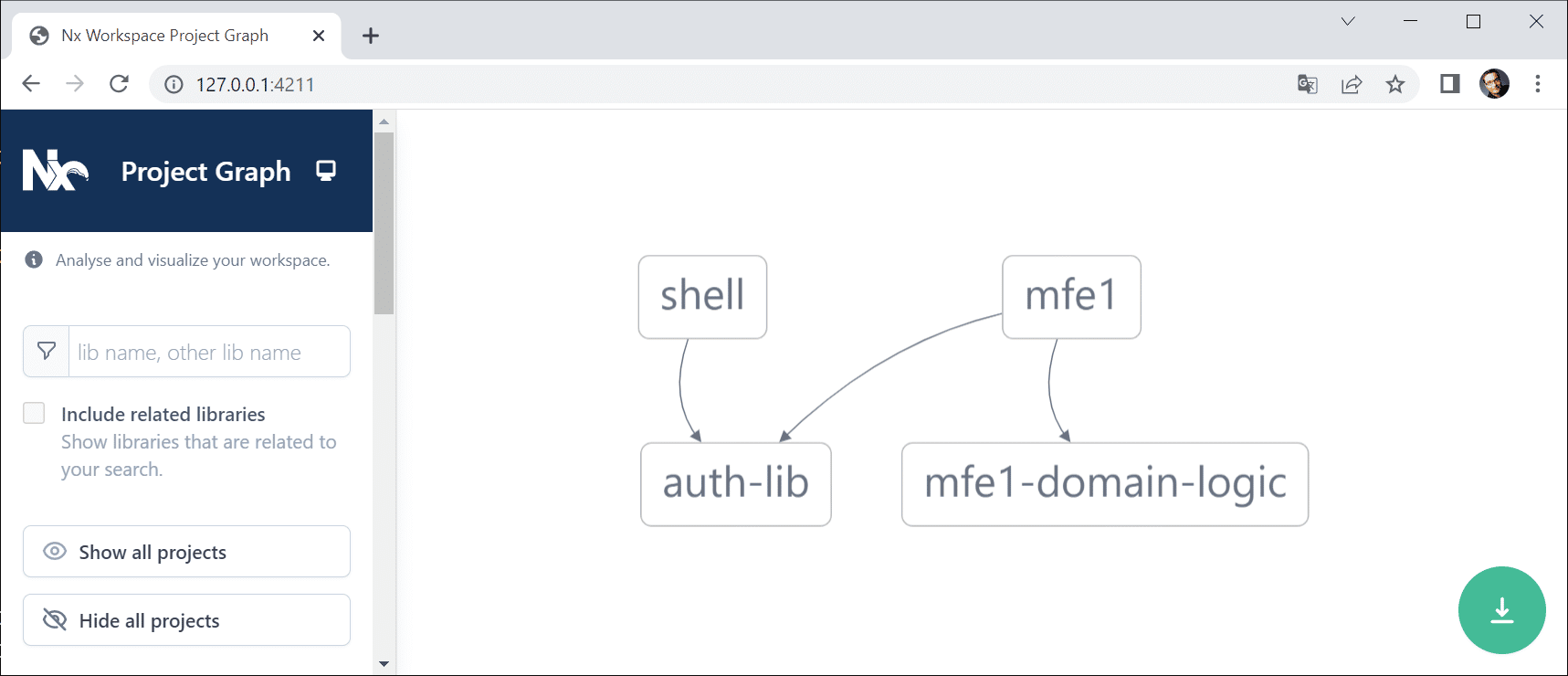
The auth-lib houses a pair of components: one for user login and another for displaying the active user. Both the shell and mfe1 make use of them:
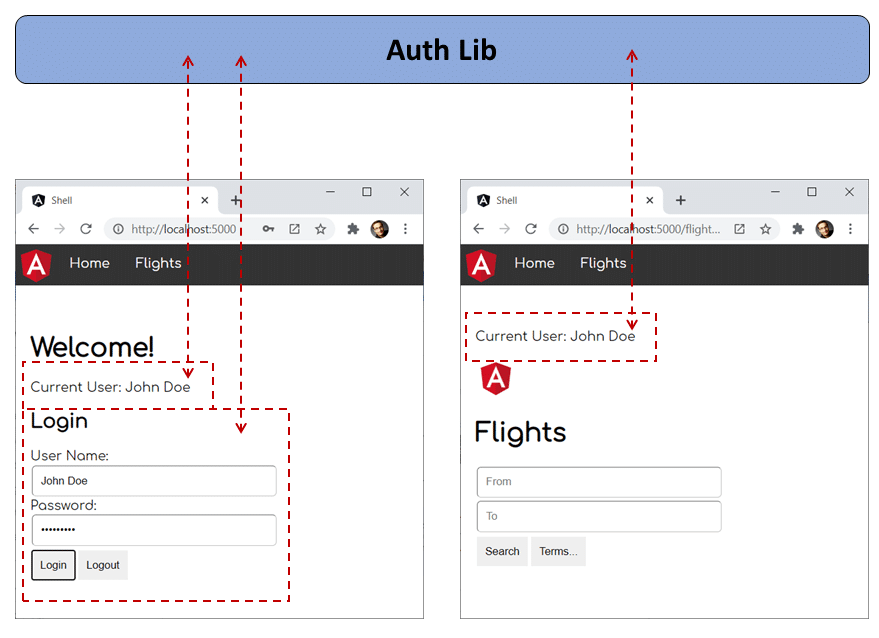
On top of that, the auth-lib maintains the current user's name within a service.
As is standard in Nx and Angular monorepos, libraries are linked via path mappings outlined in tsconfig.base.json (for Nx) or tsconfig.json (for the Angular CLI):
 "paths": {
     "@demo/auth-lib": [
         "libs/auth-lib/src/index.ts"
     ]
 },
Both the shell and mfe1 — along with any future Micro Frontends — must be independently deployable and loaded at runtime.
However, the goal is to avoid loading auth-lib twice or repeatedly! Achieving that with an npm package is straightforward. It’s one of Module Federation’s most obvious yet potent features. The following sections explore how to accomplish the same with a monorepo’s internal libraries.
Inside the Shared Library
Before jumping into the fix, let’s examine the auth-lib. It includes an AuthService that signs users in and tracks them via the _userName property:
 @Injectable({
   providedIn: 'root'
 })
 export class AuthService {

   // tslint:disable-next-line: variable-name
   private _userName: string = null;

   public get userName(): string {
     return this._userName;
   }

   constructor() { }

   login(userName: string, password: string): void {
     // Authentication for honest users
     // (c) Manfred Steyer
     this._userName = userName;
   }

   logout(): void {
     this._userName = null;
   }
 }
Next to this service, there’s an AuthComponent offering the login interface and a UserComponent that shows the logged-in user’s name. Both components are declared in the library’s NgModule:
 @NgModule({
   imports: [
     CommonModule,
     FormsModule
   ],
   declarations: [
     AuthComponent,
     UserComponent
   ],
   exports: [
     AuthComponent,
     UserComponent
   ],
 })
 export class AuthLibModule {}
As with every library, there’s a barrel file index.ts (sometimes labeled public-api.ts) that acts as the entry point, exposing everything consumers might need:
 export * from './lib/auth-lib.module';
 export * from './lib/auth.service';

 // Don't forget about your components!
 export * from './lib/auth/auth.component';
 export * from './lib/user/user.component';
Keep in mind that index.ts exports the two components even though they’re already part of the exported AuthLibModule. In this setup, that’s crucial for ensuring they’re picked up and compiled by Ivy.
Imagine the shell employs the AuthComponent while mfe1 relies on UserComponent. Since we aim to load auth-lib just once, this also facilitates sharing details about the logged-in user seamlessly.
Configuring Module Federation
Building on the earlier article, we’ll use the @angular-architects/module-federation plugin to activate Module Federation for both the shell and mfe1. Simply execute these commands:
npm i @angular-architects/module-federation -D

npm g @angular-architects/module-federation:init --project shell --port 4200 --type host

npm g @angular-architects/module-federation:init --project mfe1 --port 4201 --type remote
As a side note, Nx now offers its own Module Federation support. Under the hood, it processes Module Federation in a manner quite akin to the plugin referenced here.
This creates a webpack configuration tailored for Module Federation. Starting with version 14.3, withModuleFederationPlugin includes a sharedMappings property where you can specify which monorepo-internal libraries to share at runtime:
 // apps/shell/webpack.config.js

const { shareAll, withModuleFederationPlugin } = require('@angular-architects/module-federation/webpack');

module.exports = withModuleFederationPlugin({

     remotes: {
         'mfe1': "http://localhost:4201/remoteEntry.js"
     },

     shared: shareAll({ singleton: true, strictVersion: true, requiredVersion: 'auto' }),

     sharedMappings: ['@demo/auth-lib'],

 });
Because sharing in Module Federation is always opted into, the same configuration must appear in the Micro Frontend as well:
 // apps/mfe1/webpack.config.js

 const { shareAll, withModuleFederationPlugin } = require('@angular-architects/module-federation/webpack');

 module.exports = withModuleFederationPlugin({

     name: "mfe1",

     exposes: {
       './Module': './apps/mfe1/src/app/flights/flights.module.ts',
     },

     shared: shareAll({ singleton: true, strictVersion: true, requiredVersion: 'auto' }),

     sharedMappings: ['@demo/auth-lib'],

 });
From version 14.3 onward, the Module Federation plugin automatically shares every library within the monorepo. To rely on this default behavior, omit the
sharedMappingsproperty. When you do specify it, only the libraries you list are shared.
Hands-On Experiment
To put this into practice, launch both applications. Given that we're working with Nx, the following command handles this:
nx run-many --target serve --allThe --all flag initiates every application in the monorepo. As an alternative, you can use the --projects switch to launch a selected set:
nx run-many --target serve --projects shell,mfe1The
--projectoption accepts a comma-separated list of project names. Do not include spaces.
Once both applications are running, sign in within the shell and navigate to load mfe1. If the currently logged-in user's name is visible in mfe1, it confirms that auth-lib is instantiated only once and is being shared across the applications.
Keeping Micro Frontends Separate
A fundamental objective of a Micro Frontend architecture is to keep the individual frontends decoupled. Their independence is what allows distinct teams to work on them autonomously. To enforce this, Nx incorporates linting directives. Once configured, these rules generate errors whenever your code directly imports from another Micro Frontend or a different business domain.
The snippet below illustrates an attempt by the shell to reach into a library that belongs to mfe1:
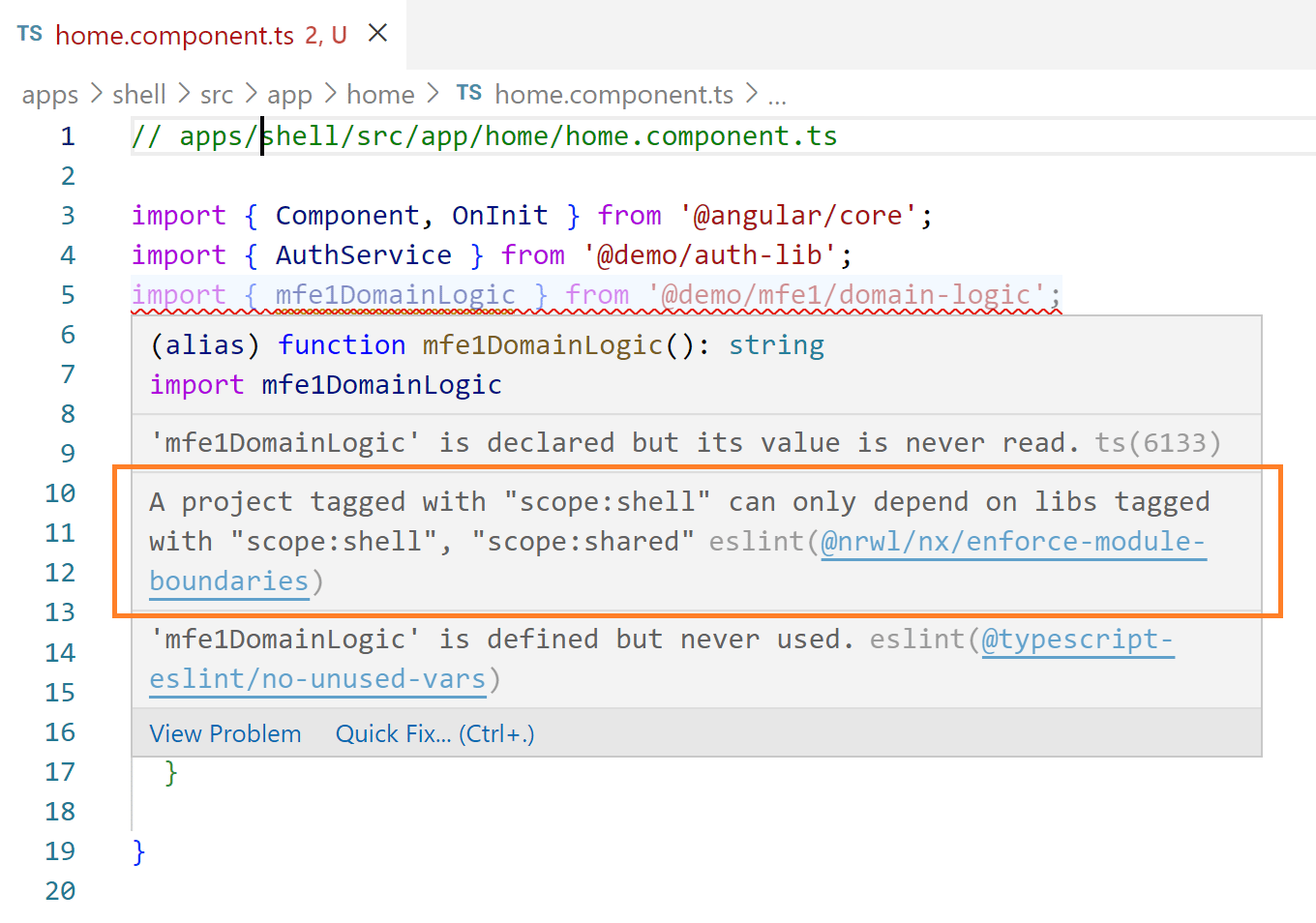
To see these errors directly in your IDE, you'll need eslint integration. For instance, Visual Studio Code requires an extension for this purpose.
Beyond checking rules within your IDE, you can execute the linter directly from the terminal:
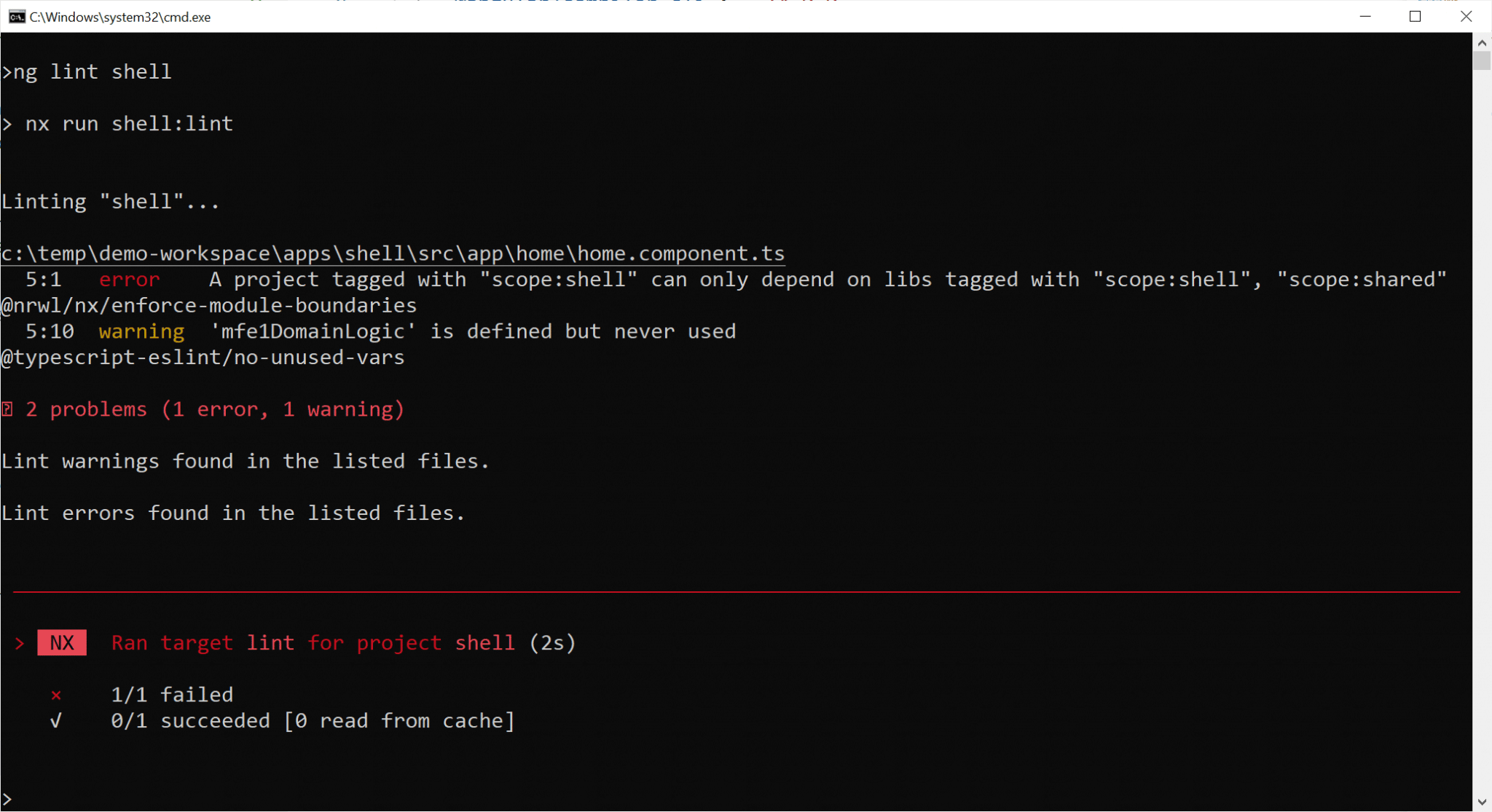
Here's the positive takeaway: If it runs on the command line, it can be automated. For instance, your CI/CD pipeline can execute this command to block merges to the main branch when these linting constraints are violated, preventing regression.
To set up these constraints, you must add tags to every application and library in the monorepo. This is done by editing the project.json located in each project's folder. For the shell, this file is at apps/shell/project.json. Within it, you'll find a `tag` property which I have assigned the value scope:shell:
 {
     [...]
     "tags": ["scope:shell"]
 }
Since the tag values are plain strings, you have complete flexibility in defining them. I've applied the same principle to mfe1 (scope:mfe1) and the auth-lib (scope:auth-lib).
With the tags established, you can formulate constraints within your main eslint configuration, specifically in the .eslintrc.json file:
 "@nrwl/nx/enforce-module-boundaries": [
   "error",
   {
     "enforceBuildableLibDependency": true,
     "allow": [],
     "depConstraints": [
       {
         "sourceTag": "scope:shell",
         "onlyDependOnLibsWithTags": ["scope:shell", "scope:shared"]
       },
       {
         "sourceTag": "scope:mfe1",
         "onlyDependOnLibsWithTags": ["scope:mfe1", "scope:shared"]
       },
       {
         "sourceTag": "scope:shared",
         "onlyDependOnLibsWithTags": ["scope:shared"]
       }
     ]
   }
 ]
After modifying global configuration files such as the .eslintrc.json, it's recommended to restart your IDE or at least its relevant services. This ensures that the new settings are applied correctly.
For a deeper look into these concepts and how Nx implements them, you can refer to my article series on Strategic Design (Domain-driven Design) and Angular.
Achieving Faster Builds
To compile all of your applications, the run-many command in Nx comes in handy:
nx run-many --target build --allHowever, invoking this command doesn't guarantee that every Micro Frontend or the shell is recompiled. Nx intelligently only rebuilds the apps that have changed. For example, in the scenario below, mfe1 remains untouched, so only the shell is rebuilt:
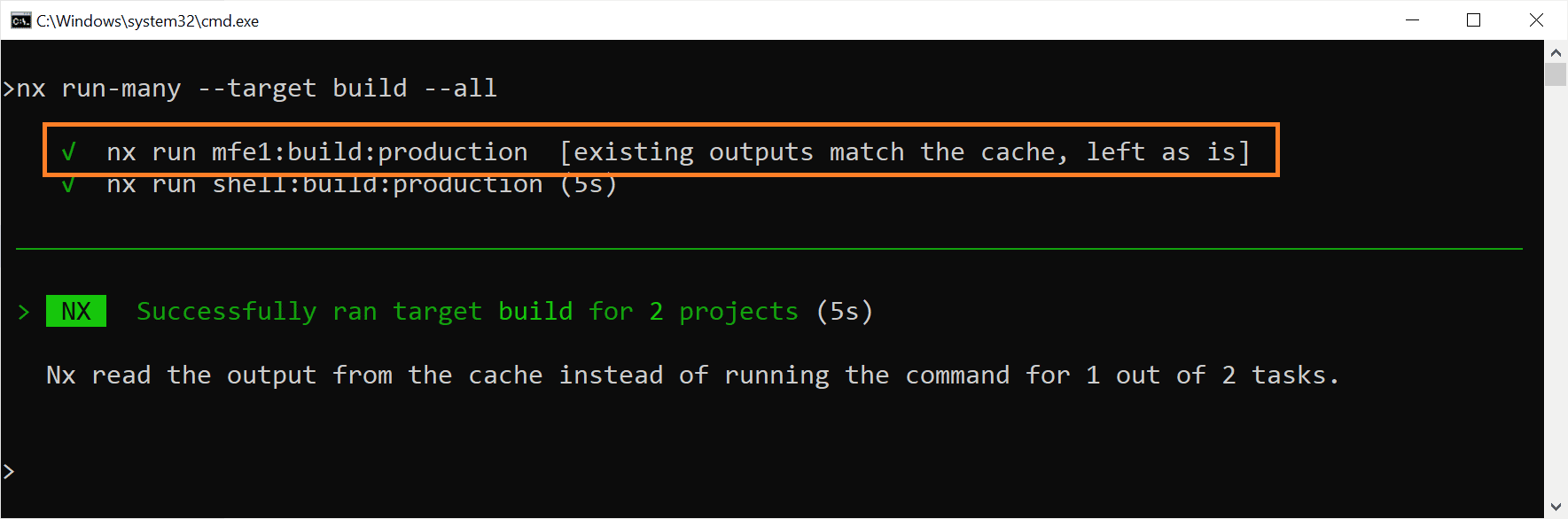
Leveraging the build cache to recompile solely modified apps can lead to significant reductions in build time.
This efficiency extends seamlessly to testing, e2e-tests, and linting. If an application or library has not been modified, it is neither tested nor linted again. Instead, results are retrieved from the Nx build cache.
Usually, this cache resides in node_modules/.cache/nx. Nevertheless, you have various options to customize both the location and the mechanics of caching.
Handling Deployments
Given that libraries typically do not have independent versions within a monorepo, it's essential to redeploy all modified Micro Frontends in unison. Fortunately, Nx provides the tools to identify which applications or Micro Frontends have been modified or are impacted by a change:
nx print-affected --type app --select projectsYou may also want to automate the detection of changed applications within your build process.
When sharing libraries at runtime, redeploying every application that has been modified or is impacted by a (library) change is crucial. If you're using a release branch, you can simply redeploy all apps that were altered within that specific branch.
For a visual understanding of the modifications in your monorepo, you can generate a dependency graph using this command:
nx affected:graphIf we suppose the domain-logic lib, which mfe1 depends on, was modified, the output would resemble the following:
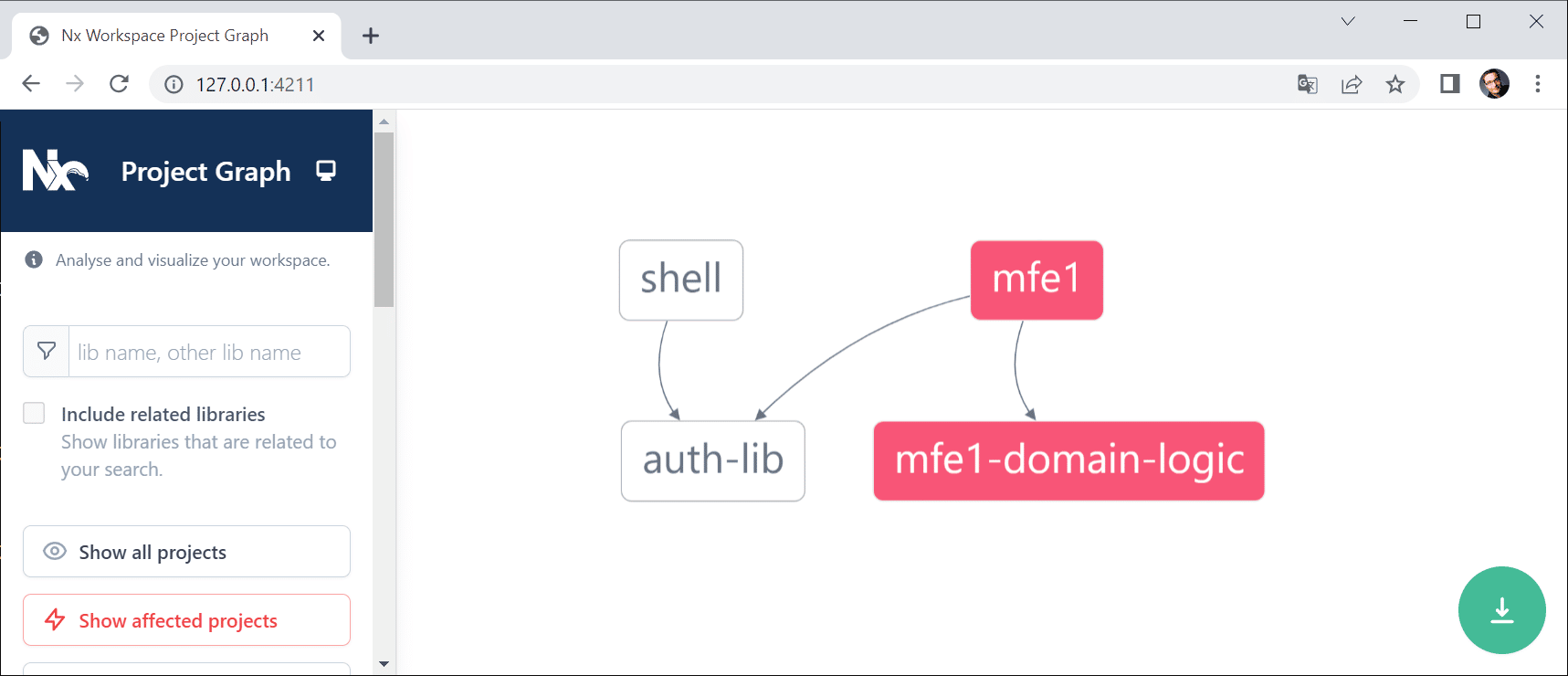
By default, the commands shown compare your current working state against the main branch. However, you can tailor this behavior using the --base and --head flags.
nx print-affected --type app --select projects --base branch-or-commit-a --head branch-or-commit-bThese options accept either a commit hash or a branch name. When a branch is specified, its most recent commit serves as the point of comparison.
Delving Deeper: Architectural Considerations
Up to this point, it's clear that Module Federation offers a straightforward path to implementing Micro Frontends with Angular. Nevertheless, several pertinent questions often surface when putting it into practice:
- What criteria should guide the division of a substantial application into manageable micro frontends?
- What access control policies should be implemented?
- Which established patterns are most effective in this context?
- How can we navigate common pitfalls associated with Module Federation?
- What advanced use cases does it support?
Our complimentary eBook, roughly 100 pages long, addresses all of these topics and beyond:
You can grab your copy right now!
A Final Word
Adopting monorepos for your Micro Frontends involves sacrificing a certain degree of flexibility to avoid common problems. You maintain the ability to deploy Micro Frontends independently, and Nx's linting rules help ensure they remain isolated from each other.
On the other hand, this approach demands consensus on common versions for the frameworks and libraries you rely on. This, in turn, mitigates the risk of version conflicts during runtime and helps manage the overall bundle size effectively.
Each strategy—monorepos or not—has its own trade-offs. The right choice depends on a careful evaluation of these implications for your specific project.