Comparing the two change detection strategies
Angular ships with a pair of strategies that dictate how change detection behaves at the component level. These strategies, Default and OnPush, are defined in the compiler core.
export enum ChangeDetectionStrategy {
	OnPush = 0,
	Default = 1,
}
The chosen strategy determines whether a child component gets checked during the change detection pass of its parent. Since child directives are evaluated as part of the host component's check, the strategy applies to the entire component subtree. Once set at compile time, you cannot alter the strategy at runtime.
In the default mode—internally named CheckAlways—Angular performs change detection on the component automatically, unless the view is explicitly detached. The OnPush alternative, referred to as CheckOnce internally, skips change detection unless the component is flagged as dirty. Angular provides built-in hooks to mark a component dirty automatically; when manual control is needed, the markForCheck method on ChangeDetectorRef does the job.
When you declare a strategy via the @Component() decorator, the Angular compiler records it in the component definition through the defineComponent function. Consider this component definition:
@Component({
	selector: "a-op",
	template: `I am OnPush component`,
	changeDetection: ChangeDetectionStrategy.OnPush,
})
export class AOpComponent {}
Here is what the compiler produces for that component:
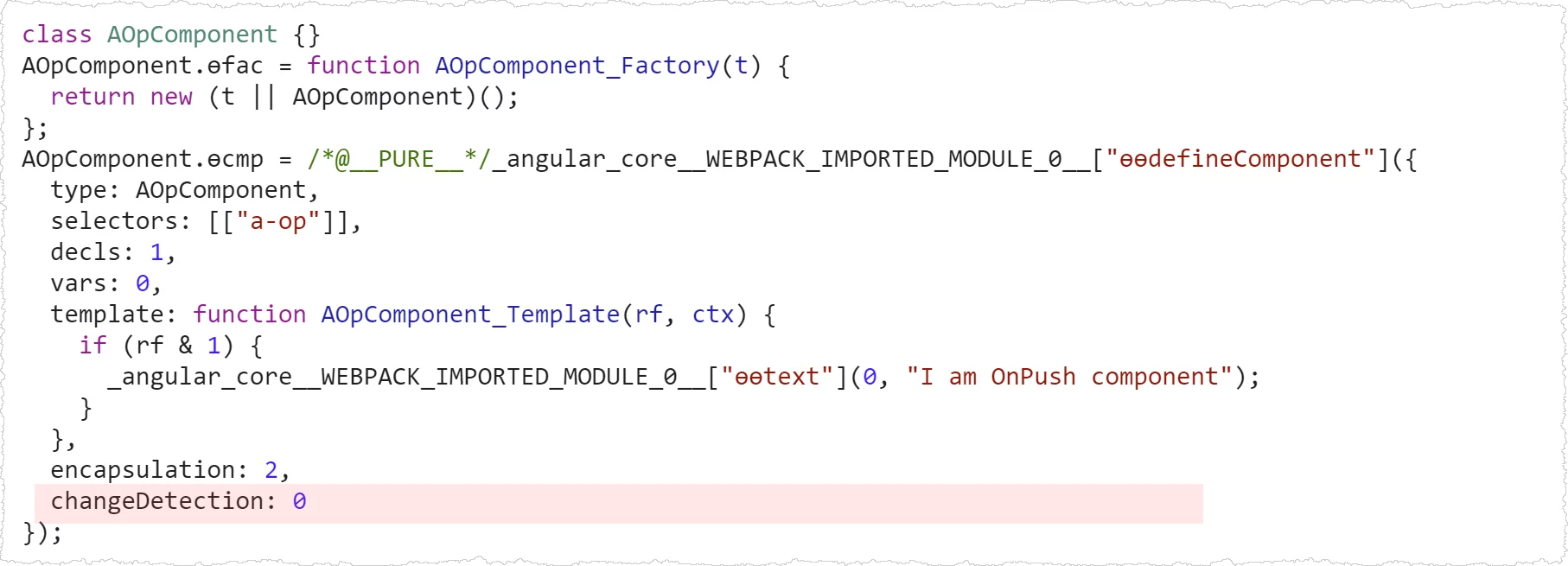
During instantiation, Angular uses this definition to set the appropriate flag on the LView object representing the view:
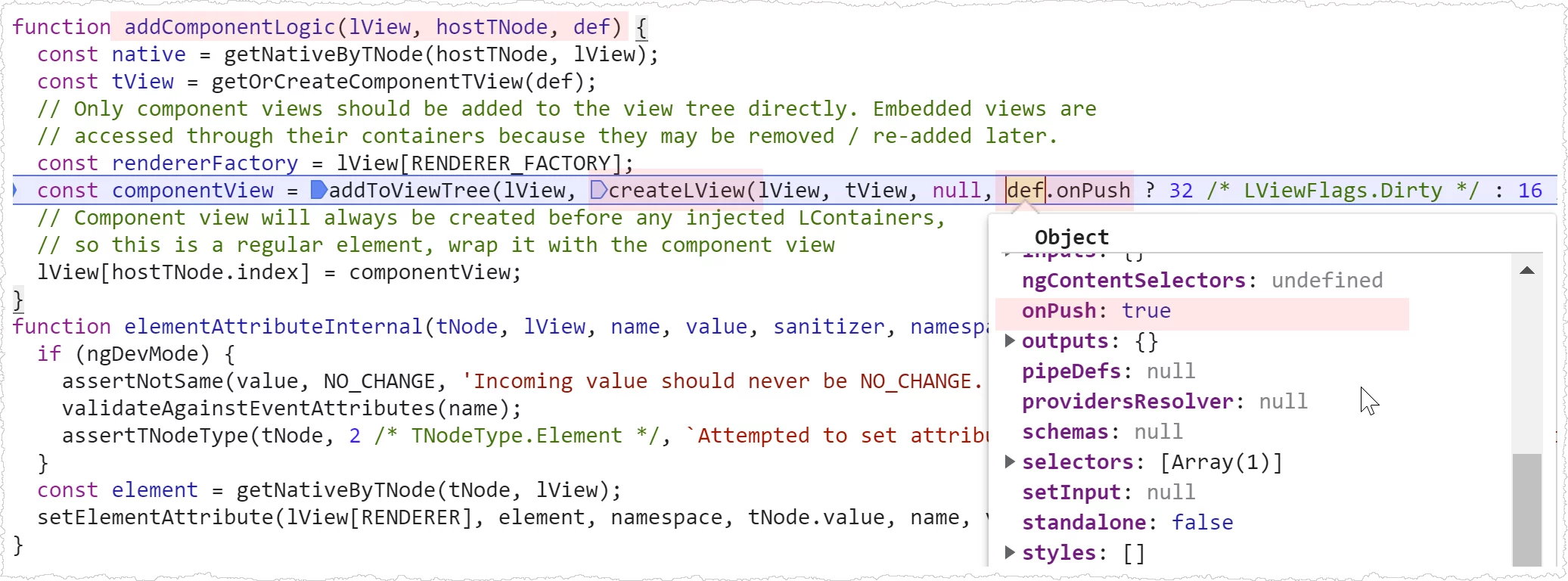
Consequently, every LView instance for this component carries either the CheckAlways or Dirty flag. With OnPush, the Dirty flag clears after the first change detection cycle completes.
Within the refreshView function, these flags on LView are inspected to decide if a component needs checking:
function refreshComponent(hostLView, componentHostIdx) {
	// Only attached components that are CheckAlways or OnPush and dirty should be refreshed
	if (viewAttachedToChangeDetector(componentView)) {
		const tView = componentView[TVIEW];
		if (componentView[FLAGS] & (LViewFlags.CheckAlways | LViewFlags.Dirty)) {
			refreshView(tView, componentView, tView.template, componentView[CONTEXT]);
		} else if (componentView[TRANSPLANTED_VIEWS_TO_REFRESH] > 0) {
			// Only attached components that are CheckAlways or OnPush and dirty should be refreshed
			refreshContainsDirtyView(componentView);
		}
	}
}
Now let’s dive into each strategy more closely.
How the default strategy works
With the default approach, a child component is always checked whenever its parent is checked. The sole exception is if you manually detach the child’s change detector, like so:
@Component({
	selector: "a-op",
	template: `I am OnPush component`,
})
export class AOpComponent {
	constructor(private cdRef: ChangeDetectorRef) {
		cdRef.detach();
	}
}
The emphasis on the parent being checked matters. If the parent isn’t checked, the child won’t be either, even under the default strategy. This behavior stems from Angular’s design where a child’s check happens within the parent’s checking phase.
Since Angular doesn’t impose any specific state-tracking pattern on developers, it defaults to checking all components to ensure correctness. An example of a developer-enforced pattern is passing immutable objects through @Input bindings, which we’ll explore with OnPush next.
Consider this simple two-component hierarchy:
@Component({
	selector: "a-op",
	template: `
		<button (click)="changeName()">Change name</button>
		<b-op [user]="user"></b-op>
	`,
})
export class AOpComponent {
	user = { name: "A" };

	changeName() {
		this.user.name = "B";
	}
}

@Component({
	selector: "b-op",
	template: `<span>User name: {{ user.name }}</span>`,
})
export class BOpComponent {
	@Input() user;
}
Clicking the button triggers an event handler that updates user.name. After the handler runs, Angular’s change detection loop checks the child B component, and the new name appears:

Even though the user object reference stays the same, its internal mutation is still reflected. This is precisely why the default strategy checks everything—without forced immutability, Angular can’t reliably detect whether inputs changed.
OnPush—the CheckOnce strategy
Angular doesn’t mandate immutability, but it offers a way to declare a component’s inputs as immutable, thus reducing how often it gets checked. The OnPush strategy serves this purpose and is a widely used optimization. Internally called CheckOnce, it skips change detection until the component is marked dirty, then checks it once, and goes back to skipping. Marking dirty happens either automatically through Angular’s mechanisms or manually via markForCheck.
Let’s revisit the earlier example, this time applying OnPush to the B component:
@Component({...})
export class AOpComponent {
  user = { name: 'A' };

  changeName() {
    this.user.name = 'B';
  }
}

@Component({
  selector: 'b-op',
  template: `
    <span>User name: {{user.name}}</span>
  `,
  changeDetection: ChangeDetectionStrategy.OnPush
})
export class BOpComponent {
  @Input() user;
}
Running the app now, Angular no longer picks up the change to user.name:

Notice that B is still checked during bootstrap—it renders the initial value A. However, on subsequent change detection cycles it’s skipped, so clicking the button won’t flip the name to B. The reason is simple: the user object reference passed via @Input hasn’t changed.
Before looking at how a component gets marked dirty, here’s a rundown of scenarios Angular uses to test OnPush behavior:
should skip OnPush components in update mode when they are not dirty
should not check OnPush components in update mode when parent events occur

should check OnPush components on initialization
should call doCheck even when OnPush components are not dirty

should check OnPush components in update mode when inputs change
should check OnPush components in update mode when component events occur
should check parent OnPush components in update mode when child events occur
should check parent OnPush components when child directive on a template emits event
The final set of test cases confirms that automatic dirty marking occurs under these conditions:
- an
@Inputreference changes - an event bound on the component itself fires
Let’s unpack each scenario next.
Handling @Input substitutions
Often, the only reason to check a child component is when its inputs shift. This holds especially true for presentational components that receive data purely through bindings.
Take our earlier example:
@Component({...})
export class AOpComponent {
  user = { name: 'A' };

  changeName() {
    this.user.name = 'B';
  }
}

@Component({
  selector: 'b-op',
  template: `
    <span>User name: {{user.name}}</span>
  `,
  changeDetection: ChangeDetectionStrategy.OnPush
})
export class BOpComponent {
  @Input() user;
}
As shown before, mutating the name inside the click callback does not refresh the screen. Angular performs a shallow check on inputs, and since the user reference remains identical, the component isn’t marked dirty. Direct mutation produces no new reference, so no automatic marking occurs.
To trigger detection, you must swap the reference. Creating a fresh user object instead of mutating the existing one resolves the issue:
@Component({...})
export class AOpComponent {
  user = { name: 'A' };

  changeName() {
    this.user = {
      ...this.user,
      name: 'B',
    }
  }
}
And it works as expected:

For policing immutability, you could implement a recursive Object.freeze helper:
export function deepFreeze(object) {
	const propNames = Object.getOwnPropertyNames(object);

	for (const name of propNames) {
		const value = object[name];
		if (value && typeof value === "object") {
			deepFreeze(value);
		}
	}

	return Object.freeze(object);
}
This would throw an error if someone attempts a mutation:
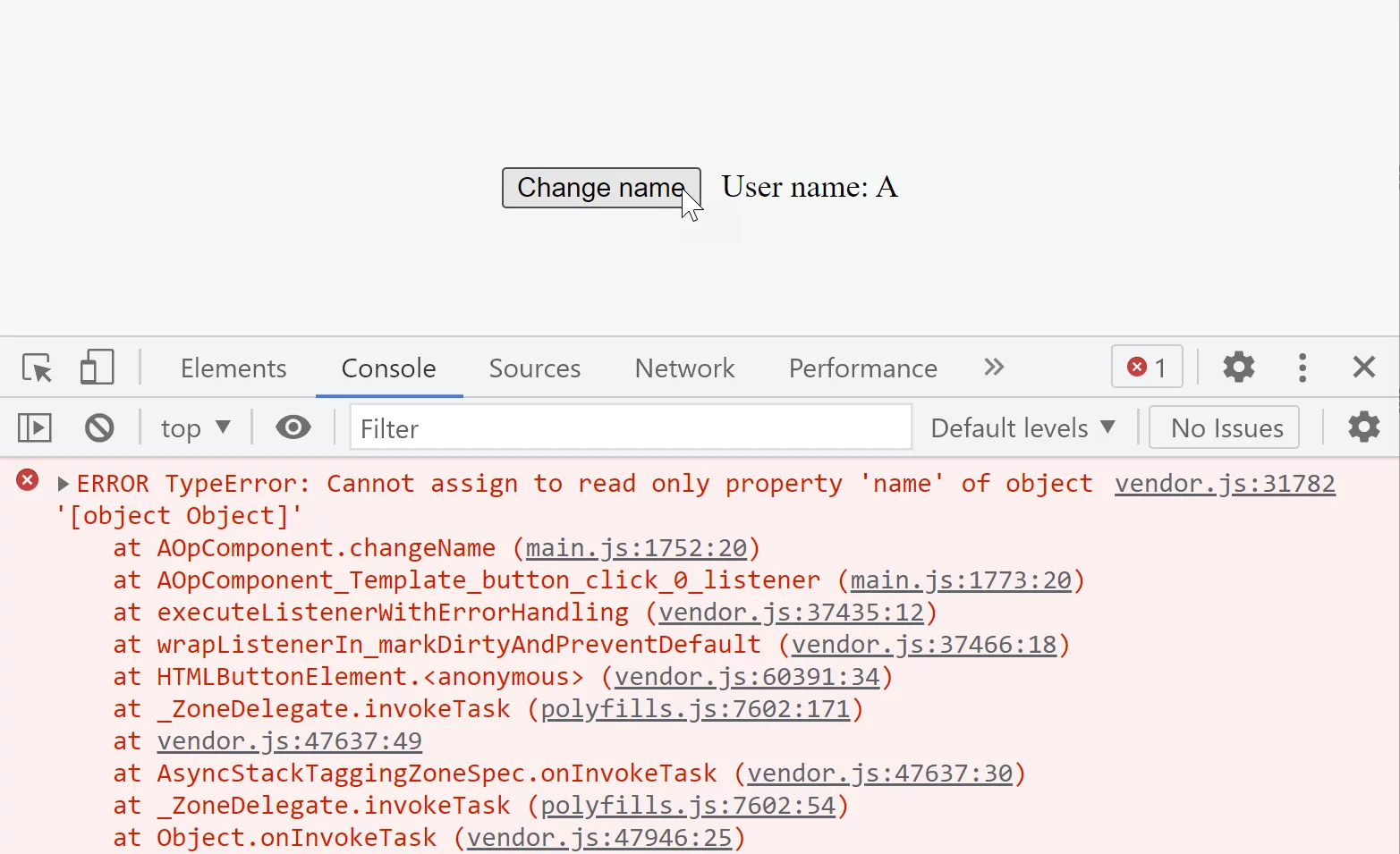
Alternatively, a dedicated library like immer is a solid choice:
import { produce } from 'immer';

@Component({...})
export class AOpComponent {
  user = { name: 'A' };

  changeName() {
    this.user = produce(this.user, (draft) => {
      draft.name = 'B';
    });
  }
}
That works seamlessly too.
Responding to bound UI events
When a native event fires on a component, Angular marks every ancestor up to the root as dirty. The reasoning is that an event might alter any part of the component tree, and Angular can’t predict which ancestors will change. So, it errs on the safe side and checks all of them after an event.
Suppose you have a tree of OnPush components like this:
AppComponent
    HeaderComponent
    ContentComponent
        TodoListComponent
            TodoComponent
If you attach an event listener within the TodoComponent template:
@Component({
	selector: "todo",
	template: ` <button (click)="edit()">Edit todo</button> `,
	changeDetection: ChangeDetectionStrategy.OnPush,
})
export class TodoComponent {
	edit() {}
}
Angular flags all ancestors dirty before executing the event handler:
So the marked components for the next check look like this:
   Root Component -> LViewFlags.Dirty
     |
    ...
     |
   ContentComponent -> LViewFlags.Dirty
     |
     |
   TodoListComponent  -> LViewFlags.Dirty
     |
     |
   TodoComponent (event triggered here) -> markViewDirty() -> LViewFlags.Dirty
In the following change detection cycle, Angular checks the entire chain of TodoComponent‘s ancestors:
AppComponent (checked)
    HeaderComponent
    ContentComponent  (checked)
        TodosComponent  (checked)
            TodoComponent (checked)
Notice that HeaderComponent is left out because it isn’t an ancestor of TodoComponent.
Manually flagging components for change detection
Returning to our earlier scenario where the user object reference was swapped out during an update—that approach let Angular naturally identify and dirty-check the B component. But what if we prefer to mutate the existing object without creating a new reference? In such cases, we can manually signal Angular that this component needs re-evaluation.
The solution lies in injecting changeDetectorRef and invoking its markForCheck method to notify Angular that this component warrants a check:
@Component({...})
export class BOpComponent {
  @Input() user;

  constructor(private cd: ChangeDetectorRef) {}

  someMethodWhichDetectsAndUpdate() {
    this.cd.markForCheck();
  }
}
Where might someMethodWhichDetectsAndUpdate fit in? The NgDoCheck hook proves ideal. It fires before Angular performs change detection on the component itself, yet still within the parent’s checking phase. This is the perfect spot to implement value comparison logic and flag the component as dirty when discrepancies are found.
The fact that NgDoCheck runs even when a component uses OnPush often raises eyebrows. However, this behavior is deliberate—there’s no contradiction once you realize it executes as part of the parent’s check cycle. Also note that ngDoCheck only triggers for the topmost child component; if this component isn’t checked by Angular, its descendants won’t have ngDoCheck called either.
Avoid using
ngDoCheckfor logging component checks.
Instead, place a template accessor like{{ logCheck() }}to track when it’s actually evaluated.
Now let’s embed our custom comparison logic into the NgDoCheck hook and mark the component dirty when we spot changes:
@Component({...})
export class AOpComponent {...}

@Component({
  selector: 'b-op',
  template: `
    <span>User name: {{user.name}}</span>
  `,
  changeDetection: ChangeDetectionStrategy.OnPush
})
export class BOpComponent {
  @Input() user;
  previousUserName = '';

  constructor(private cd: ChangeDetectorRef) {}

  ngDoCheck() {
    if (this.user.name !== this.previousUserName) {
      this.cd.markForCheck();
      this.previousUserName = this.user.name;
    }
  }
}
Keep in mind that markForCheck doesn’t trigger or promise a change detection run on its own. Refer to the section on
manual control for further details.
Observables as @Inputs
Let’s increase the complexity of our example. Picture the child B component receiving an RxJs-based observable that emits updates asynchronously—a pattern common in NgRx-driven architectures:
@Component({
	selector: "a-op",
	template: `
		<button (click)="changeName()">Change name</button>
		<b-op [user$]="user$.asObservable()"></b-op>
	`,
})
export class AOpComponent {
	user$ = new BehaviorSubject({ name: "A" });

	changeName() {
		const user = this.user$.getValue();
		this.user$.next(
			produce(user, (draft) => {
				draft.name = "B";
			})
		);
	}
}
So this stream of user objects flows into child B. We need to subscribe to this stream, verify whether the value has changed, and then mark the component as dirty when appropriate:
@Component({
	selector: "b-op",
	template: ` <span>User name: {{ user.name }}</span> `,
	changeDetection: ChangeDetectionStrategy.OnPush,
})
export class BOpComponent {
	@Input() user$;
	user = null;

	constructor(private cd: ChangeDetectorRef) {}

	ngOnChanges() {
		this.user$.subscribe((user) => {
			if (user !== this.user) {
				this.cd.markForCheck();
				this.user = user;
			}
		});
	}
}
The logic embedded in ngOnChanges closely mirrors
what the async pipe does internally:
export class AsyncPipe {
	transform() {
		if (obj) {
			this._subscribe(obj);
		}
	}

	private _updateLatestValue(async, value) {
		if (async === this._obj) {
			this._latestValue = value;
			this._ref!.markForCheck();
		}
	}
}
This is precisely why the standard practice is to offload subscription and comparison responsibilities to the
async pipe, with the sole caveat that data should remain immutable.
Here’s how the child B component looks when leveraging the async pipe:
@Component({
	selector: "b-op",
	template: ` <span>User name: {{ (user$ | async).name }}</span> `,
	changeDetection: ChangeDetectionStrategy.OnPush,
})
export class BOpComponent {
	@Input() user$;
}
There exists an extensive set of
test cases
covering how the async pipe interacts with different data types:
describe('Observable', () => {
	describe('transform', () => {
	  it('should return null when subscribing to an observable');
	  it('should return the latest available value');
	  it('should return same value when nothing has changed since the last call');
	  it('should dispose of the existing subscription when subscribing to a new observable');
	  it('should request a change detection check upon receiving a new value');
	  it('should return value for unchanged NaN');
	});
});
describe('Promise', () => {...});
describe('null', () => {...});
describe('undefined', () => {...});
describe('other types', () => {...});
This particular test
targets our exact scenario:
it("should request a change detection check upon receiving a new value", (done) => {
	pipe.transform(subscribable);
	emitter.emit(message);

	setTimeout(() => {
		expect(ref.markForCheck).toHaveBeenCalled();
		done();
	}, 10);
});
Within the transform method, the pipe subscribes to the observable; upon each new message emission, it marks the component as dirty for re-checking.