Custom Event Plugins for Controlled Change Detection
This article has remained my most frequently referenced piece. The strategy discussed here has since been improved in a follow-up piece and packaged into the @tinkoff/ng-event-plugins open source library. Be sure to explore those resources!
Angular ships with a declarative template syntax for event binding: (eventName)="onEventName($event)". When paired with ChangeDetectionStrategy.OnPush, change detection only triggers for the specific events you subscribe to. For instance, binding to (input) on an <input> element won't cause change detection when the user merely clicks it. This dramatically outperforms the default ChangeDetectionStrategy.Default. The @HostListener('eventName') decorator provides equivalent functionality for events on the host element of a directive or component.
In real-world scenarios, though, I frequently encounter situations where an event handler only needs to execute conditionally. A typical handler might look like this:
class ComponentWithEventHandler {
  // ...

  onEvent(event: Event) {
    if (!this.condition) {
      return;
    }

    // Handling event ...
  }
}
Even when the condition evaluates to false and no state actually changes, Angular still runs a full change detection cycle. For high-frequency events such as scroll or mousemove, this can seriously degrade performance.
While developing a UI component library, I noticed that a mousemove listener inside dropdown menus was triggering change detection checks throughout the entire component tree on every mouse movement. The mouse tracking was essential for correct dropdown behavior, but this specific aspect clearly warranted optimization.
This is particularly relevant for universal UI components. They may appear in large quantities on a single page and the host application can be complex and performance-critical.
One workaround involves imperatively subscribing to events outside Angular's change detection using something like Observable.fromEvent, then manually invoking markForCheck() on a ChangeDetectorRef. However, this approach introduces boilerplate and sacrifices the built-in convenience of Angular's event binding system.
Angular also lets you subscribe to "pseudo events." Writing (keydown.enter)="onEnter($event)" means the handler (and any change detection) only fires when the Enter key is pressed. This article explores how to leverage the same underlying mechanism to optimize event handling, plus adds .prevent and .stop modifiers to automatically prevent default browser behavior and halt event propagation.
Understanding Event Manager Plugins
Angular relies on the EventManager class to orchestrate all event subscriptions. This class maintains a collection of plugins that extend the abstract EventManagerPlugin base class. When an event binding is encountered, EventManager delegates it to whichever plugin claims support for that event name. Several plugins come built-in, including one dedicated to HammerJS and another that handles compound events like keydown.enter. These plugin classes are considered internal and subject to change. A GitHub issue requesting a public API for this has remained open for three years (at the time of writing) without any apparent progress.
Why does this matter for us? Although the plugin classes themselves are private, the injection token that lets you register additional plugins is part of Angular's public, documented API. This opens the door to creating custom plugins that enhance the standard event handling pipeline.
Examining the EventManagerPlugin source code reveals that despite being inaccessible for direct extension, it's largely abstract. Implementing a compatible class that fulfills its contract is straightforward:
export abstract class EventManagerPlugin {
  constructor(private _doc: any) {}
  ...
}
In essence, a plugin must determine whether it handles a given event, and it needs methods for attaching listeners to both standard elements and global targets (like body, window, and document). For our purposes, we're interested in recognizing the .filter, .prevent, and .stop suffixes. The first step is implementing the mandated supports function:
const FILTER = '.filter';
const PREVENT = '.prevent';
const STOP = '.stop';

class FilteredEventPlugin {
  supports(event: string): boolean {
    return (
      event.includes(FILTER) || event.includes(PREVENT) || event.includes(STOP)
    );
  }
}
This enables EventManager to route any event name containing these modifiers to our custom plugin. Next, we must implement subscribe/unsubscribe logic. Given that global event listeners are rarely needed for these scenarios and writing them adds complexity, we'll skip that feature. Instead, we'll strip our modifiers from the event name and pass the cleaned name back to EventManager, allowing it to delegate to the appropriate standard plugin:
class FilteredEventPlugin {
  supports(event: string): boolean {
    // ...
  }

  addGlobalEventListener(
    element: string,
    eventName: string,
    handler: Function,
  ): Function {
    const event = eventName
      .replace(FILTER, '')
      .replace(PREVENT, '')
      .replace(STOP, '');

    return this.manager.addGlobalEventListener(element, event, handler);
  }
}
For regular element events, we implement our own logic. The approach involves wrapping the original handler in an arrow function. After removing our modifiers, we hand the event back to EventManager, but this time we execute the subscription outside ngZone, ensuring change detection remains completely unaware of the event:
class FilteredEventPlugin {
  supports(event: string): boolean {
    // ...
  }

  addEventListener(
    element: HTMLElement,
    eventName: string,
    handler: Function,
  ): Function {
    const event = eventName
      .replace(FILTER, '')
      .replace(PREVENT, '')
      .replace(STOP, '');

    // Wrapper around our handler
    const filtered = (event: Event) => {
      // ...
    };

    const wrapper = () =>
      this.manager.addEventListener(element, event, filtered);

    return this.manager.getZone().runOutsideAngular(wrapper);
  }

  /*
  addGlobalEventListener(...): Function {
    ...
  }
  */
}
At this point, we only have the event name, the event object itself, and the target element. The handler we receive isn't the user's original callback; it's a chain of closures that Angular constructs internally.
A naive filtering strategy might involve attaching an attribute to the element that dictates whether to react. However, determining a reaction often depends on properties of the event itself — like the original target or whether default was already prevented. That makes attributes insufficient. We instead need a way to specify filtering logic that receives both the event and the component instance and returns a boolean. With that in place, handlers could be structured as:
const filtered = (event: Event) => {
  const filter = getOurHandler(some_arguments);

  if (
    !eventName.includes(FILTER) ||
    !filter ||
    filter(event)
  ) {
    if (eventName.includes(PREVENT)) {
      event.preventDefault();
    }

    if (eventName.includes(STOP)) {
      event.stopPropagation();
    }

    this.manager.getZone().run(() => handler(event));
  }
};
Designing the Solution
To manage these filter functions, we'll introduce a singleton service holding a Map that links elements to a mapping of event names and filter callbacks. Additional utility methods will allow for registration and cleanup. It's possible for two different handlers of the same event to be registered on one element — for instance, both a @HostListener and a template-level listener on the parent component. We'll address that scenario shortly.
The main service is deliberately minimal — just a Map plus methods to alter it:
export type Filter = (event: Event) => boolean;
export type Filters = {[key: string]: Filter};

class FilteredEventMainService {
  private elements: Map<Element, Filters> = new Map();

  register(element: Element, filters: Filters) {
    this.elements.set(element, filters);
  }

  unregister(element: Element) {
    this.elements.delete(element);
  }

  getFilter(element: Element, event: string): Filter | null {
    const map = this.elements.get(element);

    return map ? map[event] || null : null;
  }
}
The plugin can then inject this service and fetch the appropriate filter by passing the element and event name. For @HostListener support, we'll create a compact service that lives alongside the component and automatically purges its filters upon component destruction:
export class EventFiltersService {
  constructor(
    @Inject(ElementRef) private readonly elementRef: ElementRef,
    @Inject(FilteredEventMainService)
    private readonly mainService: FilteredEventMainService,
  ) {}

  ngOnDestroy() {
    this.mainService.unregister(this.elementRef.nativeElement);
  }

  register(filters: Filters) {
    this.mainService.register(this.elementRef.nativeElement, filters);
  }
}
For template-based element listeners, a matching directive handles the registration:
class EventFiltersDirective {
  @Input()
  set eventFilters(filters: Filters) {
    this.mainService.register(this.elementRef.nativeElement, filters);
  }

  constructor(
    @Inject(ElementRef) private readonly elementRef: ElementRef,
    @Inject(FilteredEventMainService)
    private readonly mainService: FilteredEventMainService,
  ) {}

  ngOnDestroy() {
    this.mainService.unregister(this.elementRef.nativeElement);
  }
}
If a component already provides the filter service, we prevent the directive from being applied there to avoid conflicting configurations. It's simple enough to wrap the component with an extra outer element and place the directive there instead. To detect collisions, we optionally inject the service using the @Self() decorator:
class EventFiltersDirective {
  // ...

  constructor(
    @Optional()
    @Self()
    @Inject(FiltersService)
    private readonly filtersService: FiltersService | null,
  ) {}

  // ...
}
Should the service be present, we log a message indicating the directive isn't permitted:
class EventFiltersDirective {
  @Input()
  set eventFilters(filters: Filters) {
    if (this.eventFiltersService === null) {
      console.warn(ALREADY_APPLIED_MESSAGE);

      return;
    }

    this.mainService.register(this.elementRef.nativeElement, filters);
  }

  // ...
}
Demonstrating the Implementation
All illustrated code is available for experimentation on StackBlitz:
Included is a pseudo select component featuring a dropdown rendered inside a modal. If you examine most dropdown implementations, you'll see similar behavior: hovering an option gives it focus, keyboard navigation then moves focus through items, and moving the mouse again returns focus to the cursored option. This behavior is straightforward to build, yet we have no need to process mousemove events when the hovered item already holds focus. A straightforward filter that checks whether the event's target is already focused avoids all those unnecessary change detection calls.
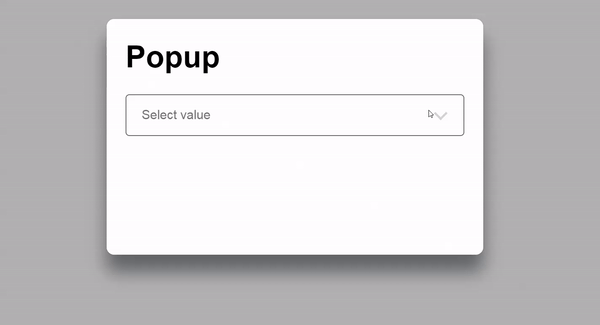
The select also uses a filtered @HostListener subscription. Pressing Esc within the popup ought to close it — unless that keystroke is already consumed by a nested component. For the select, Esc should close the dropdown and shift focus from the menu back to the select. But if the dropdown is already closed, the select should ignore the event entirely, letting it bubble upward to close the modal. This is achieved via @HostListener('keydown.esc.filtered.stop') combined with a filter function () => this.opened.
When focus leaves the select, the dropdown must close as well. Since this composite component contains multiple focusable elements, the focusout event (which bubbles) is ideal for tracking focus status. However, focusout fires on any focus shift, even those staying within the component's boundaries. The event's relatedTarget property tells us where focus is heading, which lets us write a filter that transforms focusout into an effective bubbling blur:
class SelectComponent {
  // ...

  focusOutFilter = ({relatedTarget}: FocusEvent) =>
    !this.elementRef.nativeElement.contains(relatedTarget);

  // ...

  @HostListener('focusout.filtered')
  onBlur() {
    this.opened = false;
  }

  // ...
}
Wrap-up
One caveat: Angular's internal handling for composite key events (like keydown.esc) still operates within NgZone, as the internal plugin explicitly re-enters the zone. Circumventing EventManager entirely and building our own implementation is possible, but venturing deeper into Angular internals carries increasing risk. In practice, filtering these composite events is often unnecessary anyway, since they don't typically fire at high frequency. We could still use our filters as simple early-exit guards, or simply exclude them for these events.
The technique outlined here gives you granular control over change detection even for performance-sensitive events, all while retaining Angular's familiar event binding syntax. It also enables declarative .prevent and .stop modifiers directly in the template — a common requirement. While this implementation is somewhat verbose, it offers valuable insight into Angular's event handling machinery. There's also room for refinement, such as defining filters with TypeScript decorators. That's a direction I intend to investigate and publish in a future article, along with additional decorator utilities I've been exploring.