
Understanding Design Patterns
Before diving deep, it's essential to grasp what Design Patterns truly represent. As a developer, you have the freedom to write code in countless styles. However, adopting best practices significantly impacts code maintainability. Code crafted with precision tends to outlast hastily written implementations. This means scalability and maintenance concerns diminish when you select the appropriate coding approach.
- Design patterns assist in crafting solutions that avoid complicating the overall problem.
- They enable the creation of interactive objects and highly reusable designs.
- Design Patterns form a fundamental aspect of Object-Oriented Programming.
The Gang Of Four is your gateway to design patterns. Currently, the Gang Of Four catalog contains 23 patterns. These are divided into three distinct categories: Creational, Structural, and Behavioural.
Creational Design Patterns in JavaScript
- Abstract Factory
- Builder
- Factory
- Prototype
- Singleton
Abstract Factory
What constitutes a factory? Ask a child, and they'll describe it as a production facility. For instance, a Toy Factory produces toys. Mirroring this real-world concept, a Factory in JavaScript is an object that generates other objects. Not every Toy Factory manufactures teddy bears and transformers, correct? Different toy factories specialize in various toy types. Each toy factory operates around a particular theme. Likewise, an Abstract Factory operates with a theme. Objects originating from an Abstract Factory share a common theme.
Since JavaScript lacks class-based inheritance, implementing the Abstract Factory pattern proves particularly intriguing.
Let's examine Abstract Factory in JavaScript through an illustration.
- I need to develop software for a Toy Factory.
- One department produces toys themed around the Transformers movie. Another department handles Star Wars-themed toys.
- Both departments share certain common traits while maintaining their unique themes.
function StarWarsFactory(){
this.create = function(name){
return new StarWarsToy(name)
}}

function TransformersFactory(){
this.create = function(name){
return new TransformerToy(name)
}}

function StarWarsToy(name){
this.nameOfToy = name;
this.displayName = function(){
console.log("My Name is "+this.nameOfToy);
}}

function TransformersToy(name){
this.nameOfToy = name;
this.displayName = function(){
console.log("My Name is "+this.nameOfToy);
}}

function buildToys(){
var toys = [];


var factory_star_wars = new StarWarsFactory();
var factory_transformers = new TransformersFactory();


toys.push(factory_star_wars.create("Darth Vader"));
toys.push(factory_transformers.create("Megatron"));

for(let toy of toys)
console.log(toy.displayName());
}
Builder
The builder's purpose is constructing complex objects. The client receives the final product without concerning themselves with the underlying work. Frequently, the builder pattern encapsulates composite objects. This is primarily because the construction process is both complex and repetitive.
Let's explore implementing our Toy Factory using the builder pattern.
- I possess a toy factory.
- There's a department dedicated to constructing Star Wars Toys.
- Within the Star Wars department, I aim to produce numerous Darth Vader toys.
- Creating Darth Vader toys involves two stages. First, assemble the toy, then specify its color.
function StarWarsFactory(){
  this.build = function(builder){
  builder.step1();
  builder.step2();
  return builder.getToy();
}}

function DarthVader_Builder(){
  this.darth = null;
  this.step1 = function () {
    this.darth = new DarthVader();
  }

  this.step2 = function () {
    this.darth.addColor();
  }

  this.getToy = function () {
    return this.darth;
  }
}

function DarthVader () {
  this.color = '';
  this.addColor = function(){
    this.color = 'black';
  }
  this.say = function () {
    console.log("I am Darth, and my color is "+this.color);
  }
}

function build(){
  let star_wars = new StarWarsFactory();
  let darthVader = new DarthVader_Builder();
  let darthVader_Toy = star_wars.build(darthVader);
  darthVader_Toy.say();
}
Factory
A factory's role involves producing similar objects sharing identical characteristics. This facilitates easy management, upkeep, and manipulation of objects. For example, within our Toy Factory, each toy contains specific information: purchase date, origin, and category.
var ToyFactory = function(){
  this.createToy = function(type)
  {
    var toy;
    if(type == "starwars")
      {
        toy = new StarWars();
      }
    toy.origin = "Origin";
    toy.dop = "2/22/2022";
    toy.category="fantasy";
  }
}
Prototype
Frequently, we require creating new objects with default values inherited from another parent object. This avoids generating objects with uninitialized values. The Prototype pattern serves this purpose effectively.
Prototype Patterns go by the alternative name of Properties Pattern.
- Our toy factory includes a Star Wars Department producing various characters.
- Each character possesses a genre, expiry date, and status field. These fields remain constant across all toys from the Star Wars department.
function Star_Wars_Prototype(parent){
   this.parent = parent;
   this.duplicate = function ()
   {
      let starWars = new StarWarsToy();
      starWars.genre = parent.genre;
      starWars.expiry = parent.expiry;
      starWars.status = parent.status;
      return starWars;
   };
}

function StarWarsToy(genre, expiry, status){
   this.genre = genre;
   this.expiry = expiry;
   this.status = status;
}

function build () {
   var star_wars_toy = new StarWarsToy('fantasy', 'NA', 'Jan');
   var new_star_wars_toy = new Star_Wars_Prototype(star_wars_toy);

   //When you are ready to create
   var darth = new_star_wars_toy.duplicate();
}
Singleton
Singleton Pattern translates to "Single Instance." A given object permits only one instance. When systems require data coordination from a unified location, this pattern proves useful.
var Singleton = (function () {
   var instance;

   function createInstance() {
       var object = new Object("I am the instance");
       return object;
   }

   return {
       getInstance: function () {
           if (!instance) {
               instance = createInstance();
           }
           return instance;
       }
   };
})();

function run() {

   var instance1 = Singleton.getInstance();
   var instance2 = Singleton.getInstance();

   console.log("Same instance? " + (instance1 === instance2));
}
Structural Design Patterns
- Adapter
- Bridge
- Composite
- Decorator
- Facade
- Flyweight
- Proxy
Adapter
The Adapter design pattern comes into play when an object's properties or methods require translation from one form to another. This pattern proves invaluable when components with incompatible interfaces must collaborate. The Adapter Pattern also carries the name Wrapper Pattern.
Let's apply this to our Toy Factory:
- The Toy Factory maintains a shipping department.
- We're transitioning from the old shipping department to a new one.
- However, the old shipping methods must remain operational for existing stock.
// old interface

function Shipping() {
    this.request = function (zipStart, zipEnd, weight) {
        // ...
        return "$49.75";
    }
}

// new interface

function AdvancedShipping() {
    this.login = function (credentials) { /* ... */ };
    this.setStart = function (start) { /* ... */ };
    this.setDestination = function (destination) { /* ... */ };
    this.calculate = function (weight) { return "$39.50"; };
}

// adapter interface

function ShippingAdapter(credentials) {
    var shipping = new AdvancedShipping();

    shipping.login(credentials);

    return {
        request: function (zipStart, zipEnd, weight) {
            shipping.setStart(zipStart);
            shipping.setDestination(zipEnd);
            return shipping.calculate(weight);
        }
    };
}

function run() {

    var shipping = new Shipping();
    var credentials = { token: "StarWars-001" };
    var adapter = new ShippingAdapter(credentials);

    // original shipping object and interface

    var cost = shipping.request("78701", "10010", "2 lbs");
    console.log("Old cost: " + cost);

    // new shipping object with adapted interface

    cost = adapter.request("78701", "10010", "2 lbs");

    console.log("New cost: " + cost);
}
Bridge
The bridge represents a renowned High-Level Architectural Pattern. It provides varying levels of abstraction. Consequently, Objects become loosely coupled. Every Object serving as a component possesses its own distinct interface.
Within our toy factory producing Star Wars toys, two varieties exist. One set operates via remote control. Another set functions with batteries and emits various sounds. The Bridge Pattern facilitates constructing this high-level architecture.
var Remote_Control = function (output) {
    this.output = output;
    this.left = function () { this.output.left(); }
    this.right = function () { this.output.right(); }
};

var Battery_Operation= function (output) {
    this.output = output;
    this.move = function () { this.output.move(); }
    this.wheel = function () { this.output.zoom(); }
};

var Remote_Controlled_Toy = function () {
    this.left = function () { console.log("Move Left"); }
    this.right = function () { console.log("Move Right"); }
};

var Battery_Operated_Toy = function () {
    this.move = function () { console.log("Sound waves"); }
    this.wheel = function () { console.log("Sound volume up"); }
};

function run() {

    var remote_control = new Remote_Control();
    var battery_operation = new Battery_Operation();
    var star_wars_type_1 = new Remote_Controlled_Toy(remote_control);
    var star_wars_type_2 = new Battery_Operated_Toy(battery_operation);
    star_wars_type_1.left();
    star_wars_type_2.wheel();
}
Composite
As its name indicates, a composite pattern generates objects that are either primitive or collections of objects. This supports building deeply nested structures.
In our toy factory, the composite pattern operates as follows:
- We have two sections: one manual and one automated.
- The manual section contains a set of toys (leaves).
- The automated section holds another set of toys (leaves).
var Node = function (name) {
    this.children = [];
    this.name = name;
}

Node.prototype = {
    add: function (child) {
        this.children.push(child);
    }
}

function run() {
    var tree = new Node("Star_Wars_Toys");
    var manual = new Node("Manual")
    var automate = new Node("Automated");
    var darth_vader = new Node("Darth Vader");
    var luke_skywalker = new Node("Luke Skywalker");
    var yoda = new Node("Yoda");
    var chewbacca = new Node("Chewbacca");

    tree.add(manual);
    tree.add(automate);

    manual.add(darth_vader);
    manual.add(luke_skywalker);

    automate.add(yoda);
    automate.add(chewbacca);

}
Decorator
The Decorator pattern enhances an object's properties and methods, introducing new behavior at runtime. Multiple decorators can augment or override an object's actual functionalities.
In our toy factory, we have a function that assigns names to toys. Additionally, we employ a decorator to specify the genre.
var Toy = function (name) {
    this.name = name;
    this.display = function () {
        console.log("Toy: " + this.name);
    };
}

var DecoratedToy = function (genre, branding) {
    this.toy = toy;
    this.name = user.name;  // ensures interface stays the same
    this.genre = genre;
    this.branding = branding;
    this.display = function () {
        console.log("Decorated User: " + this.name + ", " +
            this.genre + ", " + this.branding);
    };
}
function run() {
    var toy = new User("Toy");
    var decorated = new DecoratedToy(toy, "fantasy", "Star Wars");
    decorated.display();
}
Facade
The Facade design pattern provides a high-level interface for properties and methods. These properties and methods become accessible to the subsystems.
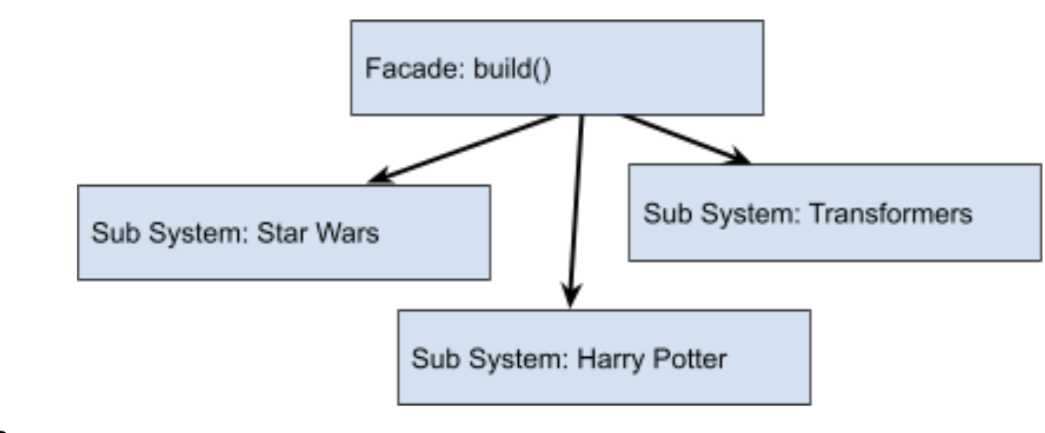
Facade Design Pattern
Flyweight
This pattern applies when objects need sharing among other Objects. The shared Objects must remain immutable. Why? Because since multiple parties share them, modification becomes prohibited. The Flyweight pattern exists within the Javascript Engine. For instance, the Javascript Engine maintains a collection of immutable strings shareable across applications.
Within our Toy factory:
- Every toy possesses a genre.
- Every toy has a country of manufacture.
- Every toy includes a year of manufacture. These attributes can reside in the Flyweight model.
function Flyweight(genre, country, year) {
    this.genre = genre;
    this.country = country;
    this.year = year;
};

var FlyWeightFactory = (function () {
    var flyweights = {};
    return {
        get: function (genre, country, year) {
            if (!flyweights[genre + country]) {
                flyweights[genre + country] =
                    new Flyweight(genre, country, year);
            }
            return flyweights[genre + country];
        }
    }
})();

function ToyCollection() {
    var toys = {};
    return {
        add: function (genre, country, year, brandTag) {
            toys[brandTag] =
                new Toy(genre, country, year, brandTag);
        }
    };
}

var Toy = function (genre, country, year, brandTag) {
    this.flyweight = FlyWeightFactory.get(genre, country, year, brandTag);
    this.brandTag = brandTag;
 }
function build() {
    var toys = new ToyCollection();
    toys.add("Fantasy", "USA", "2021", "StarWars_01");
    toys.add("Fantasy", "USA", "2021", "Transformers_01");
}
Proxy
The Proxy Pattern supplies a placeholder object instead of the actual one. This placeholder controls access to the real object's value.
For instance, our Toy Factory operates in multiple global locations. Each location produces a certain quantity of toys. The Proxy pattern simplifies understanding production numbers from each site.
function GeoCoder() {
    this.getLatLng = function (address) {
        if (address === "Hong Kong") {
            return "52.3700° N, 4.8900° E";
        } else if (address === "North America") {
            return "51.5171° N, 0.1062° W";
        } ….    };
}
function GeoProxy() {
    var coder = new GeoCoder();
    var geoCollector = {};
    return {
        getLatLng: function (location) {
            if (!geoCollector[location]) {
                geoCollector[location] = coder.getLatLng(location);
            }
            return geoCollector[location];
        }};
};
function run() {
    var geo = new GeoProxy();
    geo.getLatLng("Hong Kong");
    geo.getLatLng("North America");
}
Behavioral Design Patterns
- Chain of Responsibility
- Command
- Interpreter
- Iterator
- Mediator
- Memento
- Observer
- State
- Strategy
- Template
- Visitor
Chain of Responsibility
Anyone working with Javascript has encountered event-bubbling at some point. This involves events propagating through nested controls. Any control within the chain can opt to handle the bubbling event. The Chain of Responsibility Pattern addresses this behavior. Specifically, JQuery heavily relies on this pattern.
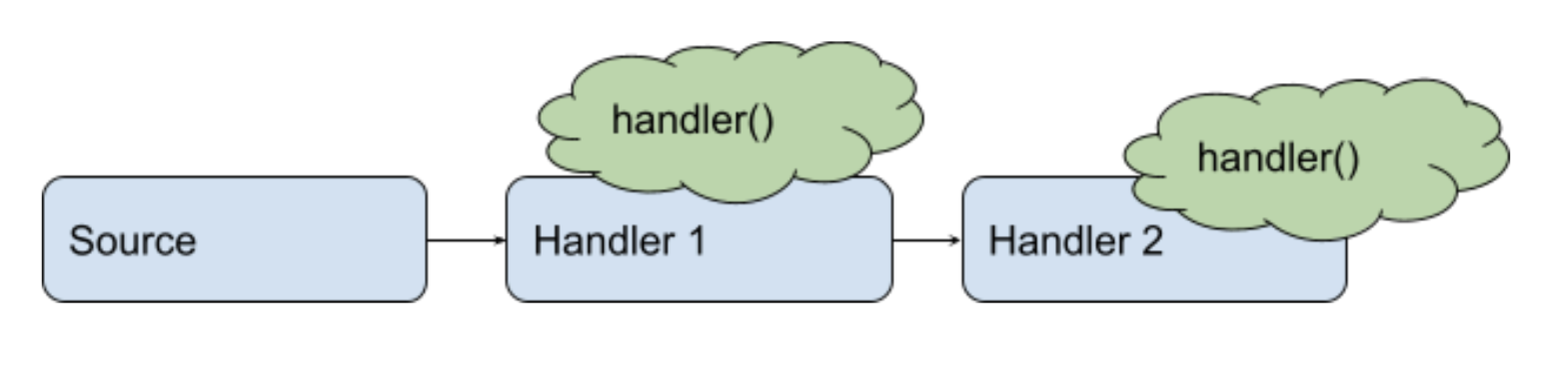
Chain of Responsibility
Command
Objects frequently share a common set of events requiring processing. Command objects facilitate building Objects where event-handling actions can be encapsulated. Typically, the Command Pattern serves to centralize functionalities. For example, the undo operation in applications demonstrates the Command Pattern. Whether triggered from the Menu Drop Down or keyboard shortcut, the identical functionality executes.
Interpreter
Not all solutions follow the same pattern. Many applications require additional code to process input or format output for users. Here, the output varies based on the application.
In our toy factory example, all Star Wars toys must carry the tagline: "May the Force be with You." Meanwhile, all Bob the Builder toys need the prefix "Are you Ready!" This additional customization layer becomes achievable through the Interpreter Pattern.
var Prefix = function (brandTag) {
    this.brandTag = brandTag;
}

Prefix.prototype = {
    interpret: function () {
        if (this.brandTag  == “Star Wars”) {
            return “May the Force be with You”;
        }
        else if (this.brandTag  == “Bob the Builder”) {
            return “Are you Ready?”;
        }
    }
}

function run() {
    var toys = [];
    toys.push(new Prefix(“Star Wars”));
    toys.push(new Prefix(“Bob the Builder”));
    for (var i = 0, len = toys.length; i < len; i++) {
        console.log(toys[i].interpret());
    }
}
Iterator
True to its name, the Iterator pattern defines how objects or collections of objects should be efficiently traversed. In Javascript, common looping constructs include: while, for, for-of, for-in, and do while. The iterator pattern enables designing custom iteration methods tailored to your application's needs.
Mediator
Another pattern living up to its name is the Mediator. It establishes a central control point for a group of objects. This pattern sees heavy usage in state management. When one object modifies its property state, the change broadcasts easily to other objects.
Here's a straightforward example demonstrating the Mediator design pattern:
var Participant = function (name) {
    this.name = name;
    this.chatroom = null;
}
//define a Itprototype for participants with receive and send implementation
var Talkie = function () {
    var participants = {};
    return {
       register: function (participant) {
            participants[participant.name] = participant;
            participant.talkie = this;
        },
        send: function (message, from, to) {
            if (to) {                      // single message
                to.receive(message, from);
            } else {                       // broadcast message
                for (key in participants) {
                    if (participants[key] !== from) {
                        participants[key].receive(message, from);
                    }
                }
            }
        }
    };
};

function letsTalk() {
    var A = new Participant("A");
    var B = new Participant("B");
    var C = new Participant("C");
    var D = new Participant("D");
    var talkie = new Talkie();
    talkie.register(A);
    talkie.register(B);
    talkie.register(C);
    talkie.register(D);
    A.send("I love you B.");
    B.send("No need to broadcast", A);
    C.send("Ha, I heard that!");
    D.send("C, do you have something to say?", C);
}
Memento
The Memento acts as a repository storing an object's state. Applications may encounter scenarios requiring object state preservation and restoration. Typically, JSON serialization and deserialization of objects facilitate implementing this design pattern.
var Toy = function (name, country, year) {
    this.name = name;
    this.country = country;
    this.city = city;
    this.year = year;
}

Toy.prototype = {
    encryptLabel: function () {
        var memento = JSON.stringify(this);
        return memento;
    },

    decryptLabel: function (memento) {
        var m = JSON.parse(memento);
        this.name = m.name;
        this.country = m.country;
        this.city = m.city;
        this.year = m.year;
        console.log(m);
    }
}

function print() {
    var darth = new Toy("Darth Vader", "USA", "2022");
    darth.encryptLabel();
    darth.decryptLabel();
}
Observer
The Observer Pattern ranks among the most extensively adopted patterns. It manifests uniquely across platforms such as Angular and React. Indeed, it warrants dedicated discussion. Nevertheless, this pattern introduces a subscription model. Objects subscribe to specific events. When those events occur, subscribers receive notifications. JavaScript operates as an event-driven programming language. Much of its architecture depends on the Observer Pattern.
State
Let's start with an example. Traffic lights display three colors: red, amber, and green. The required action varies by color. Each color has its own logic. Any object existing within a particular state must comply with that state's rules. Similarly, state patterns include specific logic collections for each state. Objects within a given state must adhere to that logic.
Strategy
The Strategy Design Pattern encapsulates algorithms for completing specific tasks. Depending on certain preconditions, the actual strategy (or method) executed changes. Consequently, algorithms within a strategy remain highly interchangeable.
In our toy factory, we distribute products through three carriers: FedEx, USPS, and UPS. Shipping costs vary by carrier. Thus, the Strategy design pattern helps determine final shipping costs.
Distributor.prototype = {
    setDistributor: function (company) {
        this.company = company;
    },

    computeFinalCost: function () {
        return this.company.compute();
    }
};

var UPS = function () {
    this.compute = function () {
        return "$45.95";
    }
};

var USPS = function () {
    this.compute = function () {
        return "$39.40";
    }
};

var Fedex = function () {
    this.compute = function () {
        return "$43.20";
    }
};

function run() {
    var ups = new UPS();
    var usps = new USPS();
    var fedex = new Fedex();
    var distributor = new Distributor();
    distributor.setDistributor(ups);
    console.log("UPS Strategy: " + distributor.computeFinalCost());
    distributor.setDistributor(usps);
    console.log("USPS Strategy: " + distributor.computeFinalCost());
    distributor.setDistributor(fedex);
    console.log("Fedex Strategy: " + distributor.computeFinalCost());
}
Template
The Template Pattern outlines a sequence of steps. Objects created against this pattern must complete all template steps. Naturally, steps can adapt to suit the specific object. This design pattern appears extensively in common libraries and frameworks.
Visitor
Finally, we arrive at the Visitor Design Pattern. It proves useful when defining new operations for a group of objects while preserving their original structure. This pattern helps when extending frameworks or libraries. Unlike other patterns discussed here, the Visitor Design Pattern sees limited usage in Javascript. Why? The JavaScript engine offers more sophisticated and flexible mechanisms for dynamically adding or removing object properties.
var Employee = function (name, salary, vacation) {
    var self = this;

    this.accept = function (visitor) {
        visitor.visit(self);
    };
  this.getSalary = function () {
        return salary;
    };
    this.setSalary = function (salary) {
        salary = salary;
    };
};

var ExtraSalary = function () {
    this.visit = function (emp) {
        emp.setSalary(emp.getSalary() * 2);
    };
};

function run() {
    var john = new Employee("John", 10000, 10),
    var visitorSalary = new ExtraSalary();
    john.accept(visitorSalary);
    }
}
Conclusion
Certain design patterns get employed by the Javascript engine frequently. Many developers remain unaware of these patterns' usage. Incorporating patterns enhances code performance and maintainability. This explains the growing emphasis on adopting patterns in your codebase. The transition to pattern-based development need not happen overnight. Instead, gradually learn these patterns and integrate them into your applications over time.