Understanding Reactive Programming
Reactive programming represents a programming paradigm alongside imperative, object-oriented, functional, or declarative styles, with its core focus placed on asynchronous and non-blocking data handling.
Within this paradigm, events themselves constitute the data, and the processing approach revolves around establishing suitable data streams where events can undergo various operations such as transformation, merging, or splitting. The producer is responsible for creating and emitting events, while consumers observe and read those events.
This paradigm proves particularly valuable in web application contexts, where asynchronous events occur continuously — ranging from user interactions with the UI, to events originating from browser APIs, to extensive communication with backend services — all of which we aim to handle in the background.
Core RxJS Concepts
RxJS serves as a JavaScript library designed to simplify the implementation of reactive code. The entire framework rests upon several fundamental concepts that, once identified and internalized, significantly streamline working with reactive code.
Function Composition
This concept integrates with functional programming principles and applies directly to RxJS operators. The elegance of defining data processing within a stream comes from assembling numerous simple operators into a cohesive pipeline.
Operators are pure functions, meaning their outputs depend exclusively on their inputs (which may be individual values from a stream, or in some cases entire streams themselves). Each operator carries a single, clearly defined responsibility — often evident directly from its name: “filter” filters values, “map” performs mapping, and “catchError” handles error scenarios.
Chains of pure functions remain straightforward to read, understand, and test (since each individual pure function can be validated in isolation).
Lazy Execution
This approach stands in contrast to eager execution. For RxJS streams (with certain exceptions), this means operations defined within streams execute only when a subscription is established — not at the moment the stream itself is defined (that is, when a consumer begins listening to the stream's values).
JavaScript Promises behave differently, as their processing commences immediately upon definition.
Consider a Promise performing an HTTP call alongside an Observable performing the same HTTP call. With the Promise, the request fires as soon as it's defined. With the Observable, execution only occurs once a subscription is created (which might happen considerably later, or potentially never at all).
Push-Based Architecture
This represents the inverse of the Pull-Based Architecture. Let's clarify both concepts:
- pull-based — when data is needed, we must actively query a mechanism to retrieve it (real-world analogy: checking the wp.angular.love blog manually to see if new articles have been published),
- push-based — relies on predefined streams where data is "pushed" and then delivered to every subscribed consumer (real-world analogy: following the wp.angular.love fanpage means you receive notifications about new posts automatically),
The stream itself functions as a contract between producer and consumers simultaneously. Consumers may listen for events even before a producer exists, and conversely, producers can emit data into a stream regardless of whether anyone is currently listening.
Behavioral Pattern

Behavioral patterns constitute the design patterns concerned with managing, organizing, and linking various behaviors.
In the RxJS context, several important terms come into play (including producer, consumer, subscription, observable, subject, operator, and others).
Any problem we approach with RxJS should be analyzed through the lens of behavioral patterns — we need to determine which roles are played by which entities (notably, identifying the producer and consumer) and how we intend to combine different behaviors (through appropriate operator composition with well-defined behavior, stream combination, and so on).
Once we develop proficiency in the reactive mindset combined with a behavioral approach to problem-solving, using RxJS correctly becomes remarkably straightforward and intuitive.
Observable
The streams we've been discussing are essentially a distinctive type of collection where values are pushed lazily (lazy push). Within RxJS, such collections are represented by the Observable — which happens to be a generic class whose type parameter describes the type of values contained within the collection.
Consumers can observe values flowing through the stream via the 'subscribe' method.
stream$.subscribe({
 next: value => console.log({value})
})
The 'pipe' method, on the other hand, accepts RxJS operators as arguments, enabling us to transform the stream (for instance, filtering out undesired values).
stream$.pipe(
 filter(value => value >= 3)
)
Numerous built-in Angular mechanisms return streams (Observables). Examples include:
- HttpClient methods (get, post, patch, delete, etc.),
- Router.events,
- AbstractControl getters (valueChanges, statusChanges),
- ActivatedRoute fields (url, params, queryParams, fragment, data)
Subscription and Observer

A subscription is an object created each time a new consumer begins listening to values within a stream.
The 'subscribe' method returns a reference to such an object. As noted earlier, creating a subscription typically initiates data processing within the stream (with some exceptions). For example, if we define a stream using an httpClient that performs a request, that request doesn't fire when the stream is initially defined — it fires when the subscription is created (and in the example below, each subscription triggers its own separate request).
const stream$ = this.httpClient.get('/cats');
const subscription1: Subscription = stream$.subscribe();
const subscription2: Subscription = stream$.subscribe();
A subscription connects a specific consumer to a stream and provides the important 'unsubscribe' method, which allows us to unsubscribe (stopping a particular consumer from listening to stream values) while simultaneously halting (canceling) the data processing associated with that consumer (in the example above, this could cancel a browser-initiated request).
In Angular applications, the standard approach is to terminate all active subscriptions (at the component level) within the OnDestroy hook (at the end of the component lifecycle). This step must not be overlooked, as neglecting it can at best lead to memory leaks, with subscriptions remaining active despite the component being destroyed.
Tip:
For canceling subscriptions within a component, the recommended approach is using the 'takeUntil' operator.
export class AppComponent implements OnInit,OnDestroy {
 private readonly destroyed$ = new Subject<boolean>();

 ngOnInit(): void {
   stream$.pipe(
     takeUntil(this.destroyed$)
   ).subscribe(value => console.log({value}))
 }

 ngOnDestroy(): void {
   this.destroyed$.next(true);
   this.destroyed$.complete();
 }
}
An alternative route is the widely-used @ngneat/until-destroy library
From the Angular perspective, AsyncPipe creates subscriptions itself and disposes of them at the appropriate moment. It offers the added benefit that a new value received through this pipe affects the component, which becomes marked as 'dirty' (thereby triggering change detection). In most scenarios, AsyncPipe proves to be a superior alternative to manually creating and removing subscriptions within component logic.
The observer is simply our consumer, represented in RxJS as an object of the Observer type. The subscription bridges the stream and the consumer, while our observer serves as the concrete implementation that consumes events emitted from the stream.
The 'subscribe' method of an Observable object accepts a (possibly partial) observer as its argument.
stream$.subscribe({
 next: this.onStreamNextValue.bind(this),
 error: this.onStreamError.bind(this),
 complete: this.onStreamComplete.bind(this)
})
Understanding Stream Types: Cold, Hot, Unicast, and Multicast
Streams can be categorized in various ways, yet one of the most significant distinctions lies in how the internal logic of a given stream is executed.
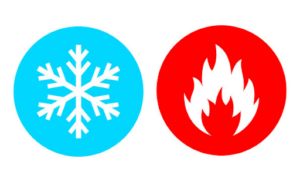
As noted earlier, the logic defined inside a stream only runs once a subscription is established (as demonstrated with the HttpClient example). These are referred to as COLD streams — think of them as inactive or frozen until a consumer arrives to trigger their execution.
In contrast, HOT streams execute their processing regardless of whether any consumer is present. Take the Router.events stream in Angular: navigation events are emitted continuously, even if no subscription has been made to observe them.
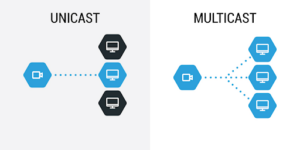
Now, consider a stream that has multiple consumers, i.e., several active subscriptions. If the stream’s logic runs independently for each consumer, we are dealing with a UNICAST stream. RxJS streams are unicast by default, though there are operators designed to change this behavior.
If the processing occurs only once and the outcome is shared among all subscribers, the stream is classified as MULTICAST.
|
UNICAST |
MULTICAST |
|
|
HOT |
hot unicast |
hot multicast – processing is independent from subscription, the result is distributed to all consumers. Example: Subject |
|
COLD |
cold unicast – processing is only executed after the subscription is created, independently for each subscriber. Example: HttpClient.get | cold multicast – processing is only executed after the subscription is created, but the result will be shared among all consumers. Example: HttpClient.get(…).pipe(shareReply(1)) |
hot unicast — this pairing is inherently contradictory, since a stream cannot simultaneously perform independent processing and handle each subscription in isolation.
Tip:
Picture a cold unicast stream that initiates an HTTP request upon subscription. The request is sent, and the server response is pushed into the stream. In Angular, a common approach is to inject the service into a component, expose the stream reference to the template, and subscribe via the asyncPipe. This means the application must wait for the module and component initialization, and then for the view to render and the pipe to be instantiated, before the request is dispatched. If we transform this stream into a hot multicast by applying the lone publishReplay operator, the request would be sent considerably earlier — right when the service instance is created — and the response data would reach the view much sooner.
Exploring Subject
A Subject is a unique variant of Observable (and therefore a stream) that is always of the hot multicast type. You can subscribe to a subject, but it also provides observer methods (next/error/complete) that allow you to imperatively inject new events into the stream. In Angular, EventEmitter (used alongside the @Output decorator in components) serves as an example of a subject.
The RxJS library includes several types of subjects:
Subject
This basic variant holds no historical data about the values in the stream. Any values pushed into the stream prior to a subscription being created will not be delivered to that subscriber.
BehaviorSubject
This subject variant introduces the notion of a current value within the stream. When you create a BehaviorSubject instance, you supply an initial value (which immediately becomes the current value), and each subsequent value pushed into the stream replaces it. Subscribing to such a subject immediately provides the observer with the current value. Additionally, BehaviorSubject allows for synchronous retrieval of the current value via a getter called value.
ReplySubject
This variant bears similarity to BehaviorSubject (a subscriber may receive values pushed before subscription), yet it is not restricted to a single value. It can cache and subsequently deliver multiple previously emitted values to new subscribers. The number of cached values can be controlled through constructor arguments, which let you specify the maximum count of retained values or the duration of the time window for caching events.
new ReplaySubject(3); // buffer up to 3 values for new subscribers
new ReplaySubject(100, 500 /* windowTime */);
AsyncSubject
This variant delivers only the final value pushed into the stream, and this happens solely after the complete event is emitted. AsyncSubject behaves similarly to the last() operator, which also waits for the complete signal and then returns the last value.
Wrapping Up
The insights shared here establish a foundational understanding for using RxJS deliberately. Armed with this knowledge, you can navigate RxJS code with ease and engage in informed discussions about the library — a potential advantage in job interviews.
Naturally, each topic covered here could be expanded in much greater detail, and there are numerous other subjects that have not been touched upon.
Feel free to leave a comment below if you'd like to explore any of these topics further, or if you have suggestions for an article on an entirely different RxJS-related subject.