Grouping Notifications by User with RxJS
The Issues section of the RxJS repository is a goldmine of real-world problems developers encounter. One such challenge stands out:
We are building a custom notification system for a web-based messenger.
1. When a message arrives, the user must see a notification with the sender's details. The notification auto-dismisses after 3 seconds.
2. If user A sends me multiple messages within that 3-second window, only one notification should appear. The 3-second timer starts on the first message from user A, and any subsequent messages from them are ignored until the timer expires, after which we listen again.
3. If another user B sends a message during that same 3-second period, a new notification should appear for B, with its own independent 3-second timer starting from the first message from B.
This is a fun puzzle, isn't it?
Let's briefly clarify what throttling means and how it differs from debouncing. The description of the throttleTime operator provides a clear definition:
throttleTimedelays the values emitted by a source for the specified duration. Like debounceTime, it controls the rate of emissions to an observer. However, unlikedebounceTime,throttleTimeensures that values are emitted at regular intervals, never more frequently than the configured period.
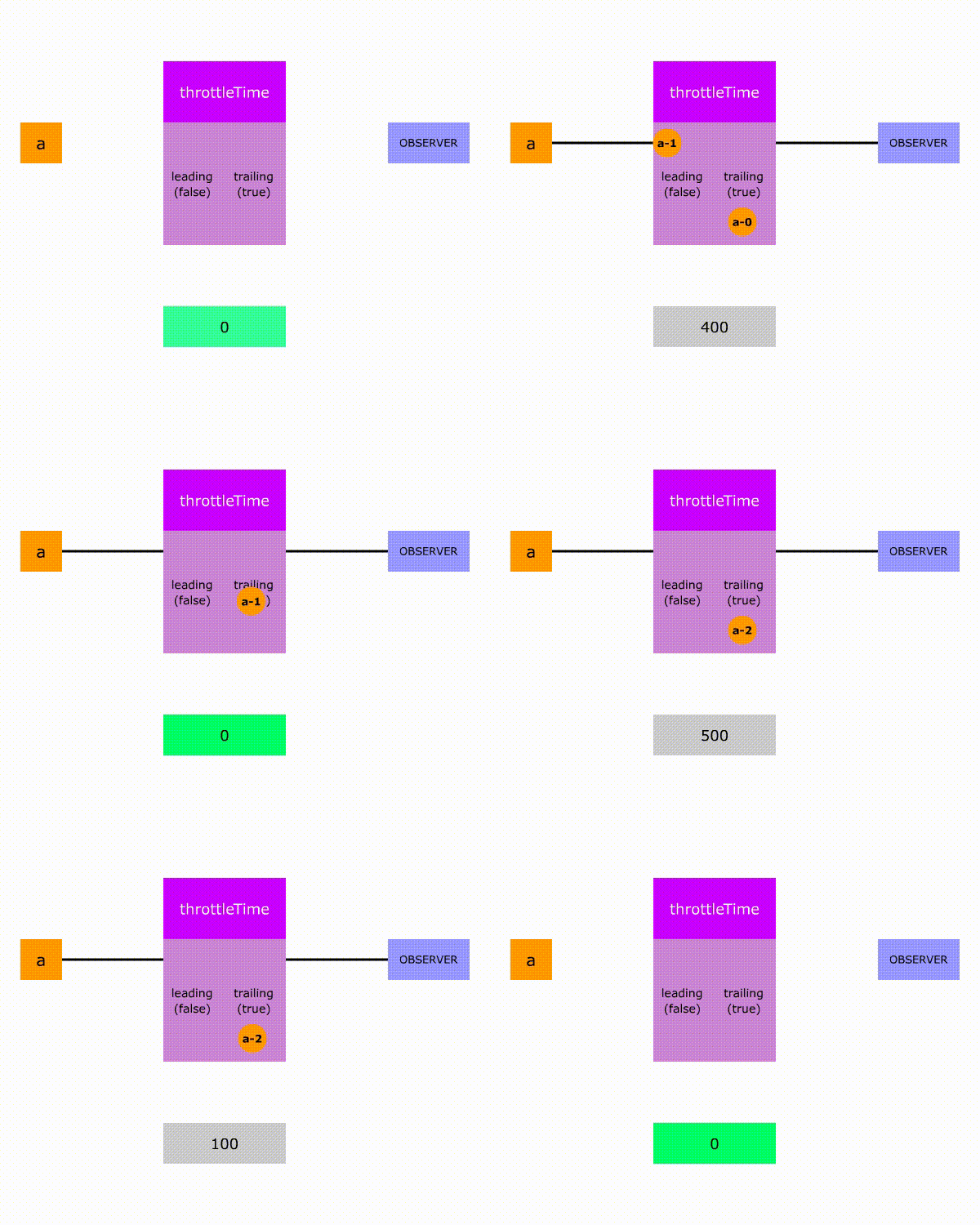
The configuration parameter also allows you to choose between leading (default) or trailing throttling. We'll focus on leading throttling here.
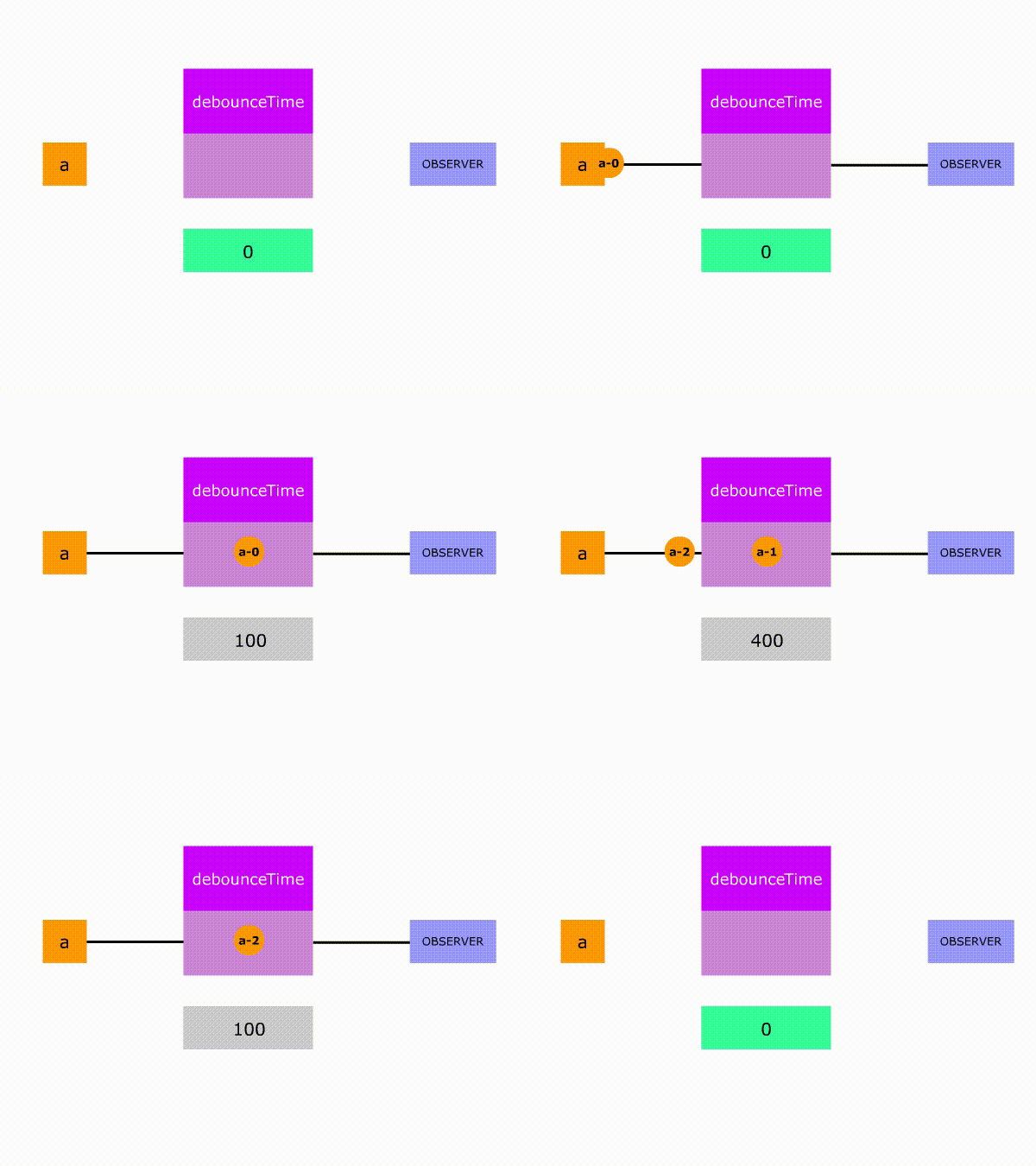
Be careful not to mix up throttling with debouncing. Debouncing operates differently: it waits for a quiet period after the source's last emission, then emits only the final value at the end of that wait. If a new value arrives before the timer finishes, the wait restarts, and the process repeats.
With that foundation, let's dive in.
Without any throttling logic, the straightforward implementation looks like this:
let Rx = window['rxjs'];
let {from, of, asyncScheduler} = Rx;
let {mergeMap, filter, delay} = Rx.operators;
console.clear();

let notifications = [
  { userId: 1, name: 'A1', delay: 100 }, // should be shown
  { userId: 1, name: 'A2', delay: 1500 }, // shouldn't be shown
  { userId: 1, name: 'A3', delay: 2500 }, // shouldn't be shown
  { userId: 1, name: 'A4', delay: 3500 }, // should be shown
  { userId: 2, name: 'B1', delay: 200 }, // should be shown
  { userId: 2, name: 'B2', delay: 300 }, // shouldn't be shown
  { userId: 2, name: 'B3', delay: 3500 }, // should be shown
]
//mock source that emits notifications
let mockSource$ = from(notifications).pipe(
  mergeMap((notif) => {
    return of(notif).pipe(delay(notif.delay));
  }),
)

mockSource$.subscribe(showNotification);

//display notifications widget
let container =  document.querySelector('.container');
function showNotification(notif) {
 const newElem = document.createElement('div');
  newElem.classList.add('item');
  newElem.innerHTML = notif.name;
  container.appendChild(newElem);
  setTimeout(() => {newElem.remove()}, 800); // remove notification element
}
Notifications with noThrottling.js hosted with ❤ by GitHub
You can see it in action here:
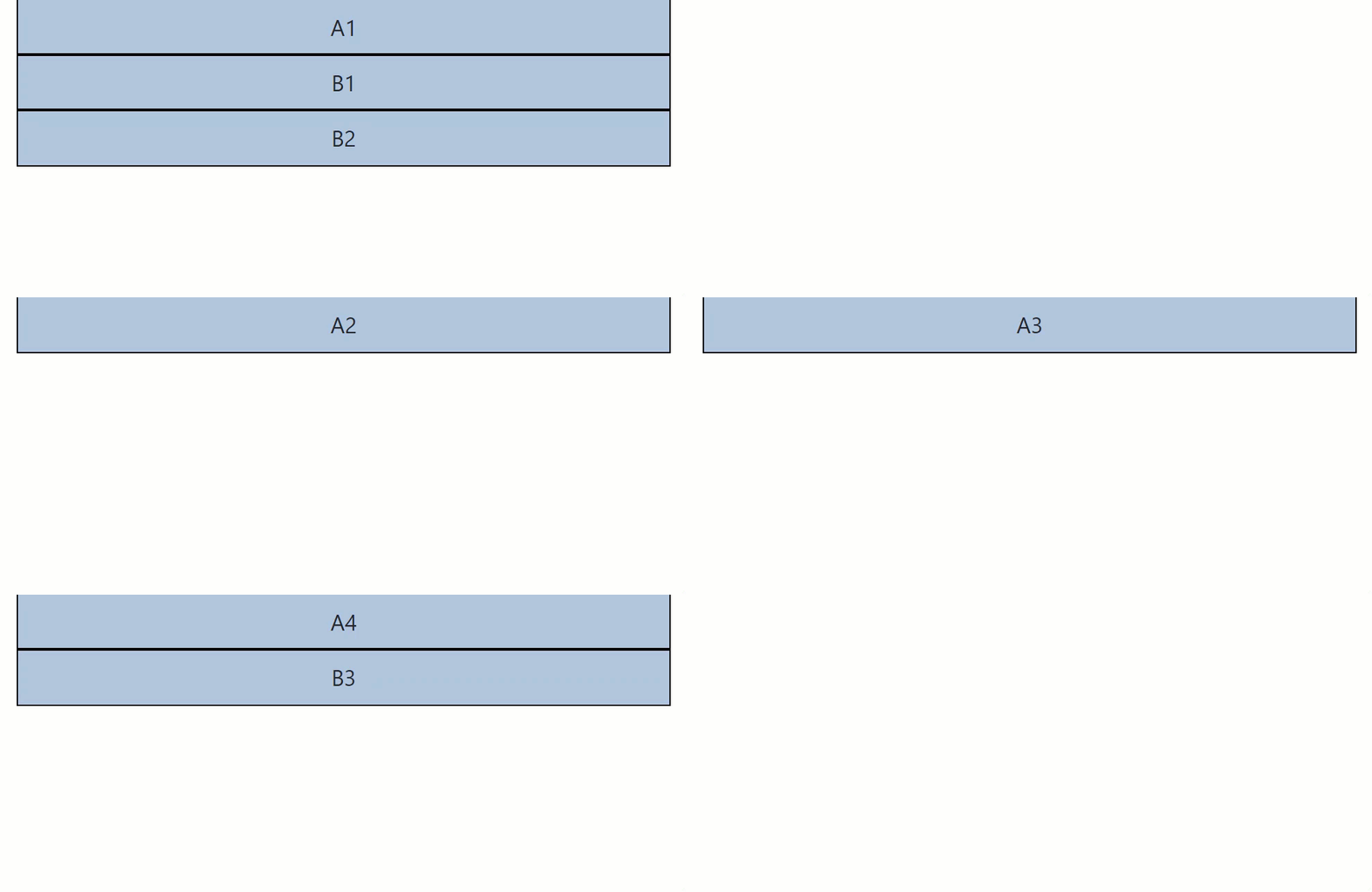
Our goal is to apply throttling individually for each user's notifications. One throttleTime operator alone won't work because it treats all notifications the same way and doesn't differentiate between users.
What if we could split the source observable into multiple observables using a selector function, then apply throttleTime to each one independently? That's exactly where the groupBy operator comes into play.
Groups the items emitted by an Observable according to a specified criterion, and emits these grouped items as
GroupedObservables, one[GroupedObservable](https://rxjs-dev.firebaseapp.com/api/index/class/GroupedObservable)per group.
Here's how it works for our scenario:
- Apply a
keySelectorfunction to each source value.
// Given:
nextSourceValue = { userId: 1, name: ‘A1’, delay: 100 }
keySelector = (notif) => notif.userId

// Result:
let GroupedObservablesIdentifier = keySelector(nextSourceValue)
2. Next, check an internal cache to see if a corresponding Observable already exists for that GroupedObservablesIdentifier. If it doesn't, create and emit a new one. If it does, simply retrieve and emit to subscribers. Because groupBy emits Observables, we use mergeMap to subscribe to them.
The final solution looks like this:
const selector = (x) => x.userId
const throttleTimeout = 3000;
source$
  .pipe(
        groupBy(selector),
        mergeMap((group$) => group$.pipe(throttleTime(throttleTimeout)))
      )
.subscribe(showNotification);
groupBy.js hosted with ❤ by GitHub
And here's a working demo showing it behaves as expected:

Under the Hood of groupBy
We made some educated guesses about how groupBy works internally. Let's verify those assumptions by examining the actual source code.
Like most built-in RxJS operators, groupBy follows a three-part structure (more details here):
- A pure function called "operatorName" — in this instance, groupBy.

2. The operatorName function creates a new Subscriber via its associated __operatorName__’Operator class and subscribes to the source — that's the GroupByOperator class here.
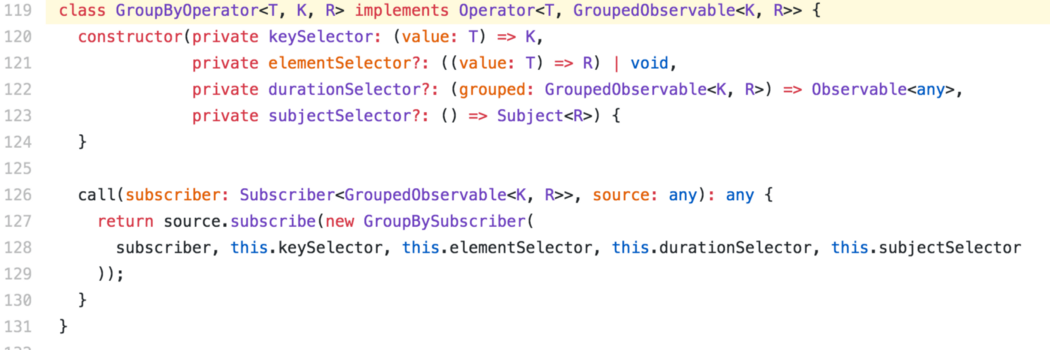
3. This __operatorName__’Operator class typically instantiates a subscriber from the __operatorName__’Subscriber class — for us, that's GroupBySubscriber. This subscriber holds the core logic of the operator. Let's take a closer look.
Our first guess was that the operator computes a GroupedObservablesIdentifier from the source value and the keySelector. Confirmed:
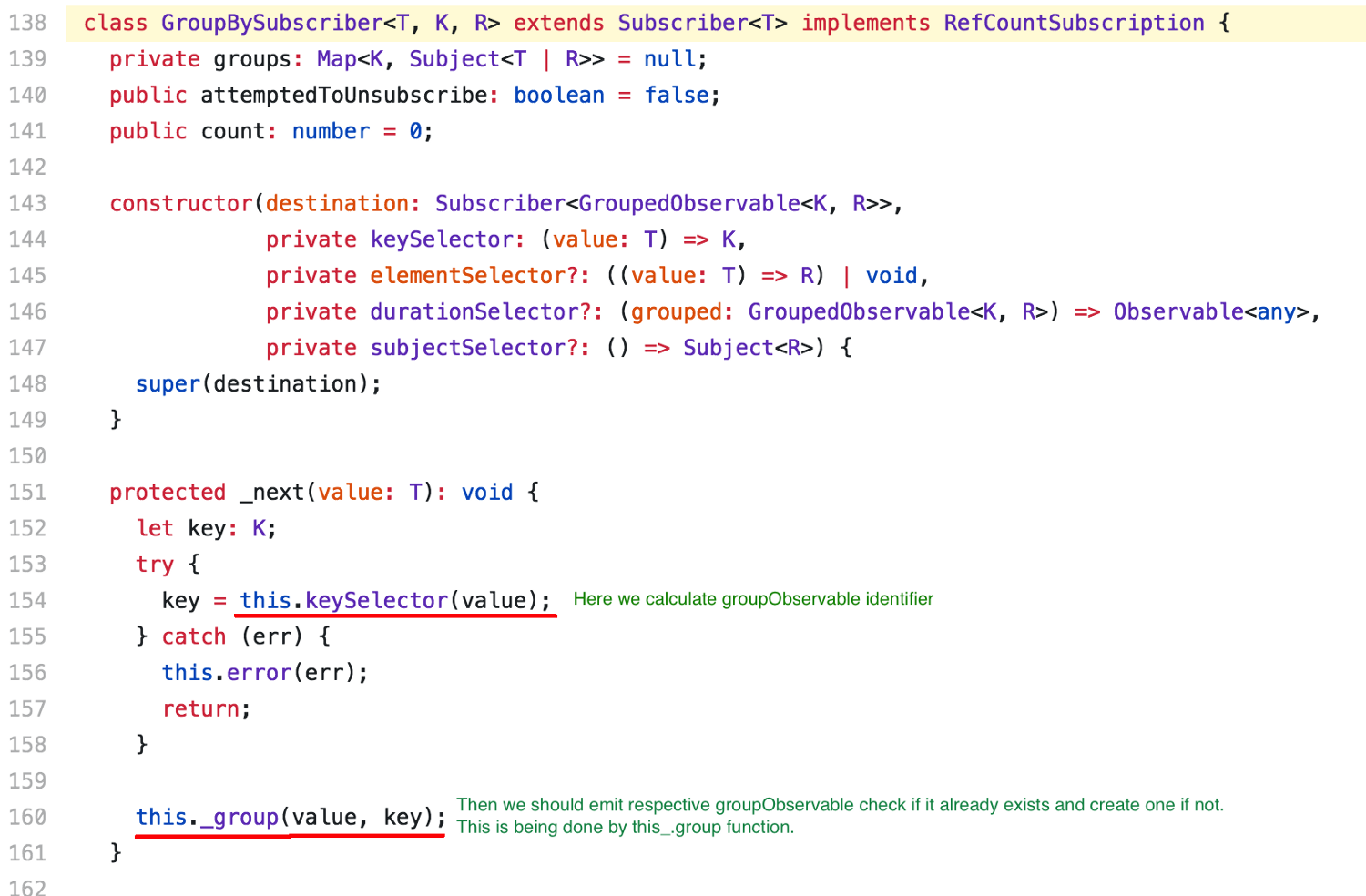
Next, we expected to find a cache where groupObservables are stored and either retrieved or created. Indeed, groupBy uses a Map for this purpose. At line 170, it checks whether a groupObservable already exists for the group:

But what happens when the groupObservable doesn't exist yet?
- A new Subject is created for this group to re-emit source values specific to that group (line 184).
- The group
Subjectis stored in the cache underthis.group(line 185). - A new
GroupObservableis created, subscribed to the group Subject (line 186). - This
GroupObservableis emitted to subscribers — and notably, it is emitted only once (line 187).

If the group Subject is already cached, the source value is emitted through that Subject. In our setup, the corresponding groupObservable forwards it to the mergeMap operator, which then passes it along to the final subscribers.
Key Takeaways
- The
groupByoperator is a versatile tool for splitting a source sequence based on a custom condition. - Check the RxJS issues board for more thought-provoking topics.
- Want to explore RxJS internals further? Consider these authors: Nate Lapinski, Nicholas Jamieson, and my other articles.
- Check out the useful guide: "RxJS switchMap, concatMap, mergeMap, exhaustMap" from angular-academy.com.
- @Michael_Hladky is crafting easy-to-understand RxJS marble diagrams — give them a look and share your thoughts here.
- Found something interesting in the RxJS source? Leave a comment.