
The @Host decorator and a lesser-known injector hierarchy
Angular’s dependency injection system offers several decorators, such as @Optional and @Self, that influence how dependencies are located. Most of them behave in an intuitive way, but the @Host decorator has long been a source of confusion for me. Apart from a brief comment in the source code, the documentation is sparse:
Specifies that an injector should retrieve a dependency from any injector until reaching the host element of the current component.
Given that most tutorials focus on module and component injectors, I assumed the decorator had something to do with the component injector hierarchy. My guess was that placing it in a child component would limit dependency lookup to that component and the parent component’s injector. To test this theory, I built a small demo:
@Component({
    selector: 'my-app',
    template: `<a-comp></a-comp>`,
    providers: [MyAppService]
})
export class AppComponent {}

@Component({selector: 'a-comp', ...})
export class AComponent {
    constructor(@Host() s: MyAppService) {}
}
Unsurprisingly, that resulted in a No provider for MyAppServic error. What’s curious is that removing the @Host decorator allows MyAppService to be resolved from the parent component as expected. So what explains this behavior? I decided to dig deeper and share my findings.
Without giving too much away, the word until in the definition above is the key:
…retrieve a dependency from any injector until reaching the host element
What this means is that the @Host decorator only influences resolution within a component’s template; it never reaches the host element itself. That’s why my demonstration failed — Angular simply does not resolve dependencies from the host parent component when @Host is present.
So it’s clear that @Host isn’t meant for child components looking up providers from their parents. The resolution path it governs is not based on the component injector hierarchy.
Then what hierarchy does it rely on?
As it turns out, Angular has a third category of injectors, separate from modules and components. These are the element injectors, which are instantiated by HTML elements and directives.
Element Injectors
Dependency resolution in Angular happens in three stages: first through element injectors, then up to component injectors, and finally to module injectors. For a thorough walkthrough of the entire pipeline, I suggest reading this detailed article by Alexey Zuev.
Most of you are likely familiar with the latter two stages, which traverse module and component injectors. Module injectors form a hierarchy when modules are lazy-loaded — a topic I covered in my NgConf talk and an accompanying article. Component injectors, also known internally as View Injectors, are established through nested components in templates, and we’ll see where that name comes from shortly.
The element injectors hierarchy, however, is a more obscure aspect of DI, largely because it’s hardly documented at all. Yet, it’s this very hierarchy that constitutes the first stage of the resolution process. These are the injectors consulted when @Host is used. So let’s explore them.
Anatomy of an element injector
As I’ve explained in earlier posts, Angular represents a component internally as a structure called a View or Component View. This is where the term "View Injector" originates. The view’s job is to store references to the DOM nodes that correspond to the HTML elements in a template. Each view consists of various node types, with the element node being the most common, as it points to an actual DOM element. The relationship between a view and the DOM can be visualized like this:

Every view node is generated from a node definition, which contains metadata about the node. This metadata, such as the element type that references DOM elements, is produced by the compiler based on the template and the directives placed on each element. The connection between a node definition and its runtime instance is shown here:
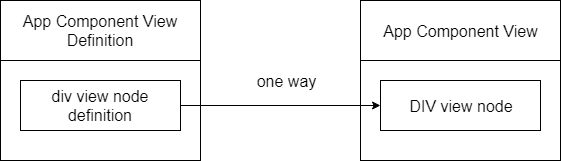
There’s a notable detail about node definitions for the element type.
In Angular, a node definition that describes an HTML element defines its own injector. In other words, an HTML element in a component’s template defines its own element injector. And this injector can populated with providers by applying one or more directives on the corresponding HTML element.
Let’s illustrate this with an example.
Imagine a template with a single div element and two directives, A and B, applied to it:
@Component({
    selector: 'my-app',
    template: `<div a b></div>`
})
export class AppComponent {}

@Directive({ selector: '[a]' })
export class ADirective {}

@Directive({ selector: '[b]' })
export class BDirective {}
Angular’s definition for this template contains the following metadata for the div:
const DivElementNodeDefinition = {
    element: {
        name: 'div',
        publicProviders: {
            ADirective: referenceToADirectiveProviderDefinition,
            BDirective: referenceToBDirectiveProviderDefinition
        }
    }
}
Notice that the node definition includes element.publicProviders, a property that acts as an injector with two entries: ADirective and BDirective. These are the actual instances of the directives applied to the div. Because both come from the same element injector, it’s possible to inject one directive instance into another. Of course, they cannot inject each other mutually, as that would create a circular dependency.
Here’s a diagram of what we’ve covered so far:
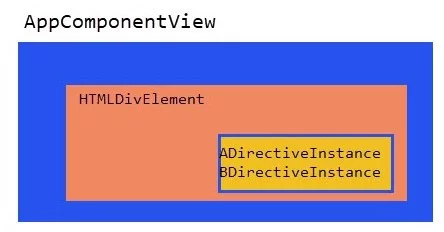
Take note that the host app-comp element sits outside the AppComponentView, since it belongs to a higher-level view.
What happens if the directive A now declares a provider?
@Directive({
    selector: '[a]',
    providers: [ADirService]
})
export class ADirective {}
As you might expect, that provider gets added to the injector of the div element:
const divElementNodeDefinition = {
    element: {
        name: `div`,
        publicProviders: {
            ADirService: referenceToADirServiceProviderDefinition,
            ADirective: referenceToADirectiveProviderDefinition
        }
    }
}
Putting it all together visually:
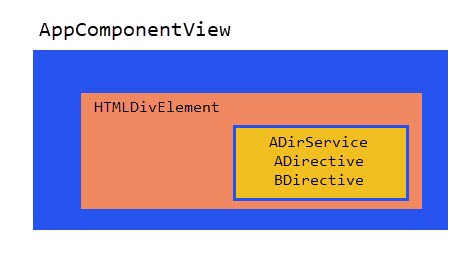
The hierarchy of element injectors
In the previous example, we only had one HTML element. When HTML elements are nested, they create a DOM tree, and in Angular’s DI system, this nesting leads to a hierarchy of element injectors within a single view.
Consider a template with a parent and a child div. We have two directives, A and B. The directive A is on the parent div and declares an ADirService provider. The directive B is on the child div and declares no providers.
Here is the example code:
@Component({
    selector: 'my-app',
    template: `
        <div a>
            <div b></div>
        </div>
    `
})
export class AppComponent {}
@Directive({
    selector: '[a]',
    providers: [ADirService]
})
export class ADirective {}
@Directive({ selector: '[b]' })
export class BDirective {}
The definition Angular generates for this template will include two element nodes, each describing one of the div elements:
const viewDefinitionNodes = [
    {
        // element definition for the parent div
        element: {
            name: `div`,
            publicProviders: {
                ADirective: referenceToADirectiveProviderDefinition,
                ADirService: referenceToADirServiceProviderDefinition,
            }
        }
    },
    {
        // element definition for the child div
        element: {
            name: `div`,
            publicProviders: {
                BDirective: referenceToBDirectiveProviderDefinition
            }
        }
    }
]
As we saw earlier, each div definition has a publicProviders property that serves as its DI container. Since the A directive on the parent div declares ADirService, that provider lands in the parent injector.
This nested HTML arrangement thus forms a chain of element injectors.
What’s more, a child component also introduces an element injector into this same hierarchy. Take the following template:
<div adir>
    <a-comp></a-comp>
</div>
When adir declares a provider, there are two element injectors in play — one on the div and one on the a-comp element. This makes sense, given that a component is essentially an HTML element with a component directive attached.
How element injectors are created
When Angular sets up an element injector for a nested element, it either lets the new injector inherit from the parent’s element injector or simply assigns the parent’s injector directly to the child node definition. Prototype-based inheritance kicks in only when the directives on the child element declare their own providers. In that case, a distinct injector is necessary for the child. If not, there’s no reason to create a new one — dependencies can be resolved directly from the parent injector.
This behavior is illustrated below:
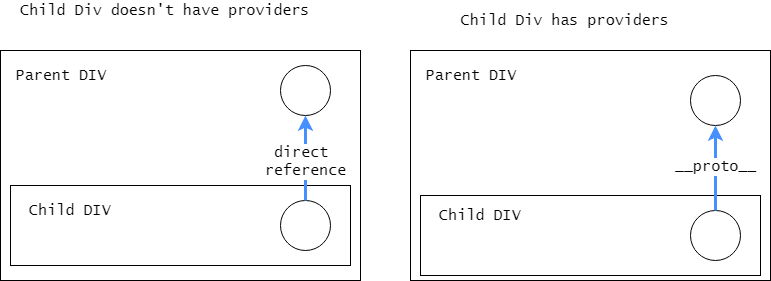
How dependency lookup works
Creating a chain of element injectors within a component view makes the dependency resolution straightforward. Rather than designing a separate traversal algorithm for injectors, Angular takes advantage of JavaScript’s native prototype-based property lookup. This means a dependency can be found in a single operation:
elDef.element.publicProviders[tokenKey]
Because of this JavaScript behavior, a token stored in the publicProviders object is located either directly on a parent element injector or via the prototype chain.
The @Host decorator’s role
Why focus on element injectors when discussing the @Host decorator? The answer is simple: this decorator does nothing more than limit the search to element injectors that exist within a single view. In the standard DI flow, when a token is not found among the element injectors in a view, Angular moves up through parent views and inspects view or component injectors. If that still fails, module injectors are examined. However, when @Host is applied, the resolution halts after the first phase—checking element injectors only within the current component view.
Practical usage
The @Host decorator appears frequently in Angular’s built-in form directives. One common scenario is injecting the parent form into the ngModel directive so the directive can register its control with that form. Here’s a standard template-driven form markup:
<form>
    <input ngModel>
</form>
Internally, the form element matches the selector of the NgForm directive, which provides itself as a ControlContainer:
@Directive({
    selector: 'form',
    providers: [
        {
            provide: ControlContainer,
            useExisting: NgForm
        }
    ]
})
export class NgForm {}
Meanwhile, the ngModel directive pulls in the parent form by requesting the same ControlContainer token and uses it to add the control to the form:
@Directive({
    selector: '[ngModel]',
})
export class NgModel {
    constructor(@Optional() @Host() parent: ControlContainer) {}
    private _setUpControl(): void {
        ...
        this.parent.formDirective.addControl(this);
    }
}
Notice the use of @Host here—it confines the lookup to the current component’s template. That usually gives the expected outcome, but there are situations, particularly with nested forms, where you want to reach a hosting form defined in a parent component. Our colleague Alexey Zuev figured out a workaround for this and documented it in detail. Worth a read.
That same article highlights another intriguing detail. If you modify the earlier example by placing MyAppService in viewProviders rather than providers:
@Component({
    selector: 'my-app',
    template: `<a-comp></a-comp>`,
    viewProviders: [MyAppService]
})
export class AppComponent {}

@Component({selector: 'a-comp', ...})
export class AComponent {
    constructor(@Host() s: MyAppService) {}
}
the service is still found and injected into the child component without issues.
This happens because Angular includes a dedicated check for viewProviders on the parent component when dealing with an @Host-decorated dependency:
// check @Host restriction
if (!result) {
    if (!dep.isHost || this.viewContext.component.isHost ||
        this.viewContext.component.type.reference === tokenReference(dep.token !) ||
        // this line
        this.viewContext.viewProviders.get(tokenReference(dep.token !)) != null) { <------
        result = dep;
    } else {
        result = dep.isOptional ? result = {isValue: true, value: null} : null;
    }
}