
Mastering Retry Logic with RxJS Exponential Backoff
Angular applications frequently communicate with remote servers through Ajax requests. These requests traverse multiple network layers—routers, switches, and other infrastructure—while also depending on the server's current state. For a request to complete successfully, every component along the way must operate flawlessly. In practice, that's not always the case.
To handle intermittent failures, web applications typically implement retry mechanisms that repeat requests until they succeed or hit a predetermined limit. While straightforward retries often suffice, certain scenarios demand a more nuanced approach.
Understanding exponential backoff
Exponential backoff is a strategy where the delay between consecutive retries grows exponentially. This article examines two custom RxJS operators built on this principle, both available in the backoff-rxjs package:
**retryBackoff**, an operator that handles error retries**intervalBackoff**, an operator that emits sequential numbers with growing delays
The exponential function in practice
The term exponential appears frequently in discussions of this technique, but its mathematical meaning deserves clarification. In mathematics, an exponential function follows this structure:
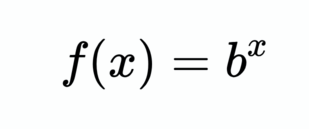
Applied to our context: as each new value is emitted (represented by x above), the subsequent delay becomes longer. In JavaScript, this translates to:
function calculateDelay(iteration, initialInterval) {
 return Math.pow(2, iteration) * initialInterval;
}
Starting from iteration 0 with an initial interval of 1000 milliseconds, the resulting delays are 1000, 2000, 4000, 8000, and so on.
Now that the foundation is laid, let's explore the first use case.
The retryBackoff operator
Retrying failed requests is the most common application of exponential backoff. Google Cloud Storage (GCS) serves as a prime example, as it mandates this strategy for handling failed request retries.
Prior to developing backoff-rxjs, I encountered various implementations of exponential backoff retries scattered across code gists and this stackoverflow answer. None offered the flexibility I required, which motivated me to create retryBackoff.
The retryBackoff operator accepts either a numeric initial delay or a RetryBackoffConfig object for more granular control. RxJS employs marble diagrams to illustrate operator behavior; here's one for retryBackoff:
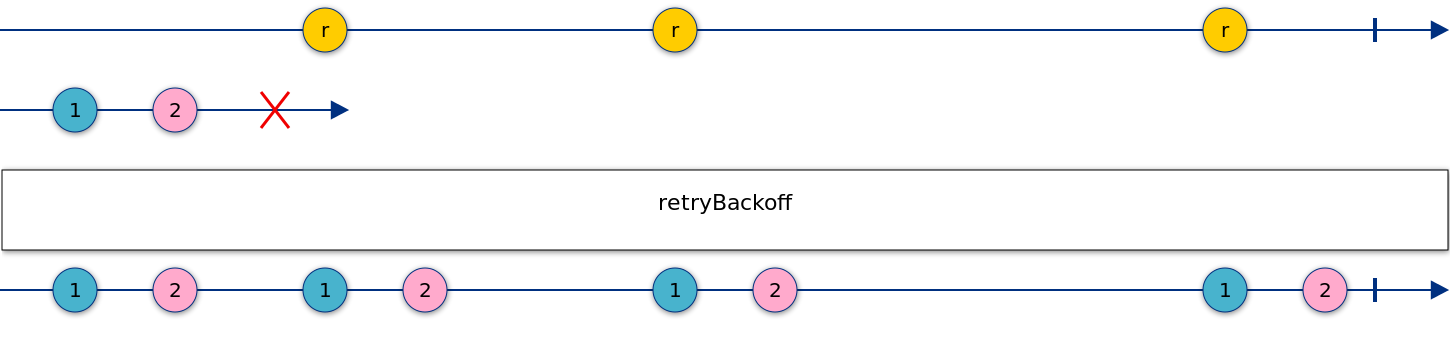
Observe how retryBackoff mirrors the behavior of the standard retry operator, and can be used just as simply:
message$ = of('Call me!').pipe(
    switchMap(() => this.service.callBackend()),
    retryBackoff(1000),
);
Configuring with RetryBackoffConfig
For scenarios requiring additional customization, the retryBackoff operator accepts a RetryBackoffConfig object with this structure:
export interface RetryBackoffConfig {
  // Initial interval. It will eventually go as high as maxInterval.
  initialInterval: number;
  // Maximum number of retry attempts.
  maxRetries?: number;
  // Maximum delay between retries.
  maxInterval?: number;
  // When set to `true` every successful emission will reset the delay and the
  // error count.
  resetOnSuccess?: boolean;
  // Conditional retry.
  shouldRetry?: (error: any) => boolean;
  backoffDelay?: (iteration: number, initialInterval: number) => number;
}
To cap the number of retries at twelve, for instance, the configuration would appear as:
message$ = of('Call me!').pipe(
    switchMap(() => this.service.callBackend()),
    retryBackoff({
        initialInterval: 100,
        maxRetries: 12,
    }),
);
Here's a breakdown of RetryBackoffConfig properties:
initialInterval— serves as both the starting delay and the basis for computing all subsequent delays; it's the sole required propertymaxRetries— sets the upper bound on retry attemptsmaxInterval— caps the maximum delay permitted between retriesresetOnSuccess— determines whether a successful response reverts the retry count and delay back to their initial state (introduced in version 6.5.6)shouldRetry— a callback that inspects the error and decides between continuing retries (returningtrue) or halting them (returningfalse)backoffDelay— a custom function for computing delay durations
Following the introduction of resetOnSuccess in RxJS's retry operator, Valentin Hăloiu contributed an equivalent flag to retryBackoff. This feature has proven quite valuable, and we're weighing whether to make it the default in the next major release.
The remaining two configuration functions—shouldRetry and backoffDelay—warrant closer examination.
Using the shouldRetry function
Certain error types signal that retrying is futile. For instance, encountering a 404 status code strongly suggests the request will never succeed, regardless of how many attempts are made.
// Determine if the error matches our expected type
// http://www.typescriptlang.org/docs/handbook/advanced-types.html#user-defined-type-guards
function isHttpError(error: {}): error is HttpError {
  // This is a type guard for interface
  // if HttpError was a class we would use instanceof check instead
  return (error as HttpError).status !== undefined;
}

message$ = of('Call me!').pipe(
    tap(console.log),
    switchMap(() => this.service.callBackend()),
    retryBackoff({
      initialInterval: INIT_INTERVAL_MS,
      maxInterval: MAX_INTERVAL_MS,
      resetOnSuccess: true,
      shouldRetry: (error) => {
        // error could be anything, including HttpError that
        // we want to handle from sevice.callBackend()
        if (isHttpError(error)) {
          // If this is HttpError and status is not 404
          // then continue retrying
          return error.status !== '404';
        }
        // should retry for the rest of the types of errors.
        return true;
      },
    }),
)
Customizing with backoffDelay
By default, delays double with each retry cycle. Yet there are situations where a gentler progression is preferable. The backoffDelay property allows substituting a custom delay calculation, such as:
backoffDelay: (iteration, initialInterval) => Math.pow(**1.5**, iteration) * initialInterval ,
or with an even more gradual increase:
backoffDelay: (iteration, initialInterval) => Math.pow(**1.1**, iteration) * initialInterval

The graph illustrates: blue represents y = 2^x, red shows y = 1.5^x, and green depicts y = 1.1^x
Live demonstration
A complete working example is available on StackBlitz.
The intervalBackoff operator
Consider what happens to your application during periods of user inactivity. Are those background tabs still actively polling your servers, consuming valuable system resources?
The second use case for exponential backoff involves progressively reducing request frequency by exponentially increasing the delay between calls. This technique proves particularly useful when the app detects prolonged user inactivity—such as an absence of mouse movement.
Examine this code sample:
import {fromEvent} from 'rxjs';
import {sampleTime, startWith, switchMap} from 'rxjs/operators';
import {intervalBackoff} from 'backoff-rxjs';
import {service} from './service';

const newData$ = fromEvent(document, 'mousemove').pipe(

    // There could be many mousemoves, we'd want to sample only
    // with certain frequency
    sampleTime(1000),

    // Start immediately
    startWith(null),

    // Resetting exponential interval operator
    switchMap(() => intervalBackoff(1000)),
    switchMap(() => service.getData()),
  );
Let's dissect what happens in this snippet:
- The mousemove event on the
documentserves as our user activity indicator - Mouse movement generates events at high frequency, so
sampleTimefilters them appropriately sampleTimewaits for the specified duration before emitting its first value. When an immediate initial call is required (which is typically the case),startWithfacilitates that behavior- At this point we reach
intervalBackoff, a pipeable operator similar tointerval—but unlikeinterval, it doubles the delay after each emission rather than maintaining a constant interval - Upon each
intervalBackoffemission, the service call executes
Keep in mind that each detected mousemove event resets the intervalBackoff operator.
Here's the marble diagram representing intervalBackoff:

Like retryBackoff, the intervalBackoff operator supports configuration beyond just the initial delay.
export interface IntervalBackoffConfig {
  initialInterval: number;
  maxInterval?: number;
  backoffDelay?: (iteration: number, initialInterval: number) => number;
}
Live demonstration
See intervalBackoff in action with this example app:
Key takeaways
Exponential backoff offers a powerful strategy with two primary use cases: interval backoff for spacing out service calls and retry backoff for handling request failures. The backoff-rxjs package delivers pipeable operators for both scenarios, constructed purely from combinations of existing RxJS operators.
Project source: https://github.com/alex-okrushko/backoff-rxjs
Gratitude goes to Ben Lesh, Max Koretskiy, and Nicholas Jamieson for their thorough review of the operators and article, along with their invaluable feedback.
Additional appreciation to Valentin Hăloiu for implementing the resetOnSuccess configuration option.