Where Should AJAX State Live in NgRx?
Do these states belong in the NgRx Store in the first place?
TL; DR: It varies… However, we’ll examine the trade-offs of several strategies. If you do decide to include loading/error in the state, make sure they are grouped under a single property.

Does dealing with multiple connected properties that describe the same AJAX call ✨spark joy✨? If not, it's time to discard them and opt for a single property instead.
Recently, Michael Hladky initiated a thought-provoking conversation on Twitter.
After some time I tried nx from @nrwl_io again.
An amazing tool that gets better and better! ? And I ❤️the console!Regarding #ngrx commands:
I consider storing errors in the store as bad practice. But here it is by default… ?Any good reason @victorsavkin @jeffbcross?
— Michael Rx Hladky (@Michael_Hladky) February 26, 2019
Error is one of the AJAX call states frequently placed in the NgRx Store. Others include Loading and sometimes even Success/Loaded.
interface ResultState {
  result: Result,
  error: string|null,
  isLoading: boolean,
  isLoaded: boolean,
}
Why are these states stored? The reasoning is often driven by UX considerations. For instance, the user should see some form of progress indicator while requests are in flight, or an error message if a request fails.
Let's examine each one individually.
Handling the Error State
While writing this piece, Brandon Roberts had already published a comprehensive article addressing error state in response to that tweet:
Handling Error States with NgRx
In that article, he thoroughly examined how error state can be managed. I'll summarize his points here and offer some additional observations of my own.
Dealing with Errors in Effects
Does your component need awareness of the error?
That’s my initial question. Does the component contain logic that relies on the error outcome? It may need to present the error message directly or execute conditional logic that hides or disables parts of the DOM in its presence.
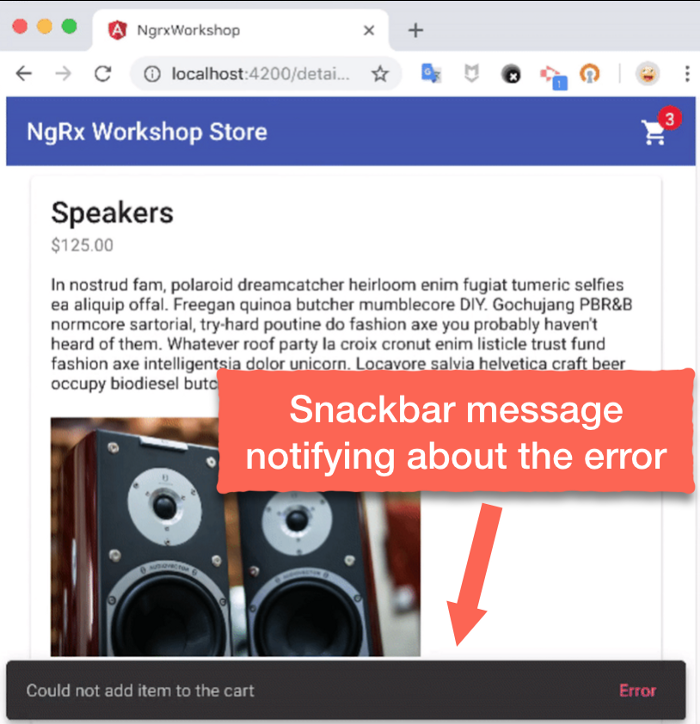
When the only consumer of the error is a snackbar or similar pop-up notification, the Effects layer can handle it.
// Dispatch is set to false, so this effect will not try to dispatch
// the result of this effect.
@Effect({ dispatch: false })
handleFetchError: Observable<unknown> = this.actions$.pipe(
  ofType(actions.FETCH_PRODUCTS_ERROR),
  map(() => {
    // Setting the timeout, so that angular would re-run change detection.
    setTimeout(
      () =>
        this.snackBar.open('Error fetching products', 'Error', {
          duration: 2500,
        }),
      0
    );
  })
);
The implementation appears as follows:
Handling Errors in Components
When components require information about errors, one approach is to manage them directly within the component, without ever adding error to the Store state. This approach leverages ****Actions**** from the @ngrx/effects package, which can be injected into a component to listen for the error action.
@Component({
  selector: 'app-movies-page',
  template: `
    <h1>Movies Page</h1>
    <div *ngIf="error$ | async as error">
      {{ error }}
    </div>
    <button (click)="reload()">Refresh List</button>
  `
})
export class MoviesPageComponent {
  error$: BehaviorSubject<string>;

  constructor(
    private store: Store<fromRoot.State>,
    actions$: Actions,
  ) {
    this.error$ = new BehaviorSubject<string>('');
    actions$.pipe(
      ofType('[Movies/API] Load Movies Failure'),
    ).subscribe(this.error$);

   this.store.dispatch({ type: '[Movies Page] Load Movies' });
  }

  reload() {
    this.error.next('');
    this.store.dispatch({ type: '[Movies Page] Load Movies' });
  }
}
The benefit of this pattern is that the error becomes part of the component's local state, so it gets automatically cleaned up when the component is destroyed.
It also helps in scenarios involving state hydration/rehydration from localStorage via meta-reducers; we wouldn’t be saving or restoring state that includes Error. That makes sense — we don’t want to display an error to a user who just landed on the page. Naturally, safeguards can be implemented to avoid that (like filtering the parts of state being synced).
However, the drawbacks number is significantly higher. If two or more components depend on the same Load Movies response, each would need to re-implement the same error-handling logic. This gets more complicated when one of those components dispatches a refresh action — it will clear only its own error, leaving the others to keep showing a stale message.
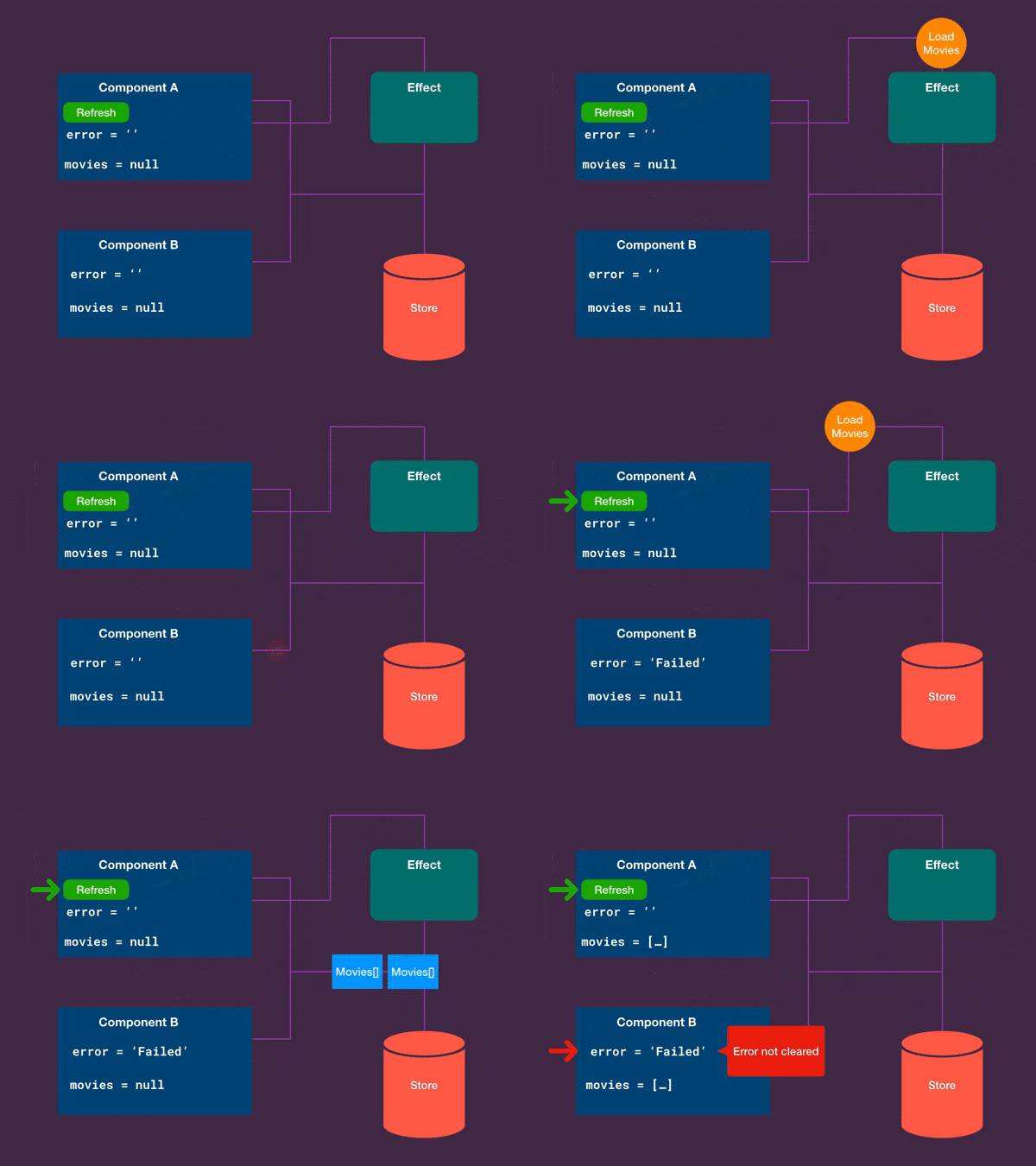
The error in Component B lingers on.
Brandon also calls out other disadvantages, like reintroducing side-effect code into components and making test setups more involved.
So, whether to keep the error local or in the NgRx Store depends on your situation, though the latter tends to be the safer option.
Handling the Loading State
Spinners and loading indicators are often tied to isLoading or pending flags in NgRx. Some argue that this shouldn't be a standalone property since it is a derived state — if the data is missing, the assumption might be that it's loading.
const isLoading = createSelector(
    getProductsState,
    state => !!state.products,
);
However, real-world UX requirements often change the picture.
Loading alongside cached results
Take a situation where we have a cached product list to show while an AJAX request checks for updates. Here, merely having data in the store isn't sufficient; an explicit isLoading flag is required.
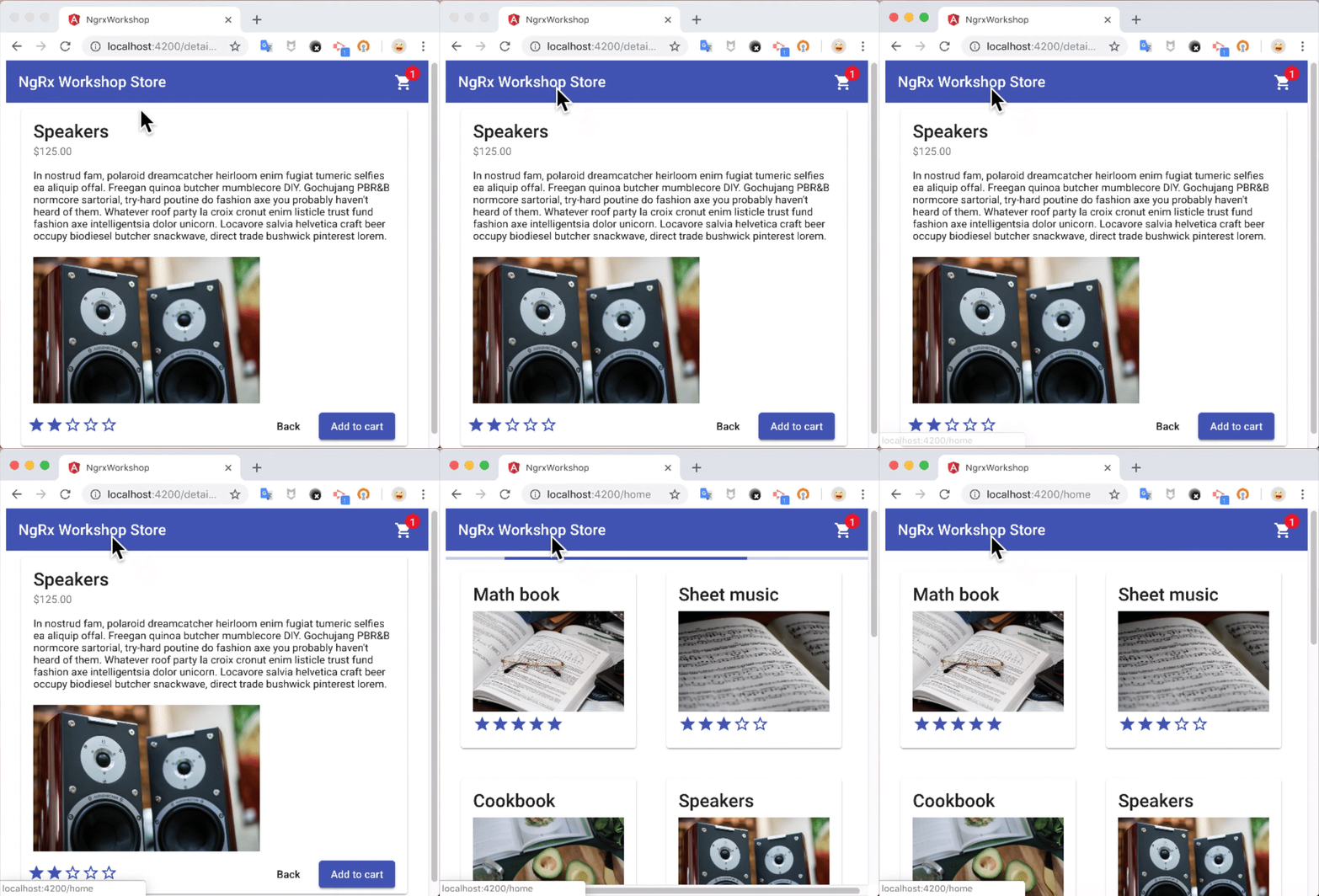
A faint indeterminate progress bar signals to the user that data could still change.
Loading paginated responses
Another scenario is when data arrives in "paginated" chunks. Once the first batch arrives, content appears immediately. But, we'd still want to show a loading indicator until all chunks finish loading.
Handling the Success/Loaded State
interface ResultState {
  result: Result,
  error: string|null,
  isLoading: boolean,
  isLoaded: boolean,
}
The success state is trickier. I haven't personally needed to store it, but I can imagine one scenario that justifies it.
Frequently, the data I work with is some kind of collection. The result is usually an array — Result[] . Because of that, even an empty result lets me distinguish between initial/loading state (result is null) and loaded/success state (result is [] — empty array).
When the result is a primitive, telling initial from loaded states is still straightforward: setting the initial state to null works fine for booleans, numbers, or strings.
Things become more complicated when the result is an object — that's where a dedicated success state might come in handy.
An alternative would be typing the result as result: Result|null|{} where an empty object might indicate an empty response. But, the team needs to agree on what each value signifies.
Consolidated State Design
Considering all the extra properties that accompany a single AJAX call, is there a more elegant solution?
During our team discussions, we concluded that combining all these aspects into a single state property works well, and we can still retrieve the error message when necessary. This also helps eliminate impossible states like { isLoading: true, error: 'Failed', isLoaded: true }.
export const enum LoadingState {
    INIT = 'INIT',
    LOADING = 'LOADING',
    LOADED = 'LOADED',
}
export interface ErrorState {
    errorMsg: string;
}

export type CallState = LoadingState | ErrorState;

// Helper function to extract error, if there is one.
export function getError(callState: CallState): string | null {
    if ((callState as ErrorState).errorMsg !== undefined) {
        return (callState as ErrorState).errorMsg;
    }
    return null;
}
With this unified interface, the ResultState looks like this:
interface ResultState {
  result: Result,
  callState: CallState,
}
The reducer becomes cleaner and less error-prone.
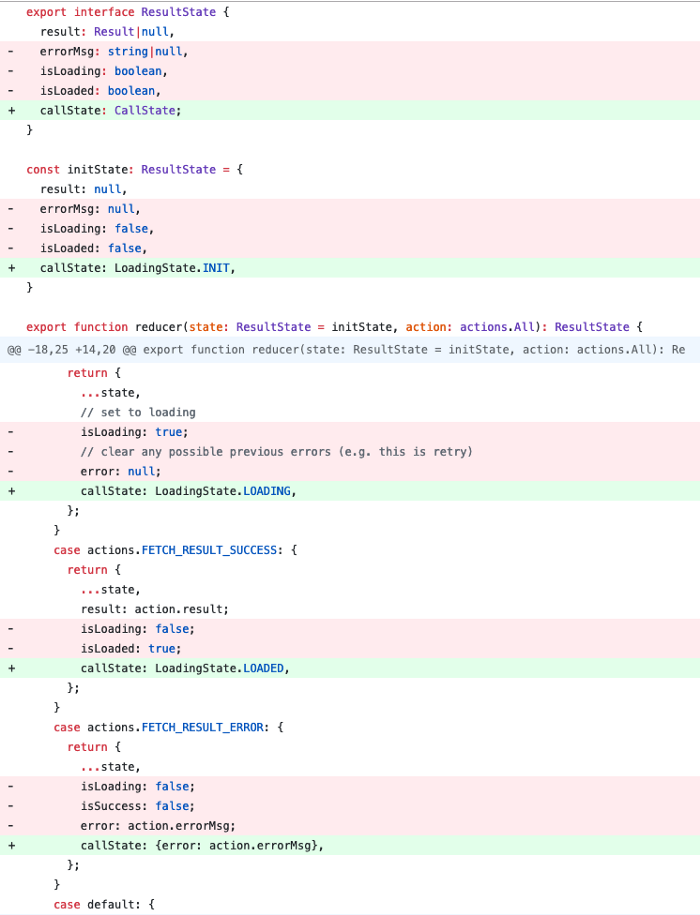
A side-by-side comparison shows the removed multi-property lines versus the added single-property approach in the reducer.
The helper function getError can be reused within selectors.
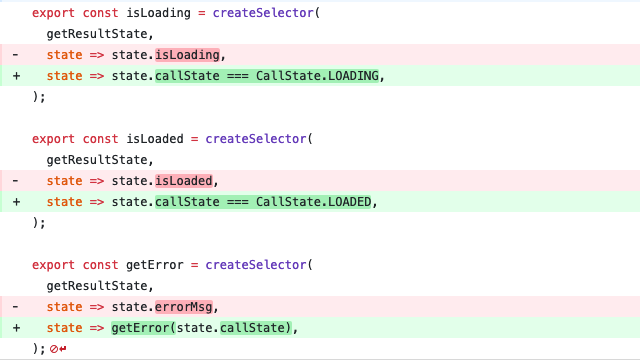
The selector comparison shows the removed multi-property lines versus the single-property addition.
As you can see, selectors remain nearly unchanged, while the reducer is significantly streamlined.
Wrapping Up
While you can often get away with leaving error and loading states out of the Store, if your UX demands are more complex, consider grouping them under a single property.