From Choosing Models to Choosing Harnesses
Selecting the right LLM only solves half of the puzzle. The identical Opus 4.7 model produces remarkably different results depending on whether it runs inside a JetBrains chat pane, in Claude Code in a terminal, or embedded in Cursor's agent mode. The harness dictates how the model perceives your project, how it modifies files, which tools it can invoke, how thoroughly it validates its own output, and whether the experience feels like smart autocomplete, a helpful copilot, or a true autonomous agent. For substantial Angular projects, this dimension carries at least as much weight as the model itself.
This article addresses that second half: the applications, IDE integrations, and agentic coding platforms I've experimented with over the past several months. The journey moves from classic Copilot-style completion to IDE-based agents and today's all-in-one super apps, concluding with where Codex, the Claude Desktop app, Cursor, Antigravity, VS Code, and WebStorm currently fit in my everyday Angular routine. Along the way, I'll examine the design philosophy behind each tool, since that often reveals more about the daily experience than a simple list of features.
Not a Benchmark
Before diving in, a necessary disclaimer: this represents my subjective experience from hands-on Angular work — real projects, training sessions, peer reviews, and large-scale refactorings — not a controlled scientific evaluation. Your editor preferences, operating system, budget constraints, organizational policies, and comfort with autonomous agents may lead you to entirely different conclusions. Treat this as a practical field journal from my present-day toolchain.
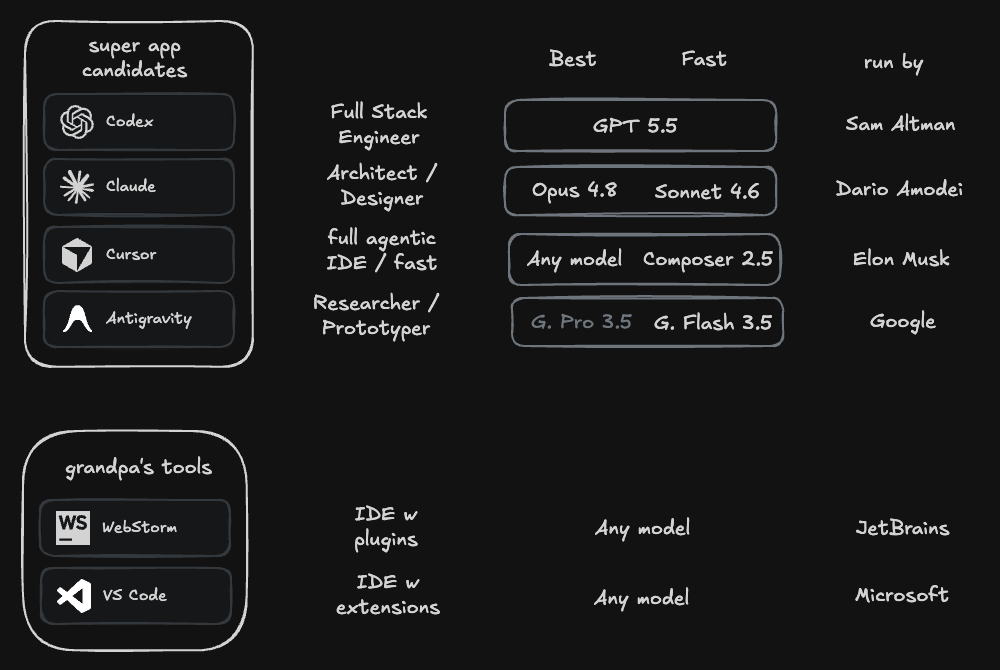
That diagram offers a simplified view of how I rank these tools across capabilities and personal liking — a visual reference, not an objective measurement.
Quick Summary: What I Use Today
If you're short on time: my primary tools for Angular development are currently Codex (powered by GPT 5.5) and the Claude Desktop app (running Opus 4.7 — now updated to 4.8, as discussed later), used almost interchangeably. Codex boasts a more refined application interface, while the Claude Desktop app unlocks the Opus models I consider most reliable for architectural decisions, design discussions, and comprehensive refactorings. Cursor with Composer 2.5 rounds out the top three, particularly when speed, budgeting, IDE integration, or cloud-based agents become priorities. Antigravity shows promise but, in my assessment, hasn't yet reached the same maturity. And whenever I need precise, manual code craftsmanship, I still gladly return to WebStorm.
These choices all presuppose a disciplined human-supervision approach: I examine every single change, and any code produced by AI must pass the test of looking like it came from my own keyboard.
The Path I Took
To make sense of my current choices, a bit of history helps. Let me walk through the evolution, starting with conventional IDE integrations and progressing to the newer agentic applications.
Starting with WebStorm + GitHub Copilot
For over ten years, PhpStorm (dating back to my WordPress days) and subsequently WebStorm served as my primary IDEs for web development. When GitHub Copilot first appeared, testing it inside WebStorm seemed like the natural move. It became one of my earliest AI coding tools and significantly shaped my perspective on AI-assisted development.
A quick check of my GitHub Billing History shows I've been a Copilot subscriber since 2023-10-27 — that's exactly 31 months of continuous use. Quite a journey. For roughly the first 25 months of that period, I relied on GitHub Copilot within WebStorm (and occasionally VS Code), which proved an excellent entry point into AI assistance. The experience felt like an organic extension of the IDE's built-in completion, smoothly handling small code fragments and repetitive patterns.
Yet limitations emerged. Copilot frequently stumbled with broader code contexts, sophisticated Angular structures, and refactors spanning multiple files. More notably, it tended to lag behind current Angular APIs by a version or two: it persistently generated NgModule-based patterns long after standalone components became standard practice, favored *ngIf and *ngFor over the newer control flow syntax, and rarely adopted signals, input(), or output() without explicit prompting. It acted more like an advanced typing aid than a collaborator for driving substantial development workflows. And occasionally it became genuinely frustrating, offering irrelevant or faulty suggestions that required manual rejection.
Throughout 2025, I also spent considerable time exploring Cursor. Despite that, I never warmed to the VS Code-based interface and preferred staying within my JetBrains environment.
WebStorm + AI Assistant + Junie + Opus 4.5
Fast forward to November 2025, when Opus 4.5 hit the scene. Excitement spread across social media, and friends encouraged me to give the new model a shot. Following the path of least resistance once more, I began using it through AI Assistant and Junie within WebStorm.
For background: JetBrains AI Assistant represents the AI functionality embedded directly in JetBrains IDEs such as WebStorm. It delivers the standard set of IDE-integrated AI features: conversation, code clarification, generation, documentation assistance, autocompletion, and focused edits within your project context. The same AI Assistant interface is evolving into a central hub for various agents and providers, so depending on your configuration, tools like Junie, Claude, Codex, or even Cursor can be accessed from within the JetBrains ecosystem.
Junie serves as JetBrains' own more autonomous coding agent. Rather than merely responding to queries or generating individual snippets, it can accept a task, formulate an action plan, edit several files, execute commands or tests with your permission, and continue iterating throughout the IDE.
However, since I predominantly used Claude Opus 4.6, I felt compelled to explore various harnesses designed for that model. This led me to adopt a new workflow combining VS Code with the Claude Code extension for my agentic coding needs.
VS Code + Claude Code + Opus 4.6
A few weeks following the public release of Opus 4.6 — around late February, I believe — I began a more deliberate search for the optimal harness for that model. Previously, my focus was almost entirely on the model itself: its quality, speed, and utility for practical Angular development. But as I compared tools more closely, it became increasingly apparent that the surrounding application plays a crucial role.
VS Code was the logical choice for this experimentation. My affection for it never matched my JetBrains tools, but I knew it well from conducting Angular Architects workshops, where a majority of attendees use it exclusively. Paired with the Claude Code extension inside VS Code, I encountered my first configuration where Opus genuinely felt more capable because of the harness wrapping it. Suddenly, Opus could scan an entire Angular feature directory, trace a signal from computed() back to its origin, and propose multi-file modifications that honored my standalone-component conventions, my route configuration, and even my providedIn: 'root' services without requiring me to manually feed it every piece of context.
That experience marked a turning point: I realized this was no longer solely about the LLM. And that realization came before I even experimented with agentic coding applications — or what I've come to call super apps — for the first time.
Beyond the IDE: Agentic Super Apps
Roughly a month into using VS Code for agentic development, I felt the pull to explore what else was out there.
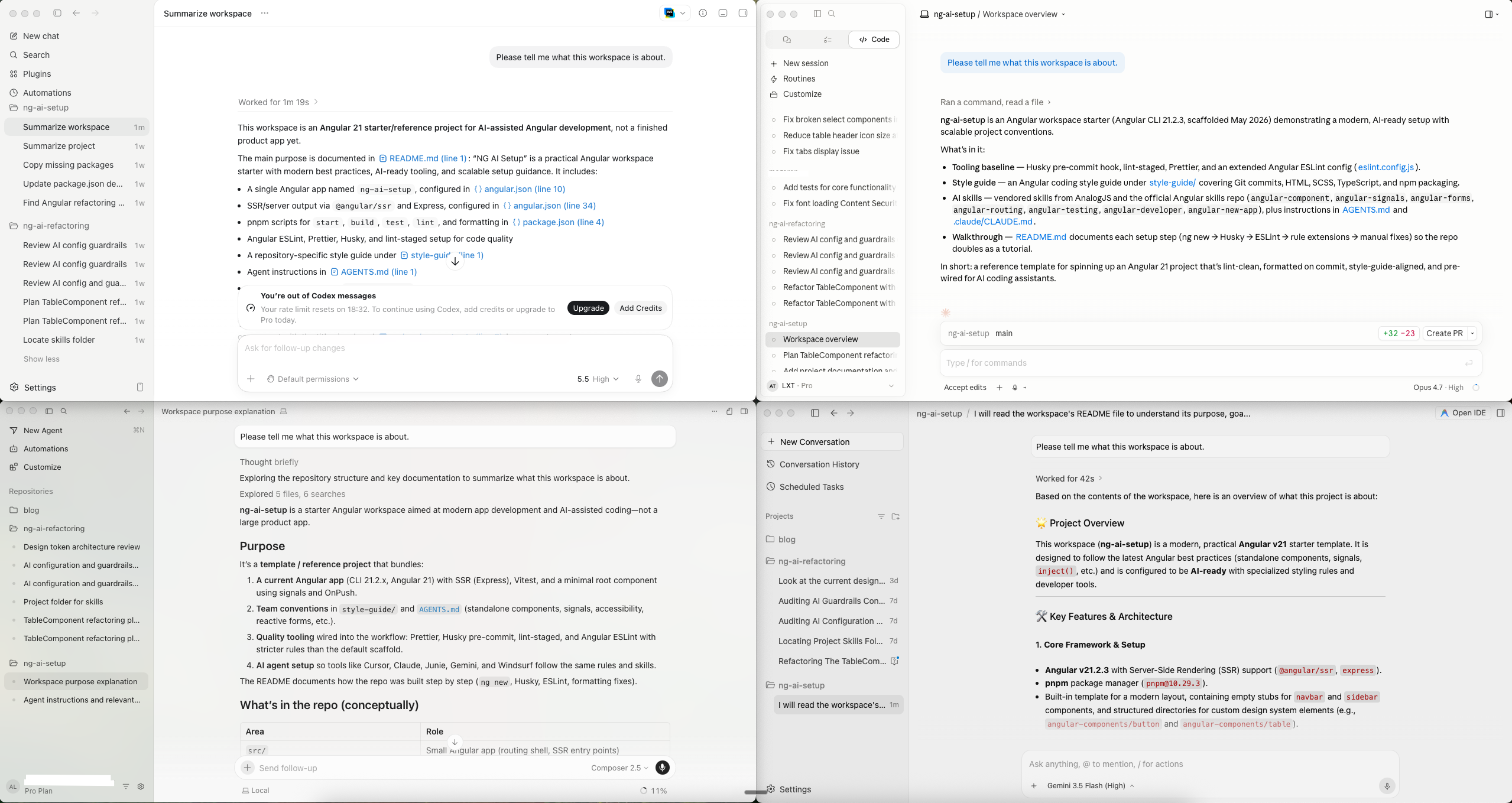
The screenshot above shows the four primary applications I rely on for agentic work at the moment: the Claude Desktop app, Codex, Cursor, and Antigravity. Honestly, at first glance they appear nearly interchangeable.
I want to be explicit about my approach: I maintain a strict human-in-the-loop process. This stems from my deep commitment to clean, high-quality code. While some argue that codebase quality will become irrelevant, I firmly disagree, though I acknowledge it's a valid challenge to my perspective.
On the surface, these tools seem like variations on a single theme. However, the more I work with them, the clearer it becomes that each is pursuing a distinct strategy. The Claude Desktop app is rooted in a terminal-first, model-centric philosophy: provide a powerful model with extensive tooling and let it operate. Codex is more about the application and verification: maintaining a calm interface, leveraging the local environment whenever feasible, and demanding the agent prove its output. Cursor prioritizes the IDE and cloud integration: keeping the editor central while enabling agents to run remotely and sync results back into the team's workflow.
The Claude Desktop App with Opus 4.7
No matter which philosophy a tool embraces, my own principle remains constant: I scrutinize every change, and I insist that every line of code appear as if I had written it myself. Given that the Claude Desktop app and the VS Code extension both drive the same underlying Claude Code agent harness, the app felt instantly familiar. The Claude CLI is the core; the desktop app and various IDE extensions are simply different interfaces to that same engine.
To be candid, I've never been a command-line enthusiast (nor a Linux devotee – I prefer macOS, though I'm an Android fan), so I genuinely appreciate a polished desktop interface. This is purely a matter of taste, I realize, but there it is.
Consequently, the first of these super apps I integrated into my daily routine was the Claude Desktop app. Interestingly, it includes a Co-working tab, intended for knowledge workers, while the Code tab is geared toward developers.
Claude Code's enduring advantage remains its terminal heritage. It met developers in an environment they already occupy, which likely explains its rapid adoption. The trade-off, however, is that this origin shapes the entire experience: rich imagery, polished UI, visual checks, and desktop finesse will perpetually feel secondary when the primary workflow is a CLI. I've also observed that Claude Code is liberal with token usage to enhance its perceived capability, such as deploying subagents or broad parallel research. This is beneficial for complex challenges, but it demands vigilance regarding cost and focus.
The newer workflow-oriented features amplify this tendency. Claude can decompose a large task into numerous smaller agent executions, explore files concurrently, and synthesize the findings into a coherent plan or implementation. This is genuinely powerful for extensive refactors or thorough code reviews, where a single agent can specialize. However, it also raises the risk profile: more subagents translate to higher token consumption, increased unpredictability, and more opportunities for minor misunderstandings to snowball. I reserve this approach for difficult, high-stakes problems, not for routine modifications.
For Angular development specifically, Claude Code with Opus 4.7 is the harness I trust most for full-stack tasks: introducing a new feature module, migrating legacy code to standalone components and signals, or refactoring a complex RxJS pipeline into a more elegant composition of signals and toSignal(). It also manages the mundane yet critical details effectively, such as keeping app.config.ts, route definitions, and lazy-loaded paths synchronized after a rename.
The Codex App with GPT 5.5
Remember how the Claude app separates Code and Co-working? That's a significant contrast with Codex from OpenAI, which merges both coding and co-working functionalities into a single, unified application.
Beginning with Codex in late April felt natural since its interface closely mirrored the Claude Desktop app. Yet, from the outset, I noticed fewer glitches and a sense that the Codex app, and consequently the GPT harness, functioned reliably most of the time.
My appreciation for Codex stems from its lack of theatrics. It offers less visual distraction, fewer flashy animations, and more emphasis on the actual work: the diff, the terminal output, and validation. That might sound mundane, but when dealing with production code, mundane is often precisely what I need. I particularly value its focus on utilizing the machine and environment I've already configured, rather than assuming every project can be effortlessly run in a pristine cloud sandbox. For an Angular application with its local configuration, browser checks, environment variables, internal packages, and perhaps idiosyncratic test setups, this is crucial.
There's another practical feature I find compelling: Codex can now be controlled from your smartphone while it continues to operate within your desktop environment. This allows me to initiate or monitor a task from the couch, the train, or elsewhere, without relocating the project to a cloud runner. I still meticulously review the diff later, but for keeping an agent productive, this is incredibly convenient.
My personal assessment is that the Codex app is superior to the Claude Desktop app as a tool. However, the models powering the Claude app—Opus 4.5, 4.6, and 4.7—remain superior to GPT 5.5 in numerous scenarios, particularly in the domains I discussed previously, like architecture and design.
For everyday Angular tasks, the performance difference is often less pronounced than model comparisons imply. Codex with GPT 5.5 excels at the work that consumes most of my week: crafting or updating standalone components, generating Vitest or Jasmine specs that properly utilize TestBed, scaffolding signal-based stores, and producing functional Signal Forms code. I find myself gravitating back to the Claude Desktop app for the more challenging, design-intensive work, such as defining a new feature's component hierarchy or decoupling a legacy service.
Cursor with Composer 2.5
After committing to a workshop on agentic coding, I realized I needed hands-on experience with all the major options, not just my favorites. Naturally, a leading candidate for the best super app is Cursor.
Cursor, which began as a VS Code fork, was an early pioneer in focusing on agentic workflows, and many developers adopted these methods long before I did. In the past, say early 2025, I felt its code generation didn't meet my standards.
That was then. Cursor now operates in a different league, exemplified by its recent agreement with SpaceXAI, which grants SpaceXAI an option to acquire Cursor for $60 billion or alternatively pay $10 billion for a partnership. This is no longer just an IDE niche story.
Why are Cursor and SpaceXAI such a natural fit? SpaceXAI brings immense computational resources via Colossus 2, while Cursor offers strong product adoption signals and rich developer workflow telemetry. Together, they are poised to lead, or perhaps already lead, the frontier of agentic coding.
Incidentally, Cursor and Composer 2.5 are exceptionally fast and can serve as a cost-effective substitute if you're paying for tokens directly rather than relying on subsidized subscription models from OpenAI or Anthropic. I'll delve deeper into the cost implications in the next post.
The aspect I previously undervalued is Cursor's cloud strategy. I primarily viewed Cursor as an AI-enhanced VS Code clone. While that remains true, the more exciting dimension involves enabling agents to operate remotely and deliver results. If your team wants to trigger tasks from Slack, run multiple agents concurrently, or provide non-developers a safe avenue to initiate small engineering tasks, Cursor's cloud agents become far more compelling than the editor alone. This naturally elevates the importance of the data and policy considerations.
For Angular work, I find Composer 2.5 most effective for mechanical refactors: renaming a service across an entire feature, converting a class-based @Input() to the modern input() signal API, or migrating templates from *ngIf/*ngFor to the new @if/@for control flow. It is fast enough to feel interactive, and that responsiveness encourages you to tackle refactors more readily rather than deferring them.
Antigravity with Gemini 3.5 Flash
Just over a week ago, on May 19, 2026, Google made its move at Google I/O, unveiling the new agentic coding application, Antigravity 2.0. What's notable is that they've pivoted Antigravity from an IDE with integrated agentic features into a super app, akin to the Claude Desktop app and Codex. Comparing its interface to Codex, it feels nearly identical, which I consider a positive, as I believe Codex currently boasts the best user interface available.
The previous IDE now functions as an integrated sub-app, launchable from within the Antigravity app as needed. This is a smart concept that I appreciate. Codex has a similar feature, allowing you to open your preferred IDE—for me, that's WebStorm. Curiously, the Claude Desktop app lacks this capability.
While the 2.0 release is a significant move in the right direction, I don't believe Antigravity is yet on par with its competitors. There are two primary reasons. First, the application still feels unpolished and occasionally glitchy, with fewer configuration options, lacking the maturity of its rivals. Second, while it supports other models, the real intent is to use it with Gemini models, particularly Gemini 3.5 Flash in the new Antigravity 2.0 setup. Access to models like Opus 4.6 has recently been curtailed, and I expect that trend to continue.
On Angular tasks, Gemini 3.5 Flash is speedy, a boon for rapid iterations across a feature module or a lengthy template. However, for my daily requirements, it is simply not yet competitive: I often observe it defaulting to slightly older Angular patterns, especially concerning signals and the new control flow. With strict guidance, it can get there, but it requires more steering than the others—more than I'm willing to invest in production work.
Open Source Options Worth Watching
Beyond the major commercial offerings, I'd recommend keeping an eye on OpenCode and T3 Code. OpenCode is a solid open-source, terminal-first choice if you prefer a model-agnostic agent and want to bring your own provider. T3 Code is interesting for the opposite reason: it provides an open-source GUI layered on top of agents you might already subscribe to, such as Claude Code, Codex CLI, OpenCode, or Cursor.
But I prefer working in the terminal
That's entirely reasonable. If you're a terminal enthusiast, you can certainly stick with it. However, I no longer consider it the obvious optimal choice for agentic coding. Apps simplify the review of diffs, management of multiple agents, utilization of screenshots or browser checks, continuation from a mobile device, and conversion of work into pull requests. This is purely subjective, and I have no desire to impose my workflow on anyone.
If you're still most comfortable in the terminal, I'd suggest starting with OpenCode. And if you enjoy crafting your own tools, look into Pi: a minimalist terminal coding harness with AGENTS.md support, skills, extensions, tree-structured sessions, and broad model provider compatibility. It feels less like a finished product and more like something you can shape to fit your own processes.
I explore the terminal-versus-IDE-versus-super-app debate more thoroughly—covering opencode, Pi, Claude Code, Cline, and the surrounding project setup—in the harness setup post.
Which Agentic Harness Would I Pick Right Now?
That was a lot of ground to cover, whether it was fresh material or a recap of tools you already knew. Let me now condense where I currently stand and which harnesses I reach for depending on the job.
My top two picks remain Codex and the Claude Desktop app, and I'd rate them about equal. They're my daily companions for nearly every task, and I consider myself fortunate to access them through subsidized subscription plans. I'll dive into the financial side in the next article.
During my workshop prep, I realized that Cursor has evolved into a full-fledged super app with solid agentic capabilities. All three of these tools can handle code generation, review, modernization, refactoring, and test writing in your Angular projects.
The real differentiator isn't just which tool cracks a given prompt. It's also the approach it takes. Claude Code shines when I want a powerful model to roam freely and explore. Codex suits me when I prefer a more measured engineering tool that leverages my local environment and keeps checks tightly integrated. Cursor is the right choice when the work needs to extend beyond my machine into an IDE, a browser, the cloud, or a collaborative team setup.
As for Antigravity, I still think the Google teams have a steep climb ahead before it competes with the other three. Naturally, those competitors won’t stand still either.
For my longstanding favorite IDE, WebStorm, I see tough times on the horizon. I'm hoping the JetBrains crew can close the gap in productivity and usability for agentic tasks. IDEs still offer real value, and they give you the flexibility to pick among multiple model providers. Cursor offers that too, whereas Codex and the Claude Desktop app tend to tie you to a single LLM vendor.
So for now, I'm staying with Codex and the Claude Desktop app. But in a few weeks, I might jump to whatever super app emerges next. We'll just have to see.
Agentic Engineering Workshop
By now, you've probably guessed my broader argument: the app is just one piece. The model, the harness, my Angular Guardrails, my Angular Coding Style Guide, and the review process all function as a whole — and deliberately designing that whole is a teachable skill.
If you'd like to choose the right harness for your team and establish a disciplined human-in-the-loop system where every line of Angular code looks professionally crafted — join our Agentic Engineering Workshop, offered in both English and German. It's a hands-on program for advanced Angular developers to move from vibe coding to traceable Agentic Engineering practices: AI-ready project structure, guardrails, spec-first and plan-first methods, UX and component prototyping, code review, testing, and modernizing legacy code.
- 🤖 Agentic Engineering Workshop – 2 days, remote
Wrapping Up
The key insight is straightforward: the harness matters. A top-tier model trapped in a weak app can feel surprisingly constrained, while that same model within a powerful agentic setup becomes far more valuable for genuine Angular projects. So Angular teams shouldn't just focus on which model is best, but also on which harness, review approach, and engineering workflow actually help them deliver better code.
In my present setup, Codex and the Claude Desktop app remain my go-to tools. Codex currently feels like the more refined application, while the Claude Desktop app grants me access to the Opus models that I rely on most for architecture, design, and deep reasoning. By the way, Anthropic has since launched Opus 4.8 (on May 28, 2026), which reinforces this article's point: the underlying model keeps advancing, but the harness around it is what I truly invest in. Cursor deserves serious attention when speed, cost, an IDE-style experience, or cloud agents are priorities, and Antigravity is one to monitor, though it still feels like it needs more time to mature. When I'm doing careful, hand-tuned work, I still revert to WebStorm.
One early lesson I took away: avoid forcing the same workflow onto every tool. Codex, the Claude Desktop app, Cursor, and even the more modest open-source choices perform best when you allow them to influence your workflow a bit.
So don't get too attached to a single app, IDE, or vendor approach. These tools evolve far too quickly, so it's worth exploring new harnesses on a regular basis and making the switch when they genuinely improve your real project outcomes.
In the costs article, I examine pricing, subscriptions, and cost per approved change. In the privacy article, I explore what these tools actually receive from your codebase and how I'd approach company policy. In the personal verdict, I bring the first arc together. And in the harness setup article, I finally clarify the distinction between app and harness and demonstrate how to configure one for Angular, step by step.
Thanks for sticking with me 🙏 this post was written by Alexander Thalhammer. For feedback, comments, or questions, don't hesitate to get in touch ❤️