
When Tests Refuse to Start: A Deep Dive
Welcome to Angular Space, where we dissect the inner workings of development pipelines and watch them crumble under pressure. In this third installment, we venture into one of the most dreaded territories for Angular developers—testing, specifically the excruciating pain of tests that take forever to even begin.
Why This Matters
This piece is conceptual in nature, with minimal code to speak of. The focus is on the startup phase of your test suite and why your pull request becomes a source of frustration the moment it enters your CI pipeline. Consider this a deep exploration rather than a hands-on guide—a place to understand the mechanics behind those agonizing waits.
Prerequisite Reading
Before diving in, I recommend reviewing Deep dive into Nx Affected. That article provides a solid foundation on how tests execute in an Nx workspace when files change—essential context for what we're about to explore.
Settle in and grab a beverage.
The Scenario
Let's establish the environment we're examining:
- Nx Monorepo (version 16 or newer)—because managing projects individually in separate repos wasn't challenging enough.
- Multiple Angular 16 applications—since the team hesitates on LTS migrations.
- Numerous internal libraries—the connective tissue ensuring UI components function consistently across the workspace, resulting from cross-team collaboration.
- Third-party organizational UI dependencies—a mixture of Angular 14 and 16, because uniformity is overrated. Poorly structured, yet somehow functional.
- Everything written in TypeScript—or so the story goes.
- Jest handles testing—via Nx's community support since Nx 14; Jasmine proved unsatisfactory.
With that out of the way, let's begin.
It's early morning. You arrive at your workspace, take a sip from your "Official Angular Space" mug—which isn't official at all. The Angular Space creator never sent you one. In defiance, you customized a purple mug from your phone provider with a permanent marker. Quite resourceful.
Next, you check your inbox.
Messages pour in from your international teams. Build times are atrocious. Complaints abound. This rivals Dante's Inferno. Tasks like nx affected -t test should complete in seconds… yet they take 15 to 30 minutes for minor test suites.
You glance at your mug. The coffee has gone cold. It trembles slightly on your desk, as if sensing your growing anxiety.
The logs reveal nothing. Jenkins execution times mock you from the dashboard. The unease you feel isn't just from sitting too long—it's the onset of full-blown concern.
This Is Painfully Slow
Tests—harmless in theory—have transformed into sluggish beasts that take minutes to initialize, only to complete in moments. No errors, no warnings—just baffling startup delays.
Even with nx cloud and parallel Nx agents, some workflows face inexplicably slow test execution. Predictability remains elusive.
Time to investigate:
Why does a simple three-case unit test require five or more minutes just to begin?
Nx's Testing Approach with Jest
Your coffee has gone cold, colleagues are messaging about test speed, and you're reconsidering your career path.
Examining how Nx orchestrates testing with Jest gives insight into where those precious minutes vanish before tests even start. The system functions, but it highlights just how finite our time truly is.
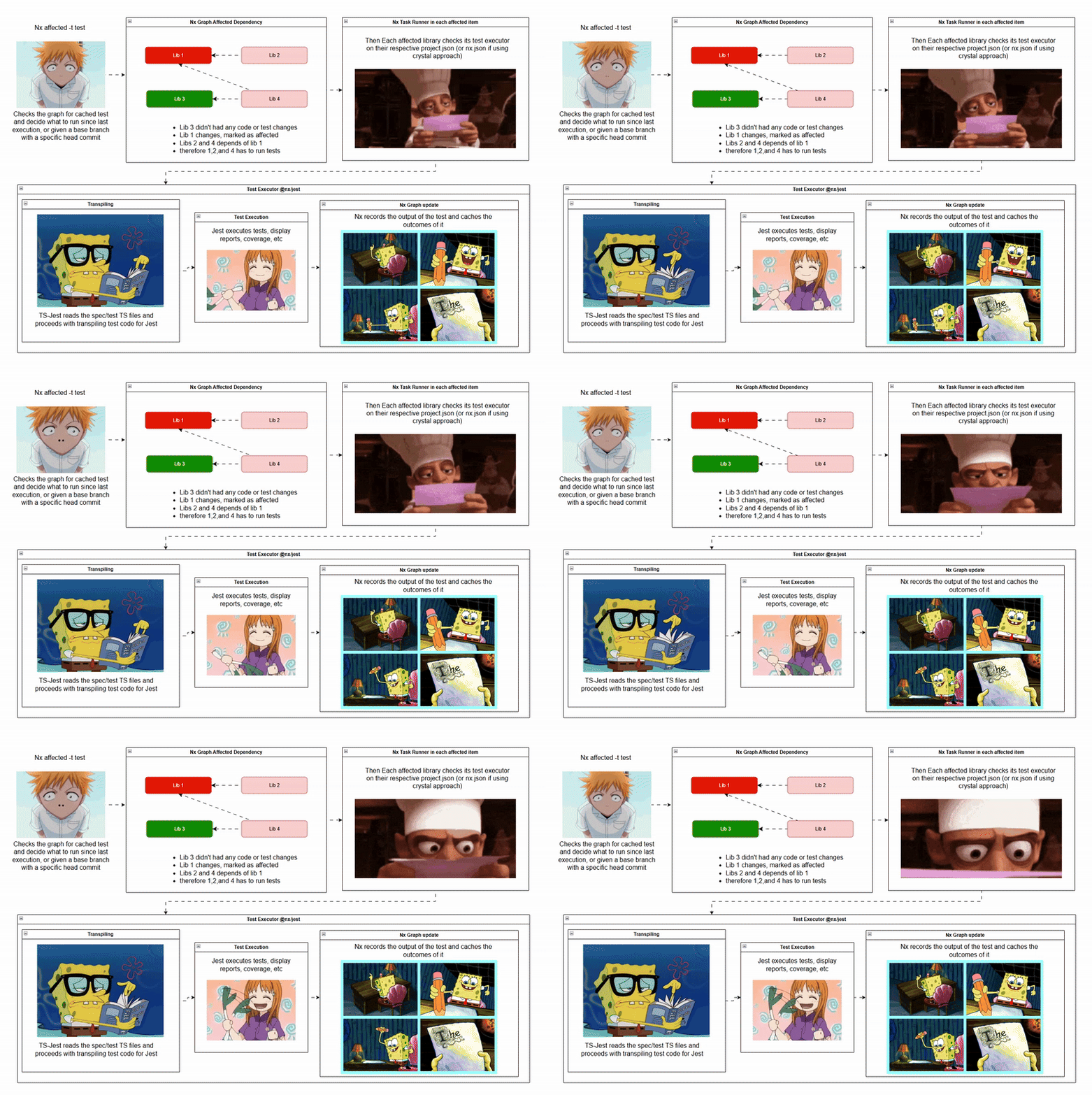
Quick Overview: Nx + Jest Visualized
For visual thinkers, here's a diagram illustrating the general flow. It maps how Nx and Jest collaborate during testing—while conveniently distracting you from your own slow test woes.
Transpiling Test Code
Now that you're ready to peek under the hood, prepare for a detailed examination. This is an autopsy, after all—not a crime scene investigation.
When you execute nx test on a library configured for Jest testing (check project.json), Nx leverages @nx/jest to invoke ts-jest on your tests during setup for code transpilation. Rather than transpiling once, Nx guarantees Jest transpiles your TypeScript code with every test run. After successful test completion, results are stored in the Nx Cache until you run nx reset to start fresh (test and build targets typically cache post-success, but this scenario differs). The compiled output from your initial CI build target (nx affected -t build) in the dist folder is ignored—Jest insists on managing its own transpilation. Why reuse existing artifacts when you can redo the work?
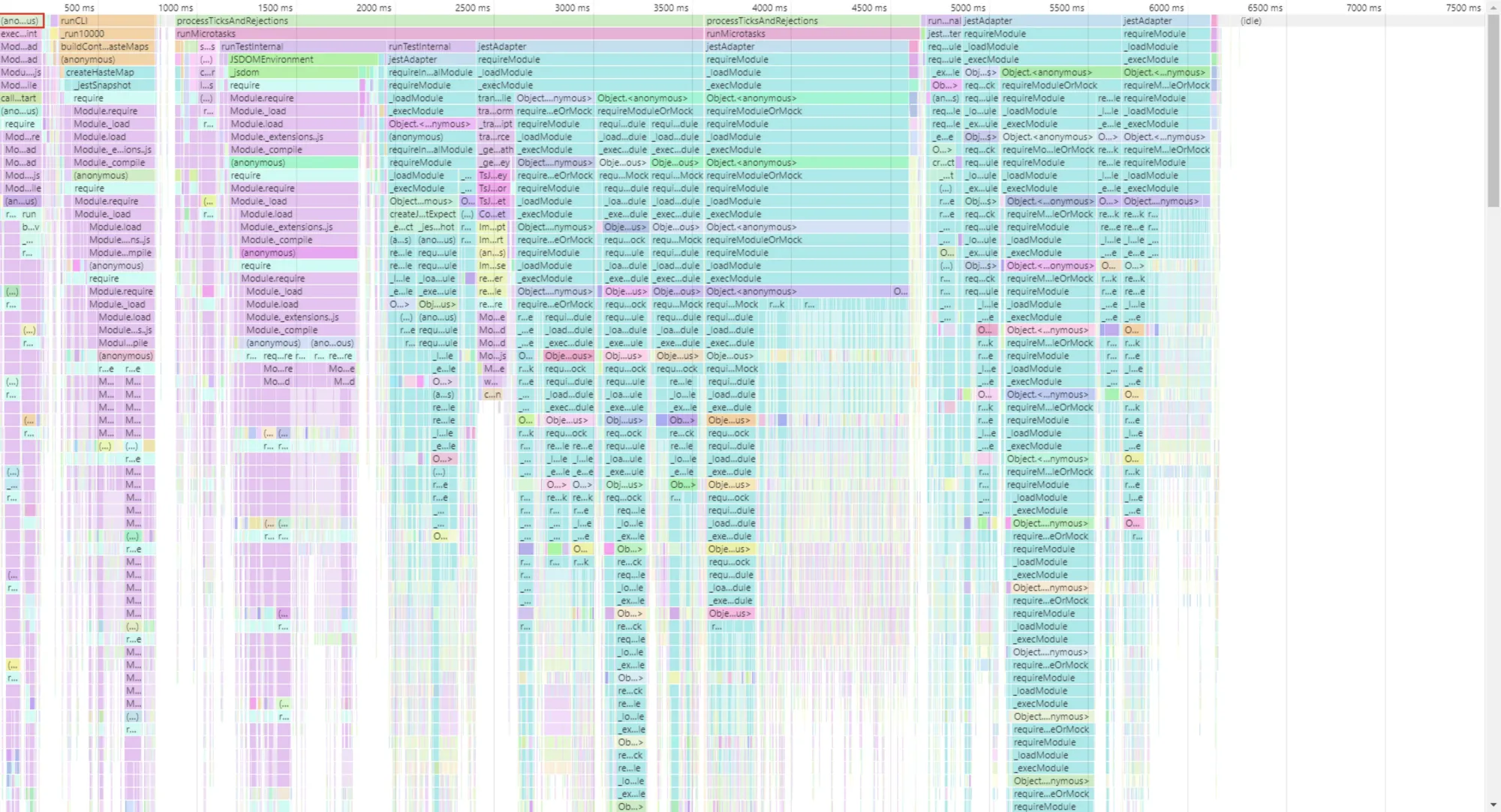
During those idle moments, you might profile memory usage in tests—observing pre-test and during-test activities. While you're profiling, Jest produces an impressive visualization of its processing:
Workspace Test Preset
The workspace configuration depends on a preset file, typically jest.preset.js. This file serves as the foundational configuration for your entire workspace, dictating test behavior across all apps and libraries. It operates like a legislative framework—nothing mystical about its contents.
Isolation of Apps and Libraries
Jest deliberately isolates apps and libraries during testing. When you designate Jest as the test runner for an application or library, Nx actively configures things, generating the necessary boilerplate for seamless operation. This rigidity ensures consistent rules across all tests—beneficial for preventing cross-contamination but introducing overhead in a monorepo context.
The test-setup.ts and jest-preset-angular Connection
The test-setup.ts file contains a reference to jest-preset-angular, a package providing the standard baseline for Angular-specific tests across apps and libraries. Unless you need customized global settings for a particular library or app, test-setup.ts remains a repetitive copy throughout the codebase.
The test Executor in project.json
Found under the test target in project.json, the executor references @nx/jest. It acts as the intermediary, forwarding the workspace preset configuration along with any additional parameters. It functions as a delivery service—receiving your package and transport it, albeit not always promptly.
Transpilation via the Executor
The crucial part: the executor invokes Jest, which transpiles your code once more for test execution. Why transpile once when twice suffices? This recurring process creates a /jest directory in your system's tmp folder, housing the transpiled output.
Handling Third-Party Dependencies
With a clearer understanding of the Nx-Jest-Angular interaction, let's address those large third-party packages that complicate matters.
Recall those Angular 14 libraries present in your workspace? The ones persisting against all odds? Every component resides within modules—sometimes hundreds per module. This is where complexity emerges.
In an effort to "streamline" usage, certain design decisions lead to unwieldy modules passed around like precious artifacts. The consequence: every test execution must resolve the module and all its components. Without Jest caching, you'll witness a slow cascade of unnecessary resolutions.
ts-jest and Code Transpilation
When a test references a component from a large module without mocking or passing alternatives, Jest doesn't skip it. It transpiles the entire module. Let's confirm this behavior:
Execute this command from your workspace root:
node ./node_modules/.bin/jest --cleanCache
This displays the cache directory Jest employs. Monitor it closely—literally observe it.
Next, run your problematic test. If you witness it expanding like a memory leak, congratulations—you've identified a key factor behind your sluggish tests.
Note: Did I Mention Memory Leaks? Yes.
This explains why Jest occasionally exits without explanation: excessive transpiled code overwhelms it. In CI environments, Jest eventually surrenders when processing exceeds its limits. No error message. No logs. No clean failure.
Simply… nothing.
Like staring into an abyss that responds by terminating your test run without any exit code.
The Mystery of the Five-Minute Test
Now, on to the most pressing concern: a potential memory leak lurking in the shadows.
Let's say your component is purely presentational. No complex logic, no heavy machinery. Simply an SSS component (Super Simple Stupid).
So why, for all that is technical, does this test require five minutes just to boot up?
For now, let's set aside the memory leak hypothesis. Digging further, it might well be the culprit. But another, equally exasperating explanation exists.
When ts-jest kicks off transpilation for EVERY piece of code connected to the component at test startup, you'll observe files and folders sprouting rapidly within THE DIRECTORY I INSTRUCTED YOU TO MONITOR. Watching this unfold feels like a horror film where each scene reveals something worse than the last.
Typically, you'd employ transformIgnorePatterns in your Jest setup to exclude unnecessary files from transformation. Yet under these circumstances, the volume of processed files becomes absurd. The further you investigate, the more you uncover an extensive, tangled web of transpiled dependencies.
Eventually, buried inside Jest's transpilation logs, you spot recognizable elements from your own codebase:
- Ag-Grid? Indeed—cell renderer code, familiar API implementations, and functions you utilize for your grids. Wonderful.
- Angular Material? Naturally.
- Random three-line transpiled files serving no apparent purpose? Absolutely.
- And that component which somehow ended up grouped within that UI library's module, despite being completely unused.
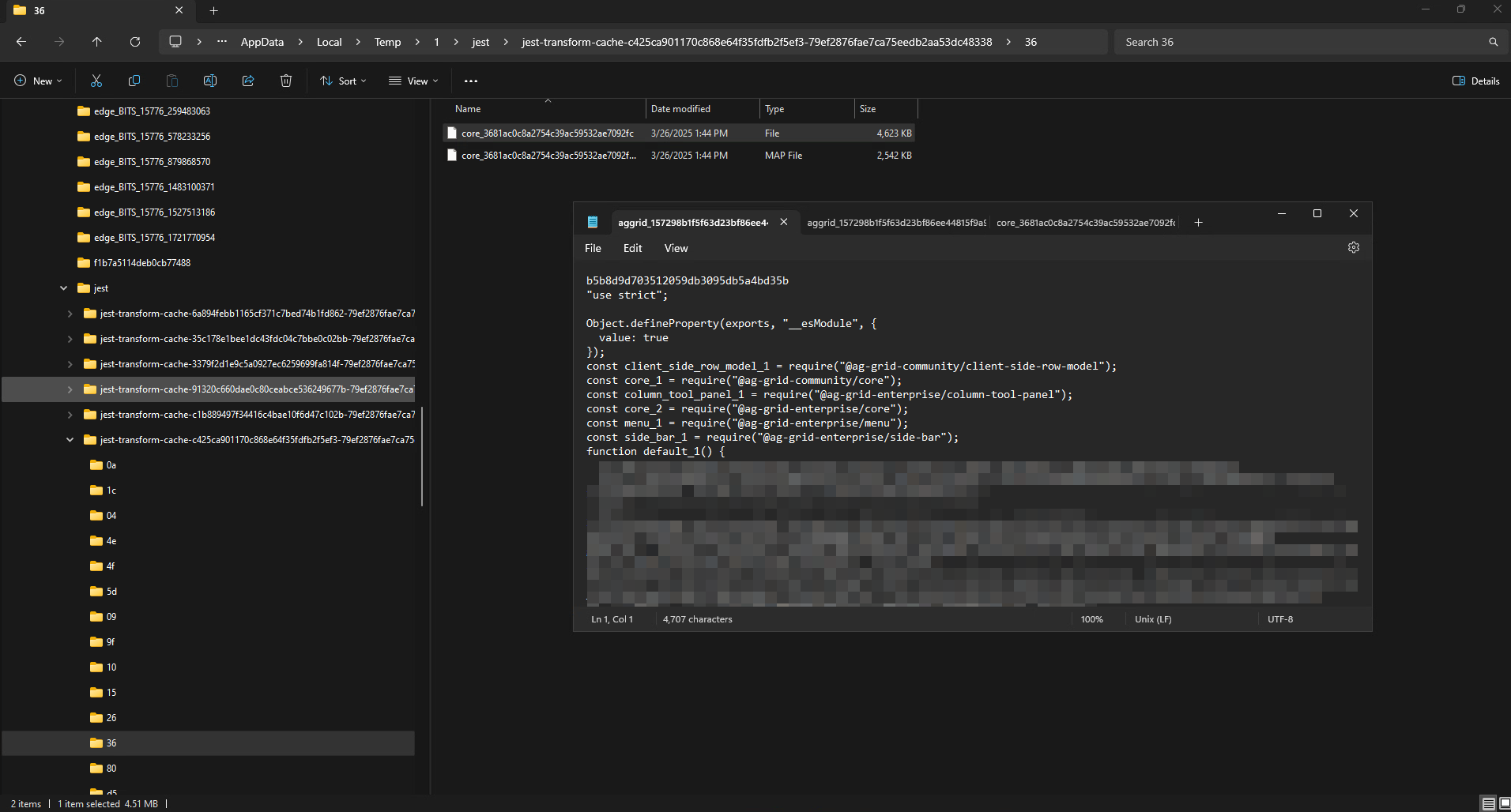
The torrent of generated files shows no sign of stopping for such a minuscule test. The worst part? As Jest transpiles more dependencies from these modules, memory consumption continues to climb.
This is a test suite with merely three (3) cases, for crying out loud! Yet the transpilation keeps churning out files without end. Time ticks away, your frustration mounts, and the terminal provides no indication that processing has concluded or that any real work is underway.
This is precisely where CI breaks down. With nx affected -t test, you might receive no exit error code whatsoever—just emptiness. No output, no explanation, nothing. Certain affected apps and libraries report their results, but that troublesome library or app responds with complete silence, defying your carefully orchestrated plans, as if Jest itself has surrendered.
It brings to mind the fable of the milkmaid—she balanced too many milk jugs, only to see everything shatter on the ground. Except here, the casualty is your CI pipeline, and the spilled milk represents your tears of thoroughly justified frustration.
Now, let's isolate the failing app or library by first running again
node ./node_modules/.bin/jest --cleanCache`
along with
nx reset
(Why would I preserve the cache of something that's already failing?)
this approach should allow us to pinpoint the output from:
nx test that-f-library
If all operates as expected, you'll witness, to your complete horror:
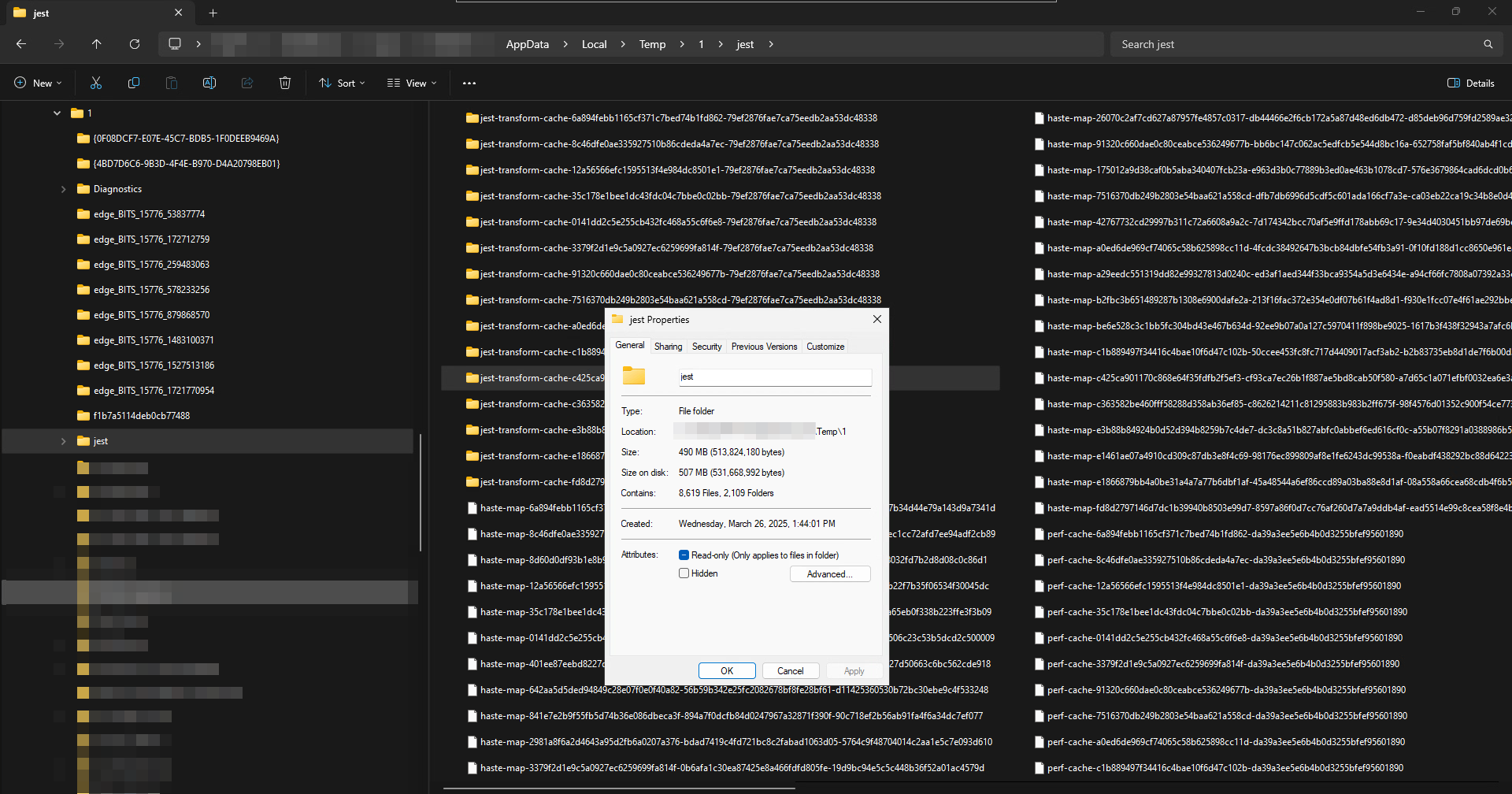
- A startup duration of five minutes (or beyond) for the test suite.
- A three-test collection that executes and succeeds in mere milliseconds.
- And an overwhelming quantity of transpiled files generated within the Jest cache.
What's the solution here?
At this point, take a pause. Step away, breathe deeply, contemplate the void, and reassess your life decisions. Because clearly, something has gone profoundly wrong.
Why Not Test the Already-Built Output?
Let's zoom out momentarily. Examining the pipeline flow from a bird's-eye perspective, a compelling question emerges...
If our CI environment already executes:
nx affected -t lint
and
nx affected -t build
... then those commands generate thoroughly transpiled, production-grade code within reasonable timeframes, correct?
... so ...
Why run tests against raw TypeScript source when we could target the compiled output instead?
Wouldn't that at least trim some of this transpilation chaos? Wouldn't it spare Jest from processing dependencies that don't need any touching?
It appears we're intentionally making things harder than necessary. But before jumping to conclusions, let's explore this more thoroughly.
Barrel Files, Anyone?
Years ago, people evangelized the practice of barrel files as if they were NgModules—which, in modern times, isn't the optimal strategy for packaging and distributing components, services, and the like. Nevertheless, some developers treat encapsulation as gospel, peppering their libraries with numerous barrel files to "contain" everything they ship. Like a sacred text, there's an index of books, chapters, verses—a sizeable tome for casual reading. Quite the apt analogy.
Regrettably, we're discussing Jest here, and Jest—unlike many test runners—holds no religious convictions doesn't maintain bookmarks to barrel files the way you might through a lengthy volume. Instead, it dives headfirst into every reference within each barrel import, and panic ensues as Jest crawls through those barrel files, hunting for dependencies and transpiling each one mercilessly, akin to an overzealous Pokémon trainer in an animal sanctuary.
And just like that, Jest consults its Pokédex. Oh! No transpiled Pidgey in your cache? Better catch it and transpile it. It was super effective.
Don't believe this? Here are some articles courtesy of an anonymous reviewer whose name escapes me at present (regardless, you'll find this article's reviewers listed at the bottom of this page. Distinguished individuals, truly.)
- Our long-standing gripe: sluggish start times
- Enough already! Won't someone think of the... tests?
- An extra helping of barrel files, anyone?
Quick Fix or Impending Catastrophe
On the surface, testing pre-transpiled code seems remarkably sensible. The code is modularized, optimized, and ought to perform faster in theory. So, what if we simply directed Jest to use moduleNameMapper to resolve everything to the pre-built output? Problem solved instantly, correct?
Incorrect.
As it happens, Jest wasn't designed with this in mind, and carelessly pointing moduleNameMapper at transpiled code can backfire considerably. Rather than skipping redundant transformations, Jest might choose a roundabout path, resolving modules once more in a fashion that actually lengthens test execution time. Right—what seemed like a performance shortcut could morph into a slow-motion catastrophe.
Thus, before we set the entire testing infrastructure ablaze, let's evaluate what must actually occur:
- Continue running tests locally against source files to catch issues before any deployment.
- Exclusively within CI, compile transpiled code once and test that artifact—preventing duplicated effort and keeping Jest from complete overload.
- Achieve
moduleNameMapperconfiguration done properly, or suffer the consequences. A botched setup will have the reverse effect, causing Jest to resolve and transpile dependencies in the most inefficient manner conceivable. - Apply
transformIgnorePatternsthoughtfully. Jest is notorious for arbitrarily deciding something requires transpilation—even when explicitly instructed otherwise - Accept that Jest may not be the savior we expected. All that buzz about speed and efficiency? Not so much when you're juggling a monorepo and substantial Angular projects.
So, does this strategy actually deliver speed gains? Perhaps—when executed flawlessly. If not, well... you might find yourself monitoring blank CI logs as Jest hurtles into an existential breakdown. The choice is yours.
But let's not fly too close to the sun and end up scorched. Given the gamble involved (honestly, this technique is quite precarious and ought to be off the table), it's wiser to reconsider our alternatives. This path definitely appears ill-advised, and any reader who's made it this far would concur that we should abandon this route.
We software engineers are adaptable creatures, pursuing solutions through various avenues. Let's discard this idea and examine another angle: if what's under test pulls in an extensive collection of code, perhaps we should concentrate on shrinking those pieces so our tests don't suffocate under invisible strain. That leads us to mocking.
Mocking Tactics
So, if Jest is hell-bent on making our existence miserable by transpiring half the codebase at every test run, the next logical step is deceiving it into doing less work. Enter mocking strategies, where we persuade Jest that it truly doesn't need to process those massive, lumbering dependencies in their entirety.
Here's our counterattack:
1. Properly Mock External Libraries with moduleNameMapper
We've established that moduleNameMapper can exacerbate issues when handled poorly, but executed correctly, it can steer Jest clear of needless transpilation.
Rather than letting Jest resolve a UI library (such as Ag-Grid or Angular Material) and transpile it from nothing, we can substitute those libraries with lightweight placeholders. At a global level in your Jest configuration, you can implement something along these lines to tackle the most substantial offenders first:
module.exports = {
  moduleNameMapper: {
    "^ag-grid-angular$": "<rootDir>/jest-mocks/ag-grid-mock.js",
    "^@angular/material$": "<rootDir>/jest-mocks/material-mock.js",
  },
};
Afterward, generate mock files such as jest-mocks/ag-grid-mock.js
module.exports = {
  AgGridAngular: jest.fn(() => ({
    onGridReady: jest.fn(),
    api: {
      sizeColumnsToFit: jest.fn(),
    },
  })),
};
🎯 Benefits: Jest no longer squanders time transpiling entire UI component suites—instead, it receives a minimal stub that satisfies imports without any real functionality.
This approach works nicely, but when testing something particular, you might want to handle it within the specific test file.
2. Apply jest.mock() at the Test-File Level
For dependencies that serve no purpose in being loaded, we can mock them on a per-test-file basis rather than compelling Jest to process them. Should a service require mocking, we can directly create an instance with the service's name and mock it.
jest.mock("src/app/services/heavy-service", () => ({
  HeavyService: jest.fn(() => ({
    fetchData: jest.fn().mockResolvedValue([]),
  })),
}));
🎯 Benefits: Jest avoids importing the actual service, cutting down on unnecessary module resolution.
It's convenient to target services, but what about something more precise? You aim to patch specific vulnerabilities instead of tackling the entire elephant in the room.
3. Leverage jest.spyOn() for Targeted Module Mocking
At times, you need only a portion of a module while preventing Jest from accessing its ponderous dependencies. Enter jest.spyOn(), which permits you to intercept precisely the pieces you require.
For illustration:
import * as HeavyModule from "src/utils/heavy-stuff";

jest.spyOn(HeavyModule, "computeSomething").mockImplementation(() => 42);
🎯 Benefits: The remainder of the module stays intact, yet Jest doesn't have to process computeSomething or its associated dependencies.
4. Deploy transformIgnorePatterns to Manage Jest
When Jest insists on transpiling elements it absolutely shouldn't, command it to stand down using transformIgnorePatterns. Doing this correctly may require brushing up on Regex fundamentals. The aim is to exclude specific files or folders from transformation, nothing beyond that:
module.exports = {
  transformIgnorePatterns: ["node_modules/(?!(lodash-es|date-fns)/)"],
};
with this setup, transpile whatever comes out of node_modules imports, minus lodash-es and date-fns
5. Mocking Angular Modules (Avoid Loading Everything)
One of the biggest performance drain in tests is Jest's attempt to resolve complete Angular modules for each test. Rather than loading a full module, construct a lightweight mock module instead:
Demonstration (Mocking Angular Modules in Jest)
import { NgModule } from "@angular/core";

@NgModule({
  providers: [
    {
      provide: HeavyService,
      useValue: { fetchData: jest.fn().mockResolvedValue([]) },
    },
  ],
})
export class MockModule {}
Then, inside your test:
TestBed.configureTestingModule({
  imports: [MockModule],
});
🎯 Benefits: Jest bypasses loading the complete real module, cutting initialization time and dependency resolution overhead.
NgMocks
Mocking is vital for preserving some shred of test sanity, keeping our CI pipeline away from spiraling into a computational black hole. However, the real predicament emerges when libraries, services, or components undergo changes—because then, we're forced to remock everything. And honestly, who diligently reads breaking change documentation before applying updates?
This is precisely where NgMocks proves its worth: It automates the nightmare of manually sustaining mocks, converting existing components, services, and modules into mock equivalents—saving us from our frequent inability to mock things correctly.
NgMocks is so comprehensive, I could author another entire article about it… but since I'm relishing my well-earned time off, that task is for another occasion. Instead, I'll point you toward this resource so you can self-educate and merge the horrors—I mean, insights—gained from this narrative with NgMocks. Trust me, it's a worthwhile endeavor.
Final Thoughts
Slow test suites in CI can stem from a wide range of issues, but one of the most significant contributors is the failure to maintain proper mocking practices that allow test artifacts to be transpiled successfully and cached efficiently. Without storing these artifacts, you might as well ignore everything discussed here, browse the web for yet another solution, and eventually find yourself back at this exact point with an unsettling sense of repetition.
Preserving artifacts is not merely a nice-to-have—it's essential for giving your test suites the speed they urgently require. In this walkthrough, Nx Cloud served as our platform of choice, and opting for a dedicated private cloud environment could yield even more substantial gains for larger codebases, enabling faster execution that no longer resembles an old-fashioned ordeal.
Having finally emerged from this surreal episode, I can head back to my workspace, take a moment with my coffee, and confirm that my test artifacts remain intact and operational.
…At least until the next problem surfaces.
Thanks for following along. I trust this brings back certain memories you'd prefer to leave buried—but then again, it never hurts to watch for the next pitfall.