Building an Extensible Dynamic Pluggable Enterprise Application with Angular — Part 1
In this article, we’ll look at how the Angular CLI’s build system can be used to produce an AOT precompiled Angular plugin that works with shared code across multiple plugins and functions with Angular Universal. This is not an official approach, but it has proven effective for our needs.

AngularInDepth is moving away from Medium. More recent articles are hosted on the new platform inDepth.dev. Thanks for being part of indepth movement!
Here’s a simplified view of what we are aiming to achieve:
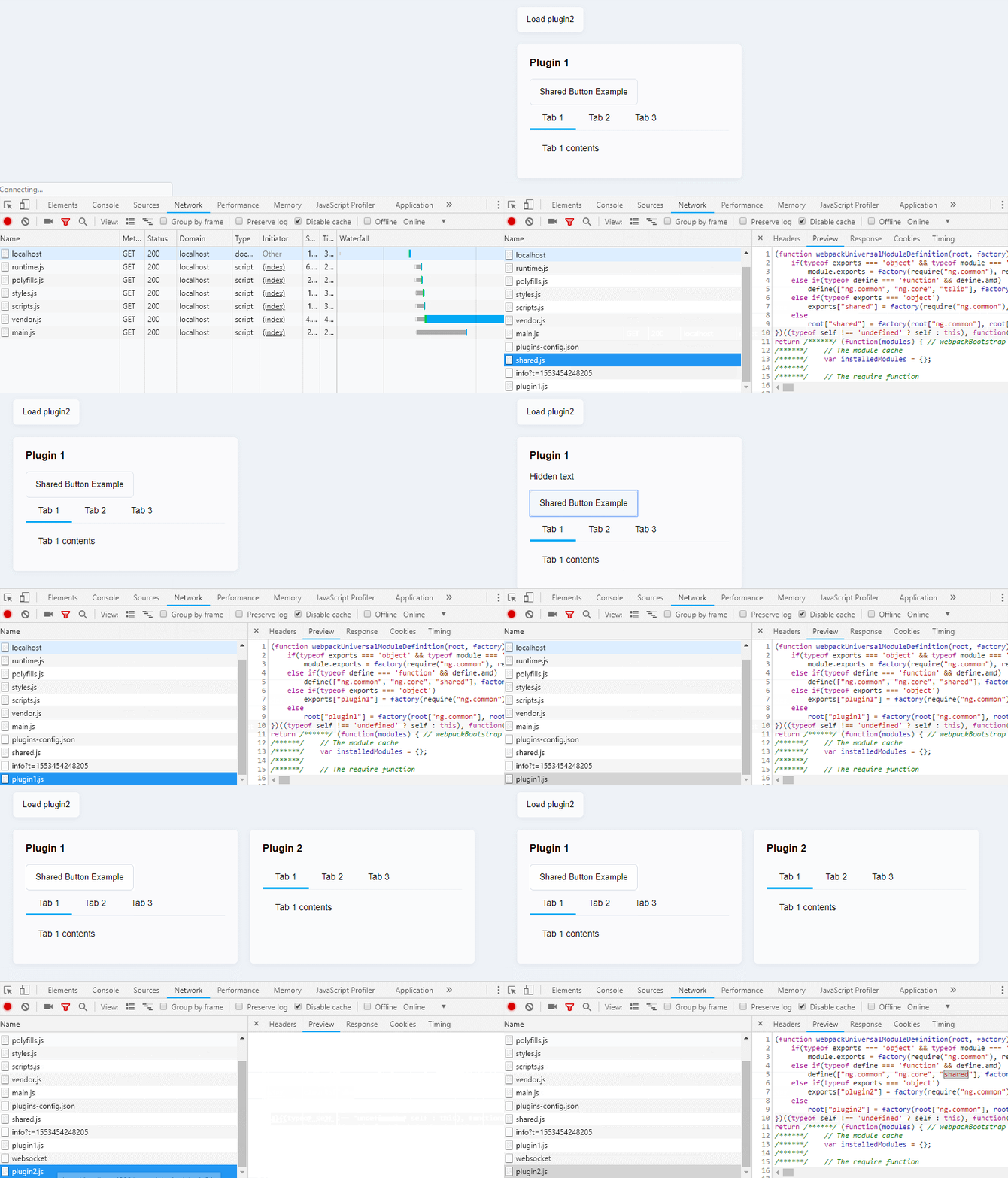
The setup consists of a straightforward page that grabs plugin settings from a plugins-config.json file. From there, it lazy loads the AOT compiled plugin (plugin1.js), which depends on shared.js. Inside that shared library are a Tabs component and its associated ng factories. After some time, we load a second plugin (plugin2.js), which takes advantage of the previously fetched shared.js rather than duplicating it.
The source code can be found in the angular-plugin-architecture repository on GitHub.
The demo runs on Angular CLI 7.3.6
Let’s work with the current ViewEngine instead of waiting for Ivy
Topics we’ll cover
- Why choose Angular?
- What are we trying to do?
- What qualifies as a plugin?
- Why building a plugin with Angular is challenging
- Key requirements
- Existing alternatives
- Steps toward a solution
- Creating a single bundle
- Setting up externals
- Dynamic exports
- Building the plugin
- Externals and a shared Angular library
- Loading the plugin (client and server)
- How to render a plugin?
- Keeping the main app safe from plugin errors
Why Angular?
The Angular ecosystem keeps growing quickly, with steady contributions from both the team and the community.
Angular provides a consistent code structure, which makes it easier for new developers to jump into a project.
We appreciate that Angular encourages modern web practices, including TypeScript, observables, server-side rendering, web workers, differential loading, progressive web applications (PWA), and lazy loading. These features can be adopted quickly and effectively.
There are plenty of other built-in features as well, such as the dependency injection system, reactive forms, and schematics.
That’s why Angular is typically our framework of choice for enterprise-level applications.
The goal
At some point, a client requested a fresh capability for an existing Angular Universal application. They wanted a pluggable Content Management System (CMS). The idea was to let a third-party developer create a new module independently and upload it. The Angular app would then pick it up automatically, without requiring a full rebuild or redeployment of the whole application.
In short, the task was to implement a plugin system.
What is a plugin?
Plugin systems allow you to extend an application without altering its core code.
That concept sounds straightforward, yet creating a plugin with Angular tends to be tricky.
Why is it so hard to create a plugin with Angular?
A former colleague, who had worked with AngularJS, once mentioned spotting an Angular 2 application written in plain es5 (perhaps he happened upon my jsfiddle or my older repo). He suggested we could simply write an Angular module in es5, drop it into a directory, and have the main app handle the rest.
I have been using Angular since its 2 alpha days, and Angular 2 (now just Angular) is fundamentally different.
The main hurdle is Ahead Of Time (AOT) compilation. AOT gives your application a performance boost, which is a big reason to use it.
Many examples online, however, rely on JitCompiler to build a pluggable architecture. That’s not the route we want to take. We want to keep the app fast and avoid bundling the compiler into the main package. Also, es5 can’t be AOT precompiled, so it’s the wrong tool here. Furthermore, Angular AOT is based on the @NgModule transitive scope, meaning everything has to be compiled together. This adds another layer of complexity.
There’s also the need to share code between plugins to prevent duplication. So what counts as duplication? There are two kinds:
- The code we write ourselves or pull from
node_modules - The code AOT generates, such as component and module factories (
component.ngfactory.jsandmodule.ngfactory.js), which amounts to a lot of code.
To prevent this duplication, we need to account for how ViewEngine creates factories.
For clarity, ViewEngine is the current rendering engine in Angular.
The catch is that Angular’s generated code can reference ViewFactory from other generated code. For example, here’s how an element definition gets tied to a ViewDefinitionFactory (from the Github source code):
elementDef(…, componentView?: null | ViewDefinitionFactory, componentRendererType?: RendererType2 | null)
As a result, all factories from a shared library end up duplicated.

This image shows the duplicated ngFactories in a non-optimized plugin.
So, when we talk about an Angular plugin system, we need to consider the following:
Requirements
- Use AOT compilation
- Prevent code duplication (e.g., avoid repeating
@angular/core,@angular/common,@angular/forms,@angular/router,rxjs,tslib) - Leverage a shared library across all plugins, but do not include the generated factories from that library in each plugin. Instead, reuse the library code and its factories.
- To import external modules, we just need to know the file path of their bundle.
- The app should be able to identify the plugin module and place it on the page.
- Ensure compatibility with server-side rendering
- Load the module only when it’s actually needed
- Maintain the same level of optimization that Angular CLI provides
These considerations drove us to create our own solution.
Similar solutions
Several approaches exist already, but most are missing critical pieces: full AOT support, optimized code, and no duplication.
One solution that comes close to our needs is: https://github.com/iwnow/angular-plugin-example
It relies on rollup to package the plugin as a UMD bundle.
However, I see some limitations with that method:
- ❌ It skips the optimization techniques Angular CLI offers: for example, it doesn’t strip Angular decorators or run buildOptimizer.
- ❌ It duplicates factories when shared components are used in multiple plugins.
Towards a Solution
Luckily, Angular is flexible enough to be customized with your own scripts.
Starting with Angular 6, you can hook into the compilation using builders. This enables custom webpack configurations, giving you full access to anything you’d expect from a vanilla webpack setup.
That idea led me to write my own builder for building plugins.
Angular CLI can generate libraries, but ng-packagr, the tool behind that, produces many extra artifacts we don’t need. (Sure, it follows the Angular Package Format—APF.) And those artifacts can only be used by other Angular applications.
So, instead, I figured I could set up an Angular application to build my plugins. By “application,” I mean one created with a command like ng generate application. This approach works well because you get the same optimization benefits as a regular Angular CLI app. For instance, after AOT, the Angular-specific decorators are gone.

This shows decorators present in a non-optimized bundle.
Now, if I could only figure out a way to produce a single bundle that exports everything I need:
Single bundle
I kicked things off with:
ng generate application plugins —minimal
That gave me a basic new Angular app in the projects folder:
projects
   |_ plugins
src
angular.json
Next, I deleted all the extraneous files, leaving just the essentials:
projects
   |_ plugins
        |_ src
            |_ plugin1
            |_ plugin2
            main.ts
        tsconfig.app.json
src
angular.json
Then I cleaned up angular.json for that project, stripping away the extra entries:
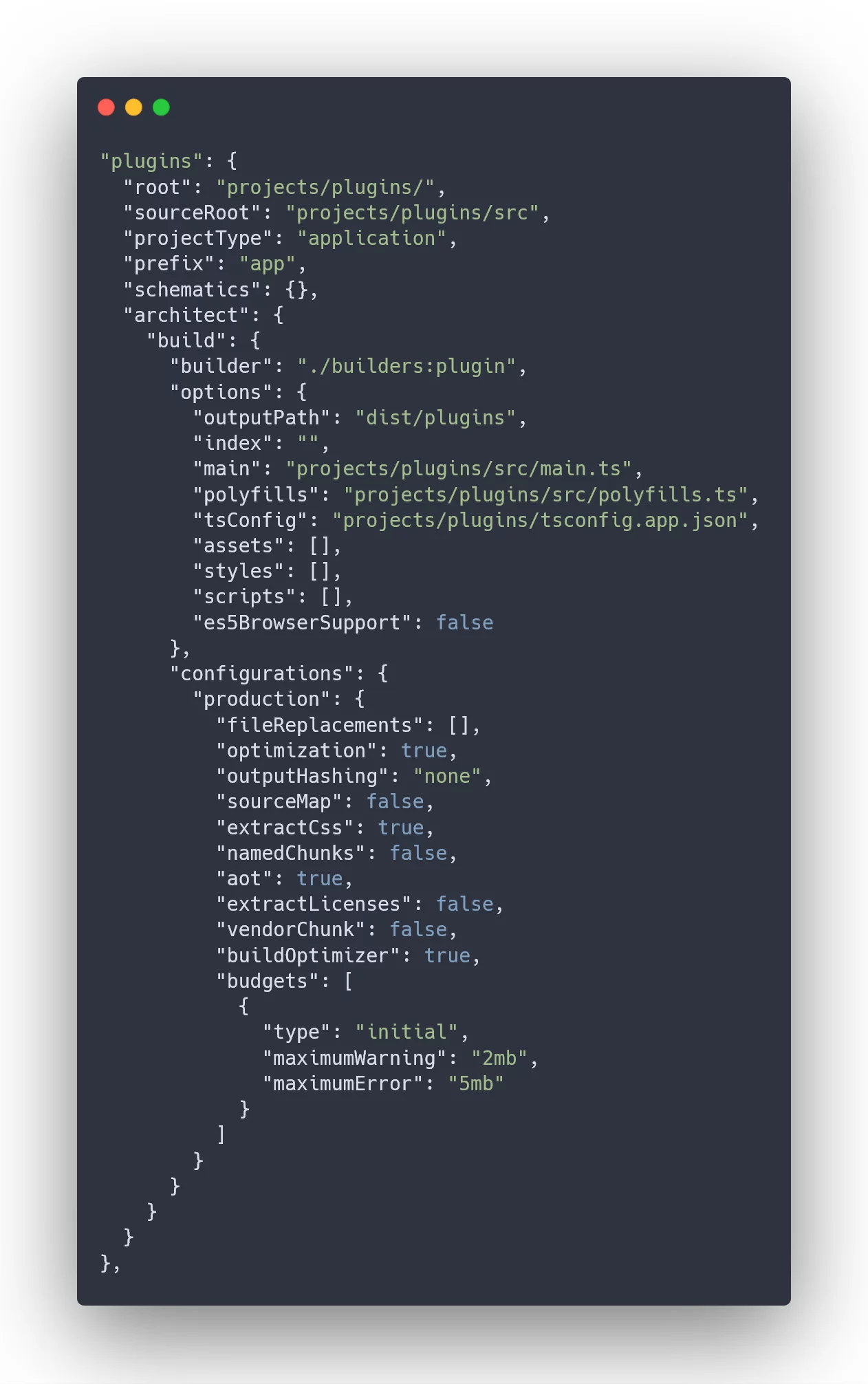
Here’s the plugins project configuration in angular.json.
As you can see, I removed index, all assets, scripts, and fileReplacements, along with other unnecessary elements. I also set up a custom PluginBuilder, which lives at ./builders:plugin.
The builder’s job is to generate a single umd bundle:
// Make sure we are producing a single bundle
delete config.entry.polyfills;
delete config.optimization.runtimeChunk;
delete config.optimization.splitChunks;
delete config.entry.styles;
config.output.library = pluginName;
config.output.libraryTarget = 'umd';
It also needs to define externals and produce the correct exports based on which plugin we are compiling. This is a core part of the builder’s functionality.
Externals
Webpack lets us set up externals. For this scenario, they might look like this:
config.externals = {
  rxjs: 'rxjs',
  '@angular/core': 'ng.core',
  '@angular/common': 'ng.common',
  '@angular/forms': 'ng.forms',
  '@angular/router': 'ng.router',
  tslib: 'tslib'
  // put here other common dependencies
};
There’s another option, which I’ll cover in the Shared library section below.
Dynamic exports
This is the interesting bit—it lets us build multiple plugins using the same build command.
First, the tsconfig.app.json for the plugins app points only to main.ts, so we only compile what’s inside main.ts.
tsconfig.app.json
{
  "extends": "../../tsconfig.json",
  "compilerOptions": {
    ...
  },
  "files": ["./src/main.ts"]
}
The builder then takes a modulePath parameter:
modulePath=./plugin1/plugin1.module#Plugin1Module
You might notice this looks like a lazy module path. The builder analyzes that path and writes generated code into main.ts. So, for the modulePath above, we end up with:
export * from './plugin1/plugin1.module';
export * from './plugin1/plugin1.module.ngfactory';
import { Plugin1ModuleNgFactory } from './plugin1/plugin1.module.ngfactory';
export default Plugin1ModuleNgFactory;
The critical goal is to export not just the code but also the factories that Angular’s compiler generates.
I keep main.ts completely empty so that I can populate it dynamically before each build and set the exports we need.
Build the plugin
Here’s an example of the build command for a plugin:
"build:plugin1": "ng build --project plugins --prod --modulePath=./plugin1/plugin1.module#Plugin1Module --pluginName=plugin1 --outputPath=./src/assets/plugins",
Let’s break down what’s happening here:
ng build — project plugins — prod
Builds thepluginsapplication created above in production mode.modulePath=./plugin1/plugin1.module#Plugin1Module
Points to the module that should be treated as the plugin.pluginName=plugin1
Sets the name for the output bundle.— outputPath=./src/assets/plugins
Determines where the final bundle gets written.
Externals and Shared Angular libraries
We can also make use of a shared library across several plugins. To expose all the factories from that library, we need the library’s code consolidated into a single file—otherwise, figuring out where those ngfactories live would be a hassle.
That’s exactly what ng-packagr produces for us.
So, we can build that generated file from ng-packagr. Start by creating a library:
ng generate library shared
Then build it specifically for the plugin structure:
"build:shared": "ng build shared && ng build –project plugins –prod –modulePath=shared#SharedModule –pluginName=shared –outputPath=./src/assets/plugins"
Now that a shared library is ready, I can reuse it in other plugins:
"build:plugin1": "ng build –project plugins –prod –modulePath=./plugin1/plugin1.module#Plugin1Module –pluginName=plugin1 –sharedLibs=shared –outputPath=./src/assets/plugins"
Pay attention to the --sharedLibs=shared flag.
To control which factory externals are used, I customize the webpack externals option with a function that catches all ngfactory imports.
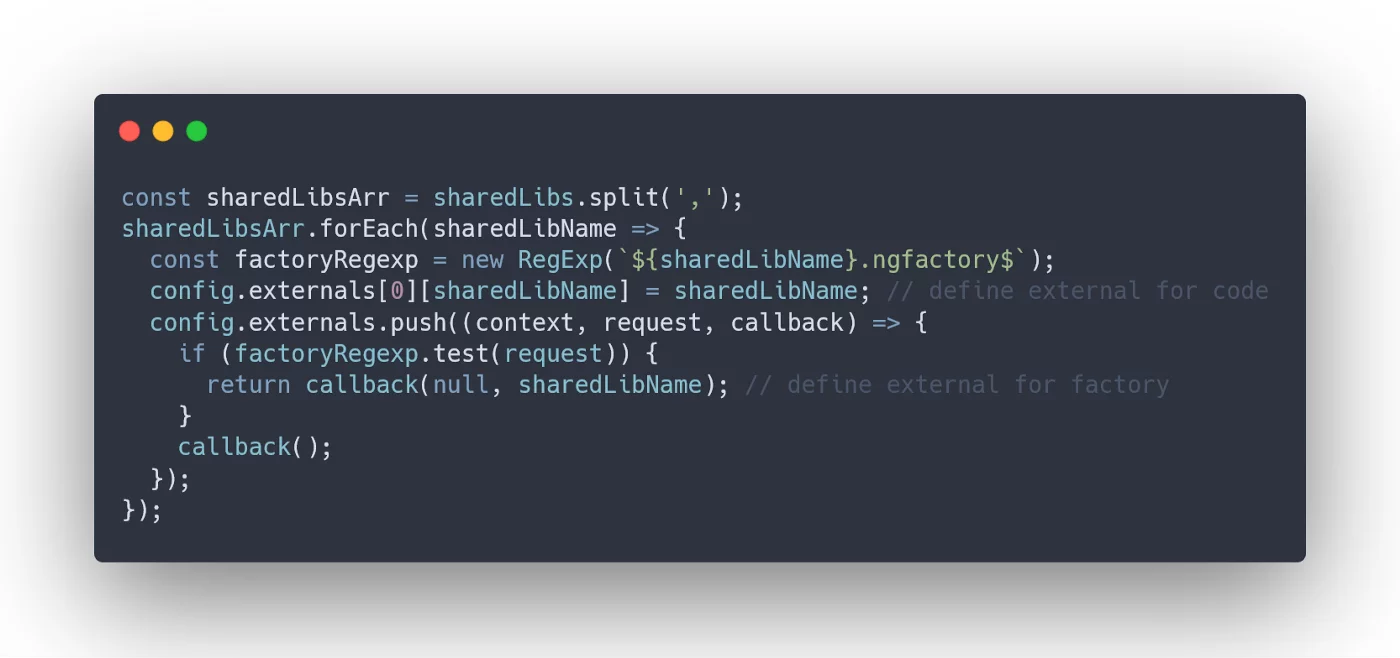
Webpack externals set up to catch factory imports.
With this, all external imports in our bundle are handled:
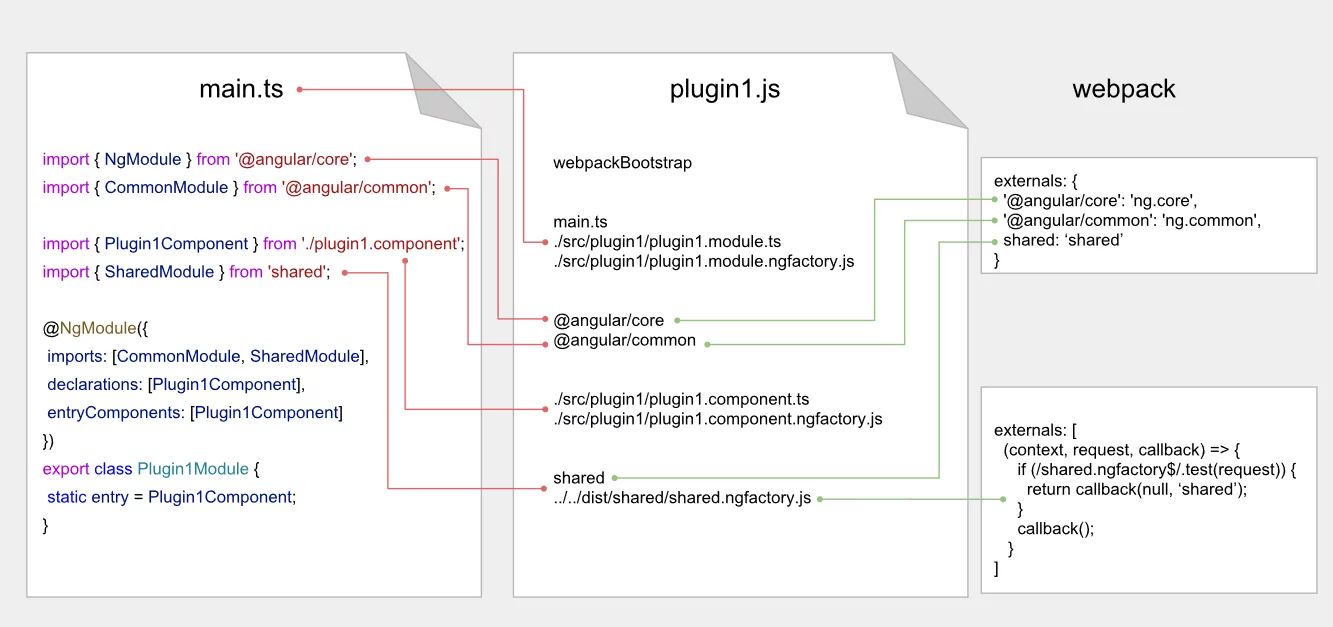
Webpack externals cover all possible external import patterns.
Finally, we reach the outcome we were aiming for:

Consuming the plugin
First things first: we need to pull the configuration from the server.
For simplicity’s sake, let’s use a basic JSON file that looks like:

This is the plugins-config.json file.
Then, to actually use the built plugin, we create two services—one for the client and one for the server—both extending the PluginLoaderService abstract class:
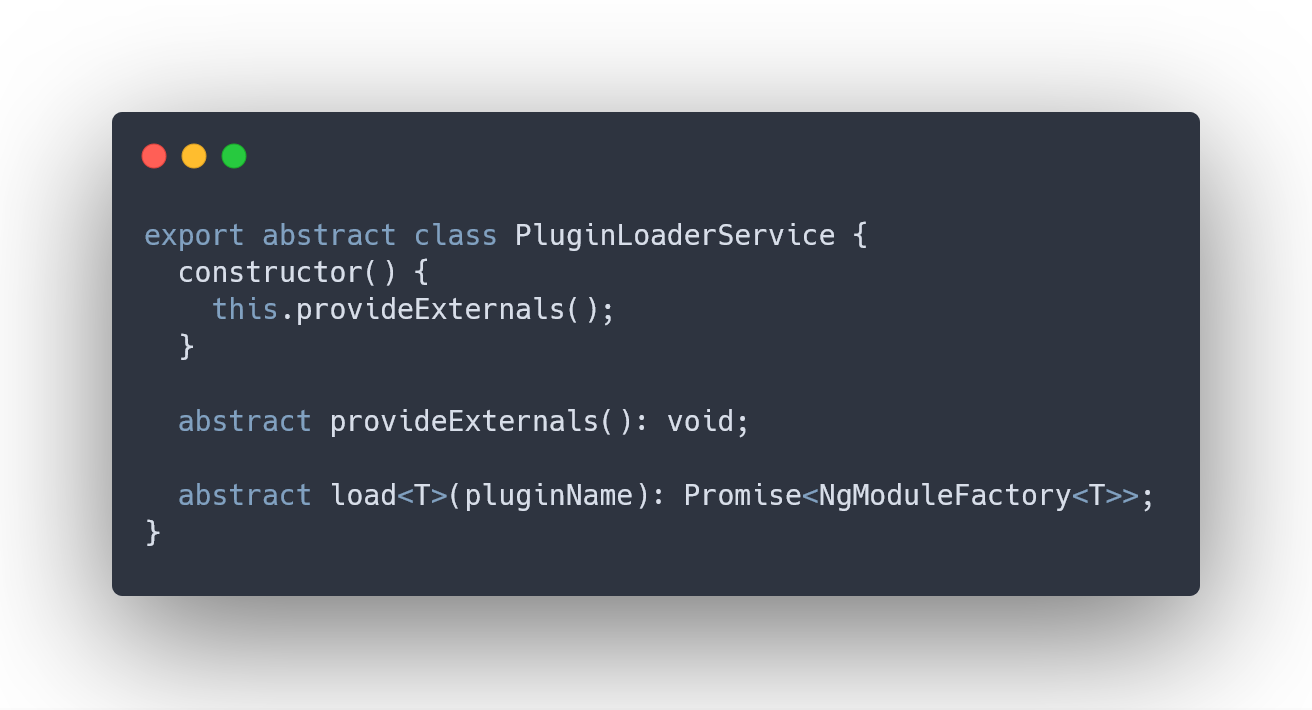
This is the base interface for the LoaderService.
Client Side
We set up Angular Dependency Injection to register a client-specific loader only for the browser side:
app.module.ts
providers: [
  { provide: PluginLoaderService, useClass: ClientPluginLoaderService }
],
For client-side plugin loading, we use a minimal systemjs__@__3.0.2 build, which supports AMD modules.
"scripts": [
  "node_modules/systemjs/dist/s.js",
  "node_modules/systemjs/dist/extras/named-register.js",
  "node_modules/systemjs/dist/extras/amd.js"
],
Externals get wired up through the global define function:
Object.keys(PLUGIN_EXTERNALS_MAP).forEach(externalKey =>
  window.define(externalKey, [], () => PLUGIN_EXTERNALS_MAP[externalKey])
);
The load function itself looks like this:
load<T>(pluginName): Promise<NgModuleFactory<T>> {
  return SystemJs.import(config[pluginName].path).then(
    module => module.default.default
  );
}
Server-Side Implementation
The server code provides its own loader service implementation:
app.server.module.ts
providers: [
  { provide: PluginLoaderService, useClass: ServerPluginLoaderService }
],
This service leverages Node.js's require method to retrieve the module:
load<T>(pluginName): Promise<NgModuleFactory<T>> {
  const factory = global['require'](`./browser${config[pluginName].path}`)
    .default;
  return Promise.resolve(factory);
}
Additionally, we override the native require function to supply externals:

External modules on the server side
When the Host Application Shares the Same Library as Plugins
Consider a scenario where our shared library must also be consumed by the main application:
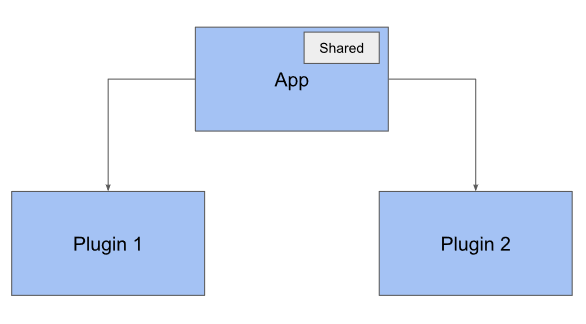
Both plugins and the main application using the same library
How can we avoid code duplication in this case?
Given that the shared library is already bundled into the main app, we can mark it as an external dependency for the plugins.
plugin-externals.prod.ts
import * as shared from 'shared';
export const PLUGIN_EXTERNALS_MAP = {
  'ng.core': core,
  'ng.common': common,
  'ng.forms': forms,
  'ng.router': router,
  rxjs,
  tslib,
  shared: { ...shared, ...require('shared/shared.ngfactory') }
};
This approach allows us to share both the library code and the Ahead-of-Time compiled output.
You might notice the prod suffix in the filename mentioned above. This is intentional—such externals are configured exclusively for production builds.
"configurations": {
  "production": {
    "fileReplacements": [
      ...
      {
        "replace": "src/app/services/plugin-loader/plugin-externals.ts",
        "with": "src/app/services/plugin-loader/plugin-externals.prod.ts"
      }
    ],
In development mode, we still load the shared library through SystemJS, just like any other plugin.
You can review a working example of this setup in the share-lib-between-app-and-plugins branch of the repository.
How Plugins Are Rendered
With NgModuleFactory at our disposal, rendering plugins becomes straightforward using well-known Angular APIs for dynamic component creation:
componentFactory.createviewContainerRef.createComponent
In the following example, we opted for the second approach:
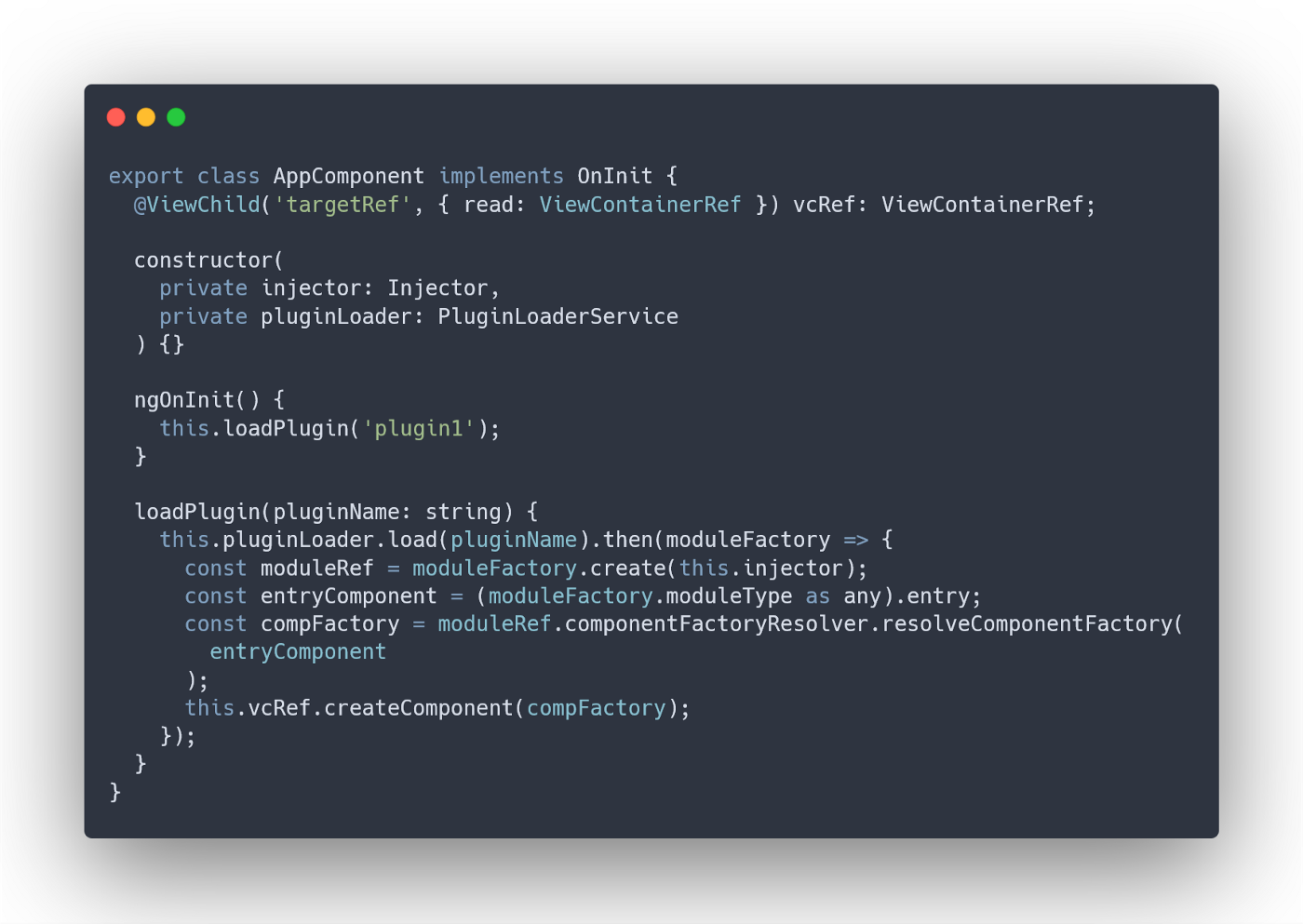
Low-level API used to render plugins
Protecting the Host Application from Plugin Failures
A persistent challenge in pluggable architectures is that exceptions raised inside plugins can bring down the entire application.
Fortunately, several strategies exist to manage such failures effectively:
- Global ErrorHandler
- Zone.onError.subscribe
- try catch
These techniques enable us to gracefully handle errors during plugin instantiation, safely terminating and reporting faulty components without disrupting the broader application.
Final Thoughts
Angular continues to evolve with every release. However, dynamic templating still lacks a straightforward, out-of-the-box solution—a feature that becomes indispensable when dealing with large applications where clients expect everything to be dynamic, lazy-loaded, and modifiable at runtime.
Fortunately, Angular CLI offers the flexibility to configure builds tailored to specific requirements. In this article, we demonstrated one approach to constructing AOT-precompiled plugins. While it may not fit every scenario perfectly, we hope you can extract some useful concepts from it.
Thanks for reading!
The complete source code is available on GitHub: angular-plugin-architecture.