
Spoiler Alert: The Short Version
- Run a diagnostic on a reactive form to pinpoint refactoring opportunities.
- Break the code apart into smaller, focused pieces for cleaner separation of duties.
- Change how the Reactive Form is constructed in TypeScript.
- Find the root cause of the performance bottleneck.
- Boost responsiveness by reshaping the form template.
- Initial Code — StackBlitz Project
- Final Code — StackBlitz Project
This piece was motivated by a Stack Overflow inquiry that was phrased as:
“Angular 7, Reactive Form slow response when has large data”
I posted an answer there, but the topic felt substantial enough for a dedicated write-up here. So, here we are.
Things You Should Know
- A working grasp of Angular. For newcomers, there’s a free YouTube series available.
- Comfort with Reactive Forms. If that’s a weak spot, check out this specific tutorial.
- Feel free to drop a comment if any step is unclear.
Our Launching Point
The Code We’re Beginning With
Looking at the initial StackBlitz, a couple of glaring problems stand out:
- The structure doesn’t follow the guidance from the Angular Style Guide.
- Both the initial render and subsequent updates feel sluggish. You can confirm this with a performance audit, or just type in any field and watch the UI lag behind your keystrokes.
Our plan to address these issues is broken into a tri-fold approach:
- Start by making the code more modular.
- Next, polish it to match the Angular Style Guide.
- Finally, trace the source of the sluggishness, refine the code, and restore performance.
Let’s move to the first action item.
ACTION 1 — Introduce Modularity
One glance at the initial StackBlitz makes it clear the organization is lacking, so that’s our first fix.
Three files are key players here:
- Service: This entity is in charge of retrieving data and converting it into a pre-filled form. We’ll offload the excess logic found in other locations into this file.
- Interface: We’ll define a schema for our data models to accurately type the information coming from the network request.
- Data JSON: We’ll extract the inline JSON inside the service’s
fetchApifunction into a dedicatedhotel.jsonfile. In the real world, this would be a REST endpoint, but a static file works here. We’ll place it in the assets folder, making it accessible at/assets/hotel.json.
Time to get our hands dirty.
1. Crafting the Interfaces:
Based on the JSON structure already present, the interfaces will look like:
export interface Hotel {
  id: string;
  currencyId: string;
  hotelYearId: string;
  priceTaxTypeId: string;
  code: string;
  name: string;
  createBy: string;
  createDate: string;
  lastUpdateBy: string;
  lastUpdateDate: string;
  remark: string;
  internalRemark: string;
  roomTypes: RoomType[];
}

export interface RoomType {
  chk: boolean;
  roomTypeId: string;
  mealTypes: MealType[];
}

export interface MealType {
  chk: boolean;
  mealTypeId: string;
  marketGroups: MarketGroup[];
}

export interface MarketGroup {
  chk: boolean;
  markets: Market[];
  rateSegments: RateSegment[];
}

export interface Market {
  marketId: string;
}

export interface RateSegment {
  chk: boolean;
  rateSegmentId: string;
  hotelSeasons: HotelSeason[];
}

export interface HotelSeason {
  chk: boolean;
  hotelSeasonId: string;
  rates: Rate[];
}

export interface Rate {
  rateCodeId: string;
  cancellationPolicyId: string;
  dayFlag: string;
  singlePrice: string;
  doublePrice: string;
  xbedPrice: string;
  xbedChildPrice: string;
  bfPrice: string;
  bfChildPrice: string;
  unitMonth: string;
  unitDay: string;
  minStay: number;
}
These are the interfaces we formulated for the data models, mirroring the JSON shape.
Manual creation is fine, but there’s a VSCode plugin that automates this step. Here’s a link if you want it:
Note that we’re opting for interfaces rather than classes for our data models. The Angular Style Guide points in this direction:
“ Consider using an interface for data models. “
2. Isolating the JSON Data:
We’ll strip the JSON data out of the service and put it into a new hotel.json file.
{
  "id": "bef2dd35-6165-48e4-bb73-0f4a6e8cba43",
  "currencyId": "233aadd2-5d16-4df9-8b3d-a632a90cc746",
  "hotelYearId": "713b1389-24f2-4818-aa81-48d82e98ff5b",
  "priceTaxTypeId": "00000000-0000-0000-0000-000000000000",
  "code": "WS2",
  "name": "Wholesale 2",
  "createBy": "system",
  "createDate": "2019-01-26T14:49:31.080Z",
  "lastUpdateBy": "userUpdate",
  "lastUpdateDate": "2019-01-28T11:11:40.541Z",
  "remark": "",
  "internalRemark": "",
  "roomTypes": [
    {
      "chk": true,
      "roomTypeId": "3daf6074-4279-4ef7-a3ae-92e5676684c3",
      "mealTypes": [
        {
          "chk": true,
          "mealTypeId": "8ac6b3d1-9f81-4fe3-8bac-96a384ccc913",
          "marketGroups": [
            {
              "chk": true,
              "markets": [
                {
                  "marketId": "ffffffff-ffff-ffff-ffff-ffffffffffff"
                }
              ],
              "rateSegments": [
                {
                  "chk": true,
                  "rateSegmentId": "00000000-0000-0000-0000-000000000000",
                  "hotelSeasons": [
                    {
                      "chk": true,
                      "hotelSeasonId": "4cf7013a-cf05-4db9-9e0c-6c5d07957da5",
                      "rates": [
                        {
                          "rateCodeId": "00000000-0000-0000-0000-000000000000",
                          "cancellationPolicyId": "16c4f160-6288-42b7-9aac	457f04a71616",
                          "dayFlag": "1234567",
                          "singlePrice": "8,100.00",
                          "doublePrice": "8,100.00",
                          "xbedPrice": "1,000.00",
                          "xbedChildPrice": "500.00",
                          "bfPrice": "400.00",
                          "bfChildPrice": "200.00",
                          "unitMonth": "0.00",
                          "unitDay": "0.00",
                          "minStay": 0
                        }
                      ]
                    },
                    {
                      ...
                    },
                    {
                      ...
                    }
                  ]
                }
              ]
            },
            {
              ...
            }
          ]
        }
      ]
    },
    {
      ...
    },
    {
      ...
    },
    {
      ...
    }
  ]
}
A fresh file created to hold a Hotel’s JSON payload.
This file goes into the src/assets/ directory.
3. Restoring the fetchApi Method:
With the data relocated, the fetchApi method is now incomplete. We’ll patch it up by issuing an HTTP request. Angular’s [****HttpClient****](https://angular.io/api/common/http/HttpClient) handles this we’ll import [****HttpClientModule****](https://angular.io/api/common/http/HttpClientModule) into @NgModule and add it to the [****imports****](https://angular.io/api/core/NgModule#imports) array. Like so:
...
import { HttpClientModule } from '@angular/common/http';
...
@NgModule({
  imports: [..., HttpClientModule, ...],
  ...
})
export class AppModule { }
Then, bring HttpClient into the service via dependency injection. It looks like this:
...
import { HttpClient } from '@angular/common/http';
@Injectable()
export class MyService {
  constructor(
    private http: HttpClient,
    ...
  ) {}
  ...
  fetchApi() {
    return this.http.get('/assets/hotel.json');
  }
}
That wraps up the first phase, leaving us with a more modular foundation.
ACTION 2 — Polish the Code
Having completed the modularization, we shift focus to refinement, transforming the current code into something cleaner.
1. Streamlining the Service:
We have the data now. Next is constructing a Reactive Form around it, but we need a form first. It must be smart enough to adapt to the data it receives.
We’ll inject FormBuilder as a dependency for form creation. For transforming objects into FormGroups, we’ll rely on the Array’s [****map****](https://developer.mozilla.org/en-US/docs/Web/JavaScript/Reference/Global_Objects/Array/map) method.
Let me sketch a service method called getHotelForm. It accepts the incoming data and builds the form from it. The API response will also be assigned as the default value for the form controls.
For the deeply nested object arrays in the payload, we’ll build helper methods that generate the child FormGroups for each array item. These helpers internally call map to create a FormGroup for each element of the array. Thus, each distinct object type gets its own builder method.
Each generate****X**** function returns a FormGroup and populates it with the values from the argument it takes. They all follow this pattern:
generateX(valueParam) {
  const formGroupName = this.fb.group({
    fieldOne: [valueParam.fieldOne, Validators.Required],
    ...,
    arrayField: this.fb.array(valueParam.someArray.map(itemInArray => generateY(itemInArray)))
  });
  return formGroupName;
}
Let me show you the code to make this clearer:
import { Injectable } from '@angular/core';
import { HttpClient } from '@angular/common/http';
import { FormBuilder, Validators } from '@angular/forms';
import { map } from 'rxjs/operators';

import { Hotel, RoomType, MealType, MarketGroup, Market, RateSegment, HotelSeason, Rate } from './hotel.model';

@Injectable()
export class UtilService {

  constructor(
    private readonly fb: FormBuilder,
    private readonly http: HttpClient
  ) { }

  getHotelForm() {
    return this.getHotel().pipe(
      map((apiResponse: any) => this.fb.group({
        id: [apiResponse.id, Validators.required],
        currencyId: [apiResponse.currencyId, Validators.required],
        hotelYearId: [apiResponse.hotelYearId, Validators.required],
        priceTaxTypeId: [apiResponse.priceTaxTypeId, Validators.required],
        code: [apiResponse.code, Validators.required],
        name: [apiResponse.name, Validators.required],
        createBy: [apiResponse.createBy, Validators.required],
        createDate: [apiResponse.createDate, Validators.required],
        lastUpdateBy: [apiResponse.lastUpdateBy, Validators.required],
        lastUpdateDate: [apiResponse.lastUpdateDate, Validators.required],
        remark: [apiResponse.remark, Validators.required],
        internalRemark: [apiResponse.internalRemark, Validators.required],
        roomTypes: this.fb.array(apiResponse.roomTypes.map(roomType => this.generateRoomTypeForm(roomType)))
      }))
    );
  }

  private getHotel() {
    return this.http.get('/assets/hotel.json');
  }

  private generateRoomTypeForm(roomType: RoomType) {

    const roomTypeForm = this.fb.group({
      chk: [roomType.chk, Validators.required],
      roomTypeId: [roomType.roomTypeId, Validators.required],
      mealTypes: this.fb.array(roomType.mealTypes.map(mealType => this.generateMealTypeForm(mealType)))
    });

    return roomTypeForm;
  }

  private generateMealTypeForm(mealType: MealType) {

    const mealTypeForm = this.fb.group({
      chk: [mealType.chk, Validators.required],
      mealTypeId: [mealType.mealTypeId, Validators.required],
      marketGroups: this.fb.array(mealType.marketGroups.map(marketGroup => this.generateMarketGroupForm(marketGroup)))
    });

    return mealTypeForm;
  }

  private generateMarketGroupForm(marketGroup: MarketGroup) {

    const marketGroupForm = this.fb.group({
      chk: [marketGroup.chk, Validators.required],
      markets: this.fb.array(marketGroup.markets.map(market => this.generateMarketForm(market))),
      rateSegments: this.fb.array(marketGroup.rateSegments.map(rateSegment => this.generateRateSegmentForm(rateSegment))),
    });

    return marketGroupForm;
  }

  private generateMarketForm(market: Market) {
    return this.fb.group({
      marketId: [market.marketId, Validators.required]
    });
  }

  private generateRateSegmentForm(rateSegment: RateSegment) {
    const rateSegmentForm = this.fb.group({
      chk: [rateSegment.chk, Validators.required],
      rateSegmentId: [rateSegment.rateSegmentId, Validators.required],
      hotelSeasons: this.fb.array(rateSegment.hotelSeasons.map(hotelSeason => this.generateHotelSeasonForm(hotelSeason)))
    });

    return rateSegmentForm;
  }

  private generateHotelSeasonForm(hotelSeason: HotelSeason) {

    const hotelSeasonForm = this.fb.group({
      chk: [hotelSeason.chk, Validators.required],
      hotelSeasonId: [hotelSeason.hotelSeasonId, Validators.required],
      rates: this.fb.array(hotelSeason.rates.map(rate => this.generateRateForm(rate)))
    });
    return hotelSeasonForm;
  }

  private generateRateForm(rate: Rate) {
    return this.fb.group({
      rateCodeId: [rate.rateCodeId, Validators.required],
      cancellationPolicyId: [rate.cancellationPolicyId, Validators.required],
      dayFlag: [rate.dayFlag, Validators.required],
      singlePrice: [rate.singlePrice, Validators.required],
      doublePrice: [rate.doublePrice, Validators.required],
      xbedPrice: [rate.xbedPrice, Validators.required],
      xbedChildPrice: [rate.xbedChildPrice, Validators.required],
      bfPrice: [rate.bfPrice, Validators.required],
      bfChildPrice: [rate.bfChildPrice, Validators.required],
      unitMonth: [rate.unitMonth, Validators.required],
      unitDay: [rate.unitDay, Validators.required],
      minStay: [rate.minStay, Validators.required]
    });
  }

}
This is the Service After Refactoring.
Here’s what we’ve accomplished:
- The service is now called
UtilService. Naming should always be descriptive, whether for properties, methods, or any other code element. - Following that logic,
fetchApiwas renamed togetHotel. - I added eight methods for form creation and its components. The main one,
getHotelForm, callsgetHotel. This method returns anObservablethat wraps the hotel data. From there, we usepipeand themapoperator to transform the response into aFormGroup. The response object, typed asHotel, sets the default values for each field. getHotelFormworks alongside seven other methods that generate childFormGroups for each distinct object type found in the various arrays. Their names are self-explanatory. I might produce a dedicated video on this for more detail, so keep an eye out.- In the end,
getHotelFormyields anObservablethat carries aFormGroupfilled with the JSON data.
2. Refining the Component Class:
With method names changed, the heavier functions like createForm and the logic inside ngOnInit are no longer necessary. The service handles everything, and our component now receives the form as an Observable from getHotelForm. The service rename also leaves the component in need of an update.
The refactor here means moving the code from the constructor into ngOnInit after cleaning it up. The createForm method gets removed. The constructor will just inject UtilService. The result looks like this:
...
import { FormGroup, FormArray } from '@angular/forms';
import { UtilService } from '../app/util.service';
@Component({...})
export class AppComponent {

  form: FormGroup;
  constructor(private readonly service: UtilService) {}
  ngOnInit() {
    this.service.getHotelForm()
      .subscribe(hotelForm => this.form = hotelForm);
  }
  ...
}
Notice I also removed FormBuilder from the imports since it’s no longer used.
However, a console error appears now.
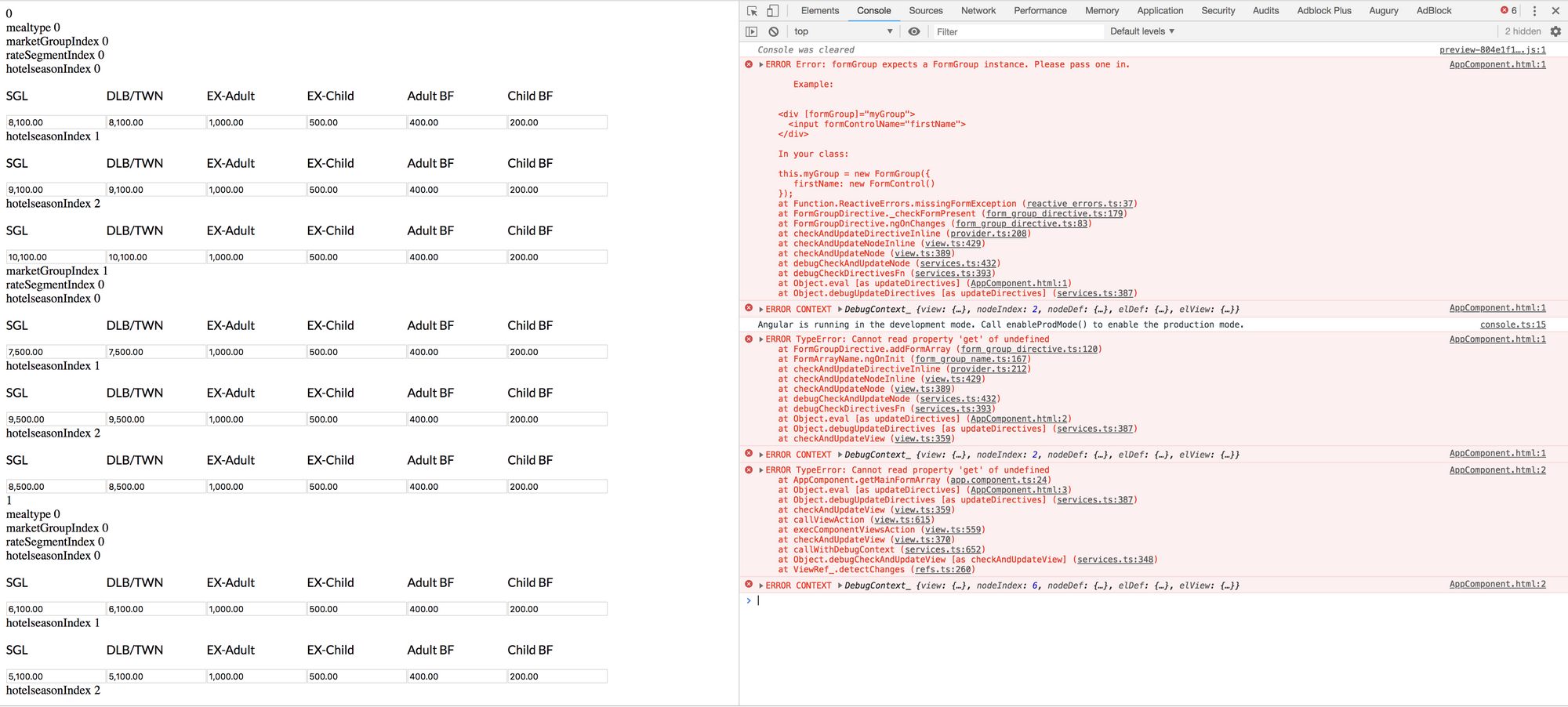
A Console Error Despite a Properly Rendering Form.
Can you guess the origin?
Right, it’s the asynchronous network call in the getHotel method, which is invoked by getHotelForm in the service. We’re hitting a JSON file via get on HttpClient. This operation runs asynchronously, so the template begins rendering before the response arrives. At that instant, form is still undefined because it only gets built after the response is processed.
What’s the fix? Simple—add an *ngIf guard to the template.
<form *ngIf="form" [formGroup]="form">
  ...
  <pre>{{form.value | json}}</pre>
</form>
That brings us to this point:
This is the groundwork from which we’ll launch the optimization efforts.
STEP 3 — Optimize the code
The current implementation aligns with the Angular Style Guide. However, performance leaves much to be desired. To see how poor it actually is, try the following exercise:
Type something into any field in the form above. You will observe a noticeable lag — a few hundred milliseconds, which is still quite perceptible. To fix this, we must first identify the root cause.
How do I identify the cause of this lag?
One approach is to add console.log(…) inside the getMainFormArray and getNestedFormArray methods.
import { Component } from '@angular/core';
import { FormArray, FormGroup } from '@angular/forms';
import { UtilService } from './util.service';
@Component({...})
export class AppComponent {

  form: FormGroup;
  constructor(private readonly util: UtilService) {}
  ngOnInit() {
    this.util.getHotelForm()
      .subscribe(hotelForm => this.form = hotelForm);
  }
  getMainFormArray(nameForm: String) {
    console.log('getMainFormArray');
    return (<FormArray>this.form.get(`${nameForm}`)).controls;
  }
  getNestedFormArray(form: FormGroup, nameFormControl: String) {
    // console.log('getMainFormArray');
    return (<FormArray>form.get(`${nameFormControl}`)).controls;
  }
}
Now, check the console to see how many logs were produced. It should be roughly 133.
Next, type 111111 into one of the input fields, then blur away from that field. After that, remove the 111111 text from the same field. Now, look at the console again — the log count should have jumped to about 1401.
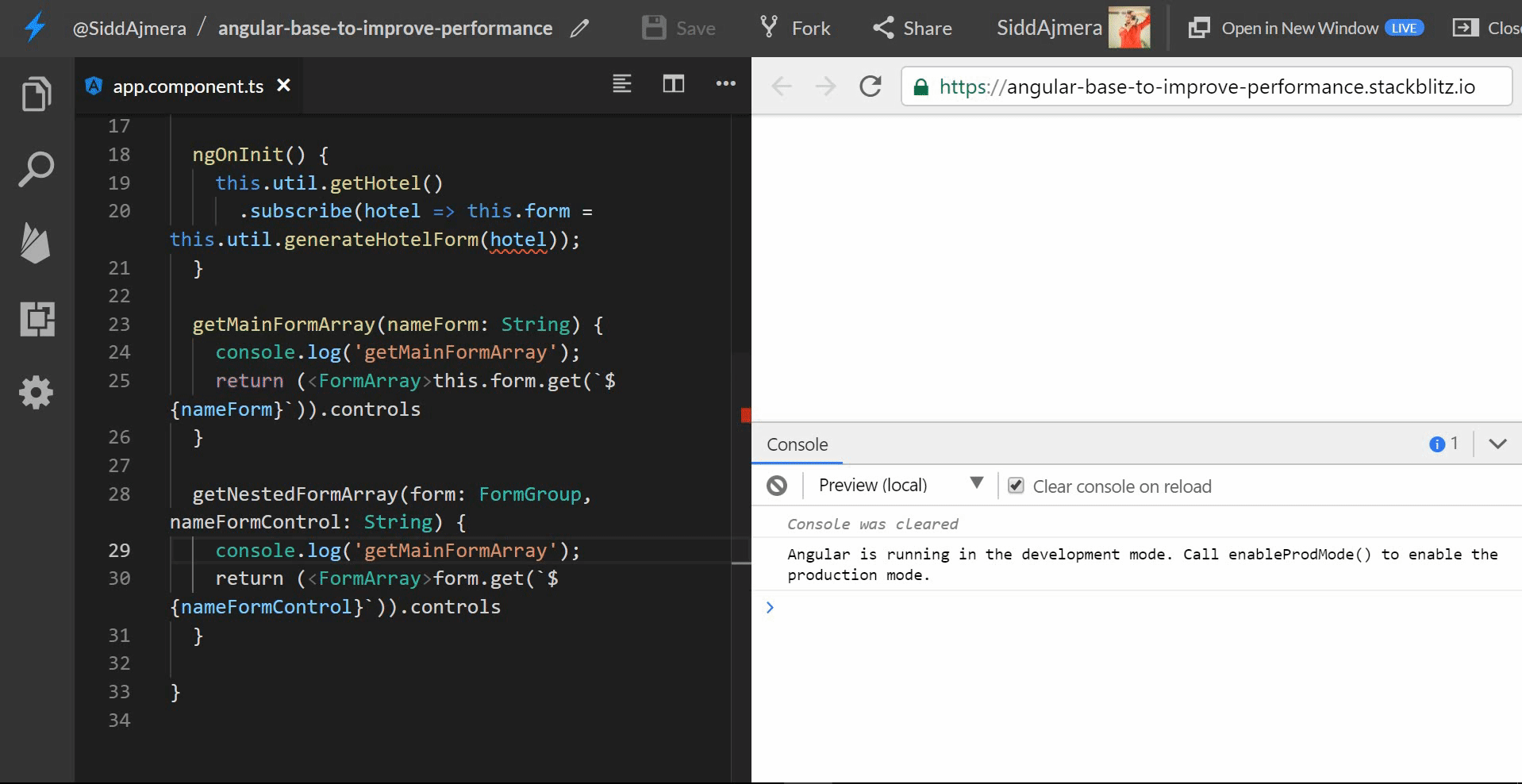
There is the lag — and the source of that lag is now clear.
The methods in our Component are being invoked almost every time Angular runs change detection on the Component. This aligns with what Tanner Edwards discussed in his lightning talk at ng-conf 2018:
Increasing Performance — more than a pipe dream — Tanner Edwards
As we all know, Angular triggers change detection under the following conditions:
- AJAX Calls
- Timeouts/Intervals
- DOM Events.
In this case, keyboard taps — being DOM Events — cause Angular to re-run change detection repeatedly. Since we are calling these methods directly in the template, Angular’s change detection floods the call stack. This is what produces those thousands of logs and the resulting lag.
So what now? Should I remove the methods? And if I do, how do I get the controls for my *ngFor in the template?
This is tricky, but there is a solution. FormGroups expose a controls property — an object that holds the actual FormGroup, FormControl, or FormArray instances.
Instead of calling getter methods to access these FormArrays in the template, we can directly use the controls object. Here is an example:
let roomType of form.controls[‘roomTypes’].controls
That gives us the roomTypes FormArray’s controls, which we can then iterate over. Replace all the function calls in the Component’s template with the syntax shown above. After making those changes, the template looks like this:
<form *ngIf="form" [formGroup]="form">
  <div formArrayName="roomTypes">
    <div *ngFor="let roomType of form.controls['roomTypes'].controls; let index = index" [formGroupName]="index">
      {{index}}
      <div formArrayName="mealTypes">
        <div *ngFor="let mealType of roomType.controls['mealTypes'].controls; let mealtypeIndex = index" [formGroupName]="mealtypeIndex">
          mealtype {{mealtypeIndex}}
          <div formArrayName="marketGroups">
            <div *ngFor="let marketGroup of mealType.controls['marketGroups'].controls; let marketGroupIndex = index" [formGroupName]="marketGroupIndex">
              marketGroupIndex {{marketGroupIndex}}
              <div formArrayName="rateSegments">
                <div *ngFor="let rateSegment of marketGroup.controls['rateSegments'].controls; let rateSegmentIndex = index" [formGroupName]="rateSegmentIndex">
                  rateSegmentIndex {{rateSegmentIndex}}
                  <div formArrayName="hotelSeasons">
                    <div class="fifth_border" *ngFor="let hotelseason of rateSegment.controls['hotelSeasons'].controls; let hotelseasonIndex = index" [formGroupName]="hotelseasonIndex">
                      hotelseasonIndex {{hotelseasonIndex}}
                      <div formArrayName="rates">
                        <div *ngFor="let rate of hotelseason.controls['rates'].controls; let rateIndex = index" [formGroupName]="rateIndex">
                          <div style="display:flex;flex-flow;row">
                            <div>
                              <p>SGL</p>
                              <input class="input text_right" type="text" formControlName="singlePrice">
                            </div>
                            <div>
                              <p>DLB/TWN</p>
                              <input class="input text_right" type="text" formControlName="doublePrice">
                            </div>
                            <div>
                              <p>EX-Adult</p>
                              <input class="input text_right" type="text" formControlName="xbedPrice">
                            </div>
                            <div>
                              <p>EX-Child</p>
                              <input class="input text_right" type="text" formControlName="xbedChildPrice">
                            </div>
                            <div>
                              <p>Adult BF</p>
                              <input class="input text_right" type="text" formControlName="bfPrice">
                            </div>
                            <div>
                              <p>Child BF</p>
                              <input class="input text_right" type="text" formControlName="bfChildPrice">
                            </div>
                          </div>
                        </div>
                      </div>
                    </div>
                  </div>
                </div>
              </div>
            </div>
          </div>
        </div>
      </div>
    </div>
  </div>
  <!-- <pre>{{form.value | json}}</pre> -->
</form>
Here’s the Changed Template
Since the methods are no longer needed on the Component class, we can remove them entirely and slim down AppComponent to something like this:
import { Component } from '@angular/core';
import { FormGroup } from '@angular/forms';
import { Observable } from 'rxjs';
import { UtilService } from '../app/util.service';
@Component({
  selector: 'my-app',
  templateUrl: './app.component.html',
  styleUrls: ['./app.component.css']
})
export class AppComponent {
  form$: Observable<FormGroup> = this.util.getHotelForm();
  constructor(private readonly util: UtilService) {}
}
Also, now that we are no longer subscribeing to the Observable, we must use the async pipe in the template:
<form *ngIf="form$ | async as form" [formGroup]="form">
  ...
  <pre>{{form.value | json}}</pre>
</form>
Test the updated StackBlitz to see if there is any performance difference:
This is our Semi-Final Code
It’s understandable if you do not notice a major difference. The original lag was only a few hundred milliseconds, and the current fields still take a few milliseconds to update. The improvement is roughly a few hundred milliseconds less than before — a subtle gain.
So? Are we done here? Is that it?
Not at all. This is only the beginning. There is more you can do to enhance the form’s performance. How? As suggested by Benedikt L and Garrett Darnell, we can split the form further by creating a child component for marketGroupFormGroup. Then, set the child component’s changeDetectionStrategy to OnPush. Something like this:
import { Component, ChangeDetectionStrategy, Input } from '@angular/core';
import { FormGroup } from '@angular/forms';
@Component({
  selector: 'market-group-form',
  templateUrl: './market-group-form.component.html',
  changeDetection: ChangeDetectionStrategy.OnPush
})
export class MarketGroupFormComponent {
  @Input() public marketGroupForm: FormGroup;
}
We can extract the template for this component from app.component.html:
<div [formGroup]="marketGroupForm">
  <div formArrayName="rateSegments">
    <div
      *ngFor="let rateSegment of marketGroupForm.controls['rateSegments'].controls; let rateSegmentIndex = index"
      [formGroupName]="rateSegmentIndex">
      rateSegmentIndex {{rateSegmentIndex}}
      <div formArrayName="hotelSeasons">
        <div
          class="fifth_border"
          *ngFor="let hotelseason of rateSegment.controls['hotelSeasons'].controls; let hotelseasonIndex = index"
          [formGroupName]="hotelseasonIndex">
          hotelseasonIndex {{hotelseasonIndex}}
          <div formArrayName="rates">
            <div
              *ngFor="let rate of hotelseason.controls['rates'].controls; let rateIndex = index"
              [formGroupName]="rateIndex">
              <div style="display:flex;flex-flow;row">
                <div>
                  <p>SGL</p>
                  <input class="input text_right" type="text" formControlName="singlePrice">
                </div>
                <div>
                  <p>DLB/TWN</p>
                  <input class="input text_right" type="text"  formControlName="doublePrice">
                </div>
                <div>
                  <p>EX-Adult</p>
                  <input class="input text_right" type="text"  formControlName="xbedPrice" >
                </div>
                <div>
                  <p>EX-Child</p>
                  <input class="input text_right" type="text"  formControlName="xbedChildPrice">
                </div>
                <div>
                  <p>Adult BF</p>
                  <input class="input text_right" type="text"  formControlName="bfPrice">
                </div>
                <div>
                  <p>Child BF</p>
                  <input class="input text_right" type="text"  formControlName="bfChildPrice">
                </div>
              </div>
            </div>
          </div>
        </div>
      </div>
    </div>
  </div>
</div>
Then, use it in app.component.html like this:
<form
  *ngIf="form$ | async as form"
  [formGroup]="form">
  <div
    formArrayName="roomTypes">
    <div
      *ngFor="let roomType of form.controls['roomTypes'].controls; let index = index"
      [formGroupName]="index">
      {{index}}
      <div
        formArrayName="mealTypes">
	<div
          *ngFor="let mealType of roomType.controls['mealTypes'].controls; let mealtypeIndex = index"
          [formGroupName]="mealtypeIndex">
	  mealtype {{mealtypeIndex}}
	  <div
            formArrayName="marketGroups">
	    <div
              *ngFor="let marketGroup of mealType.controls['marketGroups'].controls; let marketGroupIndex = index"
              [formGroupName]="marketGroupIndex">
	      marketGroupIndex {{marketGroupIndex}}
              <market-group-form [marketGroupForm]="marketGroup"></market-group-form>
            </div>
          </div>
        </div>
      </div>
    </div>
  </div>
  <!-- <pre>{{form.value | json}}</pre> -->
</form>
Notice Line 22, where we have **<market-group-form ></market-group-form>**
Ideally, the decision to break the component down into child components should depend on the complexity and nesting depth of your form. On each child component, you can set changeDetection to ChangeDetectionStrategy.OnPush. Angular will then skip change detection on child components when nothing has changed within them, which further boosts performance. After all those adjustments, this is what the final implementation should look like:
This is our Final Implementation
Test this StackBlitz and observe the performance difference. This time, the improvement should be quite noticeable.
Well Sidd, do you have any stats to suggest that the refactored code is faster?
Sure. How about a Performance Audits?
Performance Audits are an excellent way to measure app performance. Since I am using Google Chrome, I will run them there.
Open the Chrome Debugger tools and navigate to the Performance Tab. Once there, follow these steps:
- Click the Record Button.
- Click a field and type
111111. - Blur away from that field.
- Click the same field again and delete the
111111text. - Click Stop to end the recording.
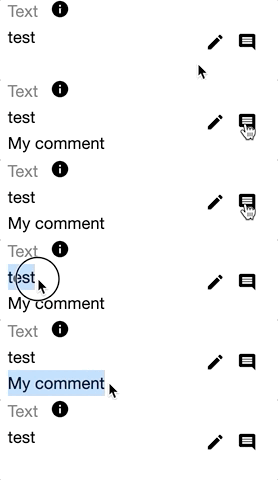
Here’s a Gif showing the steps to perform one
Run the same steps for both the Starting Point and the End Goal, and compare the results. Here are the stats I collected:
Here’s what I got for the Starting Point Example:
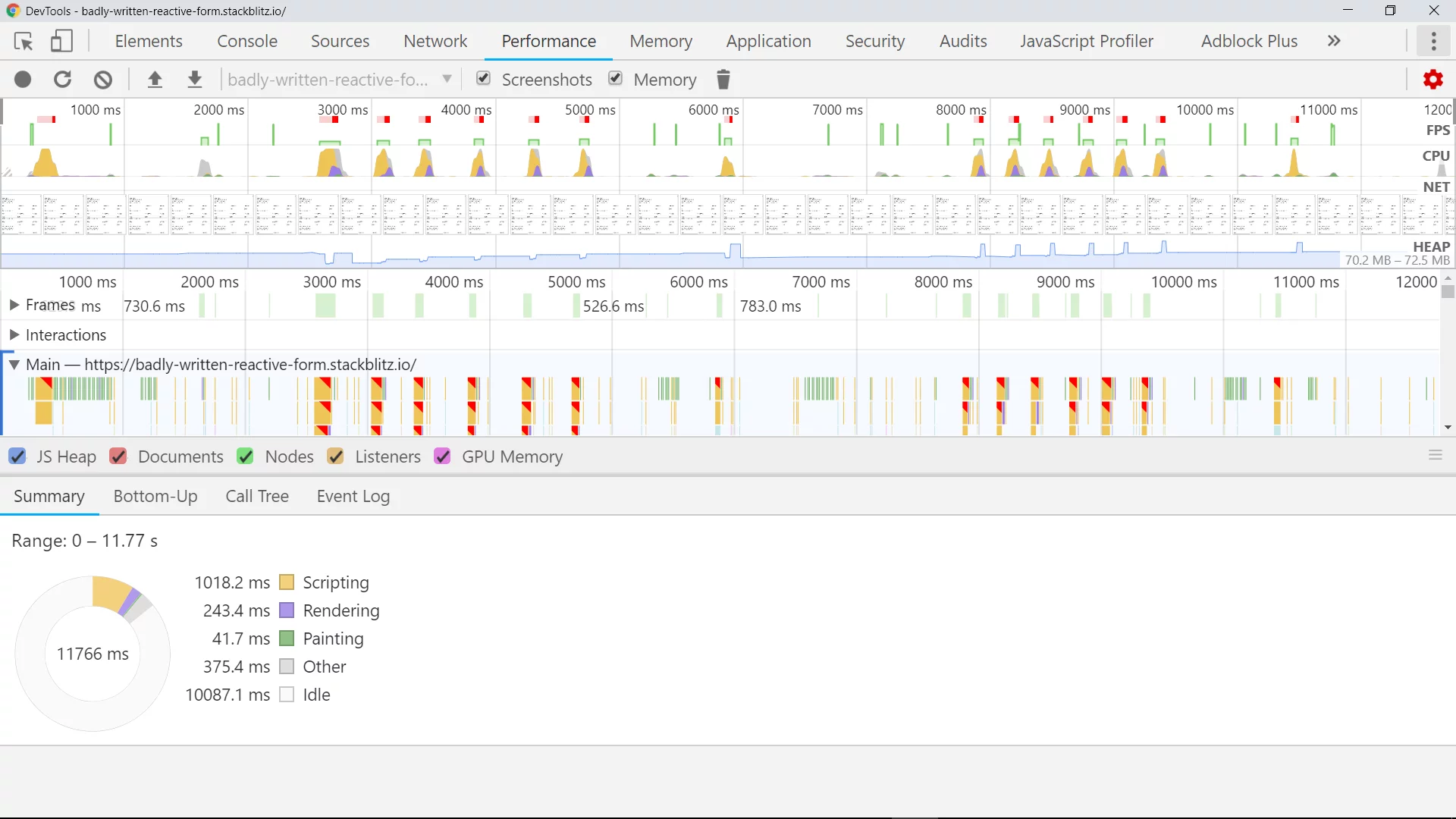
These are the stats for the Starting Point
Pay attention to the time spent on Scripting, Rendering, and Painting. The Status shows 1018.2ms for scripting, 268.0ms for rendering, and 62.5ms for painting.
Let’s see how the End Goal Example perform:
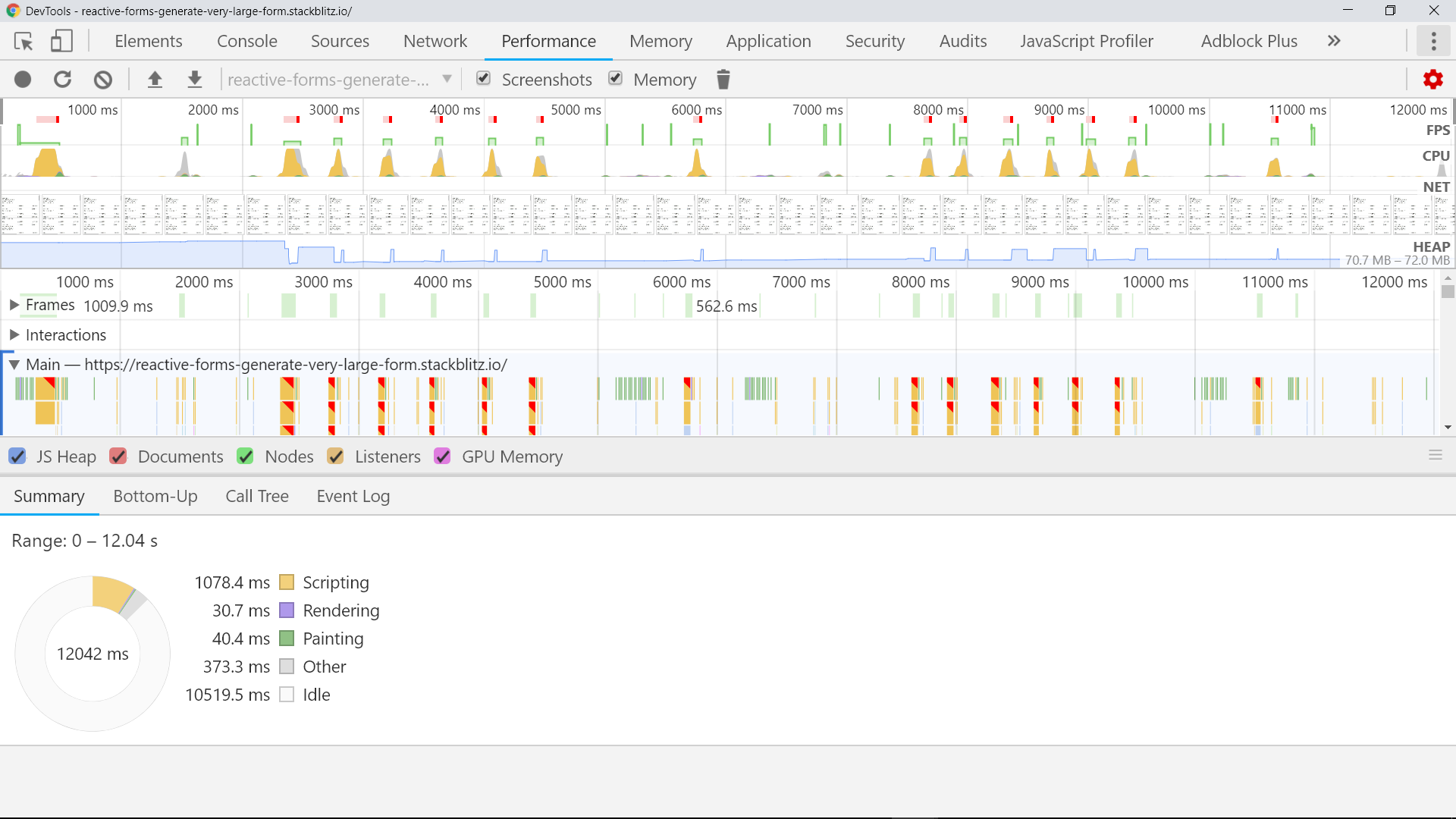
These are the stats for the End Goal
As you can see, rendering — which happens frequently on updates — took nearly 8 times less time in the final version. That is a clear performance gain of about 792% in rendering. This time, scripting took 1078.4 ms, rendering took 30.7 ms, and painting took 40.4 ms. That looks quite significant to me. What do you think?
Whoa, you’re still reading
What did we learn today? First, never call functions inside string interpolation ({{ fn() }}) or property binding ([prop]= "fn()") syntax. This causes those functions to run on every change detection cycle, which severely degrades app performance. Second, we saw that OnPush is a potent strategy for improving performance in Angular apps.
Take these lessons with you. Use them to refactor your past apps, apply them to your current projects, and keep them in mind for any future Angular work.
Closing notes
With that, I will wrap up this article. Thanks for reading to the end — I hope it wasn’t too dull.
I am deeply thankful to Alex Okrushko, Michael Karén, Max Koretskyi aka Wizard, and Rajat Badjatya for proofreading and offering constructive feedback that made this article better.
I hope this piece taught you something new about Angular and Reactive Forms. If it did, press and hold the icon, and share this article with friends who are new to Angular and aiming for similar results.
Also, leave a comment about what you want to read next. Until next time.