What does HttpClientModule bring to the table?
Angular ships with a dedicated service module called HttpClientModule. Its role is to enable HTTP requests and give us fine-grained control over how those requests and their responses are handled. The module is categorized as a service module because its primary job is to instantiate services — it does not export any components, directives, or pipes.
Jump back to the table of contents.
Initial setup and exploration
To truly grasp the inner workings, I prefer to combine a debugger session with the source code open in my editor. This makes it easy to test hypotheses and trace the flow of execution.
Local Angular installation
git clone -b 8.2.x --single-branch https://github.com/angular/angular.git
Working with StackBlitz
For a hands-on look, I've prepared a StackBlitz demo that we'll refer to throughout this exploration to see how the different pieces connect.
Getting our hands dirty
When you open the StackBlitz project, follow these steps:
- Launch the developer tools.
- Navigate to
token.interceptor.ts(using Ctrl + P) and set a breakpoint next to theconsole.warn()call. - Refresh the preview iframe in StackBlitz.
Your debugger should now pause, showing you the current execution context.
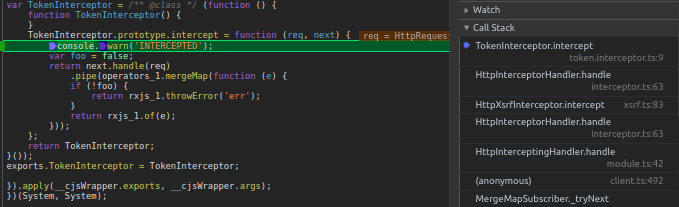
Clicking on the anonymous function from client.ts will drop you into the HttpClient class — this is the service you typically inject into your own application services to make HTTP calls.
This class is a collection of methods that correspond to the standard HTTP verbs.
export class HttpClient {
    constructor (private handler: HttpHandler) { }

    /* ... Method overloads ... */
    request(first: string | HttpRequest<any>, url?: string, options: {/* ... */}): Observable<any> {
        /* ... */
    }

    /* ... Method overloads ... */
    delete(url: string, options: {/* ... */}): Observable<any> {
        return this.request<any>('DELETE', url, options as any);
    }

    /* ... Method overloads ... */
    get(url: string, options: {/* ... */}): Observable<any> {
        return this.request<any>('GET', url, options as any);
    }

    /* ... Method overloads ... */
    post(url: string, body: any | null, options: {/* ... */}): Observable<any> {
        return this.request<any>('POST', url, addBody(options, body));
    }

    /* ... Method overloads ... */
    put(url: string, body: any | null, options: {/* ... */}): Observable<any> {
        return this.request<any>('PUT', url, addBody(options, body));
    }
}
Take a moment to peruse the HttpClient.request method in your editor to see how it orchestrates the different parts.
Now, set a breakpoint on line 492 and refresh the browser. The real magic starts here.
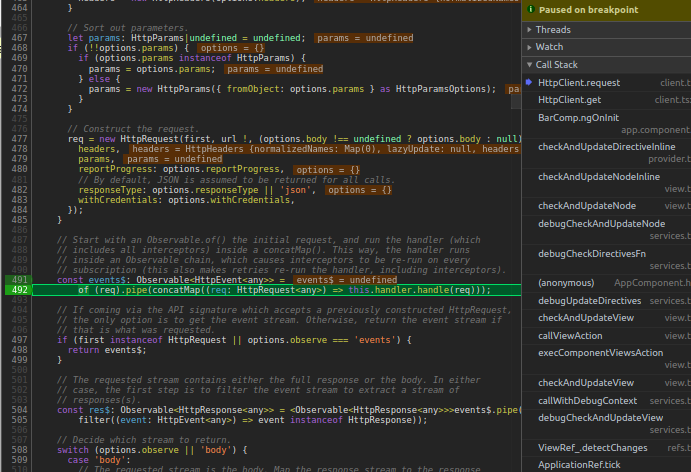
We cannot step into this.handler.handle() yet because the observable is only being constructed, not subscribed to yet. Instead, we'll manually set a breakpoint inside the handle method.
Go back to your editor and find the constructor of the class. There, you'll see that HttpHandler is a DI token that is resolved to HttpInterceptingHandler.
Here is the list of providers involved:
@NgModule({
    /* ... */

    providers: [
        HttpClient,
        { provide: HttpHandler, useClass: HttpInterceptingHandler },
        HttpXhrBackend,
        { provide: HttpBackend, useExisting: HttpXhrBackend },
        BrowserXhr,
        { provide: XhrFactory, useExisting: BrowserXhr },
    ],
})
export class HttpClientModule {
}
Next, navigate to the HttpInterceptingHandler class and put a breakpoint inside its handle method.
Once your breakpoint is set, return to the dev tools and resume execution.
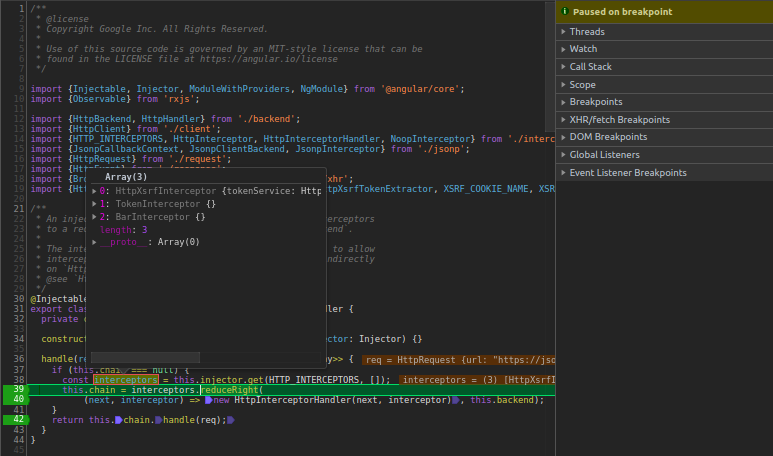
Note: BarInterceptor is registered in app.module.
This method is where all registered interceptors are collected. It does this by injecting the HTTP_INTERCEPTOR token, which is a multi-provider. This allows us to gather all the interceptor instances we've configured.
The next step is constructing the chain of interceptors. But first, let's inspect what HttpInterceptorHandler looks like:
export class HttpInterceptorHandler implements HttpHandler {
    constructor(private next: HttpHandler, private interceptor: HttpInterceptor) { }

    handle(req: HttpRequest<any>): Observable<HttpEvent<any>> {
        return this.interceptor.intercept(req, this.next);
    }
}
I find it helpful to think of this interceptor chain as a linked list, where we start building from the tail backwards to the head.
To see this visually, continue stepping through the debugger until you hit line 42, keeping an eye on the Scope panel to watch the structure being built.
Once the chain is fully assembled, we walk it from the head by stepping into the handle function at line 42.
Here's a mental picture of the linked list:
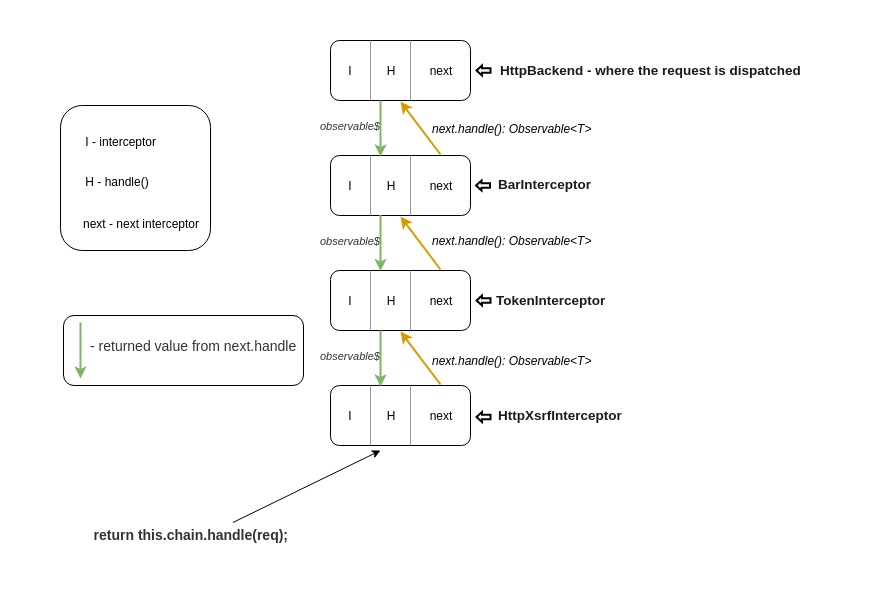
Based on the illustration, it's clear that each call to next.handle() returns an observable. This means each interceptor can modify and extend the observable that flows downwards, and any changes will propagate back up to the interceptors that precede it.
Now, let's turn our attention to this.backend. You might be wondering where it originates. In the constructor, you'll see it's provided by the HttpBackend token, which is resolved to HttpXhrBackend (as defined in the module's providers).
Inside the HttpXhrBackend
A few strategic breakpoints here will clarify a lot!
export class HttpXhrBackend implements HttpBackend {
  constructor(private xhrFactory: XhrFactory) {}

  handle(req: HttpRequest<any>): Observable<HttpEvent<any>> {
    // Everything happens on Observable subscription.
    return new Observable((observer: Observer<HttpEvent<any>>) => {
      const xhr = this.xhrFactory.build();

        /* ... Setting up the headers ... */
        /* ... Setting up the response type & serializing the body ... */

      // partialFromXhr extracts the HttpHeaderResponse from the current XMLHttpRequest
      // state, and memoizes it into headerResponse.
      const partialFromXhr = (): HttpHeaderResponse => { /* ... */ };

      // First up is the load event, which represents a response being fully available.
      const onLoad = () => { /* ... */ };

      const onError = (error: ProgressEvent) => { /* ... */ };

      xhr.addEventListener('load', onLoad);
      xhr.addEventListener('error', onError);

      // Fire the request, and notify the event stream that it was fired.
      xhr.send(reqBody !);
      observer.next({type: HttpEventType.Sent});

      // This is the return from the Observable function, which is the
      // request cancellation handler.
      return () => {
        xhr.removeEventListener('error', onError);
        xhr.removeEventListener('load', onLoad);
        xhr.abort();
      };
    });
  }
}
The most notable part of this backend is its handle() method — this is the final link in the interceptor chain and sits at the tail. Its responsibility is to actually dispatch the request to the server.
partialFromXhr is a helper that extracts the HttpHeaderResponse from the current XMLHttpRequest. It memoizes this response object so it can be reused, like inside the onLoad and onError event handlers.
The onLoad callback is triggered once the response is fully loaded. It's here that the body of the response gets parsed and validated for the first time.
const onLoad = () => {
  // Read response state from the memoized partial data.
  let { headers, status, statusText, url } = partialFromXhr();

  // The body will be read out if present.
  let body: any | null = null;

  let ok = status >= 200 && status < 300;

  /* ... Parse body and check its validity ... */

  if (ok) {
      // A successful response is delivered on the event stream.
      observer.next(new HttpResponse({
          body,
          headers,
          status,
          statusText,
          url: url || undefined,
      }));
      // The full body has been received and delivered, no further events
      // are possible. This request is complete.
      observer.complete();
  } else {
      // An unsuccessful request is delivered on the error channel.
      observer.error(new HttpErrorResponse({
          // The error in this case is the response body (error from the server).
          error: body,
          headers,
          status,
          statusText,
          url: url || undefined,
      }));
  }
}
onErroris a callback that gets invoked if a network error is encountered during the request.
const onError = (error: ProgressEvent) => {
  const {url} = partialFromXhr();
  const res = new HttpErrorResponse({
    error,
    status: xhr.status || 0,
    statusText: xhr.statusText || 'Unknown Error',
    url: url || undefined,
  });
  observer.error(res);
};
Finally, it's worth highlighting that the observable returned by HttpXhrBackend.handle() will not actually fire the request until it is subscribed to — which happens when you subscribe to a method on HttpClient (like get or post). This makes it a cold observable, and it's used with concatMap:
this.httpClient.get(url).subscribe() -> of(req).pipe(concatMap(req => this.handler.handle))
The function returned from inside the observable
return () => {
  xhr.removeEventListener('error', onError);
  xhr.removeEventListener('load', onLoad);
  xhr.abort();
};
will be called as soon as the observable stops emitting, whether that's due to an error or a complete signal.
Handling completion
const obsBE$ = new Observable(obs => {
  timer(1000)
    .subscribe(() => {
      obs.next({ response: { data: ['foo', 'bar'] } });

      // Stop receiving values!
      obs.complete();
    })

    return () => {
      console.warn("I've had enough values!");
    }
});

obsBE$.subscribe(console.log)
/*
-->
response
I've had enough values!
*/
Handling errors
const be$ = new Observable(o => {
  o.next('foo');

  return () => {
    console.warn('NO MORE VALUES!');
  }
});

be$
 .pipe(
    flatMap(v => throwError('foo')),
 )
  .subscribe(null, console.error)
/*
-->
foo
NO MORE VALUES
*/
Return to contents.
Cancel an in-flight request
A very common scenario is the typeahead search input:
this.keyPressed
    .pipe(
        debounceTime(300),
        switchMap(v => this.http.get(url + '?key=' + v))
    )
This pattern is recommended because of how switchMap works. When a new value arrives, it unsubscribes from the previous inner observable, cleaning up any pending work.
const src = new Observable(obs => {
  obs.next('src 1');
  obs.next('src 2');

  setTimeout(() => {
    obs.next('src 3');
    obs.complete();
  }, 1000);

  return () => {
    console.log('called on unsubscription')
  };
});

of(1, 2)
  .pipe(
    switchMap(() => src)
  )
  .subscribe(console.log)

/*
src 1
src 2
called on unsubscription ---> unsubscribed from because the next value(`2`) kicked in
src 1
src 2
src 3
called on unsubscription ---> completion
*/
Say the value 1 is emitted, and while we're waiting for the inner observable to finish, another value 2 arrives. This causes switchMap to tear down the old subscription, which in turn triggers the function that was returned from within the observable.
Let's peek at what this function does inside HttpXhrBackend.handle:
return () => {
    /* Skipped some lines for brevity... */

    xhr.removeEventListener('error', onError);
    xhr.removeEventListener('load', onLoad);

    // Finally, abort the in-flight request.
    xhr.abort();
}
So the logic is straightforward: whenever a subscription is cancelled, this teardown logic runs, effectively aborting the request.
Back to the outline.
Retrying failed requests
An interceptor for handling authentication tokens is a good example:
intercept (req: HttpRequest<any>, next: HttpHandler) {
  /* ... Attach token and all that good stuff ... */

  return next.handle()
    .pipe(
      catchError(err => {
        if (err instanceof HttpErrorResponse && err.status === 401) {
          return this.handle401Error(req, next)
        }

        // Simply propagate the error to other interceptors or to the consumer
        return throwError(err);
      })
    )
}

private handle401Error (req: HttpRequest<any>, next: HttpHandler) {
  return this.authService.refreshToken()
    .pipe(
      tap(token => this.authService.setToken(token)),
      map(token => this.attachToken(req, token))
      switchMap(req => next.handle(req))
    )
}

private attachToken(req: HttpRequest<any>, token: string): HttpRequest<any> {
  return req.clone({ setHeaders: { 'x-access-token': token } })
}
The retry behaviour boils down to using switchMap(() => next.handle(req)) inside of a catchError.
Reaching the code within catchError implies that the consumer has unsubscribed from the observable returned by HttpXhrBackend.handle(). This gives us the chance to re-subscribe to that source observable, which will again dispatch the HTTP request and also invoke the intercept method of any subsequent interceptors.
Here's a simpler version to illustrate the mechanics:
const obsBE$ = new Observable(obs => {
  timer(1000)
    .subscribe(() => {
      // console.log('%c [OBSERVABLE]', 'color: red;');

      obs.next({ response: { data: ['foo', 'bar'] } });

      // Stop receiving values!
      obs.complete();
    })

    return () => {
      console.warn("I've had enough values!");
    }
});

// Composing interceptors the chain
const obsI1$ = obsBE$
  .pipe(
    tap(() => console.log('%c [i1]', 'color: blue;')),
    map(r => ({ ...r, i1: 'intercepted by i1!' }))
  );

let retryCnt = 0;
const obsI2$ = obsI1$
  .pipe(
    tap(() => console.log('%c [i2]', 'color: green;')),
    map(r => {
      if (++retryCnt <=3) {
        throw new Error('err!')
      }

      return r;
    }),
    catchError((err, caught) => {
      return getRefreshToken()
        .pipe(
          switchMap(() => /* obsI2$ */caught),
        )
    })
  );

const obsI3$ = obsI2$
  .pipe(
    tap(() => console.log('%c [i3]', 'color: orange;')),
    map(r => ({ ...r, i3: 'intercepted by i3!' }))
  );

function getRefreshToken () {
  return timer(1500)
    .pipe(q
      map(() => ({ token: 'TOKEN HERE' })),
    );
}

function get () {
  return obsI3$
}

get()
  .subscribe(console.log)

/*
-->
[i1]
[i2]
I've had enough values!
[i1]
[i2]
I've had enough values!
[i1]
[i2]
I've had enough values!
[i1]
[i2]
[i3]
{
  "response": {
    "data": [
      "foo",
      "bar"
    ]
  },
  "i1": "intercepted by i1!",
  "i3": "intercepted by i3!"
}
I've had enough values!
*/
You can try this in this StackBlitz.
This is the effect of calling next.handle() in each interceptor. Now imagine that rather than const obsI3$ = obsI2$, the interceptor does something more like this:
// Interceptor Nr.2
const next = {
  handle(req) {
    /* ... Some logic here ... */

    return of({ response: '' })
  }
}

const obsI3$ = next.handle(req)
  .pipe(
    map(r => ({ ...r, i3: 'this is interceptor 3!!' })),
    /* ... */
  )
In that case, obsI3$ is the observable returned by next.handle(), meaning it can now layer its own custom behavior. If something goes wrong, it has the ability to re-execute the source observable.
In your interceptors, you'd typically implement retry logic with switchMap(() => next.handle(req)) (as shown in the first snippet). This approach ensures you execute not only the wrapped observable, but also the logic found within each interceptor's intercept() method.
As you can see, switchMap(() => /* obsI2$ */caught), the catchError operator offers a second argument, caught, which represents the source observable. (More details can be found here.)
Back to content list.
The need for cloning in interceptors
A typical pattern for adding a JWT token to requests looks like this:
if (token) {
  request = request.clone({
    setHeaders: { [this.AuthHeader]: token },
  });
}

return next.handle(request)
The primary justification for cloning is immutability. You don't want to introduce side effects by mutating the request object from different layers. Each interceptor should have the autonomy to modify and configure the request without affecting the others. The clone is then what gets passed along to the subsequent interceptor in the chain.
Continue to the table of contents.
Why is it advised to include HttpClientModule only in AppModule or CoreModule?
When a module A is lazy-loaded, Angular creates a separate child injector for it. Any providers declared within A itself, or within modules that A imports, are resolved from this child injector. Consequently, those providers are isolated to the scope of module A.
If you import HttpClientModule inside A, only the interceptors that are provided within A's own injector context will be registered and applied to outgoing requests. Interceptors registered higher up in the injector hierarchy will be ignored. This occurs because HttpClientModule brings its own set of providers, which, as explained above, are scoped to the module that imports them.
             { provide: HttpHandler, useClass: ... }
  AppModule {    /
    imports: [  /
      HttpClientModule
    ]
  }
                  { provide: HttpHandler, useClass: HttpInterceptingHandler } <- where interceptors are gathered
  FeatureModule { /  <- lazy-loaded                  |
    imports: [   /                                   |
      HttpClientModule <------------------           |
    ]                                     |          |
                                          |          |
    declarations: [FeatureComponent]       <------------------------
    providers: [                                     |              |
                                                    /               |
      { provide: HTTP_INTERCEPTORS, useClass: FeatInterceptor_1 },  |
      { provide: HTTP_INTERCEPTORS, useClass: FeatInterceptor_2 }   |
    ]                                      ------------------------>
  }                                       |
                                          | httpClient.get()
  FeatureComponent {                      |
    constructor (private httpClient: HttpClient) { }
  }
Conversely, if A does not import HttpClientModule, the injector will traverse upwards through the injector tree until it locates the necessary providers (in this scenario, finding them in AppModule). This setup implies that any interceptors defined within A will be disregarded.
Back to Content.
How can interceptors be entirely skipped?
TLDR;
Ensure that the HttpHandler token is configured to point to HttpXhrBackend:
@NgModule({
  imports: [
    /* ... */
    HttpClientModule,
    /* ... */
  ],
  declarations: [ /* ... */ ],
  providers: [
    /* ... */
    {
      provide: HttpHandler,
      useExisting: HttpXhrBackend,
    },
    /* ... */
  ]
})
export class AppModule { }
In-depth Walkthrough
It is advisable to first understand the inner workings of the HttpClientModule.
Initiating an HTTP call, such as HttpClient.get() (or any other HTTP method), will ultimately trigger the HttpClient.request() method. Within this method, the execution flow eventually hits this specific line:
const events$: Observable<HttpEvent<any>> =
        of (req).pipe(concatMap((req: HttpRequest<any>) => this.handler.handle(req)));
Now, let's examine how the this.handler property is obtained:
@Injectable()
export class HttpClient {
  constructor(private handler: HttpHandler) {}

  /* ... */
}
Upon inspecting the providers configured in HttpClientModule,
@NgModule({
    /* ... */

    providers: [
        HttpClient,
        { provide: HttpHandler, useClass: HttpInterceptingHandler },
        HttpXhrBackend,
        { provide: HttpBackend, useExisting: HttpXhrBackend },
        BrowserXhr,
        { provide: XhrFactory, useExisting: BrowserXhr },
    ],
})
export class HttpClientModule {
}
it becomes clear that the HttpHandler token is associated with HttpInterceptingHandler:
@Injectable()
export class HttpInterceptingHandler implements HttpHandler {
  private chain: HttpHandler|null = null;

  constructor(private backend: HttpBackend, private injector: Injector) {}

  handle(req: HttpRequest<any>): Observable<HttpEvent<any>> {
    if (this.chain === null) {
      const interceptors = this.injector.get(HTTP_INTERCEPTORS, []);
      this.chain = interceptors.reduceRight(
          (next, interceptor) => new HttpInterceptorHandler(next, interceptor), this.backend);
    }
    return this.chain.handle(req);
  }
}
The HttpInterceptingHandler is responsible for building the interceptor pipeline. This pipeline ultimately enables the execution of all registered interceptors against the outgoing request.
It is also noteworthy that HttpInterceptingHandler adheres to the HttpHandler contract:
export abstract class HttpHandler {
  abstract handle(req: HttpRequest<any>): Observable<HttpEvent<any>>;
}
The HttpHandler interface is also implemented by HttpBackend
export abstract class HttpBackend implements HttpHandler {
  abstract handle(req: HttpRequest<any>): Observable<HttpEvent<any>>;
}
Finally, HttpXhrBackend implements HttpBackend. This backend is the component that eventually dispatches the request to the server (Further reading can be found here).
@Injectable()
export class HttpXhrBackend implements HttpBackend {
  constructor(private xhrFactory: XhrFactory) {}

  handle(req: HttpRequest<any>): Observable<HttpEvent<any>> {
    /* ... */
  }
}
As observed, both HttpInterceptingHandler and HttpXhrBackend are required to provide an implementation for the handle() method.
Therefore, to bypass interceptors, the solution is to instruct the HttpHandler token to resolve to HttpXhrBackend instead.
@NgModule({
  imports: [
    /* ... */
    HttpClientModule,
    /* ... */
  ],
  declarations: [ /* ... */ ],
  providers: [
    /* ... */
    {
      provide: HttpHandler,
      useExisting: HttpXhrBackend,
    },
    /* ... */
  ]
})
export class AppModule { }
Back to Content.
How do setHeaders and headers differ?
setHeaders
req = req.clone({
  setHeaders: { foo: 'bar' },
})
Using setHeaders allows you to add the given headers to whatever headers are already set on the request configuration.
headers
req = req.clone({
  setHeaders: { foo: 'bar' },
})
By specifying headers (which accepts an instance of HttpHeaders), you can replace the currently configured headers entirely.
Here is the relevant excerpt from the Angular source code:
// Headers and params may be appended to if `setHeaders` or
// `setParams` are used.
let headers = update.headers || this.headers;
let params = update.params || this.params;

// Check whether the caller has asked to add headers.
if (update.setHeaders !== undefined) {
  // Set every requested header.
  headers =
      Object.keys(update.setHeaders)
          .reduce((headers, name) => headers.set(name, update.setHeaders ![name]), headers);
}
Note: This same principle applies to the pair setParams & params;.
Back to Content.
What is the underlying mechanism of HttpHeaders?
HttpHeaders is a class designed to facilitate the manipulation (supporting CRUD operations on) of request headers.
Consider the following example to understand its behavior:
const headers = new HttpHeaders({
  foo: 'foo',
  bar: 'bar',
});

const newHeaders = headers
  .append('name', 'andrei')
  .set('city', 'tgv')
  .delete('foo')
  .has('abcd');
The key feature here is its lazy initialization. It only constructs the header key-value pairs when they are actually required. This happens upon querying for their current state through methods like HttpHeaders.forEach(), HttpHeaders.get(), and so on.
Here is what the constructor looks like:
constructor(headers?: string|{[name: string]: string | string[]}) {
  if (!headers) {
    this.headers = new Map<string, string[]>();
  } else if (typeof headers === 'string') {
    this.lazyInit = () => { /* ... */ }
  } else {
    this.lazyInit = () => { /* ... */ }
  }
}
As shown, the lazyInit function is assigned during the construction of an HttpHeaders instance.
Consequently, when you perform operations such as HttpHeaders.append, HttpHeaders.set or HttpHeaders.delete — which modify the initial state supplied to the constructor — a new clone is created. This clone stores a list of these operations (create -> set, update -> append, delete -> delete).
These pending operations are eventually applied to the initial state at the point of initialization.
Here's an illustration of the HttpHeaders.clone method:
// action
interface Update {
  name: string;
  value?: string|string[];
  op: 'a'|'s'|'d';
}

private clone(update: Update): HttpHeaders {
  const clone = new HttpHeaders();
  // Preserve the initialization across multiple clones
  clone.lazyInit =
      (!!this.lazyInit && this.lazyInit instanceof HttpHeaders) ? this.lazyInit : this;
  // Accumulate actions
  clone.lazyUpdate = (this.lazyUpdate || []).concat([update]);
  return clone;
}
Let's break down this logic using the example from earlier:
const headers = new HttpHeaders({
  foo: 'foo',
  bar: 'bar',
});
/*
-->
h1.lazyInit = () => {
  // Initialize headers
}
*/

const newHeaders = headers
  .append('name', 'andrei')
  /*
  -->
  // Creating a clone
  h2.lazyInit = h1 // Preserving the first `instance` across multiple clones
  h2.lazyUpdate = { "name": "name", "value": "andrei", "op": "a" }
  */
  .set('city', 'tgv')
  /*
  -->
  // Creating a clone
  // h2.lazyInit = h1
  h3.lazyInit = h2.lazyInit // Preserving the first `instance` across multiple clones
  h3.lazyUpdate = [
    { "name": "name", "value": "andrei", "op": "a" }, // append
    { "name": "city", "value": "tgv", "op": "s" } // set
  ]
  */
  .delete('foo')
  /*
  -->
  // Creating a clone
  // h3.lazyInit = h2.lazyInit
  h4.lazyInit = h3.lazyInit // Preserving the first `instance` across multiple clones
  h4.lazyUpdate = [
    { "name": "name", "value": "andrei", "op": "a" },
    { "name": "city", "value": "tgv", "op": "s" },
    { "name": "foo", "op": "d" }
  ]
  */
  .has('abcd');
  /*
  -->
  Here is where the initialization takes place
  */
The process of applying the operations would unfold as follows:
private init(): void {
  if (!!this.lazyInit) {
    if (this.lazyInit instanceof HttpHeaders) {
      this.copyFrom(this.lazyInit);
    } else {
      this.lazyInit();
    }
    this.lazyInit = null;
    if (!!this.lazyUpdate) {
      this.lazyUpdate.forEach(update => this.applyUpdate(update));
      this.lazyUpdate = null;
    }
  }
}

private copyFrom(other: HttpHeaders) {
  other.init();
  Array.from(other.headers.keys()).forEach(key => {
    this.headers.set(key, other.headers.get(key) !);
    this.normalizedNames.set(key, other.normalizedNames.get(key) !);
  });
}
The HttpHeaders.init() method is triggered when you query the header state (e.g., using HttpHeaders.get(), HttpHeaders.has()).
Inside HttpHeaders.copyFrom(), the parameter other refers to the original HttpHeaders instance. This original instance holds the initialization function: lazyInit. Invoking other.init() leads to the crucial line within HttpHeaders.init(): this.lazyInit(); . Here, the initial state is built and stored into the original instance.
Subsequently, two tasks remain to be completed:
- Transfer the state from the original instance to the current instance (the latest clone); this is accomplished in these lines of
HttpHeaders.copyFrom():
Array.from(other.headers.keys()).forEach(key => {
  this.headers.set(key, other.headers.get(key) !);
  this.normalizedNames.set(key, other.normalizedNames.get(key) !);
});
- Execute the queued operations against the freshly copied state:
// HttpHeaders.init()
if (!!this.lazyUpdate) {
  this.lazyUpdate.forEach(update => this.applyUpdate(update));
  this.lazyUpdate = null;
}
Back to Content.
What is the purpose of HttpClientJsonpModule?
JSONP is a technique used to circumvent the well-documented CORS restriction. It achieves this by loading the target resource as if it were a script file.
When fetching a resource via a script tag, you can supply a named callback. The remote resource will then wrap its JSON payload within this callback function, which gets invoked during the script's execution.
This module offers an abstraction to leverage JSONP without needing to manually handle these complexities.
Let's investigate its internals to appreciate its utility!
@NgModule({
  providers: [
    JsonpClientBackend,
    {provide: JsonpCallbackContext, useFactory: jsonpCallbackContext},
    {provide: HTTP_INTERCEPTORS, useClass: JsonpInterceptor, multi: true},
  ],
})
export class HttpClientJsonpModule {
}
JsonpCallbackContext is injected with jsonpCallbackContext, which returns either the global window object or a simple empty object (typically in test environments). This object serves as a registry to store the callback function that the loaded script will eventually execute.
Furthermore, it provides an interceptor called JsonpInterceptor. The core responsibility of this interceptor is to intercept outgoing requests and prevent them from reaching the standard HttpBackend (which handles typical XHR requests) when the request uses the JSONP method.
@Injectable()
export class JsonpInterceptor {
  constructor(private jsonp: JsonpClientBackend) {}

  intercept(req: HttpRequest<any>, next: HttpHandler): Observable<HttpEvent<any>> {
    if (req.method === 'JSONP') {
      return this.jsonp.handle(req as HttpRequest<never>);
    }

    // Fall through for normal HTTP requests.
    return next.handle(req); // Next interceptor in the chain
  }
}
The real logic resides in JsonpClientBackend. This backend automatically generates a unique callback name to be executed by the script later. It does this by substituting a placeholder, JSONP_CALLBACK, within the request URL with the newly generated callback identifier.
export class JsonpClientBackend implements HttpBackend {
  private nextCallback(): string { return `ng_jsonp_callback_${nextRequestId++}`; }

  /* ... */

  handle (/* ... */) {
    return new Observable<HttpEvent<any>>((observer: Observer<HttpEvent<any>>) => {
      /* ... */
      const callback = this.nextCallback();
      const url = req.urlWithParams.replace(/=JSONP_CALLBACK(&|$)/, `=${callback}$1`);
    });
  }
}
Following that, it associates the callback function with the generated callback name and stores it in the object from jsonpCallbackContext.
this.callbackMap[callback] = (data?: any) => {
  delete this.callbackMap[callback];

  if (cancelled) {
    return;
  }

  body = data;
  finished = true;
};
It is critical to remember that this callback must be executed prior to the full download of the script. This mechanism allows the library to verify whether the supplied callback was triggered in scenarios where a custom callback name is provided.
This check occurs once the script has completed loading:
// Inside `JsonpClientBackend.handle`
const onLoad = (event: Event) => {
    // Maybe due to `switchMap`
    if (cancelled) {
      return;
    }

    cleanup();

    // Was the callback called with the response?
    if (!finished) {
      // If not, send the error response to the stream

      return;
    }

    // If yes, sent the response to the stream - everything was successful
}
Back to Content.
Conclusion
I trust you found this deep dive into the module both informative and engaging.
Thank you for taking the time to read!