Bringing Strategic Design to Life with Nx
In the previous article of this series, I discussed how Strategic Design helps split a software system into distinct sub-domains, each with its own bounded context. Now, I'll demonstrate how to turn those bounded contexts into actual code using Angular and an Nx-based monorepo.
My approach follows the guidelines that the Nx team published in their free e-book on Monorepo Patterns. Before that resource existed, I relied on similar techniques, but adopting the official recommendations helps establish a shared vocabulary and consistent conventions across the community.
Setting Up the Workspace
To put this architecture into practice, we use a workspace built on Nx, which extends the Angular CLI and makes it easier to organize a solution into multiple applications and libraries. Naturally, this is only one option among several. Alternatively, each bounded context could be implemented as a fully separate solution — a pattern commonly referred to as micro frontends.
In the setup described here, all applications live in an apps directory, while reusable libraries are organized under libs, grouped by their domain or bounded context name:
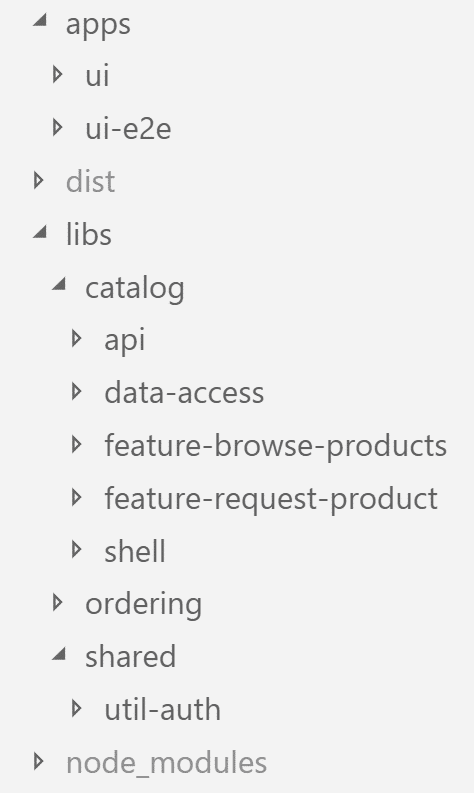
Because this kind of workspace holds several applications and libraries in a single source repository, it's known as a monorepo. This pattern is widely used at companies like Google and Facebook, and it has been the norm in the .NET ecosystem for roughly two decades.
A monorepo simplifies code sharing across projects and prevents version conflicts by maintaining a single central node_modules directory. This ensures, for example, that every library uses the same Angular version.
To get started with Nx, run the following command:
npm i -g nx
Creating a CLI-based monorepo workspace is as simple as invoking the create-nx-workspace command. After that, you can add applications and libraries with ng generate:
npx create-nx-workspace e-proc
cd e-proc
ng generate app apps/ui
ng generate lib libs/feature-request-product
Organizing Libraries by Category
In their free e-book on Monorepo Patterns, Nrwl — the team behind Nx — suggests these library categories:
- feature: Implements a use case using smart components
- data-access: Handles data retrieval, for instance via HTTP or WebSockets
- ui: Offers reusable, use-case-agnostic components (dumb components)
- util: Contains helper functions
I also add a few more categories to cover additional needs:
- shell: Serves as the entry point for a domain within an application that spans multiple domains
- api: Exposes functionality intended for use by other domains
- domain: Holds domain-specific logic, such as calculating additional expenses (not demonstrated here). This can be merged with a corresponding
data-accesslibrary to streamline the design.
To keep things clear, these categories act as prefixes for the library folders. That way, libraries of the same type appear together in a sorted list.
Each library also exposes a public API that makes selected components available, while keeping everything else hidden. This allows internal implementation details to change freely:
export * from './lib/catalog-data-access.module';
export * from './lib/catalog-repository.service';
Enforcing Library Boundaries
Minimizing dependencies between libraries is key to maintainability. Nx helps visualize this with its dependency graph. Running the dep-graph npm script shows the relationships:
npm run dep-graph
Focusing only on the Catalog domain in our case study, the graph looks like this:

Several rules govern communication between libraries, producing a consistent layering. For instance, a library may only access libraries from its own domain or from a shared set.
Access to APIs like catalog-api must be explicitly allowed for particular domains.
The category scheme also imposes constraints: a shell can only depend on features, and a feature can only depend on data-access libraries. utils, however, are accessible to anyone.
Nx offers linting rules to enforce these restrictions. They are configured in tslint.json as usual:
"nx-enforce-module-boundaries": [
      true,
      {
        "allow": [],
        "depConstraints": [
          { "sourceTag": "type:app", "onlyDependOnLibsWithTags": ["type:shell"] },
          { "sourceTag": "scope:catalog", "onlyDependOnLibsWithTags": ["scope:catalog", "scope:shared"] },
          { "sourceTag": "scope:shared", "onlyDependOnLibsWithTags": ["scope:shared"] },
          { "sourceTag": "scope:ordering", "onlyDependOnLibsWithTags": ["scope:ordering", "scope:shared"] },

          { "sourceTag": "type:shell", "onlyDependOnLibsWithTags": ["type:feature", "type:util"] },
          { "sourceTag": "type:feature", "onlyDependOnLibsWithTags": ["type:data-access", "type:util"] },
          { "sourceTag": "type:api", "onlyDependOnLibsWithTags": ["type:data-access", "type:util"] },
          { "sourceTag": "type:util", "onlyDependOnLibsWithTags": ["type:util"] },
      { "sourceTag": "name:ordering-feature", "onlyDependOnLibsWithTags": ["name:catalog-api"] }
        ]
      }
    ]
As recommended in the e-book on Monorepo Patterns, domains are tagged with the scope prefix and library types with kind. These prefixes are just for readability and can be chosen freely.
The example also includes the Ordering domain, which is allowed to access CatalogApi according to the context mapping. To manage this, a name prefix ensures only specific libraries can reach the API.
The mapping between projects and their library types or domains is defined in nx.json:
"projects": {
      "ui": {
        "tags": ["type:app"]
      },
      "ui-e2e": {
        "tags": ["type:e2e"]
      },
      "catalog-shell": {
        "tags": ["scope:catalog", "type:shell"]
      },
      "catalog-feature-request-product": {
        "tags": ["scope:catalog", "type:feature"]
      },
      "catalog-feature-browse-products": {
        "tags": ["scope:catalog", "type:feature"]
      },
      "catalog-api": {
        "tags": ["scope:catalog", "type:api", "name:catalog-api"]
      },
      "catalog-data-access": {
        "tags": ["scope:catalog", "type:data-access"]
      },  [...],  "ordering-feature": {    "tags": ["scope:ordering", "type:feature", "name:ordering-feature"]  },  [...],
      "shared-util-auth": {
        "tags": ["scope:shared", "type:util"]
      }
    }
Alternatively, these tags can be assigned when generating applications and libraries.
Run ng lint to check these rules on the command line. IDEs like WebStorm, IntelliJ, or Visual Studio Code can also flag violations as you type — the latter requires an appropriate plugin.
Don't expect these rules to always produce a perfectly clean dependency graph like the one above. However, if you lay out each domain as a block diagram where each layer can only depend on layers below, you'll see a clear, comprehensible architecture:
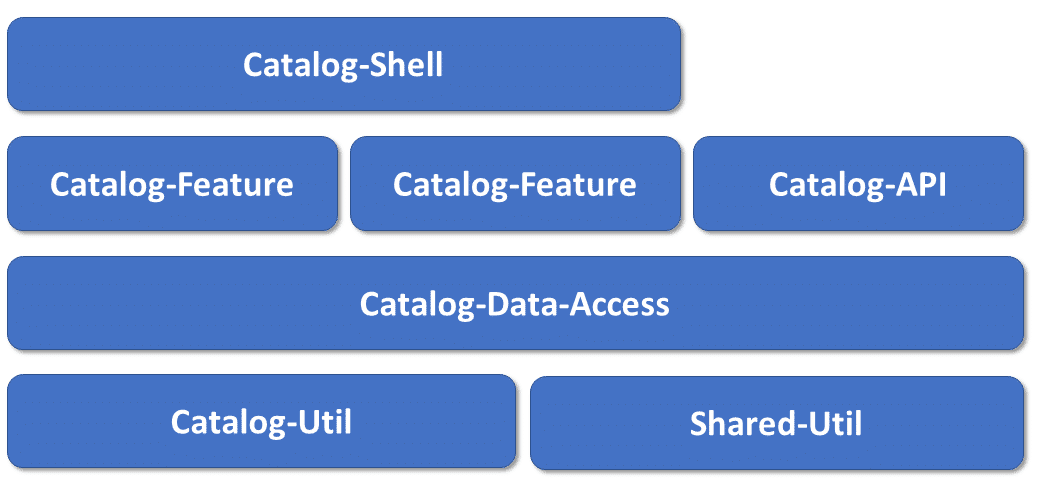
This approach also makes it obvious where to find specific parts of the application, and the rules help prevent circular dependencies — at least when APIs are only accessed by features from other domains.
Final Thoughts
Strategic Design offers a proven method for splitting an application into sub-domains with distinct bounded contexts, each with its own specialized language that all stakeholders must use consistently.
Nx, as an extension of the Angular CLI, provides an elegant way to implement these domains and contexts as separate libraries. By setting access restrictions, you can control which parts of the system can communicate with others, reducing unwanted dependencies.
One could argue that an Angular client doesn't necessarily need to contain domain logic. But with the rise of single-page applications, more and more logic ends up on the client anyway. In any case, the principles of Strategic Design have proven highly valuable for determining the right boundaries.