
Updated on 2021-12-23 for CLI 13.1.x and above
Lately, I've encountered repeated questions about assembling Micro Frontends that rely on distinct frameworks or differing framework releases. A contemporary and flexible way to address this is by leveraging Web Components in tandem with Module Federation.
However, it's important to note that frameworks are typically not designed to coexist with other frameworks or versions. Consequently, several challenges arise, and this article presents workarounds for them.
For this exploration, I'm employing an Angular-based shell that dynamically loads multiple Micro Frontends. These have been constructed using two separate Angular versions alongside React:
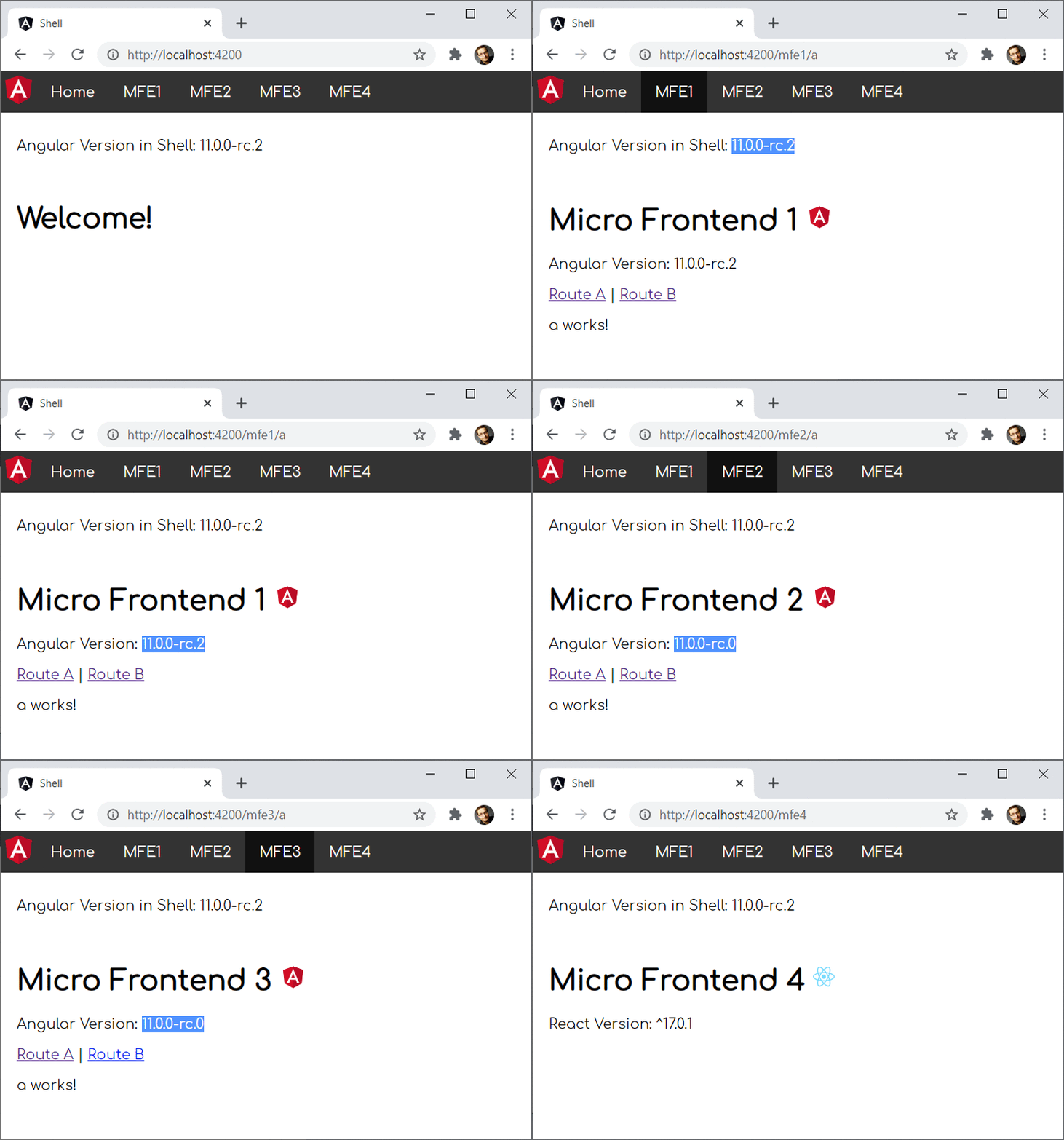
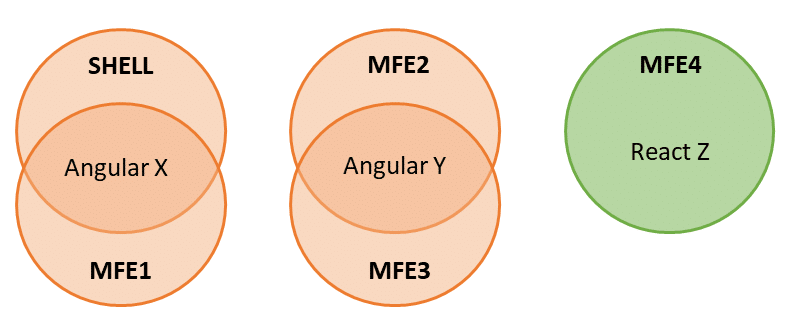
The shell and Micro Frontend 1 operate on the same Angular version. Consequently, they are intended to share it. Similarly, Micro Frontend 2 and Micro Frontend 3 share a different version. In contrast, Micro Frontend 4 is built with React:
You can access the source code for this case study here.
The Fundamental Principle for Multi-Framework(Version) MFEs
Let's begin with the primary principle for multi-framework and multi-version micro frontend architectures: Avoid it if possible ;-).
Joking aside, while wrapping applications as web components and integrating them via Module Federation isn't overly complex, numerous pitfalls lurk along the route. Therefore, I'd like to introduce two alternatives first:
Option 1: Adopting an Evergreen Version with Module Federation
The Angular team dedicates significant effort to facilitating smooth upgrades. The Angular CLI's ng update command delivers the benefits of this with a simple command. It runs a series of migration scripts that elevate your source code to the latest version. This capability, coupled with their internal processes at Google, enables them to consistently employ the newest Angular version across their more than 2600 applications.
Furthermore, when all parts of your system share the same major version, integrating them with Module Federation is uncomplicated. In this scenario, we don't need Web Components to bridge version gaps; from our framework's viewpoint, we're simply using lazy loading. Underneath, Module Federation manages the process of loading separately compiled code during runtime.
An illustrative example of this is available in this article, which is part of this ongoing series.
Option 2: Easing Version Constraints + Comprehensive Testing
Another strategy involves relaxing the strict version requirements. For instance, we might configure Module Federation to accept that an Angular 10 application is compatible with Angular 11. Module Federation offers the requiredVersion configuration property for this purpose, as discussed here.
This approach can sometimes work because Angular's core APIs haven't drastically shifted recently across major versions. However, this is not officially endorsed, and thus, it demands a substantial suite of E2E tests to verify that everything functions seamlessly together. On the flip side, E2E tests are necessary regardless, as micro frontends are runtime dependencies not known during initial compile time.
Encouraging News Before We Dive In
Most of the techniques and adjustments I'm showing here are now handled automatically by my library @angular-architects/module-federation-tools, which serves as an add-on for @angular-architects/module-federation. A live demo is also available there.
Nevertheless, this article holds significant value for you as it clarifies both the core concepts and their practical application — whether automated via a library or implemented manually — within an Angular context.
The Advantages
Alright, let's proceed to explore how combining Module Federation and Web Components enables the creation of multi-framework(version) Micro Frontends. Before examining the obstacles, I'll highlight the positive aspects.
Dependency Sharing
As noted earlier, our case study involves sharing two distinct Angular versions:
To achieve this, the shell and each Micro Frontend simply need to list the libraries they intend to share in their Module Federation configuration:
new ModuleFederationPlugin({
  [...],
  shared: ["@angular/core", "@angular/common", "@angular/router"]
})
By default, Module Federation utilizes semantic versioning to determine the highest compatible version available. Consider this scenario:
- Shell: @angular/core@^12.0.0
- MFE1: @angular/core@^12.1.0
- MFE2: @angular/core@^13.1.0
- MFE3: @angular/core@^13.0.0
In this situation, Module Federation opts for these versions:
- Shell and MFE1: @angular/core@^12.1.0
- MFE2 and MFE3: @angular/core@^13.1.0
In both instances, it chooses the highest compatible version. Further insights into this clever mechanism and configuration options to influence its behavior are available here.
Exposing Web Components
With Module Federation, a Micro Frontend (formally termed a remote) can expose any code fragment. When all system parts use the same framework version, this might be an Angular module or component.
When dealing with differing framework versions, we can expose web components:
new ModuleFederationPlugin({
  [...],
  exposes: {
    './web-components': './src/bootstrap.ts',
  },
  [...]
})
The bootstrap.ts file initializes an Angular application, wrapping an Angular component as a Web Component using Angular Elements. To integrate Angular Elements into your project, execute this CLI command:
ng add @angular/elementsThe bootstrap.ts file mirrors the source code the CLI typically generates for your main.ts. This involves invoking the platform's bootstrapModule method with our AppModule.
The main.ts file contains solely this dynamic import:
import('./bootstrap');As discussed in an earlier article of this series, this is a standard Module Federation pattern. It grants the application the time needed to negotiate and load the appropriate library versions.
To offer a web component, the Micro Frontend's AppModule leverages Angular Elements:
[...]
import { createCustomElement } from '@angular/elements';
[...]

@NgModule({
  imports: [
    BrowserModule,
    RouterModule.forRoot([...])
  ],
  declarations: [
    [...]
    AppComponent
  ],
  providers: [],
  bootstrap: []
})
export class AppModule {
  constructor(private injector: Injector) {
  }

  ngDoBootstrap() {
    const ce = createCustomElement(AppComponent, {injector: this.injector});
    customElements.define('mfe1-element', ce);
  }

}
Notice that this AppModule lacks a bootstrap component; the bootstrap array is empty. Thus, Angular triggers the module's ngDoBootstrap method. Here, createCustomElement transforms an Angular component into a web component (more specifically, a custom element).
Additionally, it registers this Web Component with the browser via customElements.define, assigning it the tag name mfe1-element.
Dynamically Loading Micro Frontends
Loading a separately compiled micro frontend on demand is equally straightforward with Module Federation. The shell (formally the host) can utilize the loadRemoteModule helper from the code>@angular-architects/module-federation package.
import { loadRemoteModule } from '@angular-architects/module-federation';

export const registry = {
    mfe1: () => loadRemoteModule({
        type: 'module',
        remoteEntry: 'http://localhost:4201/remoteEntry.js',
        exposedModule: './web-components'
    }),
    mfe2: () => loadRemoteModule({
        type: 'script',
        remoteEntry: 'http://localhost:4202/remoteEntry.js',
        remoteName: 'mfe2',
        exposedModule: './web-components'
    }),
    mfe3: () => loadRemoteModule({
        type: 'script',
        remoteEntry: 'http://localhost:4203/remoteEntry.js',
        remoteName: 'mfe3',
        exposedModule: './web-components'
    }),
    mfe4: () => loadRemoteModule({
        type: 'script',
        remoteEntry: 'http://localhost:4204/remoteEntry.js',
        remoteName: 'mfe4',
        exposedModule: './web-components'
    }),
};
The calls required for this example are placed within the shown registry object. Note that the initial call uses type: 'module', whereas the others use type: 'script'. The distinction arises because the first is based on Angular 13.1 or higher. Starting with Angular 13, the CLI produces EcmaScript modules instead of "plain old" JavaScript files.
Since mfe2 and mfe3 rely on Angular 2 and mfe4 is a conventional webpack build for React, we must use type: 'script' for these. In such cases, we also need to define the remoteName property, which is specified in the remotes' webpack configurations.
Additional details on using these methods are covered in my article about Dynamic Federation.
To load the micro frontends, we simply invoke the methods defined in the registry object:
const element = document.createElement('mfe1-element');
document.body.appendChild(element);

await registry.mfe1();
Once the web component is loaded, we can use it right away by adding an element with the registered name.
Integrating Web Components with Routing
Naturally, simply loading our Micro Frontends and treating them as dynamic web components isn't sufficient. The shell must also be capable of routing to them.
For routing to such a Web Component, this case study employs a WrapperComponent:
@NgModule({
  imports: [
    BrowserModule,
    RouterModule.forRoot([
      { path: '', component: HomeComponent, pathMatch: 'full' },
      { [...], component: WrapperComponent, data: { importName: 'mfe1', elementName: 'mfe1-element' }},
      { [...], component: WrapperComponent, data: { importName: 'mfe2', elementName: 'mfe2-element' }},
      { [...], component: WrapperComponent, data: { importName: 'mfe3', elementName: 'mfe3-element' }},
      { [...], component: WrapperComponent, data: { importName: 'mfe4', elementName: 'mfe4-element' }},

    ])
  ],
  declarations: [
    AppComponent,
    WrapperComponent
  ],
  providers: [],
  bootstrap: [AppComponent]
})
export class AppModule { }
The router configuration's data property is used to set up this wrapper. It references the remote's name as mapped in the Module Federation config (importName) and the respective Web Component's element name (elementName).
The wrapper's implementation simply loads the web component and inserts it into a placeholder assgiend via a ViewChild:
import { AfterContentInit, Component, ElementRef, OnInit, ViewChild, ViewContainerRef } from '@angular/core';
import { ActivatedRoute } from '@angular/router';
import { registry } from '../registry';

@Component({
  template: '<div #vc></div>',
})
export class WrapperComponent implements AfterContentInit {

  @ViewChild('vc', {read: ElementRef, static: true})
  vc: ElementRef;

  constructor(private route: ActivatedRoute) { }

  ngAfterContentInit(): void {

    const elementName = this.route.snapshot.data['elementName'];
    const importName = this.route.snapshot.data['importName'];

    const importFn = registry[importName];
    importFn()
      .then(_ => console.debug(element ${elementName} loaded!))
      .catch(err => console.error(error loading ${elementName}:, err));

    const element = document.createElement(elementName);
    this.vc.nativeElement.appendChild(element);

  }

}
As an alternative, we could enhance the dynamism of this example by bypassing the registry and passing the essential data for loading the remote and generating its root element directly to the wrapper component.
No Requirement for a Separate Meta Framework
One of the greatest benefits of using Module Federation is that your framework — Angular in this case — remains unaware that a separately compiled Micro Frontend is being loaded. From Angular's perspective, it's just standard lazy loading. Webpack Module Federation manages the intricate details underneath. This removes the need for a separate meta framework, thereby simplifying our scenario.
Independent Operation Mode
Each Micro Frontend can also be launched independently:

This is crucial as we aim to develop, test, and deploy our Micro Frontends separately.
Internal Lazy Loading
An additional benefit is the ability to employ conventional lazy loading within each Micro Frontend. When Micro Frontends are loaded without Module Federation, they can encounter issues because they don't recall their origin URL, thus failing to locate their lazy chunks.
The Drawbacks
Now, let's examine some of the difficulties this architecture presents.
Bundle Size Impact
Clearly, incorporating multiple versions of the same framework, as well as mixing frameworks, increases the bundle size. More data must be downloaded to the browser. However, for returning users, caching can mitigate this.
Nonetheless, you must consider the implications of increased bundle sizes when deciding on this architecture. While in certain contexts, such as intranet environments, this effect might be negligible, there are situations where this trade-off is unjustifiable—like mobile scenarios or when conversion rates are paramount. Having the ability to run individual Micro Frontends standalone can definitely help here.
Coordinating Multiple Routers
When the loaded Micro Frontends also implement routing, we must synchronize several routers: the shell's router and the routers within each Micro Frontend.
Suppose we have the URL mfe1/a. Here, the shell should manage only the initial segment, mfe1, and route to the Web Component provided by Micro Frontend 1. The Micro Frontend, in turn, should focus solely on the trailing part, /a, and trigger its corresponding route.
To accomplish this, we can use UrlMatcher instead of fixed paths in the router configurations. For instance, the shell employs a custom UrlMatcher named startsWith:
@NgModule({
  imports: [
    BrowserModule,
    RouterModule.forRoot([
      { path: '', component: HomeComponent, pathMatch: 'full' },
      { matcher: startsWith('mfe1'), component: WrapperComponent, data: { importName: 'mfe1', elementName: 'mfe1-element' }},
      { matcher: startsWith('mfe2'), component: WrapperComponent, data: { importName: 'mfe2', elementName: 'mfe2-element' }},
      { matcher: startsWith('mfe3'), component: WrapperComponent, data: { importName: 'mfe3', elementName: 'mfe3-element' }},
      { matcher: startsWith('mfe4'), component: WrapperComponent, data: { importName: 'mfe4', elementName: 'mfe4-element' }},
    ])
  ],
  declarations: [
    AppComponent,
    WrapperComponent
  ],
  providers: [],
  bootstrap: [AppComponent]
})
export class AppModule { }
Any route beginning with mfe1 will lead the WrapperComponent to load Micro Frontend 1, for example. The remaining part of the path is ignored by the shell and can be utilized by the Micro Frontend itself.
Here's the implementation of startsWith:
import { UrlMatcher, UrlSegment } from '@angular/router';

export function startsWith(prefix: string): UrlMatcher {
    return (url: UrlSegment[]) => {
        const fullUrl = url.map(u => u.path).join('/');
        if (fullUrl.startsWith(prefix)) {
            return ({ consumed: url});
        }
        return null;
    };
}
Within the Micro Frontends, however, the case study only inspects the route's ending with a corresponding endsWith function:
@NgModule({
  imports: [
    BrowserModule,
    RouterModule.forRoot([
      { matcher: endsWith('a'), component: AComponent},
      { matcher: endsWith('b'), component: BComponent},
    ])
  ],
  declarations: [
    AComponent,
    BComponent,
    AppComponent
  ],
  providers: [],
  bootstrap: []
})
export class AppModule {
 [...]
}
And here's its implementation:
export function endsWith(prefix: string): UrlMatcher {
    return (url: UrlSegment[]) => {
        const fullUrl = url.map(u => u.path).join('/');
        if (fullUrl.endsWith(prefix)) {
            return ({ consumed: url});
        }
        return null;
    };
}
The Ugly
Since none of these frameworks were built to coexist with different versions of themselves or with rival frameworks, a few unconventional workarounds become necessary. Let's walk through them.
Dealing with Routing Discrepancies
When several Angular routers run in parallel, the nested routers tend to miss route changes. As a result, they need a manual nudge every time the URL updates:
@Component([...])
export class AppComponent implements OnInit {

  [...]

  constructor(private router: Router) { }

  ngOnInit(): void {
    this.router.navigateByUrl(location.pathname.substr(1));
    window.addEventListener('popstate', () => {
      this.router.navigateByUrl(location.pathname.substr(1));
    });
  }
}
For hash-based setups, the location.hash property and the hashchanged event would be used instead.
Sharing the Angular Platform
For each shared Angular version, only one platform instance is permitted. To keep track of whether a platform already exists for a given version, we can stash it in a global map that pairs the version number with the platform object:
declare const require: any;
const ngVersion = require('../package.json').dependencies['@angular/core']; // perhaps just take the major version

(window as any).plattform = (window as any).plattform || {};
let platform = (window as any).plattform[ngVersion];
if (!platform) {
  platform = platformBrowser();
  (window as any).plattform[ngVersion] = platform;
}
platform.bootstrapModule(AppModule)
  .catch(err => console.error(err));
Angular Elements and Zone.js
There's also a more general caveat with Angular Elements: even loading Zone.js once results in multiple Zone.js instances—one for the shell and one for each Micro Frontend. This fragmentation can cause change detection to break down when data flows across micro frontend boundaries.
To sidestep this, Zone.js could simply be disabled when bootstrapping the Micro Frontends:
platformBrowser()
  .bootstrapModule(AppModule, { ngZone: 'noop' })
Of course, that means change detection becomes a manual chore. My GDE colleague, Tomas Trajan, proposed a different route: share a single Zone.js instance. The shell grabs its current NgZone and drops it into the global namespace:
export class AppModule {
  constructor(private ngZone: NgZone) {
    (window as any).ngZone = this.ngZone;
  }
}
Each Micro Frontend then pulls it from there and reuses it during bootstrap:
platformBrowser().bootstrapModule(AppModule, { ngZone: (window as any).ngZone }) If that global ngZone property happens to be undefined, the micro frontend's Angular instance falls back to its own ngZone—which is also the default behavior.
Final Thoughts
Pairing Module Federation with Web Components (via Angular Elements) brings notable benefits: shared libraries become effortless, Web Components can be provided and dynamically loaded on demand, and routing to those components works through a simple wrapper. Meanwhile, the primary framework—say, Angular—also serves as the meta framework, so no extra tooling is needed. Lazy loading even works inside the loaded Web Components.
But advantages don't come free. Bundle sizes grow, and a handful of tricks and workarounds are required to keep everything running smoothly.
Over the last few years, I've guided many companies through Micro Frontend architectures built on Web Components. Introducing Module Federation into that mix simplifies things considerably. That said, if your entire system can realistically stick to a single framework and version, Module Federation becomes even simpler to manage.
Looking Ahead: Diving Deeper into Architecture
So far, Module Federation has shown itself to be a practical route to Micro Frontends on Angular. Yet once you start working with it, a host of new questions tend to surface:
- What criteria should guide the breakdown of a large application into micro frontends?
- What kind of access restrictions make the most sense?
- Which established patterns are worth adopting?
- How can common Module Federation pitfalls be avoided?
- What advanced use cases become possible?
Our free eBook—roughly 100 pages—addresses all of these topics and much more:
Feel free to grab your copy here right away!