
Progressive Web App
Everyone knows the frustration of staring at a blank page while the browser stubbornly refuses to load a site, even when the device shows a network connection. The wait feels endless, and yet we keep hoping the content will eventually render.
The root cause is a mindset that takes a stable connection for granted — the Online first (or Network-first) assumption. To truly serve our users, flipping this priority makes sense: go Offline first (or Cache-first) and treat network availability as an afterthought, building the app as if it lives offline.
That’s where Progressive Web Apps enter the picture. In this opening segment of the series, we explore what this technology really means; the upcoming parts demonstrate transforming an Angular application into a PWA step by step.
PWA vs Native vs Hybrid
The phrase “Progressive Web App” gets thrown around a lot, so let’s pin down exactly what sets it apart from its mobile counterparts. Native apps are developed per platform with their own languages and tooling. Hybrid approaches wrap web content in a native shell to ship through app stores. PWAs, however, live entirely in the browser — no install-worthy bundle, no store listing — yet they bring a feel and functionality that hovers near native.
What makes them progressive is the ability to work regardless of the network state, load with some snap, and behave more predictably against spotty connections. A PWA is not a single framework or library but a bundle of capabilities the modern browser exposes.
Service Worker
The engine that drives most of this is a script called a service worker. It runs separately from the main page, intercepts network requests, and gets to decide what goes straight to cache and what reaches the server.
Scope
Each service worker controls a defined scope — the set of URLs it can claim. The scope rarely extends beyond the directory the script file lives in, unless narrowed with an explicit header or broader path. Navigation requests for pages outside that scope simply pass through without interception.
Registration
Before anything can happen, the browser needs to know the worker exists. Registration is a straightforward call, usually tucked into the module that bootstraps the rest of the app. It tells the browser to find the script, download it, and begin its life.
Life cycle
A service worker’s life goes through distinct phases: install, activate, and idle. The install phase is the moment to prepare caches, the activate phase helps clean up old resources and claim control of clients, and then the worker sits idle until a network event wakes it up.
Events
Several event types can call the worker into action: install, activate, fetch, push, and sync. Out of these, fetch is nearly always the busiest one, because every request the page makes triggers it and gives you the chance to serve from memory, disk cache, or network.
Communication
The worker works behind the scenes, and coordinating with that background is done through messages. The page can send structured data to the worker, or the worker can post messages back to any of the pages it controls. This two-way channel opens the door to offline analytics, caching hints, and more.
Precaching
Precaching means filling the cache with critical files during the install stage. That way, when the user hits the app later without a connection, all the skeleton assets resolve immediately. For an application shell model, where the framework code and main template are cached upfront, this makes all the difference.
Versioning
One careless update can leave the user staring at an older build forever. Versioning is the answer. You give each release a distinct cache name, install simply adds a new entry, and activation wipes any older caches that no longer match.
Caching strategies
Depending on the kind of resource, several strategies apply. A few of the common ones being: cache-first, which serves copies just as fast as possible and refreshes in the background; network-first, which only sheds light on the cache seat after the live request has failed; stale-while-revalidate, which shows what it has and then refreshes for next time; and network-only, which is best suited for actions that must not exist offline.
Multiple Service Workers
Does at most one service worker sound limiting? Actually, a single page can depend on more than one installed worker — registered for different scopes. This supports modularity when you need to cache segments independently, or mix workers from more than one origin, as long as each respects its scope.
Recipes
Throughout the practice of crafting service workers, a few patterns keep showing up. Things like responding with a stale copy when the network dries up, re-fetching in the background to maintain key resources, and flushing caches after activation appear again and again in the form of “recipes” — code snippets that you can port between projects.
Angular Service Worker
The Angular framework ships its own service worker module, neatly integrated in the @angular/service-worker package. It handles install, activation, and updates out of the box, gives you a declarative config to define caching rules for different file groups, and exposes APIs that let your application know about new updates and prompt the user to reload.
WorkBox
When you want more tuning flexibility without writing every byte of worker logic, WorkBox comes into play. It is a JavaScript library that sits on top of the service worker API and bundles battle-tested strategies into small, expressive helper functions. Many teams use it as the base for their custom caching logic.
Summary
Progressive Web Apps fundamentally change how we think about users and their connections. With a service worker at the core, we can serve cached resource right away, handle flaky connections smoothly, and pass control between the page and the background process. Which you put into practice depends on your use of hand-written workers, Angular’s own integration, or a utility library like workbox.
Now that the groundwork is in place, we are ready to move on. In the next part, we show you how to take a standard Angular application and turn it into an offline-capable PWA.
Understanding Progressive Web Apps
Progressive Web Apps, commonly abbreviated as PWAs, are applications that users can install directly from their web browser when they visit a supporting website. While these applications work across both desktop and mobile operating systems, the technology was originally designed with mobile users in mind.
When visiting a site that supports this technology, an option becomes available to add the application to your device. Once installed, it behaves much like a native application on your system.
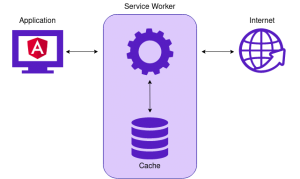
A core principle behind the PWA concept is the ability to function without an active network connection. This is achieved through the use of Service Workers, which act as intermediaries between the browser and the internet. This setup permits the implementation of strategies such as stale-while-revalidate, which gives users access to the application and its cached resources even as it updates data in the background when connectivity is available.
An illustrative overview of a PWA architecture.
PWA Versus Native Versus Hybrid
Unlike native or hybrid applications, PWAs rely on web access for their core operations since they are built on top of existing websites. Their access to native device features is more constrained, though the list of supported capabilities continues to expand. For a current breakdown of what is possible, refer to What Web Can Do Today.
A significant benefit of PWAs is that they can be installed on any platform where the browser offers adequate Service Worker support. Furthermore, there is no requirement to list the application in a platform-specific app store.
It is also worth noting that PWAs generally deliver lower performance compared to native applications, and there are potential security limitations to be aware of. A detailed comparison of native, PWA, and hybrid applications across various categories is presented in the following graphic.
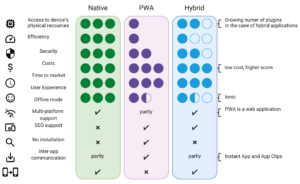
A category-by-category comparison of native, PWA, and hybrid apps.
Inside the Service Worker
A Service Worker is a specialized mechanism that serves as a proxy between the application, the browser, and the network. This enables functionality such as caching application assets, background data synchronization, and the dispatch of Push Notifications. These features are made possible through the interception of outgoing requests.
In contrast to other application scripts, the Service Worker persists even when a tab or browser is closed. When the application is next launched, the Service Worker is loaded first, enabling it to intercept any requests for application resources. If implemented correctly, the SW can render the entire application without any network connection.
Service Workers are fully asynchronous, running on a separate thread that does not block rendering. Consequently, they lack access to the DOM tree and synchronous APIs like local storage. They do, however, have access to IndexedDb and can handle XHR requests.
For security reasons, Service Workers can only be deployed over HTTPS, except in local development scenarios where localhost is considered secure. A comprehensive list of accessible features is available at the HTML5 worker test page.
Defining the Scope
A single application can accommodate multiple Service Workers, each with a defined area of responsibility. This operational range is referred to as a scope. For any given scope, only one Service Worker can be registered and active at a time.
In essence, an SW's scope encompasses all files and directories located beneath its position in the application hierarchy. An SW registered at the level of the main module, therefore, would control the entire application. During registration, it is possible to set the scope to limit the SW's control to a specific set of URLs. For instance, a scope of /api/ means the SW can intercept requests to /api/ or /api/image, but it would not control addresses further up the hierarchy, like /api (without the trailing slash) or the root directory /.
When working with Angular's Service Worker, a configuration object is required.
The Registration Process
During the initial visit to an application, the Service Worker is installed and activated immediately. On the next visit, the browser may detect the availability of a new SW version. In this scenario, the new SW is installed but is not yet activated. This instance is known as a worker in waiting, as it is standing by for its turn.
The activation of a waiting Service Worker occurs automatically once all components controlled by the previous, older SW are no longer in use. However, you might want to activate the updated SW right away. In such cases, the ServiceWorkerGlobalScope.skipWaiting() function can be used to force activation. This is often paired with Clients.claim(), which transfers all active "clients" to the new Service Worker's control. Once this is done, the updated SW handles all subsequent requests and functions.
The Life Cycle of a Service Worker
Every Service Worker follows a defined life cycle, which in summary involves registration, installation, and activation. Should an error arise during any of these steps, the SW either fails to register or a different worker is loaded in its place.
By listening for specific events during the life cycle, you can customize the initialization steps—for example, adding resources to the cache during installation. This event-driven approach allows for detailed control over the setup process.
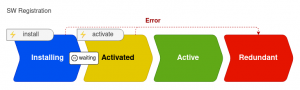
A visual representation of the Service Worker registration stages.
Handling Events
The Service Worker API provides access to several event types. Some of these are Lifecycle Events, which enable you to perform initialization tasks at the right time. Others are Functional Events, which relate to the specific capabilities SW provides.
Among the most commonly used events are:
- install – triggered during the SW installation after it has been parsed. This is the usual point for pre-caching. You may also call the ServiceWorkerGlobalScope.skipWaiting() function here to skip the waiting stage.
- activate – fires after the installation phase. This is where you can finalize any initialization, such as cleaning up resources from the previous SW.
- message – pertains to communication between the app and SW via the PostMessage API, which will be covered in the next chapter.
- fetch – concerns all outgoing requests, enabling the implementation of various caching strategies with the SW acting as an interceptor.
For an exhaustive list of supported events, refer to the W3C draft. It includes events for tasks like background synchronization using the Background Synchronization API or for handling Push Notifications.
Communicating Between Components
As noted in the events section, the application and Service Worker communicate via the PostMessage API. This involves sending messages that are received as message events.
When communicating from the SW side, you first obtain a Client instance and then call the Client.postMessage method. This is done by using the Clients.matchAll() method, or Clients.get() if the Client ID is known.
On the application side, communication uses the ServiceWorkerContainer instance found in the global Navigator.serviceworker object. This gives access to the postMessage method to send messages to the SW, and the ServiceWorkerContainer.onmessage property to handle incoming messages.
This mechanism will be used in the next section to inform the client about the availability of a new graphic.
Pre-Caching Essentials
Application resources can be classified as either static or dynamic. Static resources are those that do not change during the application's operation, such as bundled and minified application code, stylesheets, or assets. Dynamic resources are typically cached server responses, like images and other media.
With this distinction, static resources can be added to the cache during the SW installation phase. This practice is referred to as PreCaching because the saving happens before the SW is activated. Another related term is cache warming, which describes the process of moving part of the caching logic from the runtime into an SW's installation method.
Managing Versions
There are only two hard things in Computer Science: cache invalidation and naming things.
– Phil Karlton.
While caching resources to improve performance is a sound idea, maintaining the cache can be tricky. With PWAs, the main issue arises when a new SW version is deployed. The newer SW may request new data that is still being served by the active one, leading to unpredictable bugs.
To avoid these issues, it is best practice to version the cache in sync with the application version. When the new SW is activated (triggered by the activate event), its initialization should involve clearing old cache entries from the previous version while it continues to fetch updated sources. Detailed examples are available in the MDN documentation.
Caching Strategies
If you decide to use SW, you will likely want to implement data caching. There are several standard strategies to choose from, depending on your application's needs:
- Stale-while-revalidate – serves data from the cache while updating it in the background. This is the go-to strategy when data freshness is not critical.
- Network first (online first) – this strategy attempts to fetch data from the network first, and only falls back to the cache if the request fails.
- Cache first (offline first) – this is the inverse; it retrieves data from the cache first, and only fetch from the network if the data is absent.
More details on these techniques can be found in the WorkBox documentation. For more complex scenarios, Jake Archibald's Offline Cookbook is a valuable resource.
Handling Multiple Service Workers
It is not uncommon to want to use multiple SWs within a single scope, or to have several listen for the same event. However, as previously stated, only one Service Worker can operate within a given scope. If multiple SWs are registered, the one registered last will be the one that functions. This, of course, defeats the original purpose.
A solution is the WorkerGlobalScope.importScripts() method, which lets you import the definitions of other SWs. This approach merges two or more implementations into a single service worker.
When multiple handlers are listening for the same event, the execution order depends on whether they are in the main SW file or in a file imported via importScripts(). Typically, handlers in the main file execute before those in imported files. Furthermore, when intercepting outgoing requests (via the fetch event), subsequent handlers will only be invoked if the previous one did not call FetchEvent.respondWith(). It is also worth noting that resources loaded via importScripts() are cached automatically.
We will use this feature in the integration section of this article to extend the Angular Service Worker and enable communication with the application about new data availability.
Helpful Recipes
Implementing an SW has historically involved a lot of repetitive boilerplate code. To address this, Mozilla and other contributors have assembled a collection of "recipes" for common functionality. These are hosted at serviceworke.rs and serve as both a practical guide for implementing features and as an excellent API reference, clarifying the role of various code snippets.
The Angular Service Worker
For Angular, PWA support is built upon the @angular/service-worker package. It provides a module for configuring your app. It also includes services that manage SW events for update handling via SwUpdate and for employing Push Notifications through the SwPush service.
This package predefines an SW with implementations for several mechanisms, such as cache, Push Notifications, and background sync. This architecture makes it possible to implement Offline-first, Online-first, and stale-while-revalidate strategies.
Activating these functionalities is controlled by the ngsw-config.json file, which defines how the app behaves when fetching different resources. A full explanation of the available settings is provided in the Service Worker Config documentation.
Another benefit of using NGSW is its native integration within the Angular ecosystem, which provides options for when the SW gets registered during startup, allowing for non-intrusive operation. The next part of this article will delve deeper into this aspect.
The ability to use a ready-made, configurable SW is ideal when you need only the standard features. Challenges emerge when your application demands non-standard behavior. In that case, you may need to extend the Angular SW with additional functionality. This will be the focus of the next part of the article.
WorkBox as an Alternative
Another approach is to use the WorkBox library. WorkBox is a suite of modular packages developed by Google engineers, each tailored for specific tasks. A full list of these modules is available on the official WorkBox website.
Using WorkBox involves creating an SW with these packages, configured to meet your needs. an example of WorkBox with Angular will be given in the next article part.
Wrap-up
Progressive apps offer a compelling route for targeting both mobile and desktop environments. When we deliberately tap into the capabilities they expose, there is real potential to elevate the User Experience of an Angular product.
Still, it is important to remain realistic: these apps do not fully match native solutions on every front. In many ways, they sit closer to hybrid offerings, which is worth factoring into any architectural decision.
Support for PWA is now widespread across browsers and operating systems, which makes the approach increasingly viable and a strong candidate for many projects.
The follow-up installment will shift attention to concrete implementation, walking through the steps to wire up PWA in an actual Angular application. Stick around for that guide.