
Why a Shared Material Module Is a Bad Idea
I have made this mistake before, and I have seen many other developers do the same — creating a shared module for Angular Material. If you have worked with Angular Material, chances are you have a SharedMaterialModule in your project. It is time to rethink that decision.
My Motivation for This Post
I am currently working on a project with many modules and over 20,000 lines of code. When I started converting some modules to lazy-loaded ones, I noticed that the SharedMaterialModule was imported everywhere. I initially thought this was fine, but an experiment I ran convinced me otherwise.
Testing the Assumption
In a previous project, I had built custom components like grids, tables, and forms on top of Angular Material components. I ended up with a large shared Material module, and now I want to show that this was not the right approach.
Let’s build a new app to demonstrate how this pattern inflates bundle size. We’ll use webpack-bundle-analyzer to inspect the impact. First, create a new Angular app with the latest CLI:
ng new demoapp
Next, install webpack-bundle-analyzer:
Then, add the script below to package.json:
"analyze": "ng build --prod --stats-json && webpack-bundle-analyzer ./dist/demoapp/stats-es2015.json"
Run the following command to generate and view the bundle stats:
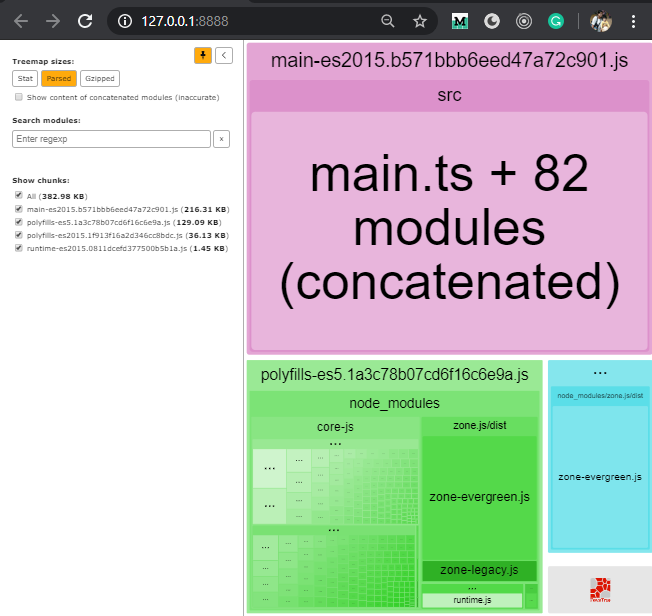
This will open a visual representation of your bundles.
Now, install Angular Material:
ng add @angular/material
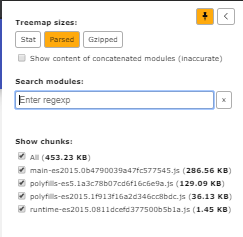
Re-run the analysis. The main bundle size has already increased by roughly 70 KB, and we haven’t used a single Material component yet.
Now, add two modules — one for employees and one for departments. We won’t lazy-load them initially:
ng g m employee --routing --module app
ng g c employee --export true
ng g m department --routing --module app
ng g c department --export true
Update app.component.html to replace the default template:
<app-employee></app-employee>
<app-department></app-department>
At this point, the bundle size stays nearly the same — in fact, it slightly decreases because the default template is heavier than our minimal markup.
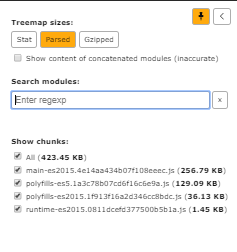
Let’s add some real code to both components, borrowing from the Angular Material documentation.
Add the following markup to the department and employee components:
<mat-accordion>
  <mat-expansion-panel>
    <mat-expansion-panel-header>
      <mat-panel-title>
        Personal data
      </mat-panel-title>
      <mat-panel-description>
        Type your name and age
      </mat-panel-description>
    </mat-expansion-panel-header>

    <mat-form-field>
      <input matInput>
    </mat-form-field>

    <mat-form-field>
      <input matInput type="number" min="1">
    </mat-form-field>
  </mat-expansion-panel>
  <mat-expansion-panel (opened)="panelOpenState = true"
                       (closed)="panelOpenState = false">
    <mat-expansion-panel-header>
      <mat-panel-title>
        Self aware panel
      </mat-panel-title>
      <mat-panel-description>
        Currently I am {{panelOpenState ? 'open' : 'closed'}}
      </mat-panel-description>
    </mat-expansion-panel-header>
    <p>I'm visible because I am open</p>
  </mat-expansion-panel>
</mat-accordion>
department.component.html
<div class="example-container">
  <mat-form-field appearance="fill">
    <mat-label>Input</mat-label>
    <input matInput>
  </mat-form-field>
  <br>
  <mat-form-field appearance="fill">
    <mat-label>Select</mat-label>
    <mat-select>
      <mat-option value="option">Option</mat-option>
    </mat-select>
  </mat-form-field>
  <br>
  <mat-form-field appearance="fill">
    <mat-label>Textarea</mat-label>
    <textarea matInput></textarea>
  </mat-form-field>
</div>
employee.component.html
Also, add the following property in department.component.ts:
panelOpenState = false;
Now, we need to import the required Material modules in both feature modules. This is the point where many of us create a shared MaterialModule like this:
ng g m shared/material --flat true
The module code looks like this:
import { NgModule } from '@angular/core';
import { OverlayModule } from '@angular/cdk/overlay';
import { CdkTreeModule } from '@angular/cdk/tree';
import { PortalModule } from '@angular/cdk/portal';
import { MatAutocompleteModule } from '@angular/material/autocomplete';
import { MatButtonModule } from '@angular/material/button';
import { MatButtonToggleModule } from '@angular/material/button-toggle';
import { MatCardModule } from '@angular/material/card';
import { MatCheckboxModule } from '@angular/material/checkbox';
import { MatChipsModule } from '@angular/material/chips';
import { MatRippleModule } from '@angular/material/core';
import { MatDividerModule } from '@angular/material/divider';
import { MatExpansionModule } from '@angular/material/expansion';
import { MatFormFieldModule } from '@angular/material/form-field';
import { MatIconModule } from '@angular/material/icon';
import { MatInputModule } from '@angular/material/input';
import { MatListModule } from '@angular/material/list';
import { MatMenuModule } from '@angular/material/menu';
import { MatPaginatorModule } from '@angular/material/paginator';
import { MatProgressSpinnerModule } from '@angular/material/progress-spinner';
import { MatSelectModule } from '@angular/material/select';
import { MatSidenavModule } from '@angular/material/sidenav';
import { MatSnackBarModule } from '@angular/material/snack-bar';
import { MatSortModule } from '@angular/material/sort';
import { MatTableModule } from '@angular/material/table';
import { MatTabsModule } from '@angular/material/tabs';
import { MatToolbarModule } from '@angular/material/toolbar';
import { MatTreeModule } from '@angular/material/tree';

const materialModules = [
  CdkTreeModule,
  MatAutocompleteModule,
  MatButtonModule,
  MatCardModule,
  MatCheckboxModule,
  MatChipsModule,
  MatDividerModule,
  MatExpansionModule,
  MatIconModule,
  MatInputModule,
  MatListModule,
  MatMenuModule,
  MatProgressSpinnerModule,
  MatPaginatorModule,
  MatRippleModule,
  MatSelectModule,
  MatSidenavModule,
  MatSnackBarModule,
  MatSortModule,
  MatTableModule,
  MatTabsModule,
  MatToolbarModule,
  MatFormFieldModule,
  MatButtonToggleModule,
  MatTreeModule,
  OverlayModule,
  PortalModule
];

@NgModule({
  imports: [
    ...materialModules
  ],
  exports: [
    ...materialModules
  ],
})
export class MaterialModule {
}
material.module.ts
Import this new MaterialModule in both the employee and department modules:
imports: [
   CommonModule,
   MaterialModule
]
Run the analyzer again. The bundle has grown by 216 KB.
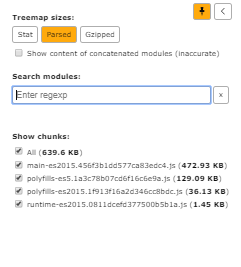
Next, we’ll lazy-load these modules to shrink the main bundle. Let’s remove EmployeeModule and DepartmentModule from app.module.ts — both the import statement and the imports array.
After removing them, the file looks like this:
import { BrowserModule } from '@angular/platform-browser';
import { NgModule } from '@angular/core';

import { AppRoutingModule } from './app-routing.module';
import { AppComponent } from './app.component';
import { BrowserAnimationsModule } from '@angular/platform-browser/animations';

@NgModule({
  declarations: [
    AppComponent
  ],
  imports: [
    BrowserModule,
    AppRoutingModule,
    BrowserAnimationsModule
  ],
  providers: [],
  bootstrap: [AppComponent]
})
export class AppModule { }
app.module.ts
Now, set up lazy-loading for both modules in app-routing.module.ts:
import { NgModule } from '@angular/core';
import { Routes, RouterModule } from '@angular/router';


const routes: Routes = [
  {
    path: 'employee',
    loadChildren: () => import('./employee/employee.module').then(m => m.EmployeeModule)
  },
  {
    path: 'department',
    loadChildren: () => import('./department/department.module').then(m => m.DepartmentModule)
  }
];

@NgModule({
  imports: [RouterModule.forRoot(routes)],
  exports: [RouterModule]
})
export class AppRoutingModule { }
app-routing.module.ts
Add the following to employee-routing.module.ts:
import { NgModule } from '@angular/core';
import { Routes, RouterModule } from '@angular/router';
import { EmployeeComponent } from './employee.component';
const routes: Routes = [
    { path: '' , component : EmployeeComponent }
];
@NgModule({
    imports: [RouterModule.forChild(routes)],
    exports: [RouterModule]
})
export class EmployeeRoutingModule { }
employee-routing.module.ts
Apply the same changes to department-routing.module.ts:
import { NgModule } from '@angular/core';
import { Routes, RouterModule } from '@angular/router';
import { DepartmentComponent } from './department.component';
const routes: Routes = [
    { path: '', component: DepartmentComponent }
];
@NgModule({
    imports: [RouterModule.forChild(routes)],
    exports: [RouterModule]
})
export class DepartmentRoutingModule { }
department-routing.module.ts
Update app.component.html to use routerLink to navigate to these lazily loaded modules:
<a [routerLink]="['/employee']" routerLinkActive="router-link-active">Employee</a>
<a [routerLink]="['/department']" routerLinkActive="router-link-active">Department</a>
<router-outlet></router-outlet>
app.component.html
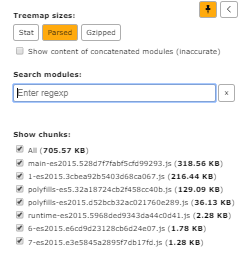
When you check the bundle size now, it should have decreased — but it went up by around 70 KB instead.
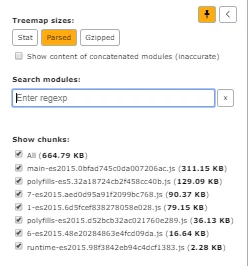
Finally, let’s remove the shared module and import only what each module actually needs. In employee.module.ts, bring in MatFormFieldModule and MatSelectModule. In department.module.ts, add MatExpansionModule and MatFormFieldModule. Delete the shared module and rerun the analysis. In this example, we reduce the bundle by about 40 KB.
Final Thoughts
I repeated a similar experiment on my current project and reduced the bundle size by around 200 KB. On the web, every kilobyte matters. I encourage you to try this refactor in your own app — you might be surprised by the difference.
The code from this article is available in this GitHub repository.