Not long ago, I encountered a dynamic service instantiation in Angular technique shared by Roberto Heckers, where a service is generated conditionally. There are times when we face a scenario with several services that all expose the same method name but provide distinct implementations, and only one of them needs to be invoked based on a given condition. In this write-up, I built a similar demo and explored additional situations where dynamically creating a service could prove beneficial.
Overview of the Application
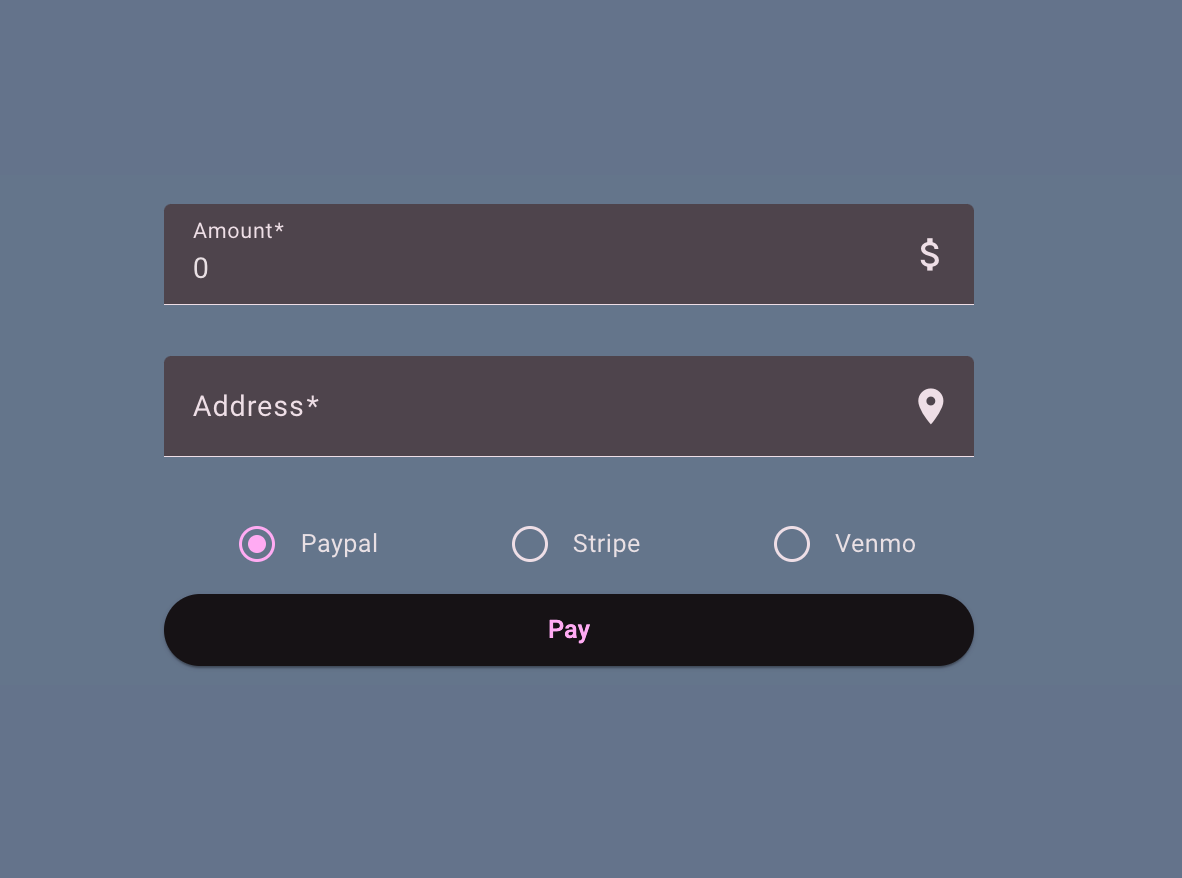
Consider a money transfer application similar to Wise or Paysend. The goal is to send funds to a friend. The user must enter the amount, provide an address, and pick a preferred payment method. Below is a straightforward representation of the interface along with the corresponding HTML and TypeScript for the form.
<form [formGroup]="form" (ngSubmit)="onSubmit()">
  <!-- payment amount -->
  <mat-form-field appearance="fill">
    <mat-label>Amount</mat-label>
    <input matInput [formControl]="form.controls.amount" />
  </mat-form-field>

  <!-- payment address -->
  <mat-form-field appearance="fill">
    <mat-label>Address</mat-label>
    <input matInput [formControl]="form.controls.address" />
  </mat-form-field>

  <!-- payment type -->
  <mat-radio-group [formControl]="form.controls.type">
    <mat-radio-button value="paypal">Paypal</mat-radio-button>
    <mat-radio-button value="stripe">Stripe</mat-radio-button>
    <mat-radio-button value="venmo">Venmo</mat-radio-button>
  </mat-radio-group>

  <!-- submit button -->
  <button mat-raised-button>Pay</button>
</form>
// TS form creation
readonly form = new FormGroup({
  amount: new FormControl(0, {
    nonNullable: true,
    validators: [Validators.required, Validators.min(0)],
  }),
  address: new FormControl('', [Validators.required]),
  type: new FormControl<'paypal' | 'stripe' | 'venmo'>('paypal', {
    nonNullable: true,
    validators: [Validators.required],
  }),
});
Up to this point, there is nothing intricate. The focus shifts to selecting the appropriate service that corresponds to the radio button option chosen by the user.
Multiple Service Providers
Three radio buttons are present — PayPal, Stripe, and Venmo. Each one corresponds to one of these service classes:
@Injectable({ providedIn: 'root' })
export class PaypalService extends PaymentBaseService {
  override pay() {
    // logic for payment
  }
}

@Injectable({ providedIn: 'root' })
export class StripeService extends PaymentBaseService {
  override pay() {
	// logic for payment
  }
}

@Injectable({ providedIn: 'root' })
export class VenmoService extends PaymentBaseService {
  override pay() {
	// logic for payment
  }
}
There are three services (PaypalService, StripeService and VenmoService) that inherit from the PaymentBaseService, which contains shared properties for all of them.
In a realistic scenario, each payment service might bundle a heavy third-party library that establishes a connection to the provider (Stripe, Venmo, etc.) at the moment of instantiation. This setup phase can be slow, add to the bundle size, introduce memory leak risks, and be prone to errors. Because of that, eagerly creating all payment services is undesirable, especially since only one is required. The ideal approach is to postpone the creation of any payment service until the user submits the form, and then instantiate just the one that fits the selected option.
It is also important to remember that when a service is consumed only within a lazy-loaded component associated with a lazy-loaded route (as in our example), the service instance is generated only after that route is activated and the service is injected into the routed component. Consequently, even if all three services are declared with provideIn: 'root', their instances are not created until the user navigates to the route where they are initially injected.
Resolving Services Dynamically
As noted before, we want to avoid eagerly instantiating every payment service because they could include substantial JavaScript logic; rather, we aim to create the appropriate one given certain conditions. To accomplish this, Angular’s Injector can be leveraged in this manner:
type PaymentType = 'paypal' | 'stripe' | 'venmo';

@Component({
  selector: 'app-page-payment',
  imports: [ /* .... */ ],
  template: `<!-- template -->`,
  standalone: true,
})
export class PagePaymentComponent {
  readonly #injector = inject(Injector);

  readonly form = new FormGroup({
    amount: new FormControl(0),
    address: new FormControl(''),
    type: new FormControl<PaymentType>('paypal')
  });

  onSubmit() {
    // get the payment type
    const type = this.form.controls.type.value;
    // update the payment service
    const paymentBaseService = this.updatePaymentService(type);
    // pay
    paymentBaseService.pay();
  }

	/* dynamically initialize a service by the type */
  private updatePaymentService(type: PaymentType) {
    switch (type) {
      case 'paypal':
        return this.injector.get(PaypalService);
      case 'stripe':
        return this.injector.get(StripeService);
      case 'venmo':
        return this.injector.get(VenmoService);
      default:
        throw new Error(`Unknown payment type: ${type}`);
    }
  }
}
Upon calling onSubmit(), the updatePaymentService() method uses the injector to fetch the appropriate service instance. The creation of the service is delayed until the user selects a type and submits the form. Since these payment services are singletons, they are instantiated only once and persist for the duration of the application.
Scenarios for Dynamic Services
Dynamic service loading is probably not your first thought when developing a feature. It tends to come to mind only when the overall feature starts feeling sluggish. Here are some real-world situations where this method could be valuable:
- Dynamic Formatter Service - A document or dataset might require formatting in various styles (e.g., JSON, XML, or CSV) depending on the user's export preference. You could have separate services, each tailored to a specific format.
- File Upload Handler - For file uploads, the service responsible for handling the process might differ based on the file type, such as images, videos, or documents. You could define a service for each upload category. Alternatively, storage options might vary, like S3 for regular files and a different solution for video content.
- Notification Service - A system may need to dispatch notifications through different channels such as Email, SMS, or Push Notifications depending on user preferences or configuration. This could be achieved with services like
EmailNotificationService,SmsNotificationService, orPushNotificationService. - Authentication Provider - A system might require authenticating users through various providers such as Google, Facebook, or a custom enterprise SSO.
All the examples mentioned above could follow the pattern illustrated below for dynamically instantiating a service.
@Injectable({ providedIn: 'root' })
export class AuthService {
  private injector = inject(Injector);
  private authProvider!: AuthBaseService;

  setAuthProvider(provider: 'google' | 'facebook' | 'enterprise') {
    switch (provider) {
      case 'google':
        this.authProvider = this.injector.get(GoogleAuthService);
        break;
      case 'facebook':
        this.authProvider = this.injector.get(FacebookAuthService);
        break;
      case 'enterprise':
        this.authProvider = this.injector.get(EnterpriseAuthService);
        break;
    }
  }

  login(credentials: any) {
    return this.authProvider.login(credentials);
  }
}
Advantages of Dynamic Services
I wouldn't consider this my default strategy for injecting services into a component, but this approach to dynamic service creation does offer several advantages over standard injection, including:
- Integration with Third-Party Services - As seen in the payment service example, each service could rely on a substantial third-party library that attempts to establish a connection within the constructor. We want to prevent delays caused by waiting for that third-party initialization. If the service isn't required, we avoid unnecessary time and resource consumption.
- Runtime Decision Making - In highly dynamic applications where extensive data is loaded from user configuration (e.g., online Photoshop, Google Maps), you might already be using dynamic components with the
@defersyntax. However, there may be instances where you need to decide which services to create, perhaps based on whether the user has a demo or a paid membership. - Compliance and Customization - This ties back to the runtime decision-making point. For instance, with payment services, you might have a common service and then create a region-specific gateway (service) for each country to accommodate local regulations.
Summary
This brief article examined how dynamic service instantiation operates in Angular, along with its benefits and scenarios where it might be considered useful. The payment-related code referenced in the article is accessible on Github. I trust you enjoyed the read—feel free to share your feedback, and connect with me on dev.to | LinkedIn.