Router Configurations Instead of Standalone Components
When working with Module Federation in Angular, the typical examples demonstrate exposing Micro Frontends through NgModules. But now that Standalone Components are available, we can build lightweight Angular solutions that skip NgModules entirely. That naturally raises the question of how Module Federation fits into an NgModule-free setup.
In this post, I'll show you the answer. We'll look at two scenarios: exposing a set of routes that target Standalone Components, and loading a single Standalone Component on its own. To demonstrate this, I've refactored my example so it runs completely without NgModules:
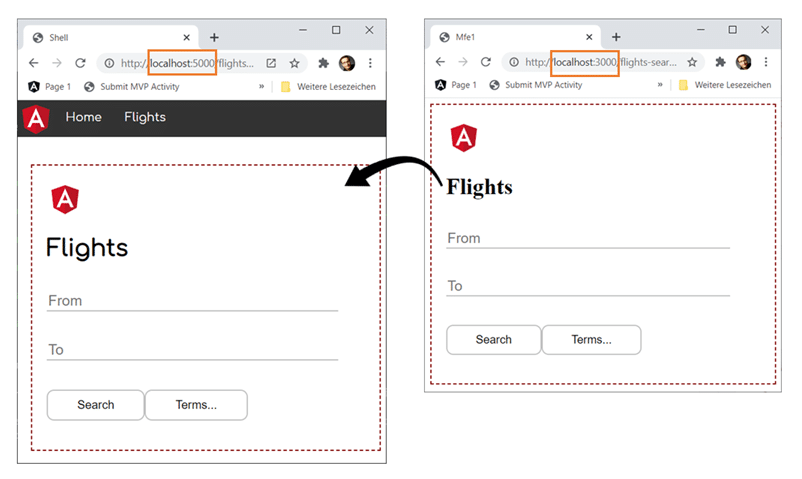
You can grab the 📂 source code from here (branch: standalone-solution).
Router Configs vs. Standalone Components
Technically, we could use Module Federation to load Standalone Components directly. That level of granularity works well for plugin-based architectures, but Micro Frontends are usually much coarser. Typically, they encompass an entire business domain that bundles together a set of related use cases.
The interesting part is that Standalone Components which belong together can be grouped within a router configuration. That means we can expose and lazy-load those configs.
Starting Point: The Micro Frontend
Our Micro Frontend here is a basic Angular app that bootstraps a Standalone Component:
 // projects/mfe1/src/main.ts

 import { environment } from './environments/environment';
 import { enableProdMode, importProvidersFrom } from '@angular/core';
 import { bootstrapApplication } from '@angular/platform-browser';
 import { AppComponent } from './app/app.component';
 import { RouterModule } from '@angular/router';
 import { MFE1_ROUTES } from './app/mfe1.routes';

 if (environment.production) {
   enableProdMode();
 }

 bootstrapApplication(AppComponent, {
   providers: [
     importProvidersFrom(RouterModule.forRoot(MFE1_ROUTES))
   ]
 });
During bootstrapping, the application registers its MFE1_ROUTES router config through service providers. That config points to several Standalone Components:
 // projects/mfe1/src/app/mfe1.routes.ts

 import { Routes } from '@angular/router';
 import { FlightSearchComponent } from './booking/flight-search/flight-search.component';
 import { PassengerSearchComponent } from './booking/passenger-search/passenger-search.component';
 import { HomeComponent } from './home/home.component';

 export const MFE1_ROUTES: Routes = [
     {
         path: '',
         component: HomeComponent,
         pathMatch: 'full'
     },
     {
         path: 'flight-search',
         component: FlightSearchComponent
     },
     {
         path: 'passenger-search',
         component: PassengerSearchComponent
     }
 ];
In this setup, importProvidersFrom serves as the bridge between the existing RouterModule and the Standalone Components world. Later router versions will offer a dedicated function for configuring the router's providers, replacing this approach. Based on the CFP, that function will be named configureRouter.
The shell is just a regular Angular app. Through lazy loading, we'll make it reference the Micro Frontend at runtime.
Enabling Module Federation
First, we install the Module Federation plugin and turn on Module Federation for the Micro Frontend:
npm i @angular-architects/module-federation

 ng g @angular-architects/module-federation:init --project mfe1 --port 4201 --type remote
That command creates a webpack.config.js. For our purposes, we need to adjust the exposes section like this:
 const { shareAll, withModuleFederationPlugin } = require("@angular-architects/module-federation/webpack");

 module.exports = withModuleFederationPlugin({
   name: "mfe1",

   exposes: {
     // Preferred way: expose corse-grained routes
     "./routes": "./projects/mfe1/src/app/mfe1.routes.ts",

     // Technically possible, but not preferred for Micro Frontends:
     // Exposing fine-grained components
     "./Component": "./projects/mfe1/src/app/my-tickets/my-tickets.component.ts",
   },

   shared: {
     ...shareAll({ singleton: true, strictVersion: true, requiredVersion: "auto" }),
   }

 });
This configuration makes available both the Micro Frontend's router config (which targets Standalone Components) and a single Standalone Component.
Static Shell
Next, we activate Module Federation for the shell as well. This section covers Static Federation, where we define the paths to our Micro Frontends directly in the webpack.config.js.
The following section demonstrates how to move to Dynamic Federation, which lets you define the loading parameters for a Micro Frontend at runtime.
To enable Module Federation on the shell side, run this command:
ng g @angular-architects/module-federation:init --project shell --port 4200 --type hostThe generated webpack.config.js for the shell must reference the Micro Frontend:
 const { shareAll, withModuleFederationPlugin } = require("@angular-architects/module-federation/webpack");

 module.exports = withModuleFederationPlugin({

   remotes: {
     "mfe1": "http://localhost:4201/remoteEntry.js",
   },

   shared: {
     ...shareAll({ singleton: true, strictVersion: true, requiredVersion: "auto" }),
   }

 });
With static federation, we also need type declarations for every configured path (EcmaScript module) that points to a Micro Frontend:
 // projects/shell/src/decl.d.ts

 declare module 'mfe1/*';
From there, the only remaining piece is a lazy route in the shell that references both the routes and the Standalone Component exposed by the Micro Frontend:
 // projects/shell/src/app/app.routes.ts

 import { Routes } from '@angular/router';
 import { HomeComponent } from './home/home.component';
 import { NotFoundComponent } from './not-found/not-found.component';
 import { ProgrammaticLoadingComponent } from './programmatic-loading/programmatic-loading.component';

 export const APP_ROUTES: Routes = [
     {
       path: '',
       component: HomeComponent,
       pathMatch: 'full'
     },

     {
       path: 'booking',
       loadChildren: () => import('mfe1/routes').then(m => m.BOOKING_ROUTES)
     },

     {
       path: 'my-tickets',
       loadComponent: () =>
           import('mfe1/Component').then(m => m.MyTicketsComponent)
     },

     [...]

     {
       path: '**',
       component: NotFoundComponent
     }
 ];
Alternative: Dynamic Shell
Now let's switch to dynamic federation. In this mode, we avoid defining the remote upfront in the shell's webpack.config.js. So we comment out the remote section:
 const { shareAll, withModuleFederationPlugin } = require("@angular-architects/module-federation/webpack");

 module.exports = withModuleFederationPlugin({

   // remotes: {
   //   "mfe1": "http://localhost:4201/remoteEntry.js",
   // },

   shared: {
     ...shareAll({ singleton: true, strictVersion: true, requiredVersion: "auto" }),
   }

 });
Additionally, within the shell's router config, the dynamic imports we used previously get replaced with calls to loadRemoteModule:
 // projects/shell/src/app/app.routes.ts

 import { Routes } from '@angular/router';
 import { HomeComponent } from './home/home.component';
 import { NotFoundComponent } from './not-found/not-found.component';
 import { ProgrammaticLoadingComponent } from './programmatic-loading/programmatic-loading.component';
 import { loadRemoteModule } from '@angular-architects/module-federation';

 export const APP_ROUTES: Routes = [
     {
       path: '',
       component: HomeComponent,
       pathMatch: 'full'
     },
     {
       path: 'booking',
       loadChildren: () =>
         loadRemoteModule({
           type: 'module',
           remoteEntry: 'http://localhost:4201/remoteEntry.js',
           exposedModule: './routes'
         })
         .then(m => m.MFE1_ROUTES)
     },
     {
       path: 'my-tickets',
       loadComponent: () =>
         loadRemoteModule({
           type: 'module',
           remoteEntry: 'http://localhost:4201/remoteEntry.js',
           exposedModule: './Component'
         })
         .then(m => m.MyTicketsComponent)
     },
     [...]
     {
       path: '**',
       component: NotFoundComponent
     }
 ];
The loadRemoteModule function receives all the key information Module Federation requires to fetch the remote. That information is nothing but strings, which means you can source it from anywhere you like.
Bonus: Programmatic Loading
While the router handles the majority of Micro Frontend (remote) loading, we can also load exposed components directly in code. To do this, we set up a placeholder with a template variable where the component will render:
 <h1>Programmatic Loading</h1>

 <div>
     <button (click)="load()">Load!</button>
 </div>

 <div #placeHolder></div>
We obtain that placeholder's ViewContainer using the ViewChild decorator:
 // projects/shell/src/app/programmatic-loading/programmatic-loading.component.ts

 import { Component, OnInit, ViewChild, ViewContainerRef } from '@angular/core';

 @Component({
   selector: 'app-programmatic-loading',
   standalone: true,
   templateUrl: './programmatic-loading.component.html',
   styleUrls: ['./programmatic-loading.component.css']
 })
 export class ProgrammaticLoadingComponent implements OnInit {

   @ViewChild('placeHolder', { read: ViewContainerRef })
   viewContainer!: ViewContainerRef;

   constructor() { }

   ngOnInit(): void {
   }

   async load(): Promise<void> {

       const m = await import('mfe1/Component');
       const ref = this.viewContainer.createComponent(m.MyTicketsComponent);
       // const compInstance = ref.instance;
       // compInstance.ngOnInit()
   }

 }
This example relies on Static Federation, so a dynamic import
Once the remote component is imported, we instantiate it with the ViewContainer's createComponent method. The returned reference (ref) exposes the component instance via its instance property. That instance lets us interact with the component—calling methods, setting properties, or wiring up event handlers.
To move to Dynamic Federation, we'd swap the dynamic importloadRemoteModule instead:
 async load(): Promise<void> {

     const m = await loadRemoteModule({
       type: 'module',
       remoteEntry: 'http://localhost:4201/remoteEntry.js',
       exposedModule: './Component'
     });

     const ref = this.viewContainer.createComponent(m.MyTicketsComponent);
     // const compInstance = ref.instance;
 }
Up Next: Architecture Deep Dive
So far, we've covered splitting a large client into multiple Micro Frontends, possibly even using different frameworks. But for enterprise-scale frontends, more questions come into play:
- What criteria guide the division of a big application into sub-domains?
- How do we ensure loose coupling between parts?
- What guarantees the solution stays maintainable over years or decades?
- Which proven patterns should we adopt?
- What other Micro Frontend capabilities does Module Federation offer?
- Should we use a monorepo or separate repositories?
Our free eBook, roughly 120 pages, addresses all these topics and more:
Feel free to download your copy now!