NgRx Entity: A Practical Walkthrough
One of the initial decisions when building an application with NgRx is determining the most effective structure for the data housed within the store. Managing business data in a centralized store is a necessity in any NgRx project, yet the process can often become a source of tedious repetition and significant time investment if we resort to creating custom, one-off solutions.
It's common to find ourselves writing nearly identical reducer logic and selectors for each distinct data type. This approach is not only prone to errors but also decelerates the entire development workflow.
This guide aims to demonstrate how NgRx Entity assists in managing business data within our store. We will explore the core value proposition of NgRx Entity and the Entity State format it promotes. We'll dissect the exact problems it solves, understand the optimal scenarios for its use, and clarify the reasoning behind it.
What We Will Cover
This post is structured to cover the following key areas:
- Defining an Entity
- Storing collections of entities in the store
- Comparing Arrays and Maps for entity state design
- Understanding NgRx Entity and its appropriate use cases
- Working with the NgRx Entity Adapter
- Setting the default entity sort order
- Establishing the initial entity state
- Simplifying reducer creation with NgRx Entity
- Utilizing NgRx Entity selectors
- Recognizing what NgRx Entity is not intended for
- Configuring a custom unique ID field
- Scaffolding an entity using NgRx Schematics
- Exploring the NgRx Entity
Update<T>type - Providing a Github repo with a runnable example
- Drawing conclusions
It's important to note that this discussion builds upon core store concepts such as actions, reducers, and selectors. For an introduction to NgRx Store and the broader store architecture, you can refer to this post: Angular Service Layers: Redux, RxJs and Ngrx Store - When to Use a Store And Why?.
If you're seeking guidance on setting up the NgRx development environment, including DevTools, the time-traveling debugger with router integration, and NgRx Store Freeze, this resource is helpful: Angular Ngrx DevTools: Important Practical Tips.
With that in mind, let's begin our deep dive into NgRx Entity, starting from the fundamentals.
What Constitutes an Entity?
In NgRx, our store typically manages various types of state, which generally include:
-
business data, such as
CoursesorLessonsin an online learning platform -
UI state, such as user preferences or interface settings
An Entity represents a piece of business data; for instance,
CourseandLessonare examples of entity types.
In code, entities are defined using TypeScript type definitions. For example, in an online course system, the primary entities would be Course and Lesson, defined as custom object types.
The Entity Unique Identifier
Both of these entities have a unique identifier field named id, which can be either a string or a number. This technical identifier is unique to a specific instance of the entity, meaning no two courses can share the same id.
A large portion of the data we store in the store consists of entities!
Storing Entity Collections in the Store
Suppose we want to store a collection of courses in the in-memory store. One straightforward approach is to keep the courses in an array under a courses property. The resulting store state would resemble the following:
Issues with Storing Entities Arrays
While storing entities as an array is the most immediate idea, it can introduce several potential problems:
-
To find a course by its known
id, we would need to iterate over the entire collection. For large collections, this could be inefficient. -
Using an array can lead to accidental duplication, where different versions of the same course (same
id) are stored as separate entries. -
When all entities are stored as arrays, the reducer logic for each entity becomes nearly indistinguishable, leading to significant code repetition.
-
Consider the simple task of adding a new entity. We would repeatedly implement similar logic to insert the entity and reorder the array to achieve a specific sort order.
Clearly, the format used for storing entities significantly impacts our application's structure and maintainability.
Let's search for the truly ideal format for storing entities.
Entity State Design: Arrays vs. Maps
One of the store's functions is to serve as a client-side in-memory database, holding a portion of the server's data. We derive our application's view models from this slice of data using selectors. This contrasts with the traditional approach of fetching view-specific models from the server via API calls.
Since the store acts as a database, it makes sense to store business entities in their own dedicated "tables", each with a unique identifier akin to a primary key. Entities can then be flattened and interconnected using these identifiers, much like in a relational database.
A more robust modeling approach is to store entity collections as a JavaScript object, which functions like a Map. In this structure, the unique id of an entity serves as the key, and the value is the entity object itself.
This new format for the entire store state would be structured as follows:
Designing for Efficient ID Lookups
This structure dramatically simplifies retrieving entities by their id, a common operation. For instance, to find the course with an id of 1, the code would simply be:
state.courses[1]
This format also helps flatten the state, simplifying the combination of multiple entities and 'joining' them via selector queries. However, there is a trade-off: we lose the inherent ordering of the collection, as JavaScript object properties do not guarantee a specific sequence.
The question arises: can we store data by id in a map while preserving order information?
Designing for Order Preservation
The solution is to utilize both a Map and an Array. Entity objects are stored in a map (named entities), while the ordering is maintained in an array (named ids).
The Entity State Format
This combined format—a map of entities alongside an array of ids—is referred to as the Entity State format and is considered the optimal structure for managing business entities in a centralized store. However, manually maintaining this state can be an unnecessary burden when writing reducers and selectors.
For instance, defining types for such a state would look somewhat repetitive, as the type definitions for different entities would be closely similar.
Furthermore, the reducer and selector logic for these entities would also share significant overlap. For example, a reducer for a LoadCourse action that adds a new course to the current CoursesState and sorts it by the seqNo field would require a substantial amount of code. We would need to write similar code for other standard operations like updating or deleting a course, and an equivalent loader for a different entity type would be nearly identical.
Avoiding Repetitive Reducer Logic
The larger issue is that the reducer for an equivalent LoadLesson action would be almost identical, except for the type it handles. This repetition indicates that the dual array-map approach, while correct, generates a lot of boilerplate code.
Avoiding Repetitive Selector Logic
The same pattern of repetition is also evident in selector logic. For example, a selector to fetch all Course entities from the store would be needed, and an almost identical version would be required for Lesson entities.
A Note on Feature Selectors
The selectCoursesState is a feature selector, which is an auxiliary selector that just extracts the courses property from the root store state, as follows:
storeState["courses"]
This utility is advantageous because it provides type safety and simplifies the definition of lazy-loaded selectors, which may not have access to the full root state type.
While a selectAllCourses selector gets all courses and returns them in an array sorted by seqNo, this logic would need to be replicated for other entities like Lesson.
Assessing the Volume of Repeated Code
Let's list the categories of code that are frequently duplicated across different entities:
- entity state definitions (e.g.,
CoursesState,LessonsState) - initial reducer state (e.g.,
initialCoursesState,initialLessonsState) - reducer logic for state changes
- selector logic for queries
This represents a significant amount of repetitive code, solely dedicated to maintaining the optimized Entity State format. Despite this being the preferred format for related entities, the manual overhead can be a hindrance, potentially leading to a different, less optimal storage solution.
NgRx Entity helps us avoid nearly all this repetitive work!
NgRx Entity: What and When to Use It
NgRx Entity is a focused library that streamlines keeping our entities in the ideal Entity State format (an array of ids combined with a map of entities).
This library is meant to be used in conjunction with NgRx Store and is a fundamental component of the NgRx ecosystem. It is generally far more effective to integrate NgRx Entity from the beginning of a project rather than building a custom in-memory database solution. Let's examine the various ways NgRx Entity simplifies the development of our NgRx application.
Defining the Entity State with NgRx Entity
Let's redefine the state for our Course entity using NgRx Entity. This yields a type definition equivalent to our manual one but with significantly less code:
Instead of defining the ids and entities properties for each entity, we can simply extend EntityState. This results in the same type safety and structure while keeping our code concise.
The NgRx Entity Adapter
To leverage the full power of NgRx Entity, the first step is to create an entity adapter. This utility object provides a collection of functions designed to simplify entity state manipulation. It is the key to writing concise initial state, reducers, and selectors while still conforming to the standard EntityState format.
Here's an example of the adapter for the Course entity, configured to sort entities based on the seqNo field:
Setting the Default Entity Sort Order
In this code, we've used the optional sortComparer property to define the ordering of the Course entity, which in turn dictates the order of entries in the ids array. If you omit this property, the entity will be sorted by its id field by default.
Writing Simpler Reducers with the Adapter
Now, let's use the adapter to declare the initial state and implement the reducer logic we previously examined:
Notice how much more straightforward it is to write reducer logic using the adapter. The addOne method significantly simplifies the process by automating several steps:
- It creates a shallow copy of the current state to ensure immutability.
- It generates a new copy of the
idsarray and inserts the new entity in its proper position according to the sort order. - It creates a new
entitiesmap that references all previous entity objects, avoiding an expensive deep copy. - It adds the new entity to this updated entities map.
Advantages of the entity adapter
By using the adapter for our reducers, we save a significant amount of effort and avoid common mistakes in reducer logic, which is often easy to get wrong. A frequent error is accidentally mutating the store state, which can be particularly problematic when using OnPush change detection. The adapter helps prevent such issues and drastically cuts down on the boilerplate code required.
Operations Supported by the NgRx Entity Adapter
Beyond addOne, the adapter provides a standard set of collection modification operations, saving us from implementing them by hand. Here are examples of each operation:
The core adapter methods behave as follows:
addOne: adds a single entity to the collection.addMany: adds multiple entities to the collection.addAll: replaces the entire collection with a new set of entities.removeOne: removes a single entity from the collection.removeMany: removes multiple entities from the collection.removeAll: clears the entire collection.updateOne: updates an existing entity.updateMany: updates multiple existing entities.upsertOne: updates an entity if it exists, or inserts it if it does not.upsertMany: updates or inserts multiple entities.
Imagine the amount of code and potential for bugs if you had to implement all this logic manually!
Using NgRx Entity Selectors
NgRx Entity also provides a suite of commonly needed selectors, such as selectAllCourses or selectAllLessons. By using the adapter, we get these selectors generated for us automatically:
These selectors are type-safe and ready for use directly in components or as a basis for building more complex selectors. It's worth noting that the selectors have generic names independent of the entity. If you need multiple selectors in the same file, using import aliases is recommended to avoid naming conflicts.
What NgRx Entity is Not Meant to Do
While NgRx Entity significantly simplifies the state, reducer, and selector logic, it's important to know its boundaries. You are still required to write the core reducer function for each entity, though you can do so more efficiently using the provided adapter methods. It centralizes but does not eliminate the need for reducer logic.
Consequently, for each distinct entity like Lesson, you'll still need to create a similar setup. The convention is to co-locate the adapter configuration, initial state, and reducer logic in the entity's dedicated reducer file (e.g., lesson.reducers.ts). In practice, entities often have specific business logic in their reducers, so code is not fundamentally duplicated. If your goal is to remove the boilerplate of entity reducer logic entirely, you might explore solutions like ngrx-data.
Configuring a Custom Unique ID Field
We've mentioned that entities should have a technical identifier field named id. However, in some scenarios this field might be absent, has a different name, or you might prefer to use another property that is a natural key. In these instances, you can provide a custom ID selector function to the adapter. This function will be called by the adapter to extract a unique identifier from your entity. For example:
In this example, we generate a unique identifier for a Lesson by combining the courseId property with the lesson's sequential number, which is unique within a given course.
Handling Custom State Properties
So far, our entity state definitions have only extended EntityState. However, you may need to store additional, non-standard properties within that state. For example, you might want a flag on your Course state that indicates whether the courses have been fully loaded.
Here is a complete example of a courses.reducers.ts file that includes such an extra state property:
To incorporate this extra property, we follow these steps:
- First, add the custom property (
allCoursesLoaded) to theCoursesStatetype definition. - Next, set its initial value in
initialCoursesStateby passing an optional object togetInitialState(). - Finally, modify it in the reducer logic by creating a copy of the state with the spread (
...) operator, changing the property, and passing the new state object to the appropriate adapter method.
Scaffolding an Entity Using NgRx Schematics
To quickly generate a reducer file like those discussed, we can leverage NgRx Schematics. First, to enable entity schematics, set the following CLI property:
ng config cli.defaultCollection @ngrx/schematics
Afterward, you can generate a new Lesson reducer file by executing the command below:
ng generate entity --name Lesson --module courses/courses.module.ts
Output of NgRx Entity Schematics
Let's inspect what the schematics command generates. We get a new, empty Entity model file along with a complete actions file where each action corresponds to a state modification method in the entity adapter.
Reviewing the Actions File Content
This actions file follows a standard, recommended structure:
- An enum
LessonActionTypeswith one entry per Lesson action. - One class for each action, with associated data passed via a payload property.
- A final union type
LessonActionscombining all action classes. This union type is particularly useful for writing reducers, ensuring full type inference and IDE auto-completion within case blocks.
Understanding the NgRx Entity Update Type
In some action definitions, you'll notice the use of Update<Lesson>. This is an auxiliary type from NgRx Entity that models partial entity updates. It contains an id property to identify the entity being updated, and a changes property that describes the specific modifications. An example of a valid update object would be one with id: 1 and changes: { description: 'New description' }.
Reviewing the Reducers File Content
The NgRx Entity schematic also creates a reducer file and its corresponding test file. The reducer file provides a clear starting point built around the adapter, with a reducer function for each action.
How to Best Use the Schematics Output?
It's crucial to understand that the files generated by schematics are not intended to be used as-is. This is true for any file generated by the CLI. For instance, you might not wish to use the generated actions file and instead create your own action conventions, as recommended in this talk:
Furthermore, your application might not need all the generated actions. It's advisable to only keep the ones you need and tailor them for your specific use case. As a rule, schematic-generated files offer a starting point that you will typically need to adapt.
Github Repository with an Example
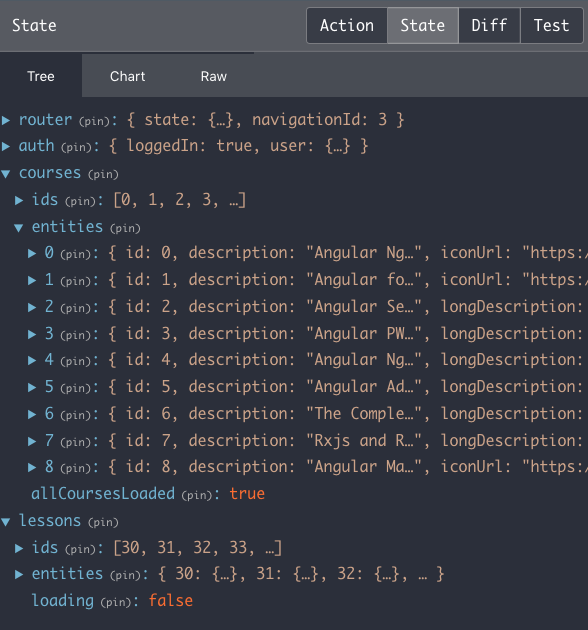
For a complete, runnable example of a small app that uses NgRx Entity with the mentioned Course and Lesson entities, you can check out this repository. Here are screenshots of the NgRx DevTools showing the store content with the entities:
Conclusions
NgRx Entity is a highly valuable package. However, to genuinely grasp its purpose, a solid understanding of fundamental store concepts—actions, reducers, selectors, and the overarching store architecture—is essential.
Once you are familiar with these, you've likely pondered the best way to structure in-store data. NgRx Entity supplies an answer: the Entity State format. This format is optimized for efficient id-based lookups while still retaining critical collection order information.
The NgRx Entity Adapter, combined with NgRx Schematics, significantly lowers the barrier to entry for adopting this pattern.
However, note that not all store state is a candidate for NgRx Entity!
NgRx Entity is specifically tailored for managing just the business entities, streamlining their storage in memory in a convenient and performant way.
Exploring the NgRx Ecosystem Further
We hope this guide serves as a strong foundation for using NgRx Entity. If you wish to delve deeper into the NgRx universe, you may find the NgRx with NgRx Data - The Complete Guide video course helpful, as it covers the ecosystem in much greater detail. For general NgRx guidance, the following posts in this series may be useful:
- Angular Service Layers: Redux, RxJs and Ngrx Store - When to Use a Store And Why?
- Angular Ngrx DevTools: Important Practical Tips
If you have any questions or comments, please feel free to leave them below, and we'll get back to you. To stay in the loop with upcoming posts on NgRx and other Angular topics, subscribe to our newsletter.
If you're new to Angular itself, the Angular for Beginners Course is an excellent starting point:
